1CACHECHK v4 2/7/96  Copyright (c) 1995 by Ray Van Tassle. (-h for help)
2 CMOS reports: conv_mem= 640K, ext_mem= 63,680K, Total RAM= 64,320K
3 Clocked at 486 100.4 MHz
4 Reading from memory.   Cache DISABLED.
5 MegaByte#:      --------- Memory Access Block sizes (KB)-----
6       1    2    4    8   16   32   64  128  256  512 1024 2048 4096 <-- KB
7 0:   58   58   58   58   57   57   57   57   57   57   --   --   --    æs/KB
8 1:   58   58   58   58   57   57   57   57   57   57   57   57   57    æs/KB
9 2  3  4  5  6  7  8  9 10 11 12 13 14 15 16 17 18  <--- same as above.
1019 20 21 22 23 24 25 26 27 28 29 30 31 32 33 34 35  <--- same as above.
1136 37 38 39 40 41 42 43 44 45 46 47 48 49 50 51 52  <--- same as above.
1253 54 55 56 57 58 59 60 61 62 63  <--- same as above.
13
14 Extra tests----
15 Wrt  57   57   57   57   57   57   57   58   57   57   57   57   57<-Write mem
16    Main memory speed --  19.1 MB/s  54.8 ns/byte  (100%) [read]  21.0 clks
17    Effective RAM access time (read ) is 219ns (a RAM bank is 4 bytes wide).
18    Effective RAM access time (write) is 218ns (a RAM bank is 4 bytes wide).
19    Clocked at 486 100.4 MHz.  Cache DISABLED.
1 CACHECHK v4 2/7/96  Copyright (c) 1995 by Ray Van Tassle. (-h for help)
2 CMOS reports: conv_mem= 640K, ext_mem= 63,680K, Total RAM= 64,320K
3 Clocked at 486 100.4 MHz
4 Reading from memory.
5 MegaByte#:      --------- Memory Access Block sizes (KB)-----
6       1    2    4    8   16   32   64  128  256  512 1024 2048 4096 <-- KB
7 0:   57   57   57   57   57   57   57   61   63   64   --   --   --    æs/KB
8 1:   10   10   10   12   65   65   65   65   65   65   65   65   65    æs/KB
9 2  3  4  5  6  7  8  9 10 11 12 13 14 15 16 17 18  <--- same as above.
1019 20 21 22 23 24 25 26 27 28 29 30 31 32 33 34 35  <--- same as above.
1136 37 38 39 40 41 42 43 44 45 46 47  <--- same as above.
1248:   10   10   10   12   65   65   66   66   65   65   65   65   65    æs/KB
1349:   10   10   10   12   65   65   65   65   65   65   65   65   65    æs/KB
1450 51 52 53 54 55 56 57 58 59 60 61 62 63  <--- same as above.
15
16 Extra tests----
17 Wrt  57   57   57   57   57   57   58   57   57   57   57   57   57<-Write mem
18 This machine seems to have one cache!? [read]
19    !! cache is   8KB --  91.8 MB/s  11.4 ns/byte  (543%)          4.4 clks
20    Main memory speed --  16.9 MB/s  61.9 ns/byte  (100%) [read]  23.8 clks
21    Effective RAM access time (read ) is 247ns (a RAM bank is 4 bytes wide).
22    Effective RAM access time (write) is 218ns (a RAM bank is 4 bytes wide).
23    Clocked at 486 100.4 MHz.  Cache ENABLED.
24 Options: -t0
show extremely slow ram subsystem for 33MHz FSB 100MHz dx4. Those numbers are more in line with 486 SX-33 or even 25MHz 😮
486 dx4 100MHz should be seeing 45-55us/KB normal RAM read speed.
Can you override L1 cache mode to WT?
It looks like its in WB right now and this somehow makes ram slower making me question if the chipset supports 486 Burst bus mode at all. It also looks like it might think it does have L2 cache somehow? like its still trying to do L2 cache lookups despite no L2 cache installed - that would explain why ram slowed from 57 to 65 us/KB.
Also curiously first Megabyte doesnt appear to be L1 cached _at all_ 😮 Is there an option in BIOS for setting uncacheable regions?
Can you override L2 cache mode to WT?
Can you explicitly disable L2 cache leaving L1 enabled?
this image suggests you should be able to disable external cache and switch L1 to WT.
Can you try with tighter timings?
Last bios image shows different RAM timings with your screen showing SLOW set, can you try fastest?
It also shows Edo set/detected. Can you try testing with FPM module to see if there is any speed difference with otherwise same settings?
is it because I use dx4 100 nv8t? write through? another cpu is sv8b. the BIOS settings is default value, I changed disable next time.what is pity that we don't know the pin definition,otherwise we can wire the cache chips manually. OK,I will try.
is it because I use dx4 100 nv8t? write through? another cpu is sv8b. the BIOS settings is default value, I changed disable next time.what is pity that we don't know the pin definition,otherwise we can wire the cache chips manually. OK,I will try.
I dont think there any cache controller inside "NEC" chipset.
PS. Did you submit your GC13 motherboard to the THERETROWEB or can you give me permission to submit it?
Need help? Begin with photo and model of your hardware 😉
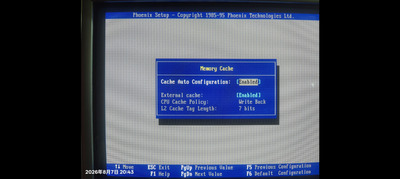 suggests you should be able to disable external cache and switch L1 to WT.