VOGONS


First post, by rinale

User metadata
Rank Newbie
Rank
Newbie

Hello everyone!!

This is my first thread on the VOGONS forum but i've been a long-time lurker checking mostly resources for Windows 98 and running my old games, however this time I decided to register to explain a bit about the issues me and a friend are finding attempting to make Phantasy Star Online Blue Burst work on it's original Legacy OS (starting from 98SE)
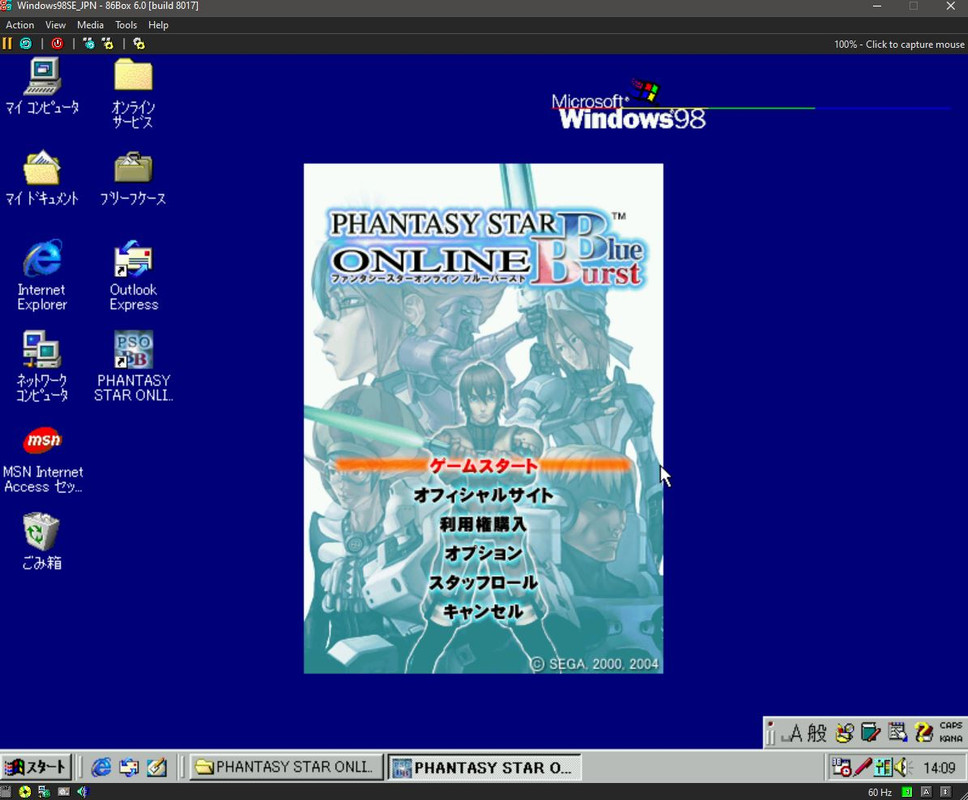
98sepsobb.jpg

Phantasy Star Online is a very famous online game released on Dreamcast and Windows PC back in 2001 with the latest version of the game Blue Burst released on 2004 with an additional update on 2005 to include new maps, monster, etc. We are currently running private servers for this game using the new open source newserv project which allows you to host your own PSO server (of any version) very easily on *NIX systems, the server isn't really a source of headaches anymore as the setup is pretty straightforward.

A year ago or so I made a backup of the very latest official installer of the game with the last game patch pre-applied to it before the servers shutdown back in 2010.

The problem with these games as you know is bypassing their DRM (GameGuard) + other compatibility shenanigans my friend created for this purpose a universal drop-in patch solution that allows you to very easily modify internal client parameters such as the IP/hostnames to point to your personal server or any other servers, switch between japanese/english support, among other things all via a simple modification of the included .ini file. The rationale of this solution was to let the users preserve the original game binaries without ever touching or modifying them in any way.

For the most part the patch works just fine on Windows 10/11 systems, the problem is when we attempt to make the game work on it's original legacy OS such as 98 or 2000 as well as wine it all kinda falls apart due to the DLL using unsuported Win32 APIs that didn't existed at the time as well being compiled using the very latest Visual Studio on Windows 11....

As you can imagine the game despite being compatible it cannot run because the patch doesn't run alongside to bypass the DRMs and patch the packed routines and launch the game properly, It has been a whole year since this started and we've been going in circles attempting different solutions but honestly we are in a roadblock due to lack of resources to test on legacy PC's (we rely on VM's and 86box to do the testing) and also lack of understanding of old Windows APIs to "port-back" the functionality so it can actually work (Detours for example).

This is the point where we kinda need some help, not sure if you guys ever faced a similar problem with other games discussed here or honestly any pointer can really help us out manage to fix the patch functionality in a proper way.

There's another solution by using another client commonly distributed called Tethealla which has already been hex pre-patched to work locally and it does indeed work as it had its GG logic stripped out, but the issue with this one is that other undocumented modifications were made to it so is not an original copy of the game anymore. From a preservation standpoint is not ideal.

There's more I want to tell about this effort but I didn't wanted to make this thread too long but I will be glad of answering any questions feel free to also download the clients posted above and run the current patcher on a Windows 10/11 machine for tinkering around with this old but legendary game.

The patch project in question is AzureFlare you can find it on github
https://github.com/Repflez/AzureFlare

You can also find the original newserv emulator here
https://github.com/fuzziqersoftware/newserv

And nice to meet you all~

Reply 1 of 8, by leileilol

User metadata
Rank l33t++
Rank
l33t++
rinale wrote on 2025-11-07, 13:31:

For the most part the patch works just fine on Windows 10/11 systems, the problem is when we attempt to make the game work on it's original legacy OS such as 98 or 2000 as well as wine it all kinda falls apart due to the DLL using unsuported Win32 APIs that didn't existed at the time as well being compiled using the very latest Visual Studio on Windows 11....

Yep, sounds like the ol' Microsoft 2020 Visual C runtime W10+ exclusivity gambit issue that sneaks up on any developer making a vaguely "Windows" release in the past five years. At this point i'd advise having the patcher developed in MinGW/Msys GCC 4.7 or 4.9 for Win9x compatibility as those compilers are more freely accessible than older versions of MSVC. (MinGW64 can allegedly do Win9x compatibility but I don't have firsthand experience with that)

apsosig.png
long live PCem

Reply 2 of 8, by rinale

User metadata
Rank Newbie
Rank
Newbie
leileilol wrote on 2025-11-07, 18:16:
rinale wrote on 2025-11-07, 13:31:

For the most part the patch works just fine on Windows 10/11 systems, the problem is when we attempt to make the game work on it's original legacy OS such as 98 or 2000 as well as wine it all kinda falls apart due to the DLL using unsuported Win32 APIs that didn't existed at the time as well being compiled using the very latest Visual Studio on Windows 11....

Yep, sounds like the ol' Microsoft 2020 Visual C runtime W10+ exclusivity gambit issue that sneaks up on any developer making a vaguely "Windows" release in the past five years. At this point i'd advise having the patcher developed in MinGW/Msys GCC 4.7 or 4.9 for Win9x compatibility as those compilers are more freely accessible than older versions of MSVC. (MinGW64 can allegedly do Win9x compatibility but I don't have firsthand experience with that)

Thank you for the pointers lei , it's something we were suspecting it was happening indeed, we will take another look at MinGW/Msys, a first approach was attempted a while back but ran into a lot of issues attempting to port the current project to MinGW with the compiler screaming because there was a lot of usage of MSVC specific stuff.

I told Repflez about these forums too, he should be joining this thread soon as well, either way I hope you don't mind we request your help to test the thing on real hardware when its ready it will help us greatly.

Reply 3 of 8, by Repflez

User metadata
Rank Newbie
Rank
Newbie

Ah, hello there. rinale told me about the thread, because I mentioned my issues getting it to work on 98.

leileilol wrote on 2025-11-07, 18:16:

Yep, sounds like the ol' Microsoft 2020 Visual C runtime W10+ exclusivity gambit issue that sneaks up on any developer making a vaguely "Windows" release in the past five years. At this point i'd advise having the patcher developed in MinGW/Msys GCC 4.7 or 4.9 for Win9x compatibility as those compilers are more freely accessible than older versions of MSVC. (MinGW64 can allegedly do Win9x compatibility but I don't have firsthand experience with that)

I tried getting it with MinGW but my inexperience with it (my fault) made it unable to compile saying it couldn't find the base libraries like libkernel32 and such. I also tried making it work by compiling it in MSVC 6 using VC6 Ultimate, but somehow it makes the application crash and burn on the 86box machine.
Right now, I'm trying to make it work on XP using back VS2022, but with the 2019 SDK and a laundry list of build arguments to shave off anything that makes it unable to work on XP. On my testing (and rinale's), it does need the last C++ Redistributable for XP, but it manages to inject properly without crashing, and at the moment I'm having problems to hook on GetStartupInfoA (Which unfortunately is needed to bypass the anticheat and was introduced in XP, based on the MSDN documentation).

Reply 4 of 8, by Matth79

User metadata
Rank Oldbie
Rank
Oldbie

Checking the versions. looks like VC++2005 is the last version for Win98 and 2010 the last version for XP

Reply 5 of 8, by rinale

User metadata
Rank Newbie
Rank
Newbie

The problem is that using the VS 2019 SDK you are also leaving out Windows 98SE out of the equation what we discussed before, and I have the feeling might complicate things even more attempting to go down the step ladder into enabling 98SE support. Like it's all getting more entangled than necessary but I could be wrong too.

Reply 6 of 8, by Repflez

User metadata
Rank Newbie
Rank
Newbie
rinale wrote on 2025-11-08, 23:20:

The problem is that using the VS 2019 SDK you are also leaving out Windows 98SE out of the equation what we discussed before, and I have the feeling might complicate things even more attempting to go down the step ladder into enabling 98SE support. Like it's all getting more entangled than necessary but I could be wrong too.

I did go lower (2017, up to XP sp3), but after talking to some other parties that I have contact with, they linked me this article about using the Clang compiler in modern Visual Studio and can target as down as NT 4.0. I do still have my reservations about GetStartupInfoA, though. I can't find a reliable source of when it was introduced, because some resources say it was introduced in XP (including MSDN), while others say it's available in 98SE.

Reply 7 of 8, by elszgensa

User metadata
Rank Oldbie
Rank
Oldbie

At some point MS decided to cut off their documentation's timeline and made everything introduced before Windows 2000 say that it's available since 2000, XP or Server 2003 (seems to be somewhat random). So the currently available docs cannot be relied on for this. Get an older copy from somewhere (e.g. MSDN CDs), or simply look directly at the files that are supposed to be exporting a given function. FWIW, I did the latter just now and a GetStartupInfoA export can already be found in the kernel32.dll that shipped with Win98 RTM, as well as in SE's. Didn't check Win95 since I don't have it on hand right now.

As for MinGW64 targeting an older Windows (9x) - can be done, but you might have to build your own toolchain since it requires certain things to be set up just right. If you want to try I can give you a list of footguns that I learned to avoid while setting up mine, but it's probably not worth the effort when you have enough viable off the shelf alternatives available to you.

edit: I noticed you're building on "Detours". Apparently that's not compatible with 9x, just the NT family... so that would need to be addressed if you want to support 98.

Reply 8 of 8, by lizard78

User metadata
Rank Newbie
Rank
Newbie
elszgensa wrote on 2025-11-13, 11:59:

At some point MS decided to cut off their documentation's timeline and made everything introduced before Windows 2000 say that it's available since 2000, XP or Server 2003 (seems to be somewhat random). So the currently available docs cannot be relied on for this. Get an older copy from somewhere (e.g. MSDN CDs), or simply look directly at the files that are supposed to be exporting a given function. FWIW, I did the latter just now and a GetStartupInfoA export can already be found in the kernel32.dll that shipped with Win98 RTM, as well as in SE's. Didn't check Win95 since I don't have it on hand right now.

As for MinGW64 targeting an older Windows (9x) - can be done, but you might have to build your own toolchain since it requires certain things to be set up just right. If you want to try I can give you a list of footguns that I learned to avoid while setting up mine, but it's probably not worth the effort when you have enough viable off the shelf alternatives available to you.

edit: I noticed you're building on "Detours". Apparently that's not compatible with 9x, just the NT family... so that would need to be addressed if you want to support 98.

+1 for the MSDN CDs, amazing resource now that all the old information has been scrubbed from the site.

I also went through the process of building the toolchain from the ground up. It's possible to get it working for sure - but quite a pain. I was also disappointed with the quality of code generated for the older processor targets when I did get it working. For a utility type project it might not matter (you'll get a working binary), but the older MSVC compilers have pretty amazing optimizations for the processors of that era. I forget the exact version of gcc that the toolchain included but I want to say it was around 11 - something like that. Especially on my K6-2 I noticed an absolutely massive difference in performance (likely the newer compiler has zero 3DNow! optimizations) sometimes as much as a 2x difference. I use VS 6.0 now (with the processor pack) and a relatively recent version of cmake still works with it.