VOGONS


Toshiba Libretto 50ct blank screen on boot

Topic actions

Reply 20 of 34, by Benalchi

User metadata
Rank Newbie
Rank
Newbie
Warlord wrote on 2022-12-28, 15:15:
Schule04 wrote on 2021-07-05, 15:33:

The internal batteries inside these old Toshibas leak and damage the mainboard. You must open it and remove/replace the green battery.

this might not be the issue but I wouldn't ignore the warning if you dont want a broken laptop.

I understand that you may have other problems. But let's see if this solves it or we have to do a deeper repair 😀
Reply 21 of 34, by bionicsa

User metadata
Rank Newbie
Rank
Newbie
theelf wrote on 2022-12-28, 13:58:
Benalchi wrote on 2022-12-28, 13:06:
Thanks a lot!!!! […]
Show full quote
theelf wrote on 2022-12-28, 13:01:

Yes no problem, send me a MP

Thanks a lot!!!!

It won't let me send private messages since I just entered the forum looking for information. It gives me the following message.
"We are sorry, but you are not authorised to use this feature. You may have just registered here and may need to participate more in discussions to be able to use this feature"

How can we do it ?

😀

Ah ok, i will upload to you a small norton ghost file with system, then you can make a booteable msdos fat32 CF card. Later i will give you the link, im working now

sendme a email

Hi theelf, could you also send me the file? I also have a 70CT which states 'ready for BIOS update' when powering on with F12. I have check the HDD it came with and it works in another PC just fine.

Reply 22 of 34, by MAZter

User metadata
Rank Oldbie
Rank
Oldbie
bionicsa wrote on 2026-01-13, 17:16:

Hi theelf, could you also send me the file? I also have a 70CT which states 'ready for BIOS update' when powering on with F12. I have check the HDD it came with and it works in another PC just fine.

Since the topic is quite old, I'm not sure he'll reply. You can try using the image from 50CT:

https://archive.org/details/toshiba-libretto-50-hdd-image

Doom is what you want (c) MAZter

Reply 23 of 34, by bionicsa

User metadata
Rank Newbie
Rank
Newbie
MAZter wrote on 2026-01-13, 18:21:
bionicsa wrote on 2026-01-13, 17:16:

Hi theelf, could you also send me the file? I also have a 70CT which states 'ready for BIOS update' when powering on with F12. I have check the HDD it came with and it works in another PC just fine.

Since the topic is quite old, I'm not sure he'll reply. You can try using the image from 50CT:

https://archive.org/details/toshiba-libretto-50-hdd-image

Thanks for that! Its just a few mb to large for my 2GB CF card, doh. I'll see if i can get another one.

Reply 24 of 34, by MAZter

User metadata
Rank Oldbie
Rank
Oldbie
bionicsa wrote on 2026-01-13, 18:43:

Thanks for that! Its just a few mb to large for my 2GB CF card, doh. I'll see if i can get another one.

It's can't be too large, it is perfect fit 2Gb hdd, or CF card.

Doom is what you want (c) MAZter

Reply 25 of 34, by bionicsa

User metadata
Rank Newbie
Rank
Newbie
MAZter wrote on 2026-01-13, 18:50:
bionicsa wrote on 2026-01-13, 18:43:

Thanks for that! Its just a few mb to large for my 2GB CF card, doh. I'll see if i can get another one.

It's can't be too large, it is perfect fit 2Gb hdd, or CF card.

I've managed to write it to another hdd, but still the same issue, poweron-black screen, power on with f12 pressed-ready for BIOS update.
Do you know where i can find the 70CT BIOS update package? I have the pcmcia floppy drive, just no floppies yet 😀

Reply 26 of 34, by bionicsa

User metadata
Rank Newbie
Rank
Newbie

Error from Win32DiskImager

Reply 27 of 34, by MAZter

User metadata
Rank Oldbie
Rank
Oldbie
bionicsa wrote on 2026-01-13, 19:16:

Error from Win32DiskImager

It supposed to be 2 Gb card, if it's not defective, not 1.9 Gb. You can try to continue, last kilobytes on volume usually does not contain necessary data.

Here alternative 815Mb US image:

https://archive.org/details/toshiba-libretto-50ct-hdd-image

Doom is what you want (c) MAZter

Reply 29 of 34, by bionicsa

User metadata
Rank Newbie
Rank
Newbie
theelf wrote on 2026-01-17, 18:40:
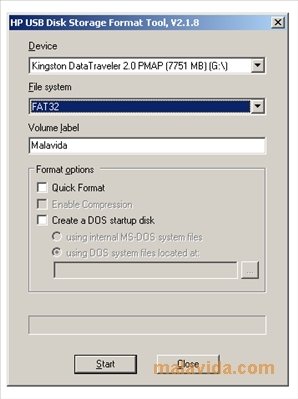
Hi!! what exactly you need? just to boot? not need a image, do with HP format tool in windows https://www.malavida.com/es/soft […]
Show full quote

Hi!! what exactly you need? just to boot? not need a image, do with HP format tool in windows https://www.malavida.com/es/soft/hp-usb-disk- … ge-format-tool/

Select make a booteable disk, select the dos system files in directory you have and thats all

hp-usb-disk-storage-format-tool-6867-1.jpg

Thanks for the reply!
I'm not actually ready for this step yet, libretto is stuck on asking for bios update when pressing f12. I'm sure once that's fixed I'll be able to use one of these images on a CF card

Reply 30 of 34, by theelf

User metadata
Rank Oldbie
Rank
Oldbie
bionicsa wrote on 2026-01-17, 18:49:
theelf wrote on 2026-01-17, 18:40:
Hi!! what exactly you need? just to boot? not need a image, do with HP format tool in windows https://www.malavida.com/es/soft […]
Show full quote

Hi!! what exactly you need? just to boot? not need a image, do with HP format tool in windows https://www.malavida.com/es/soft/hp-usb-disk- … ge-format-tool/

Select make a booteable disk, select the dos system files in directory you have and thats all

hp-usb-disk-storage-format-tool-6867-1.jpg

Thanks for the reply!
I'm not actually ready for this step yet, libretto is stuck on asking for bios update when pressing f12. I'm sure once that's fixed I'll be able to use one of these images on a CF card

Hi, sorry, maybe i dont understand very well what your problem or your need, but why you press F12?

Reply 31 of 34, by bionicsa

User metadata
Rank Newbie
Rank
Newbie

I press F12 to get the Libretto to show the update BIOS screen. Its literally the only thing my Libretto 70CT does. Normal power on give black screen.
I have taken the HDD out and put it in my PC and it wrks just fine.

Reply 32 of 34, by bionicsa

User metadata
Rank Newbie
Rank
Newbie
theelf wrote on 2026-01-17, 18:40:
Hi!! what exactly you need? just to boot? not need a image, do with HP format tool in windows https://www.malavida.com/es/soft […]
Show full quote

Hi!! what exactly you need? just to boot? not need a image, do with HP format tool in windows https://www.malavida.com/es/soft/hp-usb-disk- … ge-format-tool/

Select make a booteable disk, select the dos system files in directory you have and thats all

hp-usb-disk-storage-format-tool-6867-1.jpg

What files do i use with this tool? can you give me a screenshot of what you would use?

Reply 33 of 34, by theelf

User metadata
Rank Oldbie
Rank
Oldbie
bionicsa wrote on Yesterday, 13:12:
theelf wrote on 2026-01-17, 18:40:
Hi!! what exactly you need? just to boot? not need a image, do with HP format tool in windows https://www.malavida.com/es/soft […]
Show full quote

Hi!! what exactly you need? just to boot? not need a image, do with HP format tool in windows https://www.malavida.com/es/soft/hp-usb-disk- … ge-format-tool/

Select make a booteable disk, select the dos system files in directory you have and thats all

hp-usb-disk-storage-format-tool-6867-1.jpg

What files do i use with this tool? can you give me a screenshot of what you would use?

Just uncompress the DOS you want to use https://www.allbootdisks.com/download/dos.html in a folder, and with HP format tool just format the CF card and select the folder with DOS to use as DOS startup disk, is pretty easy and work perfect

Just be carefull to format FAT16 if you use DOS 6 or DOS 7, and FAT32 only for DOS7

I have in my 70CT a 8GB CF card, DOS7 and FAT32, work fine one partition

Reply 34 of 34, by bionicsa

User metadata
Rank Newbie
Rank
Newbie
theelf wrote on Yesterday, 14:18:
Just uncompress the DOS you want to use https://www.allbootdisks.com/download/dos.html in a folder, and with HP format tool j […]
Show full quote
bionicsa wrote on Yesterday, 13:12:
theelf wrote on 2026-01-17, 18:40:
Hi!! what exactly you need? just to boot? not need a image, do with HP format tool in windows https://www.malavida.com/es/soft […]
Show full quote

Hi!! what exactly you need? just to boot? not need a image, do with HP format tool in windows https://www.malavida.com/es/soft/hp-usb-disk- … ge-format-tool/

Select make a booteable disk, select the dos system files in directory you have and thats all

hp-usb-disk-storage-format-tool-6867-1.jpg

What files do i use with this tool? can you give me a screenshot of what you would use?

Just uncompress the DOS you want to use https://www.allbootdisks.com/download/dos.html in a folder, and with HP format tool just format the CF card and select the folder with DOS to use as DOS startup disk, is pretty easy and work perfect

Just be carefull to format FAT16 if you use DOS 6 or DOS 7, and FAT32 only for DOS7

I have in my 70CT a 8GB CF card, DOS7 and FAT32, work fine one partition

Thanks for that, i now see this. It definitely isnt write protected!