VOGONS


PIII 933 from Ebay

Topic actions

First post, by Devil996

User metadata
Rank Newbie
Rank
Newbie

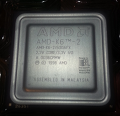
Another eBay delivery for my modest retro PC, another failure. I purchased this CPU for my Acer H61 motherboard with a slot 1 to socket 360 adapter that currently runs a PIII 600MHz well. Do you think it supports a 933 CPU? I installed it, but it shows a black screen on startup. It had a few bent pins that I managed to fix, and I'm not sure if the black screen is due to the defective or unsupported CPU. Reading a bit on the forum, it seems the CPU is supported... I think I've gotten another scam. 😀

Reply 1 of 22, by Devil996

User metadata
Rank Newbie
Rank
Newbie
Devil996 wrote on 2026-01-16, 15:30:

Another eBay delivery for my modest retro PC, another failure. I purchased this CPU for my Acer H61 motherboard with a slot 1 to socket 360 adapter that currently runs a PIII 600MHz well. Do you think it supports a 933 CPU? I installed it, but it shows a black screen on startup. It had a few bent pins that I managed to fix, and I'm not sure if the black screen is due to the defective or unsupported CPU. Reading a bit on the forum, it seems the CPU is supported... I think I've gotten another scam. 😀

It's an S61, not H61.

Reply 2 of 22, by Shponglefan

User metadata
Rank l33t
Rank
l33t

Best way to confirm is try the CPU in a different motherboard. Then you'll know if it's a defective CPU or not.

edited: As others have pointed out, it looks like it's missing a pin. You may need to solder a replacement before it will work.

Last edited by Shponglefan on 2026-01-16, 17:14. Edited 1 time in total.

Pentium 4 Multi-OS Build
486 DX4-100 with 6 sound cards
486 DX-33 with 5 sound cards

Reply 3 of 22, by TheMLGladiator

User metadata
Rank Member
Rank
Member

Has the pin in the top-right been fixed? It looks like it might be missing from the picture.

Reply 4 of 22, by Nemo1985

User metadata
Rank Oldbie
Rank
Oldbie

If that pin is missing I highly doubt that cpu will work. It's the TD0

Reply 5 of 22, by Devil996

User metadata
Rank Newbie
Rank
Newbie

It was the most crooked. I fixed it. The CPU fits into the adapter with just a little pressure... There are no missing pins, and unfortunately I don't have any other boards to test it with.

Reply 6 of 22, by Devil996

User metadata
Rank Newbie
Rank
Newbie

I was thinking that maybe the CPU isn't working because it requires some jumper changes on the adapter. It's currently working with a P3 600MHz coppermine E. So, 100MHz bus...

Reply 7 of 22, by Beerfloat

User metadata
Rank Newbie
Rank
Newbie

Your existing CPU should be running at a 6* 100Mhz multiplier with a core voltage of 1.65V, 1.7V or 1.75V (listed on the packaging).
Your slotket - adapter - is currently set to 'auto' which means the pins of the CPU are passed through to the motherboard to do voltage identification.
The Pentium III-933 should use the same voltage ranges as your 600, so that's good, but it does draw more power - 24.5W - 27W vs 15.8 - 19.7.

Your BIOS has a 'clock ratio' setting up to 8* so in theory it should be able to support the PIII-933. The ratio setting probably won't matter as most PIIIs have a fixed multiplier.
As your board is currently configured for 100Mhz I'd expect a working PIII-933 with its *7 multiplier to be identified as a PIII-700 - which should also lower its power draw.
The 'CPU clock frequency' setting in your BIOS can be configured for 133 Mhz operation, which is what you'd want to run it as a proper PIII-933.
But keep in mind that your current SDRAM might only support PC100.

For troubleshooting, you could try setting the slotket voltage jumpers manually instead of relying on 'Auto'. The settings are documented here, use magnifying glass icon for english text.

Reply 8 of 22, by Devil996

User metadata
Rank Newbie
Rank
Newbie
Beerfloat wrote on 2026-01-17, 11:03:
Your existing CPU should be running at a 6* 100Mhz multiplier with a core voltage of 1.65V, 1.7V or 1.75V (listed on the packagi […]
Show full quote

Your existing CPU should be running at a 6* 100Mhz multiplier with a core voltage of 1.65V, 1.7V or 1.75V (listed on the packaging).
Your slotket - adapter - is currently set to 'auto' which means the pins of the CPU are passed through to the motherboard to do voltage identification.
The Pentium III-933 should use the same voltage ranges as your 600, so that's good, but it does draw more power - 24.5W - 27W vs 15.8 - 19.7.

Your BIOS has a 'clock ratio' setting up to 8* so in theory it should be able to support the PIII-933. The ratio setting probably won't matter as most PIIIs have a fixed multiplier.
As your board is currently configured for 100Mhz I'd expect a working PIII-933 with its *7 multiplier to be identified as a PIII-700 - which should also lower its power draw.
The 'CPU clock frequency' setting in your BIOS can be configured for 133 Mhz operation, which is what you'd want to run it as a proper PIII-933.
But keep in mind that your current SDRAM might only support PC100.

For troubleshooting, you could try setting the slotket voltage jumpers manually instead of relying on 'Auto'. The settings are documented here, use magnifying glass icon for english text.

Thanks for the advice. I found my Slocket manual and tried manually setting it to 1.7V. I also tried setting the bus to 100MHz, but nothing... the motherboard won't boot. This CPU seems dead.

Reply 9 of 22, by Beerfloat

User metadata
Rank Newbie
Rank
Newbie

Could you post another picture of the fixed underside of the PIII-933?
It really does look like the upper right pin is actually missing. Maybe a picture can confirm whether we're talking about the same thing.

Reply 10 of 22, by Devil996

User metadata
Rank Newbie
Rank
Newbie
Beerfloat wrote on 2026-01-17, 11:31:

Could you post another picture of the fixed underside of the PIII-933?
It really does look like the upper right pin is actually missing. Maybe a picture can confirm whether we're talking about the same thing.

No problem. I looked at it carefully and it seems perfect.

Reply 11 of 22, by Devil996

User metadata
Rank Newbie
Rank
Newbie

Maybe not so perfect... I noticed a slightly oxidized pin, I try to clean it with isopropyl alcohol and scrape it with tweezers.

Reply 12 of 22, by Beerfloat

User metadata
Rank Newbie
Rank
Newbie

You're right the pins look great now. But it might be the rust - fingers crossed.
Other than that I see no obvious reason why this CPU should not work on your motherboard.

Reply 13 of 22, by Nemo1985

User metadata
Rank Oldbie
Rank
Oldbie

Definitely it's not the problem of this CPU. Unlucky without another mb it won't be easy to understand where the problem is.

Reply 14 of 22, by Devil996

User metadata
Rank Newbie
Rank
Newbie
Beerfloat wrote on 2026-01-17, 12:19:

You're right the pins look great now. But it might be the rust - fingers crossed.
Other than that I see no obvious reason why this CPU should not work on your motherboard.

No luck 🙁

Reply 15 of 22, by AlexZ

User metadata
Rank Oldbie
Rank
Oldbie

You may need newer BIOS. CPUs are rarely dead. It's the motherboards and GPUs that die. Buy only CPUs verified by seller or they need to be super cheap.

Pentium III 900E,ECS P6BXT-A+,384MB,GeForce FX 5600, Voodoo 2,Yamaha SM718
Athlon 64 3400+,Gigabyte GA-K8NE,2GB,GeForce GTX 275,Audigy 2 ZS
Phenom II X4 955,Gigabyte GA-MA770-UD3,8GB,GeForce GTX 780
Vishera FX-8370,Asus 990FX,32GB,GeForce GTX 980 Ti

Reply 16 of 22, by Beerfloat

User metadata
Rank Newbie
Rank
Newbie
Devil996 wrote on 2026-01-17, 13:06:
Beerfloat wrote on 2026-01-17, 12:19:

You're right the pins look great now. But it might be the rust - fingers crossed.
Other than that I see no obvious reason why this CPU should not work on your motherboard.

No luck 🙁

Sucks buddy. Not sure what to tell ya other than don't bin it yet. Maybe you'll find another board to try it on at some point.
Another Coppermine 933 or even a 1Ghz shouldn't be more than about $25 from Ebay but might still fail. It's a gamble but every data point narrows down the most likely culprit.

Reply 17 of 22, by Devil996

User metadata
Rank Newbie
Rank
Newbie
AlexZ wrote on 2026-01-17, 14:48:

You may need newer BIOS. CPUs are rarely dead. It's the motherboards and GPUs that die. Buy only CPUs verified by seller or they need to be super cheap.

It was very cheap, as were the GeForce 4 MX 440SE and the GeForce 2 GTS... In fact, they don't work either... I paid 10 euros for the CPU. What bothers me the most is the GeForce 2 GTS; I paid 35 euros for that and will ask for a refund. I paid 12 euros for the 440SE.

But I'm wondering why they'd sell defective items, hoping no one will notice, or give up on their claim.

This CPU still has a little hope, but I'll have to buy another motherboard to test it.

Reply 18 of 22, by Devil996

User metadata
Rank Newbie
Rank
Newbie
AlexZ wrote on 2026-01-17, 14:48:

You may need newer BIOS. CPUs are rarely dead. It's the motherboards and GPUs that die. Buy only CPUs verified by seller or they need to be super cheap.

There's no newer BIOS for my Acer H61, but from what I understand, it's a rebadged AOpen MX64. I could try flashing the BIOS on that one, but I'm afraid of bricking it.

Reply 19 of 22, by squelch41

User metadata
Rank Member
Rank
Member

Check the slotket adapter - some only support up to certain steppings of Socket 370 chips - intel put things in place to block newer CPUs working - if that's the issue, you need to modify the sockets:

https://web.archive.org/web/20250621151232/ht … der.com/370mod/

https://web.archive.org/web/20170829114242/ht … /reads/MSMG.htm

I have a tualitin celeron running in a 440BX with a slotket but it took quite a lot of trial and error to get it working!

Rom.by used to have a bios patcher to add support for additional CPUs for boards that didnt support them - mine worked without but just reported the wrong speeds on the bios screen - rom.by sorted that out.
I only did it though as the EEPROM was socketed, so I dumped the original rom and then played with the adjusted image on a new ROM chip, safe in the knoweldge that if it went wrong, I could just swap the old one back in.

Rom.by site seems to be dead now but is on archive.org:
https://web.archive.org/web/20220117162114/ht … ok/BIOS_Patcher

There is some info about patching here:
https://www.youtube.com/watch?v=0KBYj1vx3zQ

I really cant remember how I did it as it was a couple of years ago now

V4P895P3 VLB Motherboard AMD 486 133MHz.64mb RAM, CF 4Gb HDD,

440bx MSI 6119, modified slocket , Tualitin Celeron 1.2Ghz 256mb SD-RAM, CF 4GB HDD, FX5200 gfx

386sx 20MHz ICL NB386s laptop, 4mb RAM, modified bios with XT-IDE, CF 512mb, 387 FPU