VOGONS


First post, by Rubix

User metadata
Rank Newbie
Rank
Newbie

Hi all, I am restoring a big tower that was sitting in an abandoned house for many years , and there was this MediaVision Spectrum sound card inside. It has a wavetable chip and looks quite high end (big filter caps, metal connectors). Is it worth trying to repair it? It's in pretty bad condition.

The motherboard of the tower works so I'll definitely rebuild the PC.

Reply 1 of 29, by Marmes

User metadata
Rank Member
Rank
Member

This card is worth saving! I also have one.
See if you have the drivers for it inside HDD, because they cannot be found anywhere. If you want I can help

Reply 2 of 29, by Ozzuneoj

User metadata
Rank l33t
Rank
l33t
Rubix wrote on 2026-01-27, 09:25:

Hi all, I am restoring a big tower that was sitting in an abandoned house for many years , and there was this MediaVision Spectrum sound card inside. It has a wavetable chip and looks quite high end (big filter caps, metal connectors). Is it worth trying to repair it? It's in pretty bad condition.

The motherboard of the tower works so I'll definitely rebuild the PC.

Holy cow! This isn't actually a Pro Audio Spectrum. It is a MediaVision Pro Audio Wavetable, possibly also referred to as "JazzWave" (see the FCCID at the top of the card). They are very uncommon cards actually. They are based on the Jazz16 chipset which honestly doesn't have the greatest reputation in the retro gaming world, but it should work fine for a lot of things and it does have an authentic Yamaha OPL3 chip for FM synth music, which is good. Standard Jazz16 cards are fairly common, but this JazzWave also has an ICS Wavefront wavetable midi synth chip.

As an indicator of just how uncommon and obscure these cards are, I don't believe anyone has ever found drivers to make the Wavefront MIDI synth work.

I made a thread about mine a couple years back...

Media Vision Pro Audio Wavetable "JazzWave" - Jazz16 + ICS Wavefront

So, since you found this in a PC, my question to you is: Did the hard drive in that PC work? If so, there is a high likelihood that it contains the drivers needed to make the wavetable portion of this card work, making it the only known source of such files.

If you have time, please please check around on the hard drive for any drivers related to this card. If there isn't a really obvious folder with mediavision stuff in it, the autoexec.bat and config.sys files may have lines in them that initialize this card and they may lead you to a folder that contains what we're looking for.

Alternatively, if there were any discs with the computer it's possible that the disks for the card are there too. The sound card collectors and historians here would be very grateful for your efforts to upload whatever you find to the forums. 🙂

EDIT: Just realized Marmes said the same thing. I will admit I jumped right into a reply when I saw that you found this in an existing computer.

Now for some blitting from the back buffer.

Reply 3 of 29, by Rubix

User metadata
Rank Newbie
Rank
Newbie

Thanks for your replies! There were 2 hard drives inside the tower. One initializes correctly at least by the sound of it, the other one (inside a removable caddy) is broken and barely gets detected, then causes a hard disk error in during POST (error 80). It also makes bad clicking noises.

These Western Digital drives are infamous for breaking and I am frankly amazed one of them initializes properly, especially considering its condition.

Here's the bad news: the one that doesn't work was the primary master drive and was the boot drive with the OS on it. I will at least try to make an image of the other drive to see what's on it. That one will probably die soon too so for now I'm not touching it until I can image it.

That being said, if anyone knows if it's possible to revive these particular WD drives, I'll gladly give it a try. I have repaired quite a few hard drives before (including full disassembly and reassembly) but those had more obviously repairable issues (board, sticky bumpers, seized stepper motors, etc). Especially considering the water damage on this one, I doubt if there's much I can do.

I'd also like to ask for advice on how to repair the sound card. I think the only real issue is that crystal (and missing cap) with the rust around it, surely causing a short. How to best remove that crystal without damaging any traces, and how to properly clean off the rust?

Thanks a lot!

Reply 4 of 29, by Marmes

User metadata
Rank Member
Rank
Member

You can try to exchange pcbs from HDDs to test.

Reply 5 of 29, by Rubix

User metadata
Rank Newbie
Rank
Newbie

Yeah I could try that. They're different though, one was assembled in Singapore and the other one in Malaysia. They also have slightly different model numbers. But it's worth a try after I have backed up the other one.

Btw, I got your message but apparently I'm not authorized (yet) to send PMs. I guess I didn't post enough messages to be allowed that privilege 😅

I read the thread and I really wish I could help with the driver situation. It sucks that this card happened to be in a PC that was stored in such bad conditions which killed the hard drive. Although like I said, these WD Caviars from ~1996 to 1998 sadly will die regardless of the circumstances.

Reply 7 of 29, by Rubix

User metadata
Rank Newbie
Rank
Newbie

The model is WDAC22100-00H (-32H for the other one). I have attached an image of the sticker so you have all the numbers.

Reply 8 of 29, by Ozzuneoj

User metadata
Rank l33t
Rank
l33t

Man that's too bad about the hard drive.

I may have one of those drives as well and I would be willing to donate a PCB to increase our odds of getting the drivers for this card.

What country are you in?

Also, is there any chance of finding any software squirreled away somewhere in the same house? People keep some very weird things filed away "just in case we ever need them" . heh

As for the rust on the card, it looks like the only things that are rusty are the metal housing for the crystal and the legs from the missing capacitor. I would use some white vinegar to loosen and neutralize the rust and the areas with green corrosion (I see a bit of green has spread to the main chip), then carefully brush or scrape away whatever is on the surface. I doubt it has gone into the traces on the PCB, but if it has it will need bodge wires run to bypass the traces anyway, so I'd just try to get everything clean and then assess any damage. This looks like water damage to me, so I don't think the copper traces will be bad at all.

Once you've got the crusty stuff out of the way, it shouldn't be too hard to desolder those old rusty cap legs and the old rusty crystal with a bit of flux to clean things up. In the picture of my card in the other thread the crystal is marked "C16.00K" and yours looks the same. I don't think it'll be too hard to find a replacement crystal like that on some other card if you have a lot of old parts laying around. I don't really know much about crystal markings, but if that is just a standard 16Mhz crystal there are tons of them available brand new as well. I see them on Amazon and even in assortment kits with other crystals.

The capacitor that is broken off is probably the same value as the others nearby, but I will dig my card out and post here to confirm its value when I get a chance.

Last edited by Ozzuneoj on 2026-01-27, 16:05. Edited 1 time in total.

Now for some blitting from the back buffer.

Reply 9 of 29, by cyclone3d

User metadata
Rank l33t++
Rank
l33t++

Ok, I will check for a drive when I get home.

On another note, doing some digging with Chatgpt, and it is saying there is a working Linux driver / initializer for this card and the source code is available and is saying it can help port it.

I think I am going to also look at that tonight if I have the time.

Yamaha modified setupds and drivers
Yamaha XG repository
YMF7x4 Guide
Aopen AW744L II SB-LINK

Reply 10 of 29, by Ozzuneoj

User metadata
Rank l33t
Rank
l33t

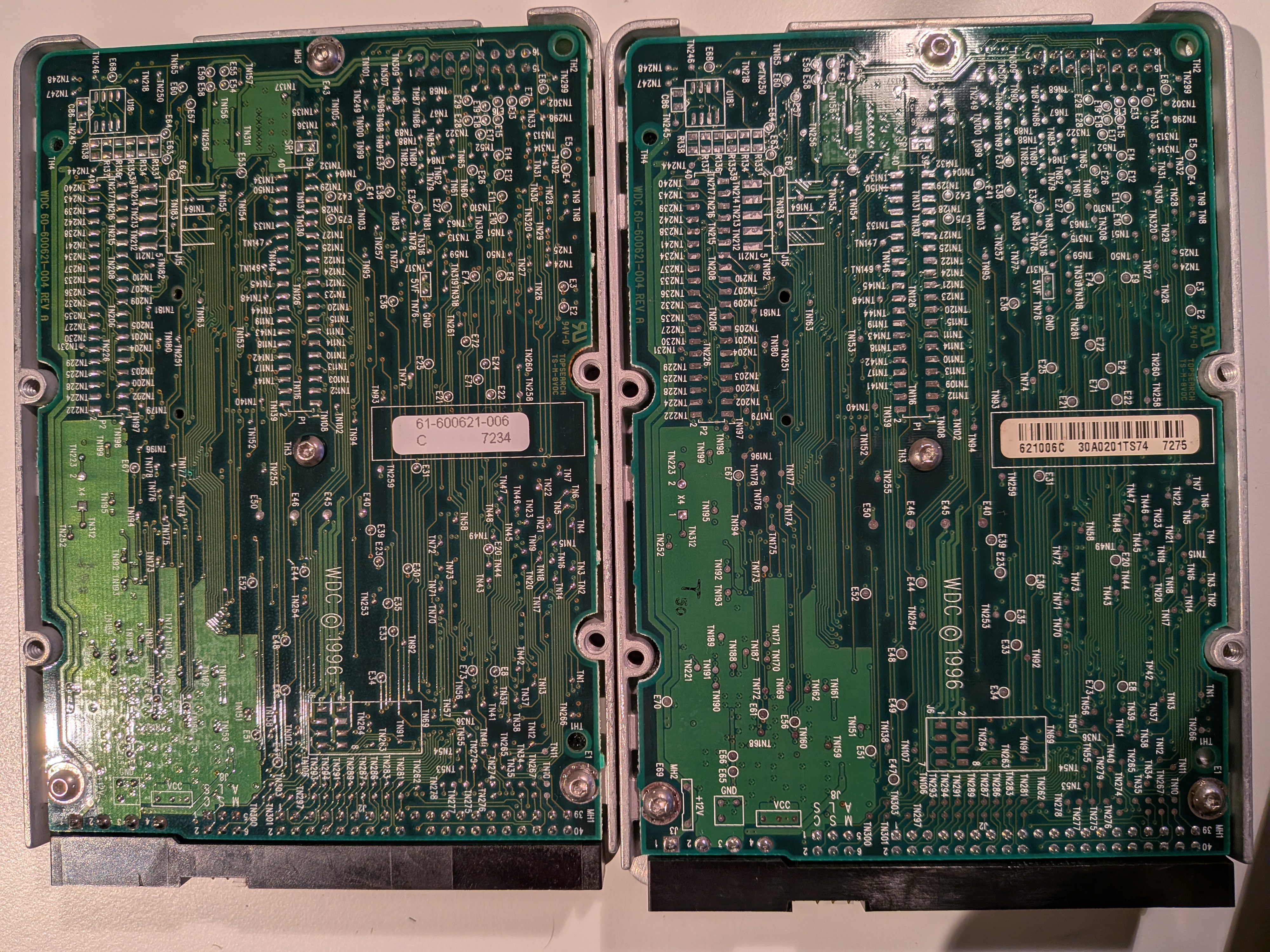
Forgot to mention, can you post pictures of the PCB from the hard drive that is not working? If possible remove it from the drive so we can see both sides.

Now for some blitting from the back buffer.

Reply 11 of 29, by Marmes

User metadata
Rank Member
Rank
Member

Is the motor working? Maybe if you give a little tap it starts spinning correctly.

Reply 12 of 29, by Shponglefan

User metadata
Rank l33t
Rank
l33t
Rubix wrote on 2026-01-27, 14:09:

I'd also like to ask for advice on how to repair the sound card. I think the only real issue is that crystal (and missing cap) with the rust around it, surely causing a short. How to best remove that crystal without damaging any traces, and how to properly clean off the rust?

Vinegar can help neutralize corrosion in progress. Some brushing and general abrasion can remove the rust.

It looks like there is already trace damage on that card, so you'll need to test all traces. There is also rust on the voltage regulator, and possible rust corrosion in the lower left side of the card (below the WaveFront chip).

Pentium 4 Multi-OS Build
486 DX4-100 with 6 sound cards
486 DX-33 with 5 sound cards

Reply 13 of 29, by Marmes

User metadata
Rank Member
Rank
Member

Then use isopropyl Alcohol to clean all the board. Do it at least twice.

Reply 14 of 29, by Rubix

User metadata
Rank Newbie
Rank
Newbie
Ozzuneoj wrote on 2026-01-27, 15:28:

Man that's too bad about the hard drive.

I may have one of those drives as well and I would be willing to donate a PCB to increase our odds of getting the drivers for this card.

What country are you in?

I'm currently in The Netherlands. I don't mind donating the drive itself if there's a chance to get the data off the drive. With these drives, I don't know why they fail so frequently. Although in this case, I'm afraid water damage may be a factor.

Ozzuneoj wrote on 2026-01-27, 15:28:

Also, is there any chance of finding any software squirreled away somewhere in the same house? People keep some very weird things filed away "just in case we ever need them" . heh

I looked around for interesting stuff when I was there, but I didn't come across any software. I must say I didn't turn everything upside down and there was a lot of stuff. The new buyers of the house let me have the computers and allowed me to buy other stuff if I found anything interesting. But I couldn't be there digging around for hours while the guy was waiting around.

Ozzuneoj wrote on 2026-01-27, 15:28:

As for the rust on the card, it looks like the only things that are rusty are the metal housing for the crystal and the legs from the missing capacitor. I would use some white vinegar to loosen and neutralize the rust and the areas with green corrosion (I see a bit of green has spread to the main chip), then carefully brush or scrape away whatever is on the surface. I doubt it has gone into the traces on the PCB, but if it has it will need bodge wires run to bypass the traces anyway, so I'd just try to get everything clean and then assess any damage. This looks like water damage to me, so I don't think the copper traces will be bad at all.

Once you've got the crusty stuff out of the way, it shouldn't be too hard to desolder those old rusty cap legs and the old rusty crystal with a bit of flux to clean things up. In the picture of my card in the other thread the crystal is marked "C16.00K" and yours looks the same. I don't think it'll be too hard to find a replacement crystal like that on some other card if you have a lot of old parts laying around. I don't really know much about crystal markings, but if that is just a standard 16Mhz crystal there are tons of them available brand new as well. I see them on Amazon and even in assortment kits with other crystals.

The capacitor that is broken off is probably the same value as the others nearby, but I will dig my card out and post here to confirm its value when I get a chance.

Thanks a lot! I would much appreciate if you could get that value for me. I'll try to remove the rust and post a follow-up if and when I succeed.

Reply 15 of 29, by Marmes

User metadata
Rank Member
Rank
Member

If you don't feel comfortable fixing this hardware, if you want, you can send to me I will give a look and send back to you.
Will not charge anything 😉

Reply 16 of 29, by Rubix

User metadata
Rank Newbie
Rank
Newbie

The drive does spin up, but then can't initialize properly.

Ozzuneoj wrote on 2026-01-27, 16:04:

Forgot to mention, can you post pictures of the PCB from the hard drive that is not working? If possible remove it from the drive so we can see both sides.

Sure:
HDD_PCBs.jpg

Reply 17 of 29, by Rubix

User metadata
Rank Newbie
Rank
Newbie
Marmes wrote on 2026-01-27, 18:46:

If you don't feel comfortable fixing this hardware, if you want, you can send to me I will give a look and send back to you.
Will not charge anything 😉

I really appreciate it! I'll have a try on it, if I can't figure it out, I'd gladly take you up on your offer!

Reply 18 of 29, by Marmes

User metadata
Rank Member
Rank
Member

It seems you need to unsolder both.😔

Reply 19 of 29, by cyclone3d

User metadata
Rank l33t++
Rank
l33t++

Ok, I've got a compiled test initializer for the onboard wavetable. Just have to pull out my test rig, install DOS and the card and the base Jazz16 drivers and then run the program and see what it returns and, if it returns expected data, run a game to see if it works as expected.

It will be a miracle if it works the first try.. ha.

I'll post in the other thread that is specifically about the drivers for this card with detailed results and updates as well as an update here to look at the other thread. I'll only post simple updates here.

Probably will not happen for a day or 2 though as I need to not stay up all night.

Yamaha modified setupds and drivers
Yamaha XG repository
YMF7x4 Guide
Aopen AW744L II SB-LINK