VOGONS


First post, by Omarkoman

User metadata
Rank Member
Rank
Member

I have this great board with a Pentium Pro 200 I want to create a new build and put in a larger SSD drive in (eg 64GB)

https://theretroweb.com/motherboards/s/gigabyte-ga-686fx

Trying various mechanical drives of sizes around 40GB etc and SSDs, it does not detect them at all, it actually freezes in the BIOS HDD detection screen. Smaller drives work.

I searched Wims but couldnt find anything there. Is this boards BIOS even patch-able? Or should I just use a PCI IDE/SATA card ?


Reply 1 of 8, by wierd_w

User metadata
Rank Oldbie
Rank
Oldbie

XT-IDE on a NIC?

Reply 2 of 8, by Omarkoman

User metadata
Rank Member
Rank
Member

Yeah I have few of those but they slow down the drive significantly, also they cause issues with optical drives. I can try to have a play but wanted to see if there was a cleaner eg bios patch option as i did that on quite few of my other boards and works perfectly.

Reply 3 of 8, by NeoG_

User metadata
Rank Oldbie
Rank
Oldbie

Unless you can get the attention of someone familar with patching BIOS files for drive support, a PCI card is going to be the next best option. You can leave your ATAPI devices connected to the mainboard for boot support and just put the drive(s) on the PCI card. Most PCI cards won't boot from ATAPI IDE devices.

98/DOS Rig: BabyAT AladdinV, K6-2+/550, V3 2000, 128MB PC100, 20GB HDD, 128GB SD2IDE, SB Live!, SB16-SCSI, PicoGUS, WP32 McCake, iNFRA CD, ZIP100
XP Rig: Lian Li PC-10 ATX, Gigabyte X38-DQ6, Core2Duo E6850, ATi HD5870, 2GB DDR2, 2TB HDD, X-Fi XtremeGamer

Reply 4 of 8, by Omarkoman

User metadata
Rank Member
Rank
Member

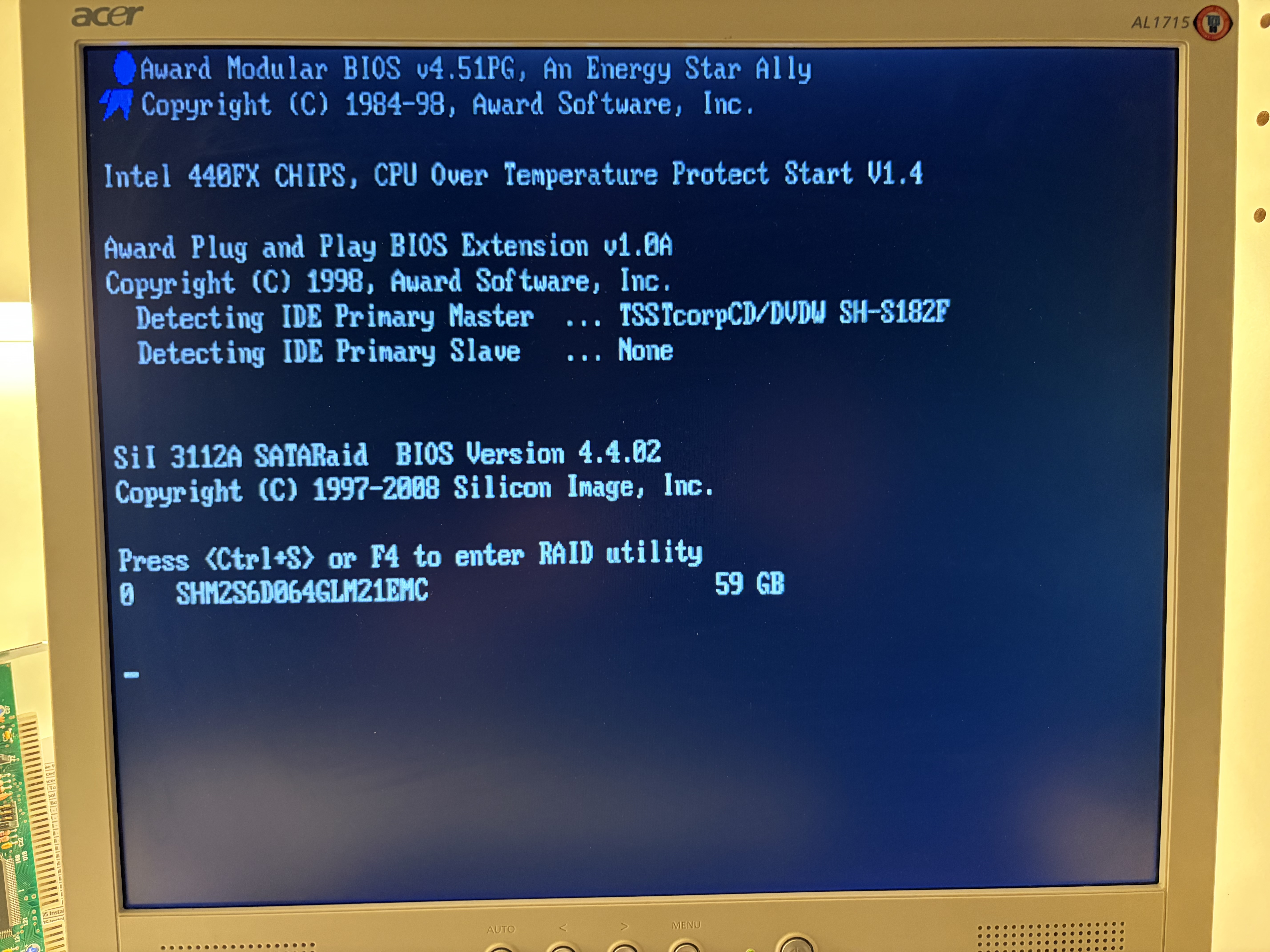
Fair call, thats actually what I am planning to do now experimenting with win98 install .

How can i get the installer to see the drive on the pci controller?

https://i.postimg.cc/DFyvtz6p/IMG-1976.jpg

The ssd is detected but the os doesnt recognise itZ i even tried the speed win98 installer which i think uses linux?

This one : https://github.com/oerg866/win98-quickinstall

It doesnt see the drive/controller.

Reply 5 of 8, by NeoG_

User metadata
Rank Oldbie
Rank
Oldbie

Which controller card are you using

98/DOS Rig: BabyAT AladdinV, K6-2+/550, V3 2000, 128MB PC100, 20GB HDD, 128GB SD2IDE, SB Live!, SB16-SCSI, PicoGUS, WP32 McCake, iNFRA CD, ZIP100
XP Rig: Lian Li PC-10 ATX, Gigabyte X38-DQ6, Core2Duo E6850, ATi HD5870, 2GB DDR2, 2TB HDD, X-Fi XtremeGamer

Reply 6 of 8, by wbahnassi

User metadata
Rank Oldbie
Rank
Oldbie

Shrinking the drive with SeaTools might work... unless you really want its full capacity. But at least you can use newer quieter drives even if most of their space is wasted.

Turbo XT 12MHz, 8-bit VGA, Dual 360K drives
Intel 386 DX-33, Speedstar 24X, SB 1.5, 1x CD
Intel 486 DX2-66, CL5428 VLB, SBPro 2, 2x CD
Intel Pentium 90, Matrox Millenium 2, SB16, 4x CD
HP Z400, Xeon 3.46GHz, YMF-744, Voodoo3, RTX2080Ti

Reply 7 of 8, by Chkcpu

User metadata
Rank Oldbie
Rank
Oldbie

Hi Omarkoman,

I’m familiar with patching Award v4.5x BIOSes for better drive support.
The latest (and only) GA-686FX BIOS I see on TRW is the V1.4 (06/29/1998-i440FX-8669-2A69HG09C-00).
Is this the BIOS version you are running, or do you have a newer BIOS?

If not, the V1.4 BIOS has indeed the infamous Award BIOS 32GB IDE HDD limit bug. I can patch this bug for full 128GiB/137GB HDD/SSD support.
Let me know which BIOS version you have, so I can patch the most recent one.

Cheers, Jan

CPU Identification utility
The Unofficial K6-2+ / K6-III+ page

Reply 8 of 8, by Omarkoman

User metadata
Rank Member
Rank
Member
Chkcpu wrote on 2026-02-05, 12:35:
Hi Omarkoman, […]
Show full quote

Hi Omarkoman,

I’m familiar with patching Award v4.5x BIOSes for better drive support.
The latest (and only) GA-686FX BIOS I see on TRW is the V1.4 (06/29/1998-i440FX-8669-2A69HG09C-00).
Is this the BIOS version you are running, or do you have a newer BIOS?

If not, the V1.4 BIOS has indeed the infamous Award BIOS 32GB IDE HDD limit bug. I can patch this bug for full 128GiB/137GB HDD/SSD support.
Let me know which BIOS version you have, so I can patch the most recent one.

Cheers, Jan

hi Jan

yes that is the BIOS I am running, the V1.40 from retroweb. Would be amazing if you can patch it !!!!

Thank you !