VOGONS


First post, by Torturephile
User metadata
Rank Newbie
Rank
Newbie

Flight Simulator 2004 (DX9) works perfect in windowed mode. However, when switching to full screen mode:

  • The menu bar (press Alt) will not be visible at all, even if the application thinks it's there. Attempting to navigate it (with arrow keys) even when it's invisible will result in the game just resuming the simulation.
  • The game's menu screens (appearing when hitting Esc or ; during simulation) will result in the game disappearing as if I minimized it. Pressing Esc or ; again will return the game to normal.
  • Hitting F10 to display the kneeboard kicks the game back to windowed mode with no borders. The kneeboard itself doesn't function well in full screen, so I have to switch back to proper windowed mode to at least close it.

Running on AMD Radeon RX 6700 XT.

Reply 1 of 6, by DaveDDS

User metadata
Rank Oldbie
Rank
Oldbie

I've seem cases like this with various graphical software (not always games) - almost always it's video card/driver related. Windowed mode uses bog standard Winblows interface, full-screen in many games invokes more direct-to-driver code... Check that your video card driver is the latest!

Dave ::: https://dunfield.themindfactory.com ::: "Daves Old Computers"->Personal

Reply 2 of 6, by Torturephile

User metadata
Rank Newbie
Rank
Newbie

Full screen works fine without dgVoodoo. As for the GPU drivers, I'm using the latest ones, 26.3.1.

Reply 3 of 6, by Dege

User metadata
Rank l33t
Rank
l33t

What about fake fullscreen mode? The symptoms you described suggests that this game puts other physical windows over the rendering window which is not tolerated by real D3D11/12 fullscreen mode (contrary to older D3D versions).

Reply 4 of 6, by Torturephile

User metadata
Rank Newbie
Rank
Newbie

I've tried multiple combinations of fake fullscreen, borderless, disable Alt-Enter to toggle screen state, and application controlled fullscreen/windowed state; with no different results.

The symptoms you described suggests that this game puts other physical windows over the rendering window which is not tolerated by real D3D11/12 fullscreen mode (contrary to older D3D versions).

Had no idea about that, but it makes sense why FS2004 acts like how I've described. If so, I guess this is more of a game/DX issue than a dgVoodoo one, correct?

Reply 5 of 6, by Dege

User metadata
Rank l33t
Rank
l33t

I tried Flight Simulator 2002 with Fake Fullscreen, the menus and overlay dialogs are working but it introduces another problem:
Flight-Simulator-9.jpg
The upper window containing the runway rendering is black, and the complete image falls apart when I move it.
So, sadly, there is no workaround for the problem at the moment.

I've run into other problems with fake fullsreen in other games when doing my testing, and there is the annoying occassional window-resize problem too, so I'll look into it in general later. Now I don't really have time for that, but it's a problem that should be cured.

Btw, I remember I did a fix for this game, did it work perfectly back then? I tried 2.79.2 but it is the same for me, but it's true that I'm on Win11 now (shouldn't matter though):
A few issues with older MS Flight Simulators

Reply 6 of 6, by Torturephile

User metadata
Rank Newbie
Rank
Newbie

Yes, those fixes still work perfect. Can't believe it's been that long since that thread.

So, I tried messing with things again. Got a bit of progress done by selecting fake full screen by itself, like how you did. Guess who didn't try enough combinations the first time.
Menu bar, game menus, and kneeboard work fine now.

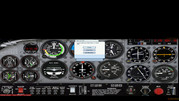
Since the game's 2D panels were made for 4:3 aspect resolutions, I run the game at 1920x1440 (4:3). My monitor is 2560x1440 (16:9). I also enabled centered scaling so the entire game's aspect ratio isn't stretched to 16:9. Unfortunately, the 2D panel is stretched and cropped as if I ran the game at 2560x1440 (16:9) or so, when using fake full screen mode.
FppCdI8.jpeg

This oddly doesn't apply for the minipanel (press W), as it appears correct.
YGbpCQG.jpeg

Without fake full screen, the 2D panel is fine, but then I get the menu problems again.
eL7adEf.jpeg

Once I have time, I'll tinker with settings, both game and dgVoodoo, to see if I get it correct.