VOGONS


Retro backup software?

Topic actions

First post, by Matth79

User metadata
Rank Oldbie
Rank
Oldbie

Planning my 3 way retro fleet, DOS, 98, XP and thinking, how do I back them up, once everything is set up how I want?
One tool? Seems unlikely from a starting point of P133 with 32MB, though I guess the DOS system could be zipped and then mTCP to a NAS. Don't mind making the "DOS" system into 95/98 "DOS" if that opens more options.
Also, hoping to cover perhaps on-system quick restore to cover software foul-ups, and off system restore if HDD dies.

Reply 1 of 6, by DosFreak

User metadata
Rank l33t++
Rank
l33t++

If you want images then Clonezilla should work on a P1 try the 486 or 586 builds, you'll need PLOP though. Also the older the better probably.
If the amount of data is too much then saving the image to a removable drive would likely be faster.

486
Clonezilla-live-2.2.1-25-i486

586 (Try older builds if too slow)
clonezilla-live-2.4.2-61-i586.iso

686 (Latest version for 686 machines)
clonezilla-live-3.2.0-5-i686.iso

https://sourceforge.net/projects/clonezilla/f … table/2.4.2-61/

How To Ask Questions The Smart Way
Make your games work offline

Reply 2 of 6, by nali

User metadata
Rank Member
Rank
Member

On old computers Plop often must be config to use Usb 1.1 mode.
Clonezilla can also be booted from the network, for example using AllInOne floppy, using a basic network card.

Reply 3 of 6, by mbbrutman

User metadata
Rank Oldbie
Rank
Oldbie

The best type of backup here is a partition image backup, not a file level backup. A partition image backup includes the FAT table, directories, hidden file, system files, etc.

If Clonezilla will work, that is what I would use. If not, something older like Power quest Drive Image works great on older machines and it also does image backups.

Reply 4 of 6, by crusher

User metadata
Rank Member
Rank
Member

I also have a 3-way fleet with DOS, 98 and XP computer 😉
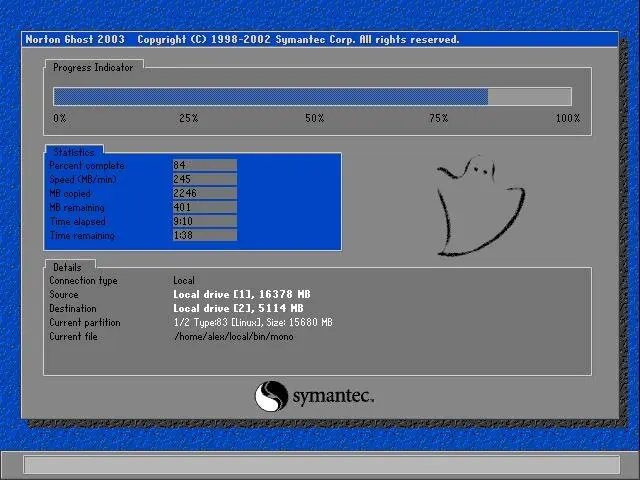
For the DOS and 98 one I had boot discs or sticks with Norton Ghost. Backup was done onto USB media.
That worked but was very slow. The backup took more times the more games I put on the systems.
The XP one I could boot with AOMEI Backuper stick and even use USB 3.0.

After I modified the systems and changed from internal hard drives (SSDs in my case) to removable racks, the backups became very comfortable and fast.
I can easily take out the SSD, plug it into an USB adapter and use it as external drive on a modern system with every backup software you like. Because of USB 3.0 it is much much faster as doing backups with the original system.

As a side advantage you can use this method for large file transfers.

Maybe it is a point you want to consider in your planning.

Reply 5 of 6, by theelf

User metadata
Rank Oldbie
Rank
Oldbie

Norton Ghost

Ivmware-norton-ghost.jpg.webp

Reply 6 of 6, by Matth79

User metadata
Rank Oldbie
Rank
Oldbie

Thanks, some good suggestions, they don't mention the old versions of Clonezilla on the main site, so I just went 192MB, no can do!
There is a NAS in my plans too, so the network assisted idea may be a runner.