VOGONS


First post, by Omarkoman

User metadata
Rank Member
Rank
Member

I bought this card advertised as pulled from working system but I cant get any sound to come out.

I have few of these cards so I am familiar with the setup in dos and they are pretty easy to get going.

The card itself looks clean and no signs of physical damage.

The Creative software detects it all ok on the set ports/irq/dma.

Just no sound.

Any suggestions what to try?

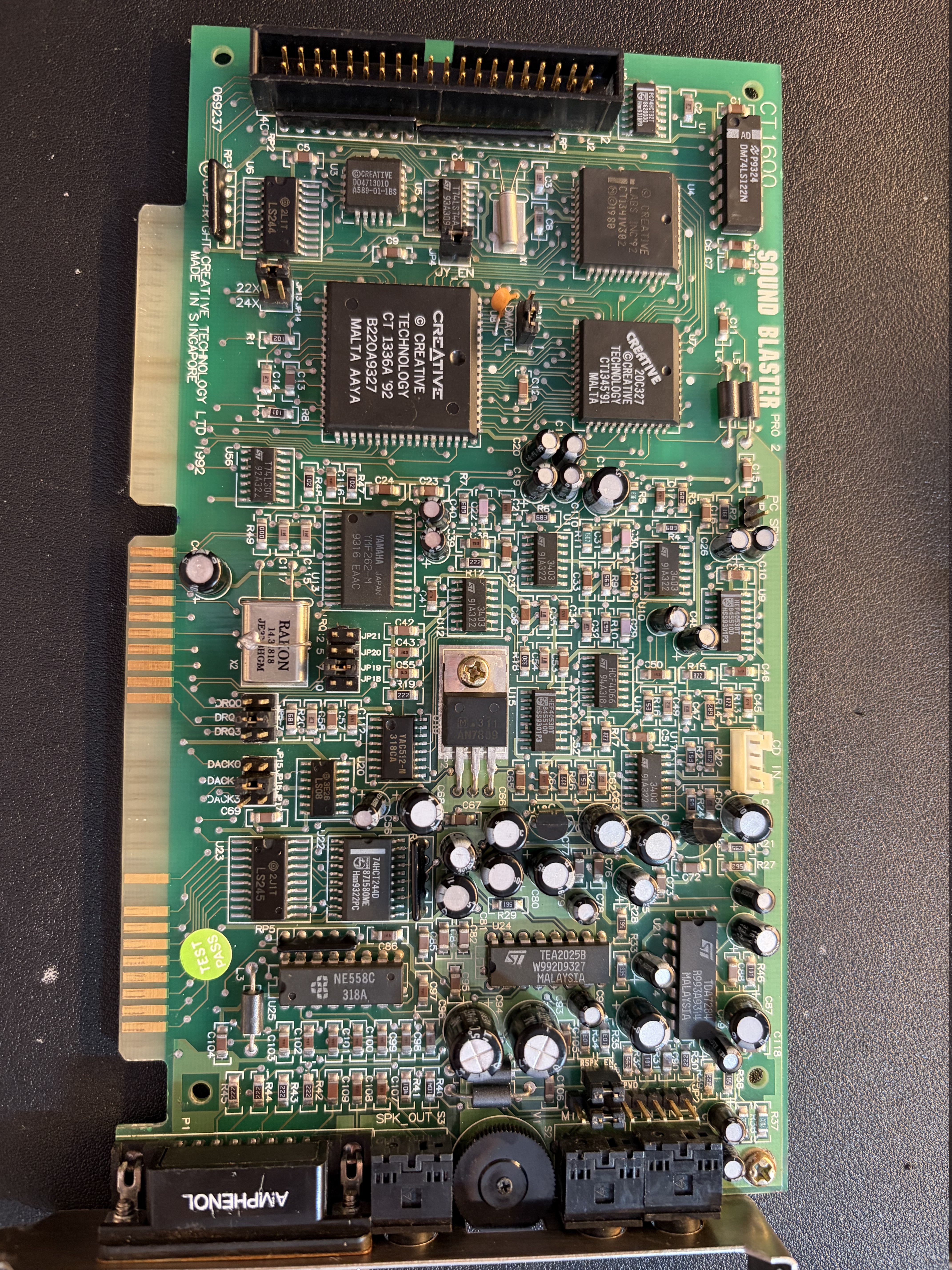
Photo of the card:

https://i.postimg.cc/54q3gpVD/IMG-4949.jpg

Reply 1 of 11, by MagefromAntares

User metadata
Rank Member
Rank
Member

Hi,

With a quick visual look at the picture, I don't see anything obviously damaged.

While these may sound obvious, but you didn't mentioned in the opening post of trying these, so I would try the following things before going into more in-depth debugging:

  • The round adjuster wheel at the back is for the volume, try moving it from one end to the other while a program is outputting sound.
  • Also try a program that is only using the Adlib FM synthesis part of the card as that doesn't need an IRQ or DMA. (However most programs that use Sound Blaster also uses FM synth effects anyway)
  • Double check that the jumpers are set to the same value on the card as it is used by the programs you are trying and the SET BLASTER variable.

While there are no components installed on the other side of the card a picture of that could be also helpful to check the solder connections, traces and the edge connector.

"A process cannot be understood by stopping it. Understanding must move with the flow of the process, must join it and flow with it." - Dune

Reply 2 of 11, by Grzyb

User metadata
Rank l33t
Rank
l33t

CT1600 doesn't need -5V, right?

In 2003, I voted in favour of joining the European Union. However, due to later developments - especially the restrictions on cash usage - I have withdrawn my support. DOWN WITH THE EU!

Reply 3 of 11, by MagefromAntares

User metadata
Rank Member
Rank
Member
Grzyb wrote on 2026-07-04, 08:54:

CT1600 doesn't need -5V, right?

The B side of an ISA card is the one you see when the external connectors are on the left side of the card(The side generally not or less populated by components), and in the images I have found on https://theretroweb.com/expansioncards/s/crea … er-pro-2-ct1600 the B5 pin of the ISA edge connector doesn't seem to be connected to anything on the card (In fact doesn't even seem to plated with metal).

"A process cannot be understood by stopping it. Understanding must move with the flow of the process, must join it and flow with it." - Dune

Reply 4 of 11, by Omarkoman

User metadata
Rank Member
Rank
Member

Sorry, but what does that mean?

Reply 5 of 11, by MagefromAntares

User metadata
Rank Member
Rank
Member
Omarkoman wrote on 2026-07-04, 10:09:

Sorry, but what does that mean?

@Grzyb suggested that the issue might be that -5 Volts is missing from the power bus of the motherboard as newer PSUs generally don't have a -5 rail, my reply was that I have checked picture of the CT1600 cards on The RetroWeb and on all the examples of CT1600 cards that has a picture of their B side has the B5 pin missing, the B5 pin is the only pin in an ISA slot to supply the -5 voltage(https://allpinouts.org/pinouts/connectors/buses/isa/), so if there are no such pin then the card cannot require -5 volts from the ISA bus, so having a newer PSU shouldn't cause issues.
(Note that this doesn't necessarily mean that the card doesn't use -5 Volts internally, as it is possible that it is converted from the -12 rail or even one of the positive rails via other methods, but the card itself doesn't need a -5 volt source as it is literally doesn't connected)

"A process cannot be understood by stopping it. Understanding must move with the flow of the process, must join it and flow with it." - Dune

Reply 6 of 11, by Omarkoman

User metadata
Rank Member
Rank
Member
MagefromAntares wrote on 2026-07-04, 07:46:
Hi, […]
Show full quote

Hi,

With a quick visual look at the picture, I don't see anything obviously damaged.

While these may sound obvious, but you didn't mentioned in the opening post of trying these, so I would try the following things before going into more in-depth debugging:

  • The round adjuster wheel at the back is for the volume, try moving it from one end to the other while a program is outputting sound.
  • Also try a program that is only using the Adlib FM synthesis part of the card as that doesn't need an IRQ or DMA. (However most programs that use Sound Blaster also uses FM synth effects anyway)
  • Double check that the jumpers are set to the same value on the card as it is used by the programs you are trying and the SET BLASTER variable.

While there are no components installed on the other side of the card a picture of that could be also helpful to check the solder connections, traces and the edge connector.

Volume knob - tried moving around, no change

Tried Adlib only games, no sound

Jumpers are correct and match autoexec set blaster.

I think it must be some trace issue or the volume controller knob is faulty / dead. I used contact cleaner but didnt help.

Is there a way to connect some of the potentiometer connectors on back to test? How can i work out which ones?

Reply 7 of 11, by badmojo

User metadata
Rank l33t
Rank
l33t

Is there hiss any anything to indicate that it's alive at all?

Life? Don't talk to me about life.

Reply 8 of 11, by Omarkoman

User metadata
Rank Member
Rank
Member

There is some hiss happening when sound is played.

But the card is clearly alive as the creative software detects it and all set ports/irq correctly.

Reply 9 of 11, by MagefromAntares

User metadata
Rank Member
Rank
Member

Considering what you answered in regards of my post and that there is also audible hissing the next thing I would check is either the Yamaha YAC512 DAC or the TEA2025 Audio Amplifier.

I would do these:

  • Check if the voltage pins have the proper voltages relative to the ground. This can be done with a multimeter.
  • Check if the wave form output by the DAC seems to be proper and that the Audio Amplifier also doesn't distort the signal, this can be done with basically any semi-competent oscilloscope seeing that the frequencies used are common audio ones and the CT1600 supports at most 44.1kHz sample rate.

This would pinpoint at which stage the sound data gets lost, narrowing the place where further checks are needed, and might be even give a direct answer if one of these chips have problems.

Both those chips tech specs are available on theretroweb.com:
For the YAC512: https://theretroweb.com/chip/documentation/ya … 16733454498.pdf - Note there are some small errors in the tech sheet, for example there is a table where there is an entry named "Operating Voltage" but given in Celsius, so most likely they meant Operating Temperature just mistyped it, or inserted into the wrong table, so take this tech spec with a grain of salt.
For the TEA2025 amplifier, there are two version of this chip that are mostly used on this card, both of them have mostly the same properties, but there are the tech sheets for both of them:
The ST version: https://theretroweb.com/chip/documentation/te … 0f409874196.pdf
The UTC version: https://theretroweb.com/chip/documentation/te … 6a929221016.pdf

EDIT: Fixed one of the links.

"A process cannot be understood by stopping it. Understanding must move with the flow of the process, must join it and flow with it." - Dune

Reply 10 of 11, by SDumas

User metadata
Rank Newbie
Rank
Newbie

I had a similar failure on a CT3670.

The problem was a faulty TL074 quad amplifier.
It was U4, near the CD_IN and J4 connectors.

I was only able to discover the problem by using an oscilloscope.

Luckily, I had another identical board; I just had to compare the signals.

For this, I used an audio CD, injecting the signal via the CD_IN connector.

If you have an oscilloscope, it wouldn't hurt to check the signals around U17, U10, and U11—quad amplifiers equivalent to the TL074.
You can also check U9, U14, and U15.

Reply 11 of 11, by Omarkoman

User metadata
Rank Member
Rank
Member

Thank you for the suggestions. Unfortunately I dont have an osciloscope, I’ll do some research on them and if relatively cheap, I might acquire one.