VOGONS


First post, by QBiN

User metadata
Rank Oldbie
Rank
Oldbie

So... I recently acquired a second hand AST Rampage Plus 286 board. It appears to be a different hardware rev (202349-001) than any of the documentation, manuals, TH99, etc. that I've been able to find refer to. Long story short, I cannot get it recognized in a 286-12 clone (Packard Bell PackMate III) with MX chipset. The AST software (I used the FASTDISK.zip that is readily floating around the net) with SMART.COM (v1.02 setup software) doesn't recognize it. I think the jumpers are whacked, but I haven't the foggiest what they should be.

It was a 3-pin jumper that appears to be a "1-2 or 2-3" toggle which maybe similar in functionality to the other revs (toggles the card back to default settings in the other revs), as well as a jumper block labeled "EBA6510" (pictured below). Nothing I've tried so far has succeeded in getting it recognized. I'm not sure whether it's just dead, or I just haven't found the right jumper settings.

Does anyone have any experience with this board?
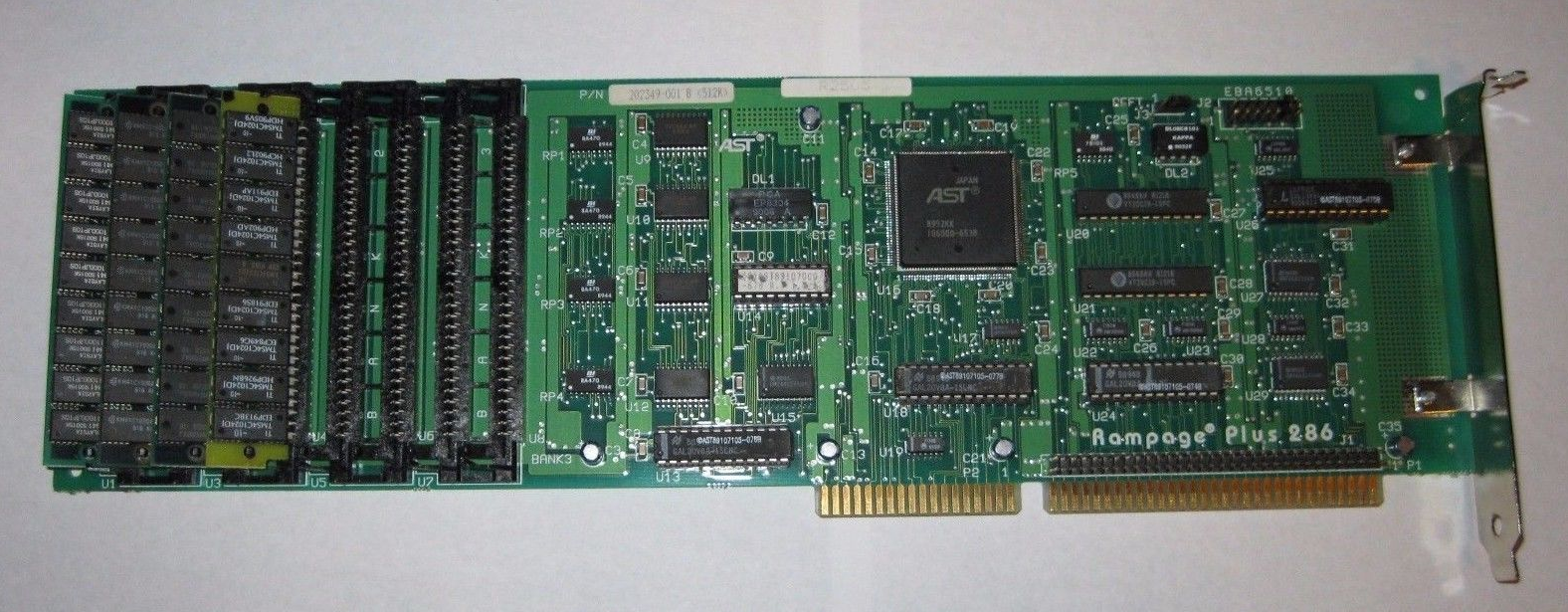
RampagePlus286.png

Reply 1 of 18, by QBiN

User metadata
Rank Oldbie
Rank
Oldbie

bump... hoping someone has worked with this board.

Reply 2 of 18, by Malvineous

User metadata
Rank Oldbie
Rank
Oldbie

I can't really make much out from the photo as it's too small to see the writing clearly. I'm guessing EBA6510 might be the memory address, but usual addresses for EMS cards are D000 or E000 so that doesn't really make sense.

Have you tried changing jumpers, cycling the power, then seeing if the drivers load?

If you run something like Norton's SI (System Information) it will likely report 16 to 64K of extra memory being available at D000/E000 when the card is active.

Reply 3 of 18, by Jolaes76

User metadata
Rank Oldbie
Rank
Oldbie

I have my card in front of me, P/N 202349-001 B <512K> R2505

AND THE BOX, MANUALS, FLOPPIES... and man, that bouquet of the 25 yrs old NOS package 😀

U1 filled with 2 pcs 1MB SIMM30s

DEFT J3 jumper on 1-2

EBA6510 J2 jumper only on 1

According to the manual, you need to run SuperPak's DETECTOR utility to find a proper I/O address then set THAT on the EBA6510 (J2)

I am uploading the stuff to Vogonsdrivers tonight.

Until then, here is the driver disk's content (attached)

"Ita in vita ut in lusu alae pessima iactura arte corrigenda est."

Reply 4 of 18, by QBiN

User metadata
Rank Oldbie
Rank
Oldbie

Thanks Jolaes! Those newer drivers did the trick.

The drivers and manuals floating around the web (including the MinusZeroDegrees website) are all for the older revision Rampage Plus that uses more discrete chips instead of more integrated version we have. Unfortunately, the card changed so much between revisions virtually nothing about the previous revision's manuals, configuration, or drivers apply or seem to work with the newer model.

Thanks for uploading them. VogonsDrivers will be the only place I know of now with a preserved copy of the newer drivers available for download.

Reply 5 of 18, by offensive_jerk

User metadata
Rank Newbie
Rank
Newbie

These drivers are a life saver. Do you have the manual scan at all?

Reply 6 of 18, by Jolaes76

User metadata
Rank Oldbie
Rank
Oldbie

http://www.vogonsdrivers.com/getfile.php?file … &menustate=50,0

What I did not scan: Headroom Utilites Manual (about 90 scanty pages, only important for serious business scenarios of days long gone)

Also, an ebay seller has version 1.2 drivers, he said was going to contact SquallStrife (would allow replacing my v1.0 drivers)

"Ita in vita ut in lusu alae pessima iactura arte corrigenda est."

Reply 7 of 18, by offensive_jerk

User metadata
Rank Newbie
Rank
Newbie
Jolaes76 wrote:

http://www.vogonsdrivers.com/getfile.php?file … &menustate=50,0

What I did not scan: Headroom Utilites Manual (about 90 scanty pages, only important for serious business scenarios of days long gone)

Also, an ebay seller has version 1.2 drivers, he said was going to contact SquallStrife (would allow replacing my v1.0 drivers)

Thanks for the manual. I'm having trouble getting mine setup. The memory amount seems to change and when I boot computer after loading drivers, it says there are a bunch of errors. Maybe I have a bad card 🙁

The 1.2 drivers would be awesome!!!! Any update on those?

Reply 8 of 18, by Jolaes76

User metadata
Rank Oldbie
Rank
Oldbie

You can try reducing the computer speed or better, start with a 12 Mhz system or lower. Adding wait states to reading RAM might help. (Uncheck zero ws, fast ISA bus etc to improve compatibility).

No news on the newer drivers yet.
I will send the ebay seller another message but I am not going to bug him any further - we are asking for a favor, after all.

"Ita in vita ut in lusu alae pessima iactura arte corrigenda est."

Reply 9 of 18, by offensive_jerk

User metadata
Rank Newbie
Rank
Newbie

I understand. Don't want to annoy the seller too much.
The system is an 8MHz IBM 5170. Now i get it where the memory doesn't error out, but the size keeps changing. I'll have to try some other simms perhaps.

Also, There's a technical bulletin on this website here on this card:

http://www.textfiles.com/computers/ASTRESEARCH/0627.tb

Reply 10 of 18, by matze79

User metadata
Rank l33t
Rank
l33t

i remember only 1Mb 9 Chip SIMMs working correctly.
Also 256Kb SIMMs should work (even with 3 Chips)

Reply 11 of 18, by offensive_jerk

User metadata
Rank Newbie
Rank
Newbie

I have 4MB of memory in this board. When I use that memory to backfill 512k to 640k, it seems I get errors on my disk drives when I try to format. I also occasionally get Parity Error 2 crashes.

I am getting newer versions of the drivers mailed to me. I will upload them here.

AST RAMPAGE 286 Superpak & Utilities
AST PN: 910316-001 Ver. 1.2 1988/1989 Rev D.

Reply 12 of 18, by offensive_jerk

User metadata
Rank Newbie
Rank
Newbie

As promised:

AST RAMPAGE 286 Superpak & Utilities
AST PN: 910316-001 Ver. 1.2 1988/1989 Rev D.

Can someone incorporate this version with the other drivers? It would be nice to have both versions available.

Reply 13 of 18, by Jolaes76

User metadata
Rank Oldbie
Rank
Oldbie

Okay, I will do it! Thanks for the update 😀

"Ita in vita ut in lusu alae pessima iactura arte corrigenda est."

Reply 14 of 18, by Jolaes76

User metadata
Rank Oldbie
Rank
Oldbie

Before I do the upload, someone please check if these drivers really work for the card - I suspect they are for the older card version as all internal version numbers are LOWER than those in my v1.0 package !

"Ita in vita ut in lusu alae pessima iactura arte corrigenda est."

Reply 15 of 18, by offensive_jerk

User metadata
Rank Newbie
Rank
Newbie
Jolaes76 wrote:

Before I do the upload, someone please check if these drivers really work for the card - I suspect they are for the older card version as all internal version numbers are LOWER than those in my v1.0 package !

You are right. I got too excited. They do not work with the card.

I saw there was an ebay auction for this same card, and the seller wrote that he had the v 1.2 drivers, so he kindly mailed them to me. However, when I ran them on my AT, the memory card was not detected. Even remm.sys did not detect the card. It's a bust. Sorry, guys. These drivers are NOT for this version card.

Reply 16 of 18, by offensive_jerk

User metadata
Rank Newbie
Rank
Newbie

I am using this card to backfill 512k to 640k on an IBM AT 8mhz. I am having a problem when I use the card to back fill, I cannot format floppy disks. When I remove the card the drives work fine. It's fitted with 4MB of memory, 3-chip 1mb simms.

Reply 17 of 18, by Jolaes76

User metadata
Rank Oldbie
Rank
Oldbie

You need to do a little research on the matter to find out the restrictions. usually you can have only 256kb on the motherboard when backfilling, but I have seen cards that can take over conv. RAM only from 0 kb... and other constraints might also exist, like the speed rating of each chip etc.
Your issue does ring a bell to me - start asking around at vintage computer forums as well! (vcfed.org)

"Ita in vita ut in lusu alae pessima iactura arte corrigenda est."

Reply 18 of 18, by offensive_jerk

User metadata
Rank Newbie
Rank
Newbie

The older models state that you need to set the jumper to 256k on the motherboard, but the manual for this model does not say to do so. Perhaps I'll configure it that way and see what happens.