VOGONS


First post, by bostonvintage1993

User metadata
Rank Newbie
Rank
Newbie

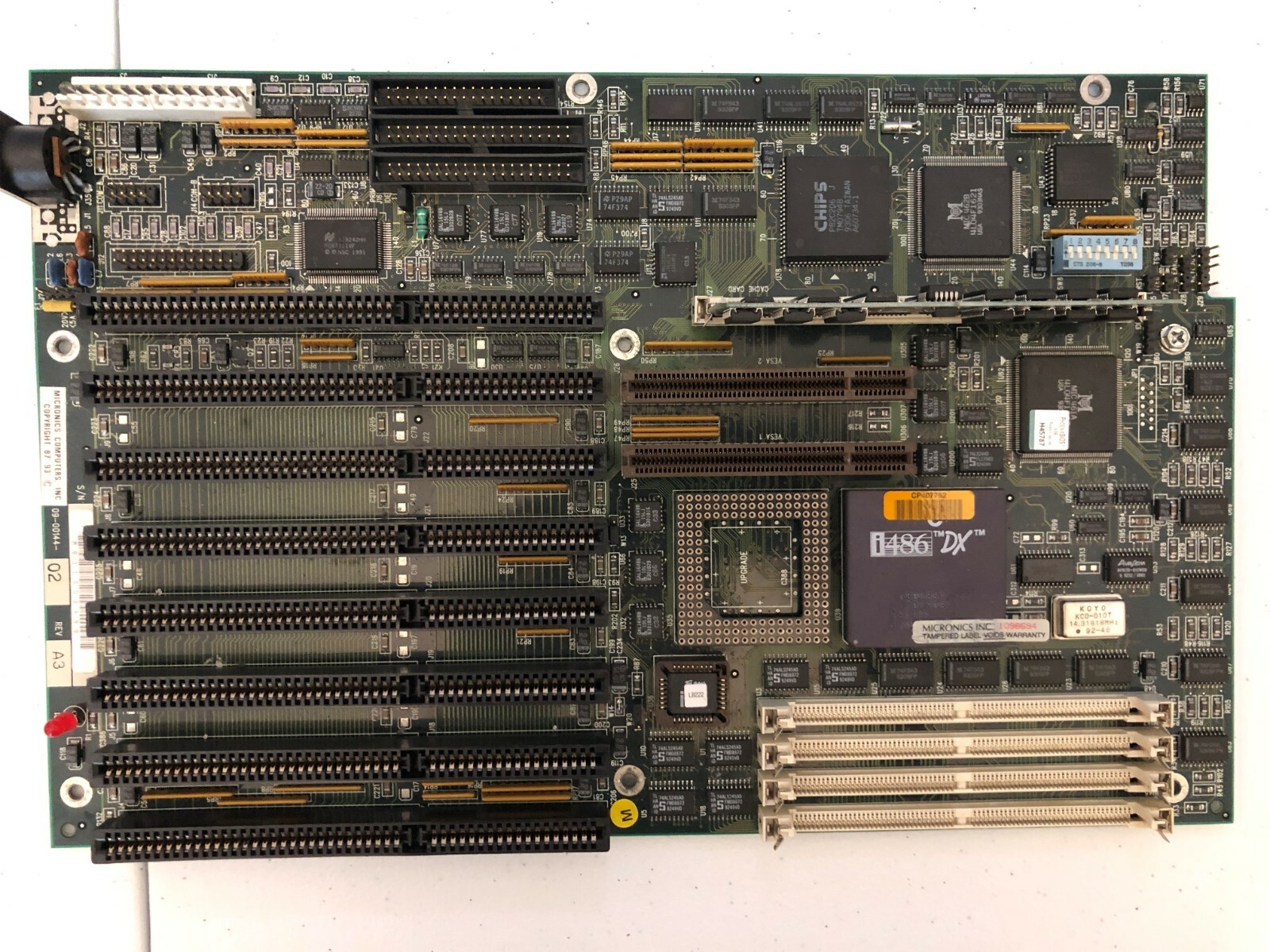
Hello! I'm brand-new to VOGONS and I signed up due to a motherboard issue on my old Gateway 2000 I need help with. Any advice would be greatly appriciated! My motherboard is the same as this one pictured https://i.ebayimg.com/images/g/cGkAAOSwFoFgBgqs/s-l1600.jpg and here is the layout for this particular board https://stason.org/TULARC/pc/motherboards/M/M … ZIF-SOCKET.html.

For years, the board was working, but I accidentally booted it up without jumper J20 on the board and I got a Flash BIOS re-write screen.

Ever since then, the board will not POST if the jumper is on the correct pins. I just get a blank screen, and if I remove the pin I get the Flash BIOS screen again. The screen says 'Press Q for 1.2 MB disk or P for 1.44 MB disk' and it will read the floppy disk and then claim to be finished with the 'Flash BIOS memory update'. However, when I put jumper J20 back on the board I just see a blank screen again.

I've tried disconnecting all the drives and cards, reseating the memory and cache, and I'm now out of ideas and turning to the community for help.

I'd really appreciate if there are any 486 experts out there who are familiar with this sort of issue.

I still see the power light turn on when the jumper is on the correct pins, but like I said the screen shows nothing.

I'm fairly certain I screwed up the Flash BIOS, and I'm not sure how to put a fresh copy of it on the motherboard. I do have the BIOS files which I copied over to a floppy disk, but nothing changed when I had the computer read it.

Again, any advice would be greatly appreciated as I need this computer to be up and running. Thank you all so much, and have a wonderful rest of your week.

-bostonvintage1993

Have any questions related to Gateway 2000? I'm here to help - send a PM!

Reply 1 of 4, by PC Hoarder Patrol

User metadata
Rank l33t
Rank
l33t
bostonvintage1993 wrote on 2021-02-16, 21:22:
Hello! I'm brand-new to VOGONS and I signed up due to a motherboard issue on my old Gateway 2000 I need help with. Any advice wo […]
Show full quote

Hello! I'm brand-new to VOGONS and I signed up due to a motherboard issue on my old Gateway 2000 I need help with. Any advice would be greatly appriciated! My motherboard is the same as this one pictured https://i.ebayimg.com/images/g/cGkAAOSwFoFgBgqs/s-l1600.jpg and here is the layout for this particular board https://stason.org/TULARC/pc/motherboards/M/M … ZIF-SOCKET.html.

For years, the board was working, but I accidentally booted it up without jumper J20 on the board and I got a Flash BIOS re-write screen.

Ever since then, the board will not POST if the jumper is on the correct pins. I just get a blank screen, and if I remove the pin I get the Flash BIOS screen again. The screen says 'Press Q for 1.2 MB disk or P for 1.44 MB disk' and it will read the floppy disk and then claim to be finished with the 'Flash BIOS memory update'. However, when I put jumper J20 back on the board I just see a blank screen again.

I've tried disconnecting all the drives and cards, reseating the memory and cache, and I'm now out of ideas and turning to the community for help.

I'd really appreciate if there are any 486 experts out there who are familiar with this sort of issue.

I still see the power light turn on when the jumper is on the correct pins, but like I said the screen shows nothing.

I'm fairly certain I screwed up the Flash BIOS, and I'm not sure how to put a fresh copy of it on the motherboard. I do have the BIOS files which I copied over to a floppy disk, but nothing changed when I had the computer read it.

Again, any advice would be greatly appreciated as I need this computer to be up and running. Thank you all so much, and have a wonderful rest of your week.

-bostonvintage1993

Welcome to Vogons 😀

Just to check, is the J20 jumper you refer to this one ?

The attachment j20_w20.jpg is no longer available

Reason I ask is that if so, it seems to equate to what's marked as W20 on the Micronics equivalent

http://www.win3x.org/uh19/public/motherboard/ … anual/32128.pdf

If it is the same jumper then I suspect that by removing it and powering on the system, you may have erased the BIOS and put the board into recovery mode, based on this warning in the settings file for the Micronics board

"W20 Flash ROM operation (see note below)

Pins 1-2 Recovery

Pins 2-3 Normal operation (default)


DO NOT change jumper W20 unless instructed by a Micronics Technical Support Engineer.

Changing the jumper will result in the Bios being erased. You must have a Flash

recovery floppy diskette before attempting to recover. The jumper is NOT moved when

updating the Flash ROM.
"

https://www.infania.net/misc/moboarchive/Micr … nuals/00144.txt

This kind of ties in with what you're now seeing on power on - set to 'normal' the board cant boot without a BIOS and set to 'recovery' it's asking for the correct floppy drive for the recovery disk, which I'm guessing you don't have (generally, BIOS recovery disks and BIOS update disks aren't the same thing)

Reply 2 of 4, by bostonvintage1993

User metadata
Rank Newbie
Rank
Newbie

Hi,

Yes, that is the jumper I removed! I accidentally removed it thinking it was another jumper and then realized I screwed up the machine - you can imagine how mad I am at myself, haha. Thank you so much for your help! Do you happen to know where I could possibly get a recovery disk? I'm truly hoping the motherboard isn't toast. Again, thank you so much for your help!

Have any questions related to Gateway 2000? I'm here to help - send a PM!
Reply 3 of 4, by PC Hoarder Patrol

User metadata
Rank l33t
Rank
l33t
bostonvintage1993 wrote on 2021-02-17, 03:25:

Hi,

Yes, that is the jumper I removed! I accidentally removed it thinking it was another jumper and then realized I screwed up the machine - you can imagine how mad I am at myself, haha. Thank you so much for your help! Do you happen to know where I could possibly get a recovery disk? I'm truly hoping the motherboard isn't toast. Again, thank you so much for your help!

Not sure this is a goer, given that your board is a Gateway OEM rather than a Micronics retail board (09-00144-xx), but there is a recovey disk available for the latter here:

"BIOS recovery disk for Micronics DXLB motherboard (Micronics part number 09-00144 or 09-00169) BIOS version: Phoenix 0.10 GLB05"

http://files.mpoli.fi/hardware/ROM/OTHER/DXLBRD.EXE

Reply 4 of 4, by bostonvintage1993

User metadata
Rank Newbie
Rank
Newbie

Hi, PC Hoarder Patrol!

I hope you've had a good couple of months! Sorry for not getting back to you earlier - life got in the way, you know how it is, haha. I got around to writing that BIOS file you supplied for me - and it worked great! I'm so happy that I didn't destroy this machine for good. Your help is very, very appreciated - thank you so much! I'm glad that I can finally put this project to rest and move on. If there is absolutely anything PC related I can do for you in return, please do not hesitate to ask! I'm an expert in early 90's Gateway 2000 documentation - so if you ever need some advice with that I'm happy to help!

Have an amazing week!

-bostonvintage1993

Have any questions related to Gateway 2000? I'm here to help - send a PM!