VOGONS


First post, by vkcpolice

User metadata
Rank Member
Rank
Member

Hi all hope everyone is doing well.
i bought a secondhand pc from ebay but am having a few issues
a long story it had a faulty psu so i pulled one from my old pc and put it in the case once i tried to boot i had no video output
i tried all sorts of things like different vga card different ram different monitor different cable with no luck in the end i gave up and put it down to a bad mobo
since i like the new case better than my old case i built my old pc into the new pc case i got cause i knew it was a good working mobo once i swapped out all the parts i had the same issue with getting no
video from my old mobo in the new case after swapping out all the parts again and stuffing around i tried the bottom pci slot next to the isa slot and yay finally got video
the question is does the bios default to just one pci slot for video and if so why did my mobo not give me the beeb error when it was in the first or 2nd slot?
it was like the mobo knew it was there but would not output video until it was in the bottom slot

anyway it seems to be working now in the bottom slot just was getting so frustrated at this issue as i had tried everything
i guess the new mobo i got is ok as well and the video out will work when i use the last pci slot or first 🤣

Reply 1 of 5, by douglar

User metadata
Rank l33t
Rank
l33t

Do you know the make & model of the motherboard? This site is helpful for that http://www.win3x.org/uh19/ .
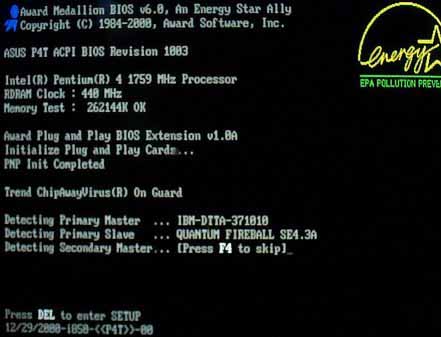
Do you have the bios string from boot time? That is also helpful.

PCI 2.1 motherboards often have trouble with video cards that are 1999 or newer for a variety of reasons
PCI <= 2.0 often have trouble with just about any video card if they require that you manually assign resources with jumpers or in the BIOS setup.

Reply 2 of 5, by vkcpolice

User metadata
Rank Member
Rank
Member

Hi i cant seem to find a model or brand on any of my at motherboards they both have the award modular bios but i cant even get into the bios cause i have no display unless i use that one pci slot that works.
just strange that it does not throw any error beebs at me but will show no display but if i take the card out then i get the error beeps.
is this a plug and play issue? im guessing its the older type of pci as the boards also have isa slots. its a pentium 200 mmx if that helps at all.
socket 7
old mobo

Reply 3 of 5, by douglar

User metadata
Rank l33t
Rank
l33t

Post a picture of the board along with the boot screen that has any info like this:

awardmedallionbios60.jpg

IF you can dump the BIOS rom to a file and attach that, it's even better.

Reply 4 of 5, by weedeewee

User metadata
Rank l33t
Rank
l33t

test your components outside of the case. pci slot location for vga card shouldn't matter on case.
verify there is no mainboard standoff in the case that might be shorting signals out.

Right to repair is fundamental. You own it, you're allowed to fix it.
How To Ask Questions The Smart Way
Do not ask Why !
https://www.vogonswiki.com/index.php/Serial_port

Reply 5 of 5, by vkcpolice

User metadata
Rank Member
Rank
Member

Hi all the pci clots seem to work now so it seems to want to default to only one slot when the cmos has lost its setting and then once its up and running all the slots work.
i do remember having similar issues back in the 90's ill post some images when i get some time as its all setup and working atm