VOGONS


Adaptec 1542CF…. big problem

Topic actions

Reply 21 of 54, by weedeewee

User metadata
Rank l33t
Rank
l33t
ElectroSoldier wrote on 2023-12-27, 21:24:
weedeewee wrote on 2023-12-27, 21:20:

FYI Re: Adaptec 1542CF…. big problem

edit, maybe the little eeprom is slightly corrupted, making the bios think the card is a 1542C.

Yeah that will be the 73Gb hard disk hes trying to run...
Which wont play well with these older cards.
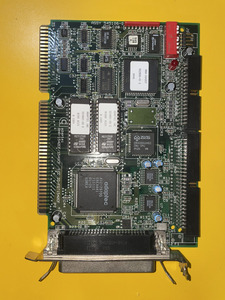

tries without, whit a hard disk drive 68pin and with a cd-rom scsi 50pin

Right to repair is fundamental. You own it, you're allowed to fix it.
How To Ask Questions The Smart Way
Do not ask Why !
https://www.vogonswiki.com/index.php/Serial_port

Reply 22 of 54, by rasz_pl

User metadata
Rank l33t
Rank
l33t

IMG_5864.jpeg

well, this is definitely CF, and Im guessing firmware checks its own checksum to detect corruption, so what gives? Card has an identity crisis. Those are UV erasable eproms and stickers dont look ever peeled (assuming this is a picture of actual card and not seller provided/from net) so its not like someone overwrote firmware with wrong one.

weedeewee wrote on 2023-12-27, 21:20:

maybe the little eeprom is slightly corrupted, making the bios think the card is a 1542C.

good lead

Last edited by rasz_pl on 2023-12-27, 21:42. Edited 1 time in total.

https://github.com/raszpl/sigrok-disk FM/MFM/RLL decoder
https://github.com/raszpl/FIC-486-GAC-2-Cache-Module (AT&T Globalyst)
https://github.com/raszpl/386RC-16 ram board
https://github.com/raszpl/440BX Reference Design adapted to Kicad

Reply 23 of 54, by weedeewee

User metadata
Rank l33t
Rank
l33t
rasz_pl wrote on 2023-12-27, 21:39:
https://www.vogons.org/thumbs/38971_69521b848768dedd6c1a7ca9f677e521/IMG_5864.jpeg […]
Show full quote

IMG_5864.jpeg

well, this is definitely CF, and Im guessing firmware checks its own checksum to detect corruption, so what gives? Card has an identity crisis

weedeewee wrote on 2023-12-27, 21:20:

maybe the little eeprom is slightly corrupted, making the bios think the card is a 1542C.

good lead

just a thought, but how would you correct that without desoldering, reading/comparing/rewriting/soldering ?

I feel OP should try with the floppy switch enabled (sw5 OPEN) to see if it makes a difference.
edit: which he'll hopefully do tomorrow

Last edited by weedeewee on 2023-12-27, 21:54. Edited 1 time in total.

Right to repair is fundamental. You own it, you're allowed to fix it.
How To Ask Questions The Smart Way
Do not ask Why !
https://www.vogonswiki.com/index.php/Serial_port

Reply 24 of 54, by ElectroSoldier

User metadata
Rank Oldbie
Rank
Oldbie

Interesting puzzle...
I really would like to know what happens when only a CDROM drive is attached to the SCSI bus though.

Those modern high capacity hard disks can throw up some very weird errors on these old cards.

Reply 25 of 54, by rasz_pl

User metadata
Rank l33t
Rank
l33t
weedeewee wrote on 2023-12-27, 21:42:

I feel OP should try with the floppy switch enabled (sw5 OPEN) to see if it makes a difference.
edit: which he'll hopefully do tomorrow

I would also test if floppy controller is working at all. Maybe CF bios tries to init floppy controller chip, and if it cant (damaged?) assumes to be the C variant.

https://github.com/raszpl/sigrok-disk FM/MFM/RLL decoder
https://github.com/raszpl/FIC-486-GAC-2-Cache-Module (AT&T Globalyst)
https://github.com/raszpl/386RC-16 ram board
https://github.com/raszpl/440BX Reference Design adapted to Kicad

Reply 26 of 54, by weedeewee

User metadata
Rank l33t
Rank
l33t
rasz_pl wrote on 2023-12-27, 22:04:
weedeewee wrote on 2023-12-27, 21:42:

I feel OP should try with the floppy switch enabled (sw5 OPEN) to see if it makes a difference.
edit: which he'll hopefully do tomorrow

I would also test if floppy controller is working at all. Maybe CF bios tries to init floppy controller chip, and if it cant (damaged?) assumes to be the C variant.

good thought. potential path to investigate.

Right to repair is fundamental. You own it, you're allowed to fix it.
How To Ask Questions The Smart Way
Do not ask Why !
https://www.vogonswiki.com/index.php/Serial_port

Reply 27 of 54, by Horun

User metadata
Rank l33t++
Rank
l33t++

That is odd, the comment about BIOS thinking the adapter is a "C" model . Maybe the micro firmware is bad. The 2.02 bios is a common one.
With my IBM DMVS had to jumper the drive to force SE mode to work on any non LVD controller including my 1540CF, it is single ended only.

Hate posting a reply and then have to edit it because it made no sense 😁 First computer was an IBM 3270 workstation with CGA monitor. Stuff: https://archive.org/details/@horun

Reply 28 of 54, by ElectroSoldier

User metadata
Rank Oldbie
Rank
Oldbie

Yes this is "one of those cards" that might require the force SE on the drive to be enabled.
But i suspect its more down to the capacity of the drive throwing the BIOS into a whirl because it can see it but doesnt know how to use it so throws up this error.

Maybe

It will be interesting to see a resolution to this one what ever it turns out to be.

Reply 29 of 54, by Horun

User metadata
Rank l33t++
Rank
l33t++
rasz_pl wrote on 2023-12-27, 21:24:

firmware dumps for C CF and CP variants https://minuszerodegrees.net/rom/rom.htm

That is v2.01 and there are newer ones saved by members. All the v2.x only support 8GB max AFAIK (my v2.10 does). Attached all the 1542CF bios files I have collected....
Sorry if the dates are over the place, had them saved in other computers/places and moved them and decided to re-read my card just to make sure....
Might find them useful, good thing the 1542CF has socketed roms.

Hate posting a reply and then have to edit it because it made no sense 😁 First computer was an IBM 3270 workstation with CGA monitor. Stuff: https://archive.org/details/@horun

Reply 30 of 54, by AlessandroB

User metadata
Rank Oldbie
Rank
Oldbie

Incredible, the problem was in the presence of the SoundBlaster 16. What led me astray was the incorrect Bios message, otherwise I probably would have tried first to see if there were any conflicts.

I immediately saw the 1.2GB disk, then I entered the controller configuration (ctrl-a) and set support for large disks and it saw an 8GB disk.

What do you think?

Reply 31 of 54, by weedeewee

User metadata
Rank l33t
Rank
l33t
AlessandroB wrote on 2023-12-28, 12:55:

Incredible, the problem was in the presence of the SoundBlaster 16. What led me astray was the incorrect Bios message, otherwise I probably would have tried first to see if there were any conflicts.

I immediately saw the 1.2GB disk, then I entered the controller configuration (ctrl-a) and set support for large disks and it saw an 8GB disk.

What do you think?

Good to see you got it working.
The 8GB is a scsi bios limitation. No way around it for dos usage, since afaik there is no bios update that has large disk support for this card.
since the 1542CF is set to IO 330 ... with the soundblaster 16 it probably conflicts with the mpu401 interface.

Right to repair is fundamental. You own it, you're allowed to fix it.
How To Ask Questions The Smart Way
Do not ask Why !
https://www.vogonswiki.com/index.php/Serial_port

Reply 32 of 54, by AlessandroB

User metadata
Rank Oldbie
Rank
Oldbie
weedeewee wrote on 2023-12-28, 13:32:
Good to see you got it working. The 8GB is a scsi bios limitation. No way around it for dos usage, since afaik there is no bios […]
Show full quote
AlessandroB wrote on 2023-12-28, 12:55:

Incredible, the problem was in the presence of the SoundBlaster 16. What led me astray was the incorrect Bios message, otherwise I probably would have tried first to see if there were any conflicts.

I immediately saw the 1.2GB disk, then I entered the controller configuration (ctrl-a) and set support for large disks and it saw an 8GB disk.

What do you think?

Good to see you got it working.
The 8GB is a scsi bios limitation. No way around it for dos usage, since afaik there is no bios update that has large disk support for this card.
since the 1542CF is set to IO 330 ... with the soundblaster 16 it probably conflicts with the mpu401 interface.

yes, i have changed from 330 to 300 on the sb16 (i have read thet can be some problem with game that expext to find a mpu401 at 330?) and change the DMA on the adaptec from 5 (used by a sb16) to 6.

now a new problem… starting from dos 6.22 floppy fdisk can allow me to create an active 2gb partition, but once reboot it not allow me to format it… simply not find c:

Reply 33 of 54, by AlessandroB

User metadata
Rank Oldbie
Rank
Oldbie

another little problem is that i can’t find the jumper to force the drive from lvd to se mode, is present in my 68pin drive but non in the sca version… can be a removed feature?

Reply 34 of 54, by weedeewee

User metadata
Rank l33t
Rank
l33t
AlessandroB wrote on 2023-12-28, 14:16:

another little problem is that i can’t find the jumper to force the drive from lvd to se mode, is present in my 68pin drive but non in the sca version…

can be a removed feature?

yes, can be. to be totally sure, lookup complete model nr of drive for datasheet/manual and look if SE is still available.
Personally, I would just hook up the drive to the controller and hope for the best, see what gives, then go looking for solutions, eventually ask around.

Right to repair is fundamental. You own it, you're allowed to fix it.
How To Ask Questions The Smart Way
Do not ask Why !
https://www.vogonswiki.com/index.php/Serial_port

Reply 35 of 54, by weedeewee

User metadata
Rank l33t
Rank
l33t
AlessandroB wrote on 2023-12-28, 13:54:
weedeewee wrote on 2023-12-28, 13:32:
Good to see you got it working. The 8GB is a scsi bios limitation. No way around it for dos usage, since afaik there is no bios […]
Show full quote
AlessandroB wrote on 2023-12-28, 12:55:

Incredible, the problem was in the presence of the SoundBlaster 16. What led me astray was the incorrect Bios message, otherwise I probably would have tried first to see if there were any conflicts.

I immediately saw the 1.2GB disk, then I entered the controller configuration (ctrl-a) and set support for large disks and it saw an 8GB disk.

What do you think?

Good to see you got it working.
The 8GB is a scsi bios limitation. No way around it for dos usage, since afaik there is no bios update that has large disk support for this card.
since the 1542CF is set to IO 330 ... with the soundblaster 16 it probably conflicts with the mpu401 interface.

yes, i have changed from 330 to 300 on the sb16 (i have read thet can be some problem with game that expext to find a mpu401 at 330?) and change the DMA on the adaptec from 5 (used by a sb16) to 6.

now a new problem… starting from dos 6.22 floppy fdisk can allow me to create an active 2gb partition, but once reboot it not allow me to format it… simply not find c:

This is weird and requires some more information.
Does fdisk still see the drive & partition after reboot ?

Right to repair is fundamental. You own it, you're allowed to fix it.
How To Ask Questions The Smart Way
Do not ask Why !
https://www.vogonswiki.com/index.php/Serial_port

Reply 36 of 54, by PC Hoarder Patrol

User metadata
Rank l33t
Rank
l33t
AlessandroB wrote on 2023-12-28, 14:16:

another little problem is that i can’t find the jumper to force the drive from lvd to se mode, is present in my 68pin drive but non in the sca version… can be a removed feature?

This one?

The attachment 7.8 Option jumper block - hus151473vl3800.pdf.png is no longer available

Reply 37 of 54, by AlessandroB

User metadata
Rank Oldbie
Rank
Oldbie
PC Hoarder Patrol wrote on 2023-12-28, 15:05:
AlessandroB wrote on 2023-12-28, 14:16:

another little problem is that i can’t find the jumper to force the drive from lvd to se mode, is present in my 68pin drive but non in the sca version… can be a removed feature?

This one?

7.8 Option jumper block - hus151473vl3800.pdf.png

yes

Reply 38 of 54, by AlessandroB

User metadata
Rank Oldbie
Rank
Oldbie

i have tested the drive on the 2940u2w and is working. Probably some incompatibility with too years between controller and hard disk. i think i will not use this controller on my dx4, too much trouble, too much limitation, i think i will let the controller go. My 15k drive i think are great on pentium and up machines. i will use my hard disk on my Pentium2 o my powermacG4

Reply 39 of 54, by AlessandroB

User metadata
Rank Oldbie
Rank
Oldbie

Today in unlucky day, i have found that scsi was “forget” by Apple starting from Tiger 10.4.x… i can’t use my HD in my G4 for all-around system deive damn!