VOGONS


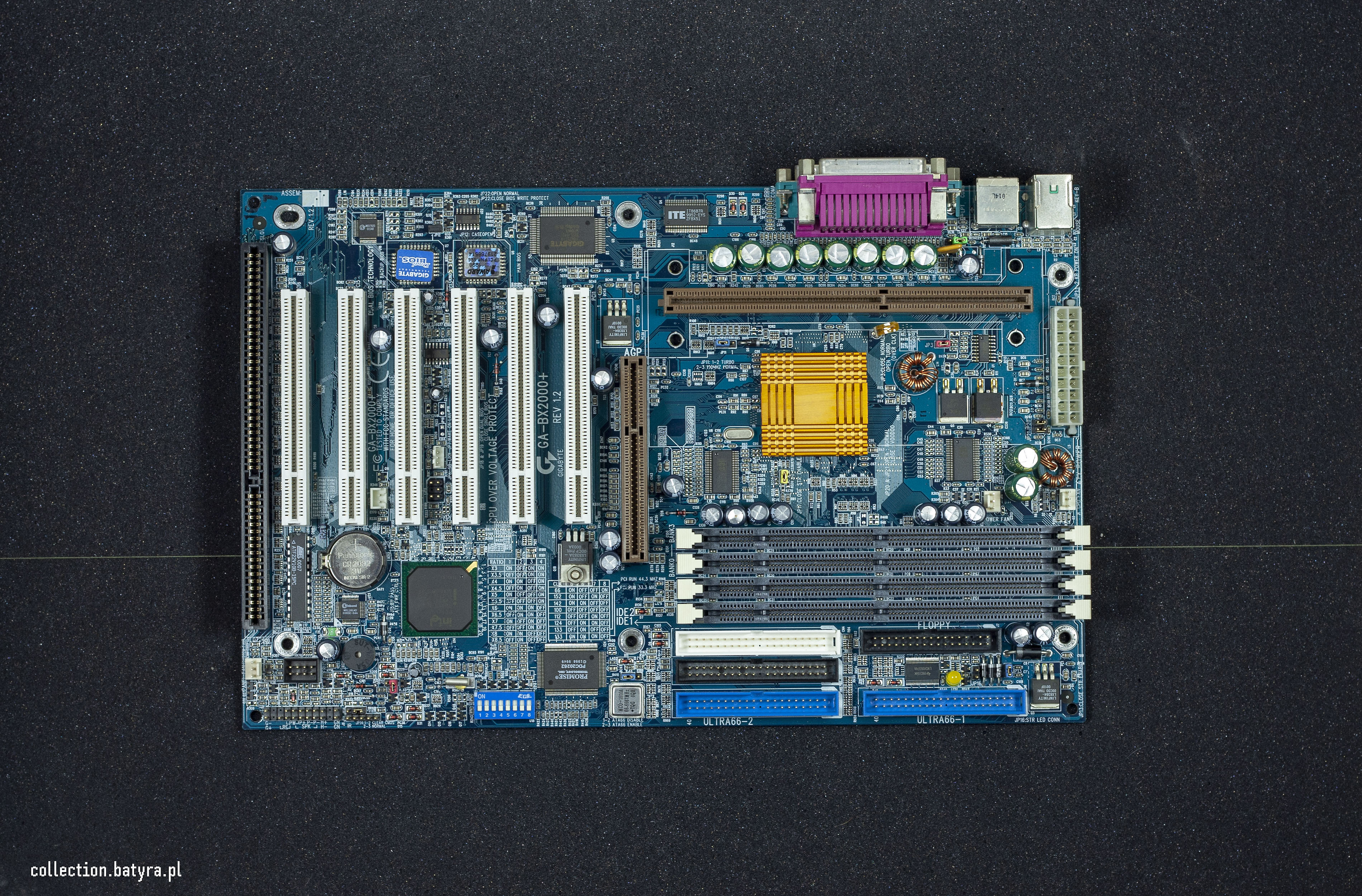
Troubleshooting Gigabyte GA-BX2000+

Topic actions

First post, by dulu

User metadata
Rank Member
Rank
Member

- no post, on any GPU, CPU, RAM
- tried to switch all of jumpers
- main bios chip and promise chip are very warm (burned out)?


Reply 1 of 29, by zyga64

User metadata
Rank Oldbie
Rank
Oldbie

I'm not an expert by any means, but at first I would:
- check for scratches, missing parts or wrong orientation of BIOS chip according to images available on the internet,
- check for any short circuits between GND and all the positive and negative voltage pins on PSU socket on motherboard (with PSU disconnected),
- if not find any short circuits, check all voltages with GPU, CPU, RAM removed,
- provide detailed photo of both sides of board here.

Scamp: 286@20 /4M /CL-GD5422 /CMI8330
Aries: 486DX33 /16M /TGUI9440 /GUS+ALS100+MT32PI
Triton: K6-2@400 /64M /MGA-2064W+3dfx /YMF718
Seattle: P!!!750 /256M /MX440 /Vibra16s+SBLive!
Panther Point: 3470s /8G /GTX750Ti /HDA

Reply 2 of 29, by appiah4

User metadata
Rank l33t++
Rank
l33t++

Hard to diagnose without photos but the bios chip should never be warm, it's either inserted the wrong way around or there is another short on the board.

Please post high res photos.

Reply 3 of 29, by PcBytes

User metadata
Rank l33t
Rank
l33t

My two cents:

-BIOS chip should NOT be warm. Either it's installed in reverse or it's already burnt out.

-PDC chip should usually be warm, actually. About most of the IDE/RAID chips I dealt with, they ran warm to hot.

I would suggest replacing the BIOS chip, assuming it's socketed. I figure it should be enough to get your board up and running, assuming the capacitors are fine.

"Enter at your own peril, past the bolted door..."
Main PC: i5 3470, GB B75M-D3H, 16GB RAM, 2x1TB
98SE : P3 650, Soyo SY-6BA+IV, 384MB RAM, 80GB

Reply 4 of 29, by A001

User metadata
Rank Newbie
Rank
Newbie

I have a GA-BX2000 with similar problems. Fans spin, no POST. Two swollen caps next to AGP slot.

Reply 5 of 29, by rasz_pl

User metadata
Rank l33t
Rank
l33t

I think BX2000 come with soldered bios, hot bios chip is worrying, would start with voltage and ripple measurements

https://github.com/raszpl/FIC-486-GAC-2-Cache-Module for AT&T Globalyst
https://github.com/raszpl/386RC-16 memory board
https://github.com/raszpl/440BX Reference Design adapted to Kicad
https://github.com/raszpl/Zenith_ZBIOS MFM-300 Monitor

Reply 6 of 29, by Nexxen

User metadata
Rank l33t
Rank
l33t

https://theretroweb.com/motherboards/s/gigabyte-ga-bx2000

BIOS is dual bios chips. Can't be orientation 😀
All other options stand, bios chips burnt included.

PC#1 Pentium 233 MMX - 98SE
PC#2 PIII-1Ghz - 98SE/W2K

- "One hates the specialty unobtainium parts, the other laughs in greed listing them under a ridiculous price" - kotel studios
- Bare metal ist krieg.

Reply 7 of 29, by appiah4

User metadata
Rank l33t++
Rank
l33t++

I own a BX2000 and a BX2000+, their bios chips DO go bad. My BX2000 would constantly give me bios corruption errors unless I used the backup bios instead. There are several other cases of BX2000 bios chips going bad, for example I remember posting in this one:

BIOS issues on Gigabyte GA-BX2000

I don't know if this is due to a failure on behalf of the EEPROM or some capacitor issue in the BIOS voltage circuitry, but it is known problematic. It is not unheard of electrolytic caps to go bad short, so I would start with a recap the bios power circuitry..

Reply 8 of 29, by dulu

User metadata
Rank Member
Rank
Member

is this mothernoard able to boot only with backup bios chip?

Reply 9 of 29, by appiah4

User metadata
Rank l33t++
Rank
l33t++
dulu wrote on 2022-11-16, 17:41:

is this mothernoard able to boot only with backup bios chip?

There should be a jumper to force it to do just that IIRC?

Reply 10 of 29, by Nexxen

User metadata
Rank l33t
Rank
l33t
appiah4 wrote on 2022-11-17, 07:00:
dulu wrote on 2022-11-16, 17:41:

is this mothernoard able to boot only with backup bios chip?

There should be a jumper to force it to do just that IIRC?

Between PCI 3 and 4.

PC#1 Pentium 233 MMX - 98SE
PC#2 PIII-1Ghz - 98SE/W2K

- "One hates the specialty unobtainium parts, the other laughs in greed listing them under a ridiculous price" - kotel studios
- Bare metal ist krieg.

Reply 11 of 29, by dulu

User metadata
Rank Member
Rank
Member

its bx2000, not bx2000+ i there is no (soldered) jp18 and jp19 jumpers

Reply 12 of 29, by Nexxen

User metadata
Rank l33t
Rank
l33t
dulu wrote on 2022-11-19, 13:11:

its bx2000, not bx2000+ i there is no (soldered) jp18 and jp19 jumpers

Edit the title then.

PC#1 Pentium 233 MMX - 98SE
PC#2 PIII-1Ghz - 98SE/W2K

- "One hates the specialty unobtainium parts, the other laughs in greed listing them under a ridiculous price" - kotel studios
- Bare metal ist krieg.

Reply 13 of 29, by dulu

User metadata
Rank Member
Rank
Member
Nexxen wrote on 2022-11-19, 13:33:
dulu wrote on 2022-11-19, 13:11:

its bx2000, not bx2000+ i there is no (soldered) jp18 and jp19 jumpers

Edit the title then.

ok sorry, there IS bx2000+, not bx2000. Title is correct 😁

I desoldered main bios. RAID chip is still hot - same chip on working ga-7zxr is cold after boot.

Reply 14 of 29, by Nexxen

User metadata
Rank l33t
Rank
l33t
dulu wrote on 2022-11-19, 13:52:
Nexxen wrote on 2022-11-19, 13:33:
dulu wrote on 2022-11-19, 13:11:

its bx2000, not bx2000+ i there is no (soldered) jp18 and jp19 jumpers

Edit the title then.

ok sorry, there IS bx2000+, not bx2000. Title is correct 😁

I desoldered main bios. RAID chip is still hot - same chip on working ga-7zxr is cold after boot.

Any changes? Does it switch chips?

PC#1 Pentium 233 MMX - 98SE
PC#2 PIII-1Ghz - 98SE/W2K

- "One hates the specialty unobtainium parts, the other laughs in greed listing them under a ridiculous price" - kotel studios
- Bare metal ist krieg.

Reply 15 of 29, by dulu

User metadata
Rank Member
Rank
Member

no changes, no boot

Reply 16 of 29, by rasz_pl

User metadata
Rank l33t
Rank
l33t

have you checked 5V rail? Maybe its form a computer that died in a PSU/thunderstorm accident
EDIT: measure resistance on 5V rail

https://github.com/raszpl/FIC-486-GAC-2-Cache-Module for AT&T Globalyst
https://github.com/raszpl/386RC-16 memory board
https://github.com/raszpl/440BX Reference Design adapted to Kicad
https://github.com/raszpl/Zenith_ZBIOS MFM-300 Monitor

Reply 17 of 29, by dulu

User metadata
Rank Member
Rank
Member

about 1100 ohm on +12V and 200 ohm on +5v

Reply 18 of 29, by dulu

User metadata
Rank Member
Rank
Member

When measuring the voltage on the isa connector, the board turned off - I think I made a short circuit ... Mobo stopped starting at all. There is a short circuit on the 5V line. I desoldered the RAID chip - still shorted. I connected the battery to the 5V line to check which element will heat up - the south bridge gets hot. So I think it's over.

Reply 19 of 29, by rasz_pl

User metadata
Rank l33t
Rank
l33t

so at least nothing is dead shorted on supply rails. Might be something shorting data busses, but bios is on a separate one from Promise IDE controller, maybe PIIX4 southbridge is dead. You can try measuring resistance (both to ground and 3.3/5V supply) on PCI data bus and BIOS data pins

for reference Gigabyte-GA-BX2000.jpg

Last edited by rasz_pl on 2022-11-19, 20:31. Edited 1 time in total.

https://github.com/raszpl/FIC-486-GAC-2-Cache-Module for AT&T Globalyst
https://github.com/raszpl/386RC-16 memory board
https://github.com/raszpl/440BX Reference Design adapted to Kicad
https://github.com/raszpl/Zenith_ZBIOS MFM-300 Monitor