VOGONS


First post, by Elementis

User metadata
Rank Newbie
Rank
Newbie

Hi! i'd like to set up my dosbox so that when put onto a DVD+R CD, when you put said DVD+R cd into the computer, it automatically runs an old game called stargunner at %1 framecycles because of the massive speedup it has when on Windows 7.

I'd also like it to run in fullscreen mode, and automatically mount the driver and run it.

Thanks for your time!

Reply 2 of 30, by Elementis

User metadata
Rank Newbie
Rank
Newbie

sorry, whats an Autorun.INF?

and will it autorun when the CD is inserted into the computer?

Reply 4 of 30, by Dominus

User metadata
Rank DOSBox Moderator
Rank
DOSBox Moderator

Autorun.inf is needed to make windows automagically start a program on loading a cd/dvd (as long as autoplay is not disabled - if that is then you can't do anything).

Windows 3.1x guide for DOSBox
60 seconds guide to DOSBox
DOSBox SVN snapshot for macOS (10.4-11.x ppc/intel 32/64bit) notarized for gatekeeper

Reply 5 of 30, by Elementis

User metadata
Rank Newbie
Rank
Newbie

Okay, looks like everything is good to go except for 1 tiny thing.

I need to make it so that the Cycles are at 100 During the launch,

but drop to a fixed 2 or 3 during gameplay.

Stargunner always speeds up to rediculous speeds when activated, but it wont launch if i put it to fixed 2 right away.

Reply 7 of 30, by Elementis

User metadata
Rank Newbie
Rank
Newbie

Tried that, thanks.

Everything is perfect except for the Autorun.INF file, i havent gotten it just right so that DOSbox launches when the disc is inserted.

Reply 8 of 30, by Dominus

User metadata
Rank DOSBox Moderator
Rank
DOSBox Moderator

Can you post your results when you got it ready? For example what fixed your cycle problem, what the autorun looks like...

Windows 3.1x guide for DOSBox
60 seconds guide to DOSBox
DOSBox SVN snapshot for macOS (10.4-11.x ppc/intel 32/64bit) notarized for gatekeeper

Reply 9 of 30, by Elementis

User metadata
Rank Newbie
Rank
Newbie

i have a small problem that whenever i try to put the disk into a new a computer (works fine on mine) the Autoexecute settings are not there, and my changes arent there either.

It seems that my particular settings are set onto my computer.

i'd like it so that the Configuration i made in the options in saved onto the cd, not onto my computer.

how can i do this?

Reply 10 of 30, by collector

User metadata
Rank l33t
Rank
l33t

What is your Autorun.inf starting? A batch file? Does it launch DOSBox if you execute it without using the Autorun? Also, you must have Autorun enabled in Windows as Dominus posted. Does the Autorun work with other discs?

Post the contents of your Autorun.inf and your batch file/[autoexec] section of your dosbox.conf you are using with this.

The Sierra Help Pages -- New Sierra Game Installers -- Sierra Game Patches -- New Non-Sierra Game Installers

Reply 11 of 30, by Elementis

User metadata
Rank Newbie
Rank
Newbie

Autorun is starting DOSBOX.Exe itself and it does launch dosbox.exe as i want it to.

[autorun]
open=DOSBox.exe

thats how i have the .inf file set up.

and here are my autoexc settings.

Mount E E:\
E:\
STARGUN.EXE

Reply 12 of 30, by Jorpho

User metadata
Rank l33t++
Rank
l33t++
Elementis wrote:
and here are my autoexc settings. […]
Show full quote

and here are my autoexc settings.

Mount E E:\
E:\
STARGUN.EXE

Unfortunately, there is no way to guarantee that the CD-ROM drive will be drive E on every computer.

I think you might be able to use "mount e ." (e space period) instead.

Reply 13 of 30, by Elementis

User metadata
Rank Newbie
Rank
Newbie

i just need it for a few computers.

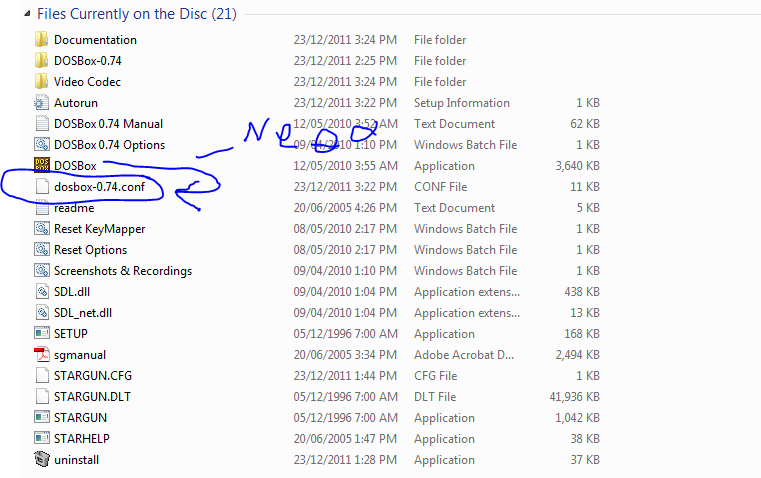
but what i need it to do right now is look at the .conf file thats on the cd, not the .conf file on my computer.

how can i do that?

Reply 14 of 30, by Elementis

User metadata
Rank Newbie
Rank
Newbie

configur.png

I need dosbox using THAT config file.

also, the above dosbox folder is empty.

Reply 15 of 30, by Dominus

User metadata
Rank DOSBox Moderator
Rank
DOSBox Moderator

First, I meant autorun.inf 😉

Second, does

Mount c .
C:
Stargun

In dosbox.conf autorun work?

Last edited by Dominus on 2011-12-24, 00:31. Edited 1 time in total.

Reply 16 of 30, by Elementis

User metadata
Rank Newbie
Rank
Newbie

yes but im using this on a cd, so i need E, not C.

Reply 17 of 30, by collector

User metadata
Rank l33t
Rank
l33t

You need to tell it what conf file to use (see the -conf switch in the README). Also, for the mounting, use relative paths. Mount the game's folder as on the C: drive, not E:. Keep in mind that many games have trouble running directly from the CD. Any files that it needs to write or change cannot be done on read only media. One solution to this would be to have the Autorun start a batch file to copy the game files to a temp folder and mount that as your C:. The batch could also start DOSBox and delete the game's temp folder on DOSBox exit.

The Sierra Help Pages -- New Sierra Game Installers -- Sierra Game Patches -- New Non-Sierra Game Installers

Reply 18 of 30, by Dominus

User metadata
Rank DOSBox Moderator
Rank
DOSBox Moderator

No, you need c 😉
You do not need to match the drive you "create" for dosbox via mount to the existing real drive.
Just for future things you might do with dosbox, some games do expect to be on C.
Thus always start with mounting something to c.

Mount c D:/dosgames
(this mounts the folder dosgames on your D:/ drive to C:/ in Dosbox)

On your CD rename dosbox-0.74.conf to dosbox.conf and Dosbox should use that conf file without needing the -conf switch.