VOGONS


First post, by mikeyp

User metadata
Rank Newbie
Rank
Newbie

Hi all

I'm hoping some of you might be able to help me. I've been stung on ebay unfortunately. The seller was a little vague, but gave just enough detail that I don't think I have any recourse.

I've got this Toshiba Protege T3400CT which is physically in pretty nice condition. It's come with all its bits, external floppy, 2 batteries (assuming both needing a rebuild), its original power pack and best of all, all its original documentation, manuals, discs etc. Problem is it sort of doesn't power on.

When you connect the power, the AC adapter LED lights green. The battery LED lights orange, indicating it's charging. So far, so good. When you press the power button, it briefly powers on, you hear the fan spin for a split second, then everything powers off and the AC adapter LED blinks red/orange, indicating abnormal voltage or power supply malfunction. The Toshiba power supply is 15V 1.4A.

I have tried another power supply which is 16V 3.3A as one volt won't hurt and got the same result.

Does anyone have any thoughts on what I should try next please?

To say I'm a little disappointed is an understatement.

Thanks in advance.

Michael
Last edited by mikeyp on 2019-05-07, 12:03. Edited 2 times in total.

Reply 1 of 6, by Nvm1

User metadata
Rank Member
Rank
Member

Open it up and check for the standby and rtc battery (packs).
Those tend to start leaking and cause all kind of problems. So the first step should be to remove them, clean/fix their redisue and if possible fix replacements somewhere so that they cannot damage the board.

And if they are dead/flat, the system might refuse to powerup as intended 😐

Reply 2 of 6, by mikeyp

User metadata
Rank Newbie
Rank
Newbie

Thanks Nvm1. I have disassembled it. The RTC battery looks fine but the Ni-MH standby battery has indeed broken down and leaked. The system board appears largely unscathed but the power supply board nearest the battery appears to have quite a bit of residue nearest the battery. It doesn't look too bad to be honest and could be fixable. I'll neutralise it with vinegar tonight, clean it up with isopropyl alcohol, see where I'm at and take some pictures if I'm struggling.

Interesting what you say about it possibly not starting with a dead battery. I'll get replacements ordered if I can find them.

I've found this and it's really helpful: http://www.minuszerodegrees.net/manuals/Toshi … ce%20Manual.pdf

Reply 3 of 6, by mikeyp

User metadata
Rank Newbie
Rank
Newbie

Hmm. Here's a problem, i can't find the backup battery in the UK. It is available fairly cheaply ($17) in the USA, but shipping is extortionate from any stores that will ship internationally and it ends up over $67!

Are there any UK businesses that will sell me one?

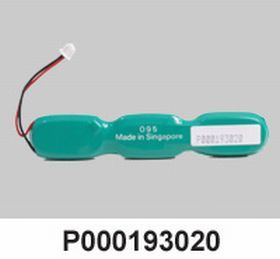
The original is a VARTA 3.6V 110mAh NI-MH battery. Part numbers seem to be P000193020 or FDCE11860

It's this FDCE11860.JPG
https://www.technooutlet.com/fdce11860.html.

Reply 4 of 6, by mikeyp

User metadata
Rank Newbie
Rank
Newbie

After more searching, I figure VARTA don't make that particular configuration any more, however they do still make this, so I'm going to buy it, cut it up and solder wires to the tags to get the configuration I need. The individual cells appear to be the right dimensions.
https://cpc.farnell.com/varta/55615403059/bat … 0mah/dp/BT05124

The CMOS battery wants replacing too. The size doesn't exist any more but I figure this will do.
https://cpc.farnell.com/maxell/ml2032-t26/but … 2-3v/dp/BT01219

Further to the powering on problem, I stumbled on this http://vobarian.com/toshibaProblem.html which suggests there's a common failure on quite a few models of a failed capacitor which wants replacing. If it really is that simple, then I'll be a happy geek. 😀
Also here https://web.archive.org/web/20050422014137/ht … fix/index.shtml
and here https://web.archive.org/web/20050408203604/ht … ar/toshiba.html

Thank goodness for archive.org!

Feel free to let me know if I'm wrong about any of this or encourage me if you think I'm heading in the right direction.

Reply 5 of 6, by mikeyp

User metadata
Rank Newbie
Rank
Newbie

Sorry to keep posting but I keep finding stuff that should be archived so I'm posting here so I and others can find later.

Here's a list of bios updates for Toshiba T-Series laptops like the Portege T3400CT. This is the last page before Toshiba took it down. The files weren't archived by archive.org however the ftp links to toshiba still work.
https://web.archive.org/web/20011006144834/ht … ios/tseries.htm

So the link for the T3400CT bios doesn't work but if you edit off the archive.org parts, you get ftp://ftp.toshiba.ca/bios/b3400ct.exe which does!

Reply 6 of 6, by mikeyp

User metadata
Rank Newbie
Rank
Newbie

I just wanted to follow up and close out this thread. The fault turned out to be a failure on the motherboard not the power supply board. I replaced the motherboard with known working one and all is well now. I've left out the nimh backup battery which leaked and just need to replace the CMOS battery now.

I might see about testing the failed board, see if any of the surface mount caps need replacing but that's a project for another day.

Re. the BIOS updates mentioned above. The Toshiba FTP site is now password protected. Toshiba are typically unhelpful, refusing to respond unless you give them a valid serial number. The machine is so old they won't recognise it. I have since found an archive of old BIOS upgrades for these machines at http://www.minuszerodegrees.net/manuals/Toshi … oshiba_bios.htm