VOGONS


Reply 20 of 35, by tsalat

User metadata
Rank Member
Rank
Member
weedeewee wrote on 2022-11-02, 19:48:
The pin where you're measuring 2MHz seems to be A6 signal, not CLK signal. I think the correct pin to measure should be from th […]
Show full quote
tsalat wrote on 2022-11-02, 18:53:
thank you again for your reply. I have measured today the CLK with the oscilloscope and I am bit confused. I have tried the posi […]
Show full quote
rasz_pl wrote on 2022-10-31, 20:00:

some kind of resistor network should be pulling all data and 0-23 address bits high, while 24-31 low. ISA IRQs high, ISA DRQs low. D/C R/W M/IO high
is your bios/isa bus behind 245 buffer? even without bios that working pullups should never allow for any random behavior.

thank you again for your reply.
I have measured today the CLK with the oscilloscope and I am bit confused. I have tried the position on the PGA socket to measure the CLK and as well the 15-pin on the QFP. Both were showing something like 2MHz and the signal was not looking as I would expect. I have uploaded a picture of the board here: https://www.sylex.repository.3d-sphere.com/in … d4pSdMLtfFHM4jX, and highlighted the points as well.

Underneath the BIOS is an SN74LS244N BUFFER - I guess you were referring to this one.
I guess the CPU should have the 40MHz clock, right? or not?

The pin where you're measuring 2MHz seems to be A6 signal, not CLK signal.
I think the correct pin to measure should be from the left bottom corner of the 386 footprint on the photo, the third column, 6th row, counting from the bottom left corner.
QFP pin 15 should be correct CLK signal. please verify, on photo, you measure left side of qfp package, 15th pin from top.

Hi and thank you for your answer,

I have measured the pins once more and the one you were referring as well: https://www.sylex.repository.3d-sphere.com/in … a3ZSyoHAKraX9KJ
i have included the pictures from the oscilloscope as well. The one on the PGA package, 6th row/3rd column, showed 80MHz. The one on the QFP, 15th pin, showed from 0,2-2MHz - was changing over time. If the debug card had indicated some communication, the frequency was higher but I have picked up maximum of 2MHz - see the picture.

Now I am not sure if the CPU is ok, I had the impression that the CPU should have 40MHz at this pin after it will be initialized but it doesnt look like this.
Could the CPU be damage, although it is a new one and the behaviour is more or less the same as with the old one?

thx, tomas
Reply 21 of 35, by rasz_pl

User metadata
Rank l33t
Rank
l33t

cpu clock is fine
one by one put scope on BIOS data/address and CE/OE pins, press reset and look at the signal, see if you can spot a weird one, like stuck high/low or not going all the way up/down

https://github.com/raszpl/sigrok-disk FM/MFM/RLL decoder
https://github.com/raszpl/FIC-486-GAC-2-Cache-Module (AT&T Globalyst)
https://github.com/raszpl/386RC-16 ram board
https://github.com/raszpl/440BX Reference Design adapted to Kicad

Reply 22 of 35, by tsalat

User metadata
Rank Member
Rank
Member
rasz_pl wrote on 2022-11-03, 11:30:

cpu clock is fine
one by one put scope on BIOS data/address and CE/OE pins, press reset and look at the signal, see if you can spot a weird one, like stuck high/low or not going all the way up/down

hi, thank you all for your suggestions, really helpful since I already have no idea what to do next.
I have measured the voltage on all pins on the BIOS and measured the pins with the oscilloscope: https://www.sylex.repository.3d-sphere.com/in … XtKPX7oc6ZWB8zC. The pictures are going from the top left corner down from pin 1, pin 2, etc... I have missed two pins and I do not have the screens from them but the output was looking similar as the rest of them.

As for the behaviour, the screens from the oscilloscope are after the board is powered up. After pressing the reset button the pins are sometimes "dead" - stuck high or low - most of them if not all, but next time they have again some communication. Today the board started, after a few reset attempts to continually beep. Resetting solved the beep but didn't did anything after. I am not sure what to do next since I have no idea what could cause the "stuck" behaviour or freezing the board from boot.

note: The BIOS is already soldered back but I have used the old picture.

tomas

Reply 23 of 35, by rasz_pl

User metadata
Rank l33t
Rank
l33t

Those ones could be bad depending on pin numbers and relation to CD/OE. Did you solder a socket for bios chip?
Does 244 chip under bios chip inputs connect directly to bios pins? https://www.mouser.com/datasheet/2/149/fairch … f244-608438.pdf

>After pressing the reset button the pins are sometimes "dead" - stuck high or low - most of them if not all,

This is good! which ones? 😀 if Address pins are stuck after reset when the board acts dead then we have some clues. Either CPU sometimes completely fails to start or whatever is buffering address bus is bugging out. Is it still erratic with no ram plugged in at all?

https://github.com/raszpl/sigrok-disk FM/MFM/RLL decoder
https://github.com/raszpl/FIC-486-GAC-2-Cache-Module (AT&T Globalyst)
https://github.com/raszpl/386RC-16 ram board
https://github.com/raszpl/440BX Reference Design adapted to Kicad

Reply 24 of 35, by tsalat

User metadata
Rank Member
Rank
Member
rasz_pl wrote on 2022-11-04, 08:36:
Those ones could be bad depending on pin numbers and relation to CD/OE. Did you solder a socket for bios chip? Does 244 chip und […]
Show full quote

Those ones could be bad depending on pin numbers and relation to CD/OE. Did you solder a socket for bios chip?
Does 244 chip under bios chip inputs connect directly to bios pins? https://www.mouser.com/datasheet/2/149/fairch … f244-608438.pdf

>After pressing the reset button the pins are sometimes "dead" - stuck high or low - most of them if not all,

This is good! which ones? 😀 if Address pins are stuck after reset when the board acts dead then we have some clues. Either CPU sometimes completely fails to start or whatever is buffering address bus is bugging out. Is it still erratic with no ram plugged in at all?

Hi,

I have mapped the behaviour after some testing, see here: https://www.sylex.repository.3d-sphere.com/in … tNbWJtfntwXLyE7, and a few words about this. I have added a socket for the BIOS.
The 244 is connected directly to BIOS by 3x pins - outlined in the picture (behaviour 1). The behaviour of the output pins of the BIOS changes over time and I have noticed a few one, also outlined in the picture but mentioned point by point below:

- After powering up the board, for the first time, none of the pins is having a communication according to the oscilloscope but all the pins are "High". Reset will not change the behaviour but power cycling yes - outlined in the picture (behaviour 2)
- All pins are having some sort of communication on all pins. The reset will bring the pins to low (during reset) and again to communication - outlined in the picture (behaviour 3)
- After some reset cycles, some of the pins will still have some communication and some will be "low" and "high" - outlined in the picture (behaviour 5)
- Without the BIOS inserted, all pins of the socket are having some communication expect one pin that is "high" - outlined in the picture (behaviour 4)

As for - Is it still erratic with no ram plugged in at all? - I will check this later today.

tomas

Reply 25 of 35, by rasz_pl

User metadata
Rank l33t
Rank
l33t

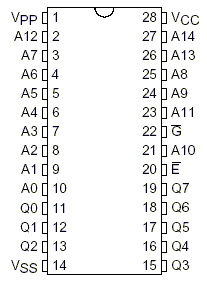
bios pinout https://www.futurlec.com/Memory/27C256-150.shtml
27C256.gif

those connections look weird, like the 244 is buffering address bus? I would expect it to connect bios 11-13 15-19 pins to 244 inputs 2 4 6 8 11 13 15 17
maybe it is for lower half of address bus, that means it should also connect pins 6-10 to 3 5 14 16 18
also pins 20 and 22 of BIOS _must_ both be low at the same time for successful bios read, if they arent going down at same time then bios has no chance of executing, best to probe them together on two channels, triggering on one and looking if the other is ever low on trigger

https://github.com/raszpl/sigrok-disk FM/MFM/RLL decoder
https://github.com/raszpl/FIC-486-GAC-2-Cache-Module (AT&T Globalyst)
https://github.com/raszpl/386RC-16 ram board
https://github.com/raszpl/440BX Reference Design adapted to Kicad

Reply 26 of 35, by tsalat

User metadata
Rank Member
Rank
Member

Hi,

I took a few days off from the board and thus replying only now.
I am ready to start replacing the ICs, one by one, but any tip what IC to replace first would be appreciated, i.e. the buffer beneath the BIOS? etc... I think I will add sockets for some of them, at least for the ones for which it will be possible.

Is it still erratic with no ram plugged in at all?

Didnt noticed any difference with or without the RAM.

those connections look weird, like the 244 is buffering address bus? I would expect it to connect bios 11-13 15-19 pins to 244 inputs 2 4 6 8 11 13 15 17
maybe it is for lower half of address bus, that means it should also connect pins 6-10 to 3 5 14 16 18

Understand but not much I can comment here. I have tried to measure the continuity once more and got the same results as before. The only pins that are directly connected from the BIOS to the buffer are the ones I have mentioned before.

also pins 20 and 22 of BIOS _must_ both be low at the same time for successful bios read, if they arent going down at same time then bios has no chance of executing, best to probe them together on two channels, triggering on one and looking if the other is ever low on trigger

I took the measurements today. Placing two probes on pin 20 and 22. The first start gave only High on both pins - this is actually a behaviour I always see. The first start after some time gives no signal/communication on the pins.
After a few turn off/turn on toggling I got the signal as in the attachment. I hope is this behaviour you have mentioned - if not, let me know and if possible, explain it a bit more. I am learning on the fly and I am already beyond my knowledge here, heh - happy to learn though.

thx, tomas

Reply 27 of 35, by rasz_pl

User metadata
Rank l33t
Rank
l33t

The fact those two signals reliably arent there on first powerup is a good start to finding the cause. Makes me think power_good is not generated on first try, usually powergood is responsible for the initial reset. Sadly there are no datasheets for UM82C491F UM82C493F 🙁
Does your post card have a reset diode? if not ISA pin B2 is reset signal, put a scope on that and power the board to see if it pulses at the start.
Try to find where BIOS pins 20 and 22 connect to, check UM82C493F first, then all the TTL chips.

Was the initial track damage due to battery leakage?

btw sister board with minimal changes https://theretroweb.com/motherboards/s/qdi-386-4n-d04a

Last edited by rasz_pl on 2022-11-10, 10:20. Edited 1 time in total.

https://github.com/raszpl/sigrok-disk FM/MFM/RLL decoder
https://github.com/raszpl/FIC-486-GAC-2-Cache-Module (AT&T Globalyst)
https://github.com/raszpl/386RC-16 ram board
https://github.com/raszpl/440BX Reference Design adapted to Kicad

Reply 28 of 35, by tsalat

User metadata
Rank Member
Rank
Member

hi,

thank you for your answer.

Try to find where BIOS pins 20 and 22 connect to, check UM82C493F first, then all the TTL chips.

I have tried to find the continuity between the pins 20 and 22 and found connections coming to the keyboard BIOS, UM82C491F and UM82C49F.
Both pins are going from what I can see directly under the CPU - no direct connection to CPU, at least I didn't find, and then to the UM82C491F . Anyway, see the diagram in the image below.

https://www.sylex.repository.3d-sphere.com/in … yMpLFPQYbEaCZwg

Does your post card have a reset diode? if not ISA pin B2 is reset signal, put a scope on that and power the board to see if it pulses at the start.

Yes, it has, the behaviour during start is: the reset diode is lit and then go dark 1) first start the signal diode is dark, 2) second start (turn on/off) the signal diode has some signal and blink. The reset diode is always lit at the start. I have tried to start the board by holding reset shortened during the start for 2sec and then releasing it. No difference.

Was the initial track damage due to battery leakage?

No, but I have found a mechanical damage next to BIOS, see the red circle in the picture. This was fixed, one trace was for the battery and the second to a BIOS pin that is connected to the keyboard BIOS. Both traces are having continuity and there is no short between them or to the ground.

The second damage was next to the CPU, this looked like "only" a broken trace but even after removing the old/damaged trace, there was continuity between the CPU pin and the rest of the trace that I have jumper wire later on.

Apart from those two issues, no damage was found, no leaked battery or corrosion on the traces.
I have also checked, again and just in case, under microscope all legs from the CPU and the UM82C491F and UM82C49F. Both are solidly holding on the board although a cold joint is not something I would notice.

Any idea what try next? 😀

br, Tomas

Reply 29 of 35, by rasz_pl

User metadata
Rank l33t
Rank
l33t
tsalat wrote on 2022-11-10, 08:10:

Sadly that looks good. Purple is shared ROMCS and KBCS, green is memory read signal.
Most likely UM82C493F is UMCs variation on 82c206 with different pinout (maybe to prevent second sourcing, forcing motherboard manufacturers to buy both chips as a pair).

tsalat wrote on 2022-11-10, 08:10:

the reset diode is lit and then go dark
1) first start the signal diode is dark

wait, so during first powerup reset diode doesnt blink at all?
Does it lit up when you manually press reset?

We need to find Reset and powergood inputs. I see only 5 diodes, reset circuit usually is build using one, so is powergood if its not using direct signal from the PSU.
1 Look if pin 1 of AT power connector (orange cable one) is connected to any pins on big chips/ttl/diodes.
2 trace RESET button header signal, it will most likely go to some resistor, and then that resistor will connect to diode, capacitor and one or both big chips.

Some chipsets have separate resent and powergood inputs, others just take powergood and you reset them by pulling PG down. Its very difficult to repair motherboard without at least chip pinouts 🙁

https://github.com/raszpl/sigrok-disk FM/MFM/RLL decoder
https://github.com/raszpl/FIC-486-GAC-2-Cache-Module (AT&T Globalyst)
https://github.com/raszpl/386RC-16 ram board
https://github.com/raszpl/440BX Reference Design adapted to Kicad

Reply 30 of 35, by tsalat

User metadata
Rank Member
Rank
Member

Hi,.

No, sorry, the reset signal is at the power up and the diode blinks at the start. I will trace down the orange wire tomorrow.

Thx, tomas

Reply 32 of 35, by tsalat

User metadata
Rank Member
Rank
Member

hi,

yes, it seems that this is working as it should, the reset.
I did the tracing today and found that:

- the "orange" wire, 1st pin of the AT connector goes on the top of the board between a capacitor-resistor (not connected to them) between the first ISA slot
- goes to the back side to the board and connects to an resistor near the UM82C493F
- and goes to the second pin of the UM82C493F (as see on the image)

I didn't find any other connections to it on the UM82C493F or the UM82C491F.

https://www.sylex.repository.3d-sphere.com/in … JgG5njWCtjDCTpy

Now, it can be dead, the UM82C493F or UM82C491F are dead and without, as you mentioned, a datasheet to see what to expect and spare parts I will not repair this no matter what. But anyway, any other idea what to measure, check, replace?

thank you, Tomas

Reply 33 of 35, by rasz_pl

User metadata
Rank l33t
Rank
l33t

Im out of ideas 🙁 I still have a feeling its something cracked (track/via/resistor)

https://github.com/raszpl/sigrok-disk FM/MFM/RLL decoder
https://github.com/raszpl/FIC-486-GAC-2-Cache-Module (AT&T Globalyst)
https://github.com/raszpl/386RC-16 ram board
https://github.com/raszpl/440BX Reference Design adapted to Kicad

Reply 34 of 35, by Nexxen

User metadata
Rank l33t
Rank
l33t

Ok, last resort is desoldering everything and checking for broken traces underneath sockets.

PC#1 Pentium 233 MMX - 98SE
PC#2 PIII-1Ghz - 98SE/W2K

- "One hates the specialty unobtainium parts, the other laughs in greed listing them under a ridiculous price" - kotel studios
- Bare metal ist krieg.

Reply 35 of 35, by tsalat

User metadata
Rank Member
Rank
Member
rasz_pl wrote on 2022-11-14, 00:45:

Im out of ideas 🙁 I still have a feeling its something cracked (track/via/resistor)

thank you a lot, learned a lot, thats important. I will prepare some action plan and start to check/desolder/solder back certain components.

Nexxen wrote on 2022-11-14, 01:27:

Ok, last resort is desoldering everything and checking for broken traces underneath sockets.

will try, at least for components I am certain about I will not destroy them at first, and then also for the other ones 😀

thank you a lot, all of you!

tomas
