VOGONS


Reply 40 of 47, by Joseph_Joestar

User metadata
Rank l33t++
Rank
l33t++
Joseph_Joestar wrote on 2026-06-30, 04:26:

Heh, as mentioned before, I mostly did it for fun, but Creative was apparently highlighting this feature when marketing their Audigy cards.

I managed to find this page where Creative was advertising the use of FireWire for network gaming.

Interesting stuff, it made me wonder how connecting 10+ computers via FireWire would work in practice. I don't currently have the means to test that myself, but maybe someone else has actually experienced it back in the day.

My retro builds

Reply 41 of 47, by myne

User metadata
Rank l33t
Rank
l33t

I can't imagine anyone would have.
Firewire was released in the era of ~$15 RTL8139s, and even crappy 10mbit hubs were good enough for 10 PCs.

100mbit 8port switches were well within the range of affordable for one of 10 people - and worst case you could do some hilarious looking but functional things with multiple routers daisychained.

Maybe someone, somewhere did it for a laugh.

I built:
Convert old ASUS ASC boardviews to KICAD PCB!
Re: A comprehensive guide to install and play MechWarrior 2 on new versions on Windows.
Dos+Windows 3.11+tcp+vbe_svga auto-install iso template
Script to backup Win9x\ME drivers from a working install
Re: The thing no one asked for: KICAD 440bx reference schematic

Reply 42 of 47, by BaronSFel001

User metadata
Rank Member
Rank
Member

I came across this idea late yesterday so didn't dig more into it until today, but apparently back through the heyday of Windows XP (pre-Gigabit ethernet) IEEE 1394 connection was ranked as the best for file transfers: comparable in speed to USB 2.0 (a moot point for System 20 because it only has 1.1) with none of the connection compatibility hassles. On the other hand, it was underutilized: typically included as standard only on Macs and geared (like my Radeon) towards multimedia rather than general networking use. I still need to run some tests and get my system back together, including fixing my IDE connections to install Windows Me so I can transfer drivers via USB stick, but then I look forward to seeing if the FireWire that happened to come with my GPU may be the answer to the online gaming connection question I have been crunching on for years.

EDIT: Initial research indicates there is no direct way to connect from a 1394 port to the internet, despite TCP/IP being supported on the software side, because of cable transmission incompatibilities. A probable solution is a FireWire/CAT5 extender: a kit designed to overcome the tight (15 feet) range limit of a 1394 connection by using twisted-pair ethernet as an extension. A kit comes with paired units because it is meant to connect two FireWire devices, but that means a single one ought to effectively function as a 1394->RJ45 converter to other hardware.

System 20: PIII 600, LAPC-I, GUS PnP, S220, Voodoo3, SQ2500, R200, 3.0-Me
System 21: G2030 3.0, X-fi Fatal1ty, GTX 560, XP-Vista
Retro gaming (among other subjects): https://baronsfel001.wixsite.com/my-site

Reply 43 of 47, by Jo22

User metadata
Rank l33t++
Rank
l33t++
Joseph_Joestar wrote on 2026-06-30, 06:46:
Joseph_Joestar wrote on 2026-06-30, 04:26:

Heh, as mentioned before, I mostly did it for fun, but Creative was apparently highlighting this feature when marketing their Audigy cards.

I managed to find this page where Creative was advertising the use of FireWire for network gaming.

Interesting stuff, it made me wonder how connecting 10+ computers via FireWire would work in practice. I don't currently have the means to test that myself, but maybe someone else has actually experienced it back in the day.

This is interesting, I love such strange concepts! 😄
I wonder how they managed to connect up to 63 PCs..
The Audigy has one FireWire port, it seems, so chaining isn't possible.

But there are FireWire hubs, as I've found out by reading this blog: https://oldvcr.blogspot.com/2021/06/the-paral … e-hubs.html?m=1

myne wrote on 2026-06-30, 07:44:
I can't imagine anyone would have. Firewire was released in the era of ~$15 RTL8139s, and even crappy 10mbit hubs were good enou […]
Show full quote

I can't imagine anyone would have.
Firewire was released in the era of ~$15 RTL8139s, and even crappy 10mbit hubs were good enough for 10 PCs.

100mbit 8port switches were well within the range of affordable for one of 10 people - and worst case you could do some hilarious looking but functional things with multiple routers daisychained.

Maybe someone, somewhere did it for a laugh.

I remember that Windows XP was (is) notable to have support for FireWire networking (IP over 1394)
It can use a FireWire cable like a cross-over network cable.

Which used to be kinda cool, because back in the day not all NICs had cable auto detection.
Users needed to posses a special cross-over ethernet cable (equivalent to a null-modem cable on serial/parallel ports) to connect two 10BaseT NICs.

Fun fact: According to this old 2002 Chip Online article, Windows Me has this feature, as well! 😁

https://www.chip.de/artikel/Workshop-FireWire … _140028001.html

English Translation

Edit: There's some truth within the Creative advertisement, I think.
I think that FireWire 400 networking between two PCs/Macs made sense to users without Gigabit ethernet NICs.

With an Audigy card, the FireWire port came "for free", after all.
While to be honest it likely wasn't intended for that purpose in first place.
The real reason was that FireWire was an multimiedia port.

It was popular among high-end camcorders and high-quality webcams.
The networking feature was something Creative could use as another feature argument to gamers.

"Time, it seems, doesn't flow. For some it's fast, for some it's slow.
In what to one race is no time at all, another race can rise and fall..." - The Minstrel

//My video channel//

Reply 44 of 47, by Joseph_Joestar

User metadata
Rank l33t++
Rank
l33t++
Jo22 wrote on 2026-06-30, 19:52:

This is interesting, I love such strange concepts! 😄
I wonder how they managed to connect up to 63 PCs..
The Audigy has one FireWire port, it seems, so chaining isn't possible.

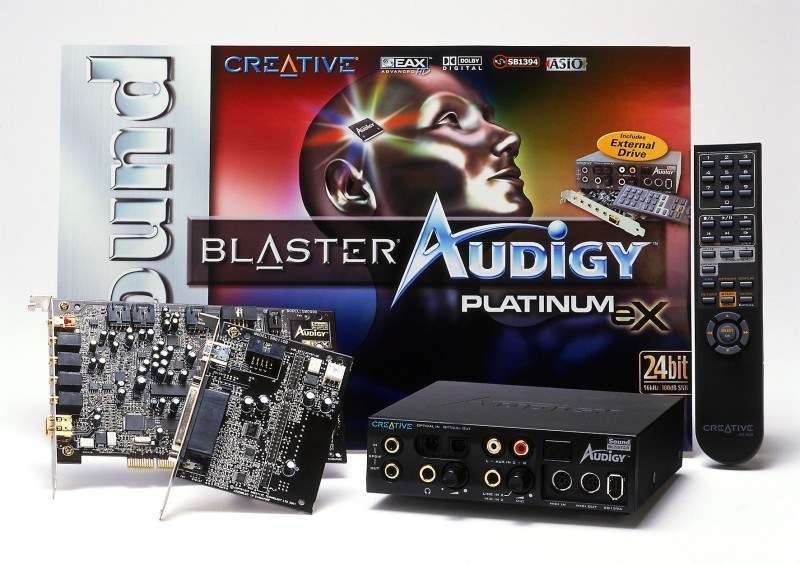
If the Audigy was hooked up to the corresponding front panel or external drive (e.g. SB0090 + SB0110) you could have two FireWire ports on the same PC.

creative-labs-sound-blaster-audigy-platinum-ex-33748.jpg

But yeah, a hub would be more practical.

My retro builds

Reply 45 of 47, by DaveDDS

User metadata
Rank Oldbie
Rank
Oldbie

Continues to be an interesting thread...

I did some tests a while back with my own DDLINK file transfer tool running on DOS systems, using 10m NE2000 compatible cards connected through an ethernet HUB.

And got pretty close to the theoretical max of 10 mbits / second (1.25m bytes/sec).

But this was with nothing else running on the systems (no multitasking or other interrupting hardware) and an effective direct connection between the two.

I can see some "trouble" with trying to get absolute max hardware speed on most newer stuff.

Any newer OS will be multi-tasking (and have various hardware/software interrupts going on in background as well) which means you really can't guarantee "instant" CPU response/throughput.

Also, faster network connections will be through a "switch" which since it has to figure out which physical port to send a packet to, will have to introduce some delay/buffering - as it has to receive at least part of the packet in order to determine how to route it.

And with even a small delay "in transit", how the higher-level protocol/drivers deals with that delay can greatly affect effective throughput.

If you really want to measure actual hardware throughput of the network transceiver in the NIC, you would want to use a back-to-back connection (no switch, only two directly connected nodes) which will means you have to stick to basic low-level packet (a higher level protocol will most certainly require more than simple negotiation between the two endpoints)

You would also have to set up an OS with minimal background activity for max. response and throughput.

Could be fun ... but I would expect that with the right setup you could achieve network throughput noticeably higher than you would see in "real world" conditions.

But... just guessing, could be "fun" to set it up and see how close you can get to the theoretical max. and how close a "normal" system could come!

https://dunfield.themindfactory.com ; "Daves Old Computers" ; SW dev addict best known:
ImageDisk: rd/wr ANY floppy PChw can ; Micro-C: compiler for DOS+ManySmallCPU ; DDLINK: simple/small filecopy(w/o netSW)via Lan/Lpt/Com

Reply 46 of 47, by Grzyb

User metadata
Rank l33t
Rank
l33t
DaveDDS wrote on Yesterday, 04:02:
I did some tests a while back with my own DDLINK file transfer tool running on DOS systems, using 10m NE2000 compatible cards co […]
Show full quote

I did some tests a while back with my own DDLINK file transfer tool running on DOS systems, using 10m NE2000 compatible cards connected through an ethernet HUB.
And got pretty close to the theoretical max of 10 mbits / second (1.25m bytes/sec).
[...]
But... just guessing, could be "fun" to set it up and see how close you can get to the theoretical max. and how close a "normal" system could come!

Yes, theoretical maximum for 10/100/1000 Mbps Ethernet is 1.25/12.5/125 MB/s.

In real-world conditions, using normal FTP, they can score 1.1+/11+/110+ MB/s - but only with Full Duplex!

NE2000 lacks FD, so if you managed to get it close to 1.25 MB/s, then it's quite an accomplishment, indeed.

In 2003, I voted in favour of joining the European Union. However, due to later developments - especially the restrictions on cash usage - I have withdrawn my support. DOWN WITH THE EU!

Reply 47 of 47, by DaveDDS

User metadata
Rank Oldbie
Rank
Oldbie
Grzyb wrote on Yesterday, 05:07:

... NE2000 lacks FD, so if you managed to get it close to 1.25 MB/s, then it's quite an accomplishment, indeed.

I don't recall the exact numbers, and at that time I hadn't yet added the options to automate DDLINK, so I was starting the transfer manually and timine it with a stopwatch. I was mainly interested in transfers over Com and Lpt (which are much slower).

IIRC my test was a binary file exactly 1mb = 1024*1024 bytes = 1,048,576 bytes.
DDLINK defaults t0 1024 byte "packets" and has 5 byte of overhead (start1,length2,...data...1024,crc2), but CRC is omitted in network (which already has crc) and packet adds tomac6,frommac6,type2 & CRC (i don't recallif this is 2 or 4) - so assume +16 = 1024+3+16 = minimum 1043/packet + whatever the NIC uses to identify start/size/end etc. = so at least 1024*1043 = 1,068,032 bytes = 8,544,256 bits.

I do recall it was about a second to transfer ... which at the time was WAY less than the other methods.

Now that I can automate DDLINK keys (ie: make the transfer happen automatically), I could do the test again with a program timing with the DOS 55ms "tick" and get a much more accurate number (and use a bigger file as well).

I didn't do this because DDLINK is a Q&D tool I wrote to move IMD images on/off of DOS booted from floppy with a RamDisk for main storage. And at the time I was characterizing how long it takes to move a 1+ mb image over Com or Lpt --- Lan was so much faster I really didn't worry about investigating further.

https://dunfield.themindfactory.com ; "Daves Old Computers" ; SW dev addict best known:
ImageDisk: rd/wr ANY floppy PChw can ; Micro-C: compiler for DOS+ManySmallCPU ; DDLINK: simple/small filecopy(w/o netSW)via Lan/Lpt/Com