VOGONS


First post, by WcDuck

User metadata
Rank Newbie
Rank
Newbie

Greetings everyone,
i come to this temple of wisdom as a final resort. As an amateur, i feel i tried everything on my power before pleading for help.

System specs:
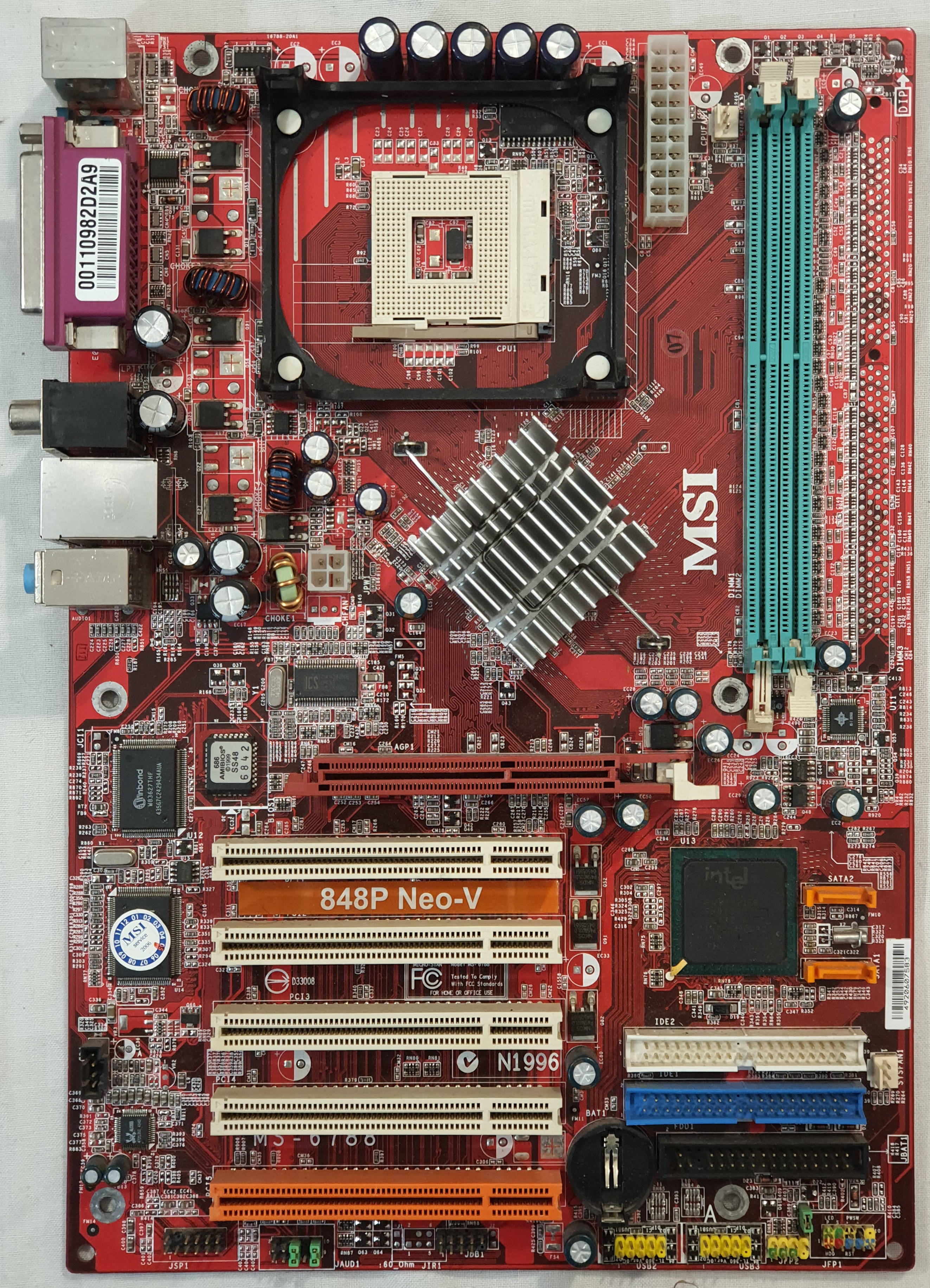
Motherboard: MSI 848p Neo-v
Cpu: Pentium 4 3.0 GHz
Ram: 2x DDR400 512 mb
Audio: CT4830
PSU: Generic 500w (trustworthy)
OLD GPU: Radeon 7000 64 mb
OS: Windows 98SE

The rig is built on the cheap for the usual reasons: a bit of nostalgia and some late dos - early windows gaming, for which the old GPU was more than up to the task. The system was stable.
I have found for free a seemingly working Radeon 9700 Pro. No major issues on installing drivers, no flickering, no overheating.
Upon launching some game the computer freezes - case in point Red Alert 2 Yuri's revenge stuck on loading screen.
In other, the game will freeze when the screen starts to be populated by a sufficient number of sprites - case in point, a Cossaks-engine based 2003 game.
Same with Hidden and Dangerous, or The Sims, both freezing on some secondary menu.
For the rest, the system seems stable when not engaged in 3d tasks.

Troubleshooting:
Swapped or removed ram sticks
Installed additional cooling
GPU's power pins seemingly in order
Cloned and swapped Hdd (some improvement there, now i have to keep the power button pressed in other for the system to shut down)
AGP bios setting checked
Reduced AGP from 8 to 4x done
Fast writing off done
Reduced Clock speed done
Omega drivers installed

I'm afraid that the issue might be corrupted memory. But there is no flickering or graphic problem that might point at that.
Any suggestion?

Reply 1 of 18, by RandomStranger

User metadata
Rank Oldbie
Rank
Oldbie

Does this happen only on certain games?
Does this happen only on Windows 98?
Does the graphics card works well in a different PC?
Does the PC work well with a different graphics card?
What version of driver do you use? Did you try others?

By my experience Windows 98 could mess up itself during installation so cloning it when replacing the hard drive won't necessarily fix it if it's already corrupted.

sreq.png retrogamer-s.png

Reply 2 of 18, by WcDuck

User metadata
Rank Newbie
Rank
Newbie
RandomStranger wrote on 2025-12-29, 22:52:
Does this happen only on certain games? Does this happen only on Windows 98? Does the graphics card works well in a different PC […]
Show full quote

Does this happen only on certain games?
Does this happen only on Windows 98?
Does the graphics card works well in a different PC?
Does the PC work well with a different graphics card?
What version of driver do you use? Did you try others?

By my experience Windows 98 could mess up itself during installation so cloning it when replacing the hard drive won't necessarily fix it if it's already corrupted.

- Seemingly, but i did try some more games - No problem with Max Payne, Return to Castle Wolfenstein, Half Life, Counter Strike, Gta 2, Red Alert 2. I'm puzzled.
- Serious Sam ran for 15 minutes, than the freezing happened
- Sim City 3000 would black screen and freeze on starting. I slowed the frequency for DVI on "high-res" screens - the game would load but the black screen would go on an off on repetition.
- The pc is builded with a win98 focus, i'll double proof it with XP though
- Unfortunately i don't have another Agp motherboard available to double check that
- Yes, with the previous Gpu the system was stable
- I did try different drivers, same problems. As First Ati Catalyst Suite 6.0 9500/9700, followed by Ati Catalyst Suite 6.2 9700, as last Radeon Omega Catalyst Drivers 2.6.37 9500/9700. ( + DirectX 9.0c and OpenGL 1.4.4145)
- The cloning of the hdd was the one but last attempt - i use macrium reflect to image the disk and have reliable backups - at every drivers update i started from the last stable version of win98 for this particular pc. Do you suggest a fresh start with
a clean installation?

Reply 3 of 18, by shevalier

User metadata
Rank Oldbie
Rank
Oldbie
WcDuck wrote on 2025-12-29, 18:52:

Any suggestion?

https://tehsiggi.github.io/agp-power-monitor/
Maybe the graphics card is just overheating?
The 9700/9800 has very poor cooling, and the thermal grease may have dried out.
But you'll never know, because normal temperature monitoring was only introduced starting with the 9800XT.
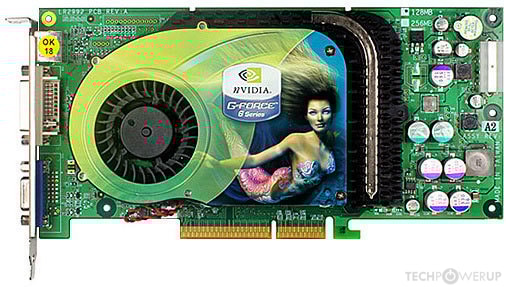
For the GF6800, with comparable age and power consumption, cooling looks like this.
https://tpucdn.com/gpu-specs/images-new/c/177 … front-large.jpg

3DMark2003 is now available for free download from the developer's website.
One hour of the loop tests ‘Mother Nature’ + ‘CPU # 1’ test will show whether there are any stability issues.

Aopen MX3S, PIII-S Tualatin 1133, Radeon 9800Pro@XT BIOS, Audigy 4 SB0610
JetWay K8T8AS, Athlon DH-E6 3000+, Radeon HD2600Pro AGP, Audigy 2 Value SB0400
Gigabyte Ga-k8n51gmf, Turion64 ML-30@2.2GHz , Radeon X800GTO PL16, Diamond monster sound MX300

Reply 4 of 18, by RandomStranger

User metadata
Rank Oldbie
Rank
Oldbie

Also... Going for 2×512MB RAM on Windows 98 is not recommended. Try 1×512 or 2×256MB. Same with hard drives above 128GB of storage space. W98 just wasn't prepared yet to deal with those.

If it only happens on certain games, than the graphics card itself shouldn't be faulty. It's an early XP-era card rather than a late W98-era one. Maybe the drivers just don't work well with certain games, or it just doesn't agree with other hardware components under Windows 98. Giving it another shot on a freshly installed Windows 98 might worth a shot, upgrading the cooler if it's still the factory original is also recommended.

Otherwise not covering too much ground with one PC is something to consider. DOS+W9x compatibility while also going for games as recent as Serious Sam and Return to Castle Wolfenstein can be difficult. You'll have games on both ends that just won't comply to various degrees. For W9x games of the year 2000 is a good cut-off point.

sreq.png retrogamer-s.png

Reply 5 of 18, by WcDuck

User metadata
Rank Newbie
Rank
Newbie
shevalier wrote on 2025-12-30, 16:36:
https://tehsiggi.github.io/agp-power-monitor/ Maybe the graphics card is just overheating? The 9700/9800 has very poor cooling, […]
Show full quote
WcDuck wrote on 2025-12-29, 18:52:

Any suggestion?

https://tehsiggi.github.io/agp-power-monitor/
Maybe the graphics card is just overheating?
The 9700/9800 has very poor cooling, and the thermal grease may have dried out.
But you'll never know, because normal temperature monitoring was only introduced starting with the 9800XT.
For the GF6800, with comparable age and power consumption, cooling looks like this.
https://tpucdn.com/gpu-specs/images-new/c/177 … front-large.jpg

3DMark2003 is now available for free download from the developer's website.
One hour of the loop tests ‘Mother Nature’ + ‘CPU # 1’ test will show whether there are any stability issues.

The thermal grease have been replaced, and one of those external dual-fans cooling card have been installed too - and none of the capacitors seems damaged. This also puzzles me.
Thanks for the advice, I'll use the program right away.

Reply 6 of 18, by WcDuck

User metadata
Rank Newbie
Rank
Newbie
RandomStranger wrote on 2025-12-30, 17:21:

Also... Going for 2×512MB RAM on Windows 98 is not recommended. Try 1×512 or 2×256MB. Same with hard drives above 128GB of storage space. W98 just wasn't prepared yet to deal with those.

If it only happens on certain games, than the graphics card itself shouldn't be faulty. It's an early XP-era card rather than a late W98-era one. Maybe the drivers just don't work well with certain games, or it just doesn't agree with other hardware components under Windows 98. Giving it another shot on a freshly installed Windows 98 might worth a shot, upgrading the cooler if it's still the factory original is also recommended.

Otherwise not covering too much ground with one PC is something to consider. DOS+W9x compatibility while also going for games as recent as Serious Sam and Return to Castle Wolfenstein can be difficult. You'll have games on both ends that just won't comply to various degrees. For W9x games of the year 2000 is a good cut-off point.

- I did run with only a 512 stick as one of the first troubleshooting attempts - on the top of that dos games refused to launch if both sticks were installed. The problem remained, and adding mistery is that now dos games launch with both of the sticks no problem. Win98 is quite something
- c:\windows is located in at 8gb partition of a salvaged 500gb hdd, and the rest of the unused space have been initialized after completing the system set up using patches.
- Ho no, i used this more "modern" games only as a benchmark. My idea is the same - set the time limit at 2000-2001, but some earlier game like Simcity 3000 were struggling due to lack of juice with the previous card, hence the 9700 struggle. I do have an old 1rst gen i5 that i use as a winxp-era machine which already covers the 2000-2010 segment.

Thanks for the assitance - i have a final question, in case the 9700 resists any troubleshooting: would an FX 5500 be a suitable replacement? i found one that complies with the "cheap" policy

Reply 7 of 18, by Ozzuneoj

User metadata
Rank l33t
Rank
l33t

How many amps does the PSU supply on the +5v rail, and what model is it? Being a P4 system it should be fairly well balanced with 12v and 5v loads, but you said it is generic and that would worry me, regardless of whether you consider it trustworthy. Old PCs can put unusual loads on modern PSUs, and old PSUs may or may not have aged well... either situation can lead to instability, even if you're nowhere near the maximum rated wattage of the unit.

All that said, I hope you're able to figure it out. The 9700 Pro is a good match for your P4. An FX 5500 is usually identical to an FX 5200 and is a fraction of the performance of a 9700 Pro, so, I wouldn't consider it a good replacement if you intend to play any games made after 2001 or maybe 2002 at very low settings. If you just need to get the machine working, it will suffice. Try to find one with a 128bit memory bus if possible. Usually if a card has 8 RAM chips (all on one side or 4 on each) it will be 128bit, though I think it's possible for FX 5200\5500 cards with 4 chips to be 128bit as well, it's just less common.

Alternatively, a Radeon 9600 (non-SE, and NOT a 9550 of any kind) is an excellent budget card that shouldn't be super expensive. Lots of them were made for OEMs, so they are very generic looking, but they're probably twice as fast as an FX 5200\5500 in a lot of cases. Still nowhere near as fast as a 9700 Pro, but a good solid performer.

Last edited by Ozzuneoj on 2026-01-02, 01:44. Edited 1 time in total.

Now for some blitting from the back buffer.

Reply 8 of 18, by RandomStranger

User metadata
Rank Oldbie
Rank
Oldbie

I'd go for a Ti4200 or an FX5600 as a replacement. Maybe a Radeon 8500LE/9100 or Geforce Ti200 if they are available. Probably the FX5600 would be the cheapest.

The FX5200/5500 can be decent, but were very messy. There are a lot of them with 64bit BUS and/or slow RAM (some as low as 266MHz) and those are abysmal.

sreq.png retrogamer-s.png

Reply 9 of 18, by shevalier

User metadata
Rank Oldbie
Rank
Oldbie
WcDuck wrote on 2026-01-01, 16:52:
shevalier wrote on 2025-12-30, 16:36:
https://tehsiggi.github.io/agp-power-monitor/ Maybe the graphics card is just overheating? The 9700/9800 has very poor cooling, […]
Show full quote
WcDuck wrote on 2025-12-29, 18:52:

Any suggestion?

https://tehsiggi.github.io/agp-power-monitor/
Maybe the graphics card is just overheating?
The 9700/9800 has very poor cooling, and the thermal grease may have dried out.
But you'll never know, because normal temperature monitoring was only introduced starting with the 9800XT.
For the GF6800, with comparable age and power consumption, cooling looks like this.
https://tpucdn.com/gpu-specs/images-new/c/177 … front-large.jpg

3DMark2003 is now available for free download from the developer's website.
One hour of the loop tests ‘Mother Nature’ + ‘CPU # 1’ test will show whether there are any stability issues.

The thermal grease have been replaced, and one of those external dual-fans cooling card have been installed too - and none of the capacitors seems damaged. This also puzzles me.
Thanks for the advice, I'll use the program right away.

Capacitors rarely appear damaged; often they simply fail silently.
The FX5500, with a memory frequency equal to the core frequency, scores 2000 points in 3DMark03, FX5700 ~ 3000
The Radeon 9600 scores around 3500, and the 9800XT scores 4900.
Your 9700 Pro, I don't know, probably somewhere around 4100 points.
The FX series will be a weak replacement for your graphics card.
Of course, you can spend all the money in the world and buy a 5950 Ultra. 😀

Aopen MX3S, PIII-S Tualatin 1133, Radeon 9800Pro@XT BIOS, Audigy 4 SB0610
JetWay K8T8AS, Athlon DH-E6 3000+, Radeon HD2600Pro AGP, Audigy 2 Value SB0400
Gigabyte Ga-k8n51gmf, Turion64 ML-30@2.2GHz , Radeon X800GTO PL16, Diamond monster sound MX300

Reply 10 of 18, by WcDuck

User metadata
Rank Newbie
Rank
Newbie
Ozzuneoj wrote on 2026-01-01, 17:20:

How many amps does the PSU supply on the +5v rail, and what model is it? Being a P4 system it should be fairly well balanced with 12v and 5v loads, but you said it is generic and that would worry me, regardless of whether you consider it trustworthy. Old PCs can put unusual loads on modern PSUs, and old PSUs may or may not have aged well... either situation can lead to instability, even if you're nowhere near the maximum rated wattage of the unit.

All that said, I hope you're able to figure it out. The 9700 Pro is a good match for your P4. An FX 5500 is usually identical to an FX 5200 and is a fraction of the performance of a 9700 Pro, so, I wouldn't consider it a good replacement if you intend to play any games made after 2001 or maybe 2002 at very low settings. If you just need to get the machine working, it will suffice. Try to find one with a 128bit memory bus if possible. Usually if a card has 8 RAM chips (all on one side or 4 on each) it will be 128bit, though I think it's possible for FX 5200\5500 cards with 4 chips to be 128bit as well, it's just less common.

Alternatively, a Radeon 9600 (non-SE, and NOT a 9550 of any kind) is an excellent budget card that shouldn't be super expensive. Lots of them were made for OEMs, so they are very generic looking, but they're probably twice as fast as an FX 5200\5500 in a lot of cases. Still nowhere near as fast as a 9700 Pro, but a good solid performer.

- Here is a pic of the PSU in question, it originally powered the I5 build that i mentioned, ca. 2009. So far it has always been a solid workhorse, but it is indeed old.

- I have found some solution on an old win xp forum. Increasing the AGP voltage from bios to 1.6v, setting AGP to 4x and fast writing off from setting gave 90% stability.
The 4 pin direct-to-psu connector has also been replaced by a 4 pin molex splitter, but maybe it has nothing to do with it.

- The system could complete a full test on 3DMark01, but only the graphic part of the test on 3dMark03 v3.4.0 - it would manage to perform the no-sound part, but freezing starting the 24bit audio one.
I could run Dungeon Keeper 2 (1999) for 2-3 hours in one occasion. At the next win 98 startup, it would freeze after few moment.
Same results after reinstalling the audio drivers.

- I gathered by reading some 2003-4 old forum that there were known issues between ATI graphic cards and MSI motherboards, and between ATI drivers and Soundblaster one. Running a swipe with DH Driver Cleaner was of no help.
I Might have to begrudgingly obtain an Nvidia graphic card, i grow fond of this 9700. Thanks for all the tipps =)

Reply 11 of 18, by shevalier

User metadata
Rank Oldbie
Rank
Oldbie
WcDuck wrote on 2026-01-07, 16:15:

- I have found some solution on an old win xp forum. Increasing the AGP voltage from bios to 1.6v, setting AGP to 4x and fast writing off from setting gave 90% stability.

Adjusting the AGP voltage literally means adjusting the AGP voltage of the “slot,” i.e., the AGP signaling interface.
Not the power supply of the video card itself.
Therefore, motherboards that required an increase in AGP voltage were never stable enough—they always glitched at least once a day, from my personal experience.

but freezing starting the 24bit audio one.

No incarnation of Sound Blaster LIVE 5.1 supports 24-bit.
Perhaps you mean 32 audio streams in 3DMark (sound test #2)?

I could run Dungeon Keeper 2 (1999) for 2-3 hours in one occasion. At the next win 98 startup, it would freeze after few moment.

This is a great game with great bugs.
I strongly advise against using it as a stability test.
It doesn't put any significal load on the graphics card and puts a heavy load on the CPU.
And it should crash at least once per session, on any hardware combination with any operating system. 😀

I would look at another motherboard, to be honest.
I think the problem is with it.

PS.
Let me guess, you have the first revision of the motherboard with three transistors along the PCI slots (there is also a Q91 in the middle).
https://theretroweb.com/motherboard/image/848 … c3635658791.jpg
Not the second one, with two, as in this photo from the internet.
https://images37.fotosik.pl/1538/ea99e74bbd288e6fmed.jpg

Aopen MX3S, PIII-S Tualatin 1133, Radeon 9800Pro@XT BIOS, Audigy 4 SB0610
JetWay K8T8AS, Athlon DH-E6 3000+, Radeon HD2600Pro AGP, Audigy 2 Value SB0400
Gigabyte Ga-k8n51gmf, Turion64 ML-30@2.2GHz , Radeon X800GTO PL16, Diamond monster sound MX300

Reply 12 of 18, by WcDuck

User metadata
Rank Newbie
Rank
Newbie
shevalier wrote on 2026-01-07, 17:44:
Adjusting the AGP voltage literally means adjusting the AGP voltage of the “slot,” i.e., the AGP signaling interface. Not the po […]
Show full quote
WcDuck wrote on 2026-01-07, 16:15:

- I have found some solution on an old win xp forum. Increasing the AGP voltage from bios to 1.6v, setting AGP to 4x and fast writing off from setting gave 90% stability.

Adjusting the AGP voltage literally means adjusting the AGP voltage of the “slot,” i.e., the AGP signaling interface.
Not the power supply of the video card itself.
Therefore, motherboards that required an increase in AGP voltage were never stable enough—they always glitched at least once a day, from my personal experience.

but freezing starting the 24bit audio one.

No incarnation of Sound Blaster LIVE 5.1 supports 24-bit.
Perhaps you mean 32 audio streams in 3DMark (sound test #2)?

I could run Dungeon Keeper 2 (1999) for 2-3 hours in one occasion. At the next win 98 startup, it would freeze after few moment.

This is a great game with great bugs.
I strongly advise against using it as a stability test.
It doesn't put any significal load on the graphics card and puts a heavy load on the CPU.
And it should crash at least once per session, on any hardware combination with any operating system. 😀

I would look at another motherboard, to be honest.
I think the problem is with it.

PS.
Let me guess, you have the first revision of the motherboard with three transistors along the PCI slots (there is also a Q91 in the middle).
https://theretroweb.com/motherboard/image/848 … c3635658791.jpg
Not the second one, with two, as in this photo from the internet.
https://images37.fotosik.pl/1538/ea99e74bbd288e6fmed.jpg

- I see.. I do have the first revision, and i assume that this particular mobo has a reputation 😀

- Well, there is a field where i have no knowledge whatsoever. After the crashes I have seen in the test menu the "24 audio" entry (sound test #2) and associated it with "bit". My bad.

- Hehe, i am aware how clunky DK2 is, and the usual crashes that inevitably are to be met when using it. What interested me was if and when the freezing would have happened. Quite ironic that a notoriously bug riddled game would be the one running for the longest time.

- As suggested I`m looking for a socket 478 mobo, and found an ASUS P4S533 that would fit. Is there any specific problem that is associated with this particular model?

Reply 13 of 18, by RandomStranger

User metadata
Rank Oldbie
Rank
Oldbie
WcDuck wrote on 2026-01-12, 18:17:

- As suggested I`m looking for a socket 478 mobo, and found an ASUS P4S533 that would fit. Is there any specific problem that is associated with this particular model?

I have an Abit board with a SiS chipset. It does the job so the P4S533 should also work OK as long as you use a compatible CPU. Though it's definitely not a high-end model.
I don't remember what was the fastest graphics card I tried in it. At least a Ti4200 or FX5700. I don't think I tried my 9800Pro in that one.

sreq.png retrogamer-s.png

Reply 14 of 18, by shevalier

User metadata
Rank Oldbie
Rank
Oldbie
WcDuck wrote on 2026-01-12, 18:17:

- I see.. I do have the first revision, and i assume that this particular mobo has a reputation 😀

I don't know about the reputation of this motherboard, I just encountered similar behaviour with my Jetway. 🙁

Since the MS-6788 circuit diagram is available on the internet, it became interesting to see what MSI engineers had created.
https://drive.google.com/open?id=17Iby5n_X9_0 … 7xMmqPXrY4J85Il
6788_20a1_std.pdf - you first revision
6788_20b_a.pdf - the second.
page 21

The idea of connecting two regulators in series simply to distribute heat between two transistors instead of one usually ends in failure.
Since then, I have been collecting unusual circuit designs from manufacturers.
Your board ranks first.

Aopen MX3S, PIII-S Tualatin 1133, Radeon 9800Pro@XT BIOS, Audigy 4 SB0610
JetWay K8T8AS, Athlon DH-E6 3000+, Radeon HD2600Pro AGP, Audigy 2 Value SB0400
Gigabyte Ga-k8n51gmf, Turion64 ML-30@2.2GHz , Radeon X800GTO PL16, Diamond monster sound MX300

Reply 15 of 18, by Ydee

User metadata
Rank Oldbie
Rank
Oldbie
Ozzuneoj wrote on 2026-01-01, 17:20:

Alternatively, a Radeon 9600 (non-SE, and NOT a 9550 of any kind) is an excellent budget card that shouldn't be super expensive. Lots of them were made for OEMs, so they are very generic looking, but they're probably twice as fast as an FX 5200\5500 in a lot of cases. Still nowhere near as fast as a 9700 Pro, but a good solid performer.

May I ask why no Radeon 9550 card is recommended? Aren't they built on the same GPUs (RV350) as 9600 and 9600PRO? Some even on the newer RV360 from the Radeon 9600XT, the most powerful of the 9600 series.
Sure, they have a slower clocked core (usually easy to overclock) and memory (usually 5ns, but you can also find 4ns and 3.6ns, and these can also be overclocked), but I wouldn't completely dislike them.

Reply 16 of 18, by Ozzuneoj

User metadata
Rank l33t
Rank
l33t
Ydee wrote on 2026-01-13, 11:39:
Ozzuneoj wrote on 2026-01-01, 17:20:

Alternatively, a Radeon 9600 (non-SE, and NOT a 9550 of any kind) is an excellent budget card that shouldn't be super expensive. Lots of them were made for OEMs, so they are very generic looking, but they're probably twice as fast as an FX 5200\5500 in a lot of cases. Still nowhere near as fast as a 9700 Pro, but a good solid performer.

May I ask why no Radeon 9550 card is recommended? Aren't they built on the same GPUs (RV350) as 9600 and 9600PRO? Some even on the newer RV360 from the Radeon 9600XT, the most powerful of the 9600 series.
Sure, they have a slower clocked core (usually easy to overclock) and memory (usually 5ns, but you can also find 4ns and 3.6ns, and these can also be overclocked), but I wouldn't completely dislike them.

I have always avoided them because, at least in the US, manufacturers seem to like leaving off the "SE" so a lot of 9550 cards only have a 64bit memory interface (making it a 9550SE), which really kills performance when coupled with the slower RAM and lower clocks that they are often given. Since these are the lowest end cards of this generation, it is common to find ones with worse specs than they were ever intended to have. You also get some that are called a 9550XL, and each of those could be better or worse than a 9550\SE and could have 64bit or 128bit memory... there seems to be no consistency there.

On the other hand, I haven't really seen many 9600SE (64bit) cards mislabeled as 9600 (128bit), so a 9600 tends to not be as risky of a purchase as long as you avoid the 9600SE.

If you can find a 128bit 9550, then it is probably okay, though the core clock I think is usually 30% slower than a 9600, and it very well could have lower clocked memory than normal. The biggest concern though is getting a 64bit one. That will just flat out kill performance.

It looks like there are 9550 models that use the same PCB as OEM 9600 models, so they are probably 128bit, but I can't say for sure. As always, avoid any models with empty spots for RAM. They are almost guaranteed to not be 128bit.

Now for some blitting from the back buffer.

Reply 17 of 18, by tehsiggi

User metadata
Rank Member
Rank
Member

Just go by memory IC count and location.
If there are 8 memory chips and they are oriented in an L shape, it's 99% 128bit. Why? The Memory controller channels are oriented on two sides of the GPU, memory chips are evenly spread (trace lengths must match) having 4 on the front and back are either 8x16bit (TSOP) or 8x32bit in dual rank modes (BGA).

AGP Card Real Power Consumption
AGP Power monitor - diagnostic hardware tool
Graphics card repair collection

Reply 18 of 18, by Ydee

User metadata
Rank Oldbie
Rank
Oldbie
Ozzuneoj wrote on 2026-01-13, 18:29:
I have always avoided them because, at least in the US, manufacturers seem to like leaving off the "SE" so a lot of 9550 cards o […]
Show full quote

I have always avoided them because, at least in the US, manufacturers seem to like leaving off the "SE" so a lot of 9550 cards only have a 64bit memory interface (making it a 9550SE), which really kills performance when coupled with the slower RAM and lower clocks that they are often given. Since these are the lowest end cards of this generation, it is common to find ones with worse specs than they were ever intended to have. You also get some that are called a 9550XL, and each of those could be better or worse than a 9550\SE and could have 64bit or 128bit memory... there seems to be no consistency there.

On the other hand, I haven't really seen many 9600SE (64bit) cards mislabeled as 9600 (128bit), so a 9600 tends to not be as risky of a purchase as long as you avoid the 9600SE.

If you can find a 128bit 9550, then it is probably okay, though the core clock I think is usually 30% slower than a 9600, and it very well could have lower clocked memory than normal. The biggest concern though is getting a 64bit one. That will just flat out kill performance.

It looks like there are 9550 models that use the same PCB as OEM 9600 models, so they are probably 128bit, but I can't say for sure. As always, avoid any models with empty spots for RAM. They are almost guaranteed to not be 128bit.

Oh, now I understand. Here in Europe, however, we had the opportunity to access interesting versions of the Radeon 9550, I myself had a Jetway 9550XT with 3.3ns Samsung memory and RV360. Others were by GeCube 9550XT Extreme, Platinum and Infinite versions with 3.3 and 2.5ns memory chips. Usually noticeably cheaper than the Radeon 9600PRO, to which the power was equal or close.

https://www.techpowerup.com/gpu-specs/gecube- … t-extreme.b2364
http://ixbtlabs.com/articles2/radeon/gecube-1.html
https://pctuning.cz/article/radeon-9550-na-tri-zpusoby