VOGONS


First post, by ciocan95B235R

User metadata
Rank Newbie
Rank
Newbie

Hi, i`m trying to run the original 1998 white album vn. I tried with english windows releases on a Coppermine 1000 Celeron running windows 2000 , a Thorton Athlon XP 2600+ with XP and a Prescott 533fsb P4@2.8GHZ and the game hangs at startup to no avail on eachh machine, the game only runs on pcem with a JP win98 version. Any tips on this?

Reply 1 of 4, by jh80

User metadata
Rank Newbie
Rank
Newbie

You generally have to be using a Japanese version of Windows 98 to run Japanese games like that. Otherwise, you won't be able to display the text correctly and the game won't work. With Windows 98, it wasn't possible to install language packs.

Reply 2 of 4, by Jo22

User metadata
Rank l33t++
Rank
l33t++

Hi, that's because of the double-byte enconding for text fonts, maybe.
And Japanese Windows versions support Japanese fonts natively.

Windows 2000/XP do support Japanese characters through Unicode if the the support for East Asian characters was installed.
Info: https://www.instructables.com/Add-East-Asian- … -to-Windows-XP/

However, that has little effect on Windows 9x applications using ANSI code pages instead of Unicode, however.
Also, some applications even check for non-Japanese Windows and refuse to work (some Japanese emulator did that).
A real Japanese Windows 2000/XP is better here, I think.

For Western Windows XP, there's Microsoft AppLocale and NT Locale Emulator Advance.
It will some applications make think it's a Japanese system.

Some links:

Microsoft AppLocale
https://www.shrinemaiden.org/forum/index.php?topic=4138.0

https://web.archive.org/web/20060719161320/ht … &displaylang=en

https://legacyupdate.net/download-center/down … ocale-utility-1

NT Locale Emulator Advance
https://www.nookgaming.com/how-to-play-japane … ocale-emulator/

Windows 3.x/NT specific

https://otakuworld.com/index.html?/toys/utils.html

PS: Some special Windows releases have "English with Japanese support".
Such as Windows 3.1 or Windows 95..
They have an English GUI and can displayJapaneye characters out of box.
Also, there's an early add-on called Win/V for Windows 3.1 (demo).

Edit: @jh80 indeed, a Japanese Windows 98SE is fine.
It also was last official OS for the dying PC-9821 platform.
A beta of Windows 2000 was the latest there was.
So it makes sense that Windowd 98SE remained very popular because of PC-98 platform, maybe.

"Time, it seems, doesn't flow. For some it's fast, for some it's slow.
In what to one race is no time at all, another race can rise and fall..." - The Minstrel

//My video channel//

Reply 3 of 4, by LSS10999

User metadata
Rank Oldbie
Rank
Oldbie
Jo22 wrote on Today, 00:28:
Windows 2000/XP do support Japanese characters through Unicode if the the support for East Asian characters was installed. Info: […]
Show full quote

Windows 2000/XP do support Japanese characters through Unicode if the the support for East Asian characters was installed.
Info: https://www.instructables.com/Add-East-Asian- … -to-Windows-XP/

However, that has little effect on Windows 9x applications using ANSI code pages instead of Unicode, however.
Also, some applications even check for non-Japanese Windows and refuse to work (some Japanese emulator did that).
A real Japanese Windows 2000/XP is better here, I think.

IIRC you can set a non-Unicode codepage since WinNT 4.0, and East Asisn language data is bundled since that version as well.

For some programs, changing non-Unicode codepage should be enough, though some programs also expect Regional (formatting) options to be the same as well.

For WinXP you can use AppLocale to change options for a single program.

For newer Windows there's an app called Locale Emulator which allows you change both regional setting and non-Unicode codepage for a single program.

Last edited by LSS10999 on 2026-06-05, 15:10. Edited 1 time in total.

Reply 4 of 4, by bakemono

User metadata
Rank Oldbie
Rank
Oldbie

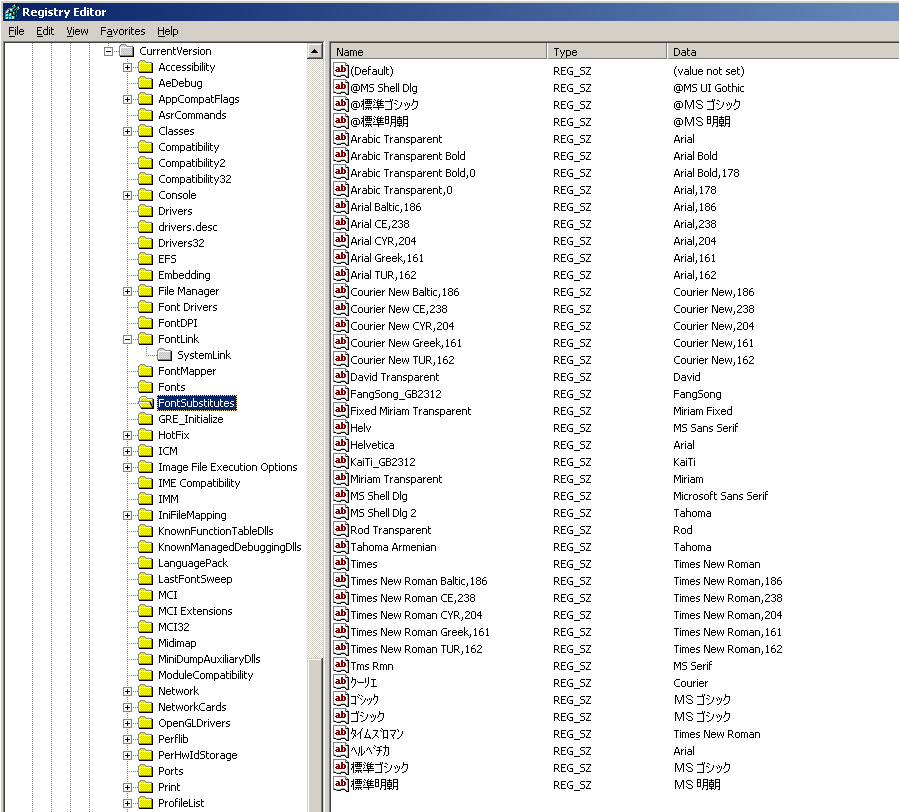
I've gotten every Japanese game I've tried except one to work on Windows 2000. At a minimum, you need the system default code page set to Japanese so that eg. Shift-JIS filenames and UI text will work. Sometimes you also need the user locale set to Japan, for programs that call GetLocaleInfo. And sometimes you might need to have the same font selections that Japanese Windows has, see here: http://www.hyakushiki.net/misc/fontsubs.png

GBAJAM 2024 submission on itch: https://90soft90.itch.io/wreckage