VOGONS


Reply 280 of 299, by MrSegfault

User metadata
Rank Newbie
Rank
Newbie
kalohimal wrote on 2026-06-19, 17:18:

I'm puzzled though of why you cannot adjust multiplier. What is the program's response when you run:
cpuspd m11 i m6 i

C:\CPUSPD>cpuspd m11 i m6 i
CPUSPEED version 2.2 - by David C.Y. Wong.
Current multiplier: 11.0
Intel(R) Core(TM)2 Duo CPU E7500 @ 2.93GHz ID(6,17,A)
CPU frequency is 2936MHz (PERF) / 2936MHz (TSC)
Current multiplier: 11.0
Intel(R) Core(TM)2 Duo CPU E7500 @ 2.93GHz ID(6,17,A)
CPU frequency is 2935MHz (PERF) / 2935MHz (TSC)

CPU: Intel Core 2 Duo E7500 2.93 GHz Dual-Core
Graphics: EVGA NVIDI​A GeForce ​7900 GT 25​6MB + Zalman VF9​00-Cu Cooler
Memory: 2 GB (1 x 2 GB) DDR2 Memory
Soundcard: Creative S​oundblaste​r Audigy 2​ ZS
Storage: 1TB + 500GB SSD + 120gb HDD

Reply 281 of 299, by kalohimal

User metadata
Rank Member
Rank
Member

That's quite strange. Could you check your bios setting for EIST please? If it's disabled then it's possible, even though I had pulled out my socket 7 board and with the EIST set to disabled it still works. What motherboard are you using?

Meanwhile, try this to get 486 speed:
cpuspd o7 cd i

Slow down your CPU with CPUSPD for DOS retro gaming.

Reply 282 of 299, by MrSegfault

User metadata
Rank Newbie
Rank
Newbie

I'm using an MSI G41M4-L.
https://theretroweb.com/motherboards/s/msi-g4 … ms-7592-ver-1.0

I already have disabled EIST as a way to check if this would fix the issue with the multiplier not changing but it hasn't made a difference sadly.

CPU: Intel Core 2 Duo E7500 2.93 GHz Dual-Core
Graphics: EVGA NVIDI​A GeForce ​7900 GT 25​6MB + Zalman VF9​00-Cu Cooler
Memory: 2 GB (1 x 2 GB) DDR2 Memory
Soundcard: Creative S​oundblaste​r Audigy 2​ ZS
Storage: 1TB + 500GB SSD + 120gb HDD

Reply 283 of 299, by kalohimal

User metadata
Rank Member
Rank
Member

EIST should be enabled not disabled for power management to work. If it is still not helping then the only way I could think of is to try the CPU on another socket 775 motherboard.

Slow down your CPU with CPUSPD for DOS retro gaming.

Reply 284 of 299, by MrSegfault

User metadata
Rank Newbie
Rank
Newbie

Turns out that the multiplier control only seems to work via MS DOS and not Windows 9X. Not sure why but whatever I put in does seem to actually change it.
Also, my DOS programs seem to launch a lot quicker even when the CPU is throttled compared to doing so on Windows 9X. Probably because DOS is less demanding than Windows.

I have another question. Are we allowed to combine the usage of throttle, multiplayer, and ODCM to achieve the speeds we want? Using throttle at a certain threshold with L2 disabled does seem to work for me but I want to make slight adjustments to the speed as well.

CPU: Intel Core 2 Duo E7500 2.93 GHz Dual-Core
Graphics: EVGA NVIDI​A GeForce ​7900 GT 25​6MB + Zalman VF9​00-Cu Cooler
Memory: 2 GB (1 x 2 GB) DDR2 Memory
Soundcard: Creative S​oundblaste​r Audigy 2​ ZS
Storage: 1TB + 500GB SSD + 120gb HDD
Reply 285 of 299, by kalohimal

User metadata
Rank Member
Rank
Member

Yes you can combine them, e.g.:

CPUSPD m6 o6 t4 cd i
sets multiplier to 6, odcm to 6, throttle to 4, disable cache, and displays system info.

Slow down your CPU with CPUSPD for DOS retro gaming.

Reply 286 of 299, by MrSegfault

User metadata
Rank Newbie
Rank
Newbie

Sweet! Thank you so much.

CPU: Intel Core 2 Duo E7500 2.93 GHz Dual-Core
Graphics: EVGA NVIDI​A GeForce ​7900 GT 25​6MB + Zalman VF9​00-Cu Cooler
Memory: 2 GB (1 x 2 GB) DDR2 Memory
Soundcard: Creative S​oundblaste​r Audigy 2​ ZS
Storage: 1TB + 500GB SSD + 120gb HDD

Reply 287 of 299, by Shiftyy

User metadata
Rank Newbie
Rank
Newbie

Hi,

I am trying to change the multiplier on my unlocked Core 2 Extreme x6800.

When I run

CPUSPD m i m8 i

Nothing happens. It just prints the current frequency twice.

What am I doing wrong?

Reply 288 of 299, by Falcosoft

User metadata
Rank l33t
Rank
l33t
Shiftyy wrote on 2026-07-23, 09:33:
Hi, […]
Show full quote

Hi,

I am trying to change the multiplier on my unlocked Core 2 Extreme x6800.

When I run

CPUSPD m i m8 i

Nothing happens. It just prints the current frequency twice.

What am I doing wrong?

Try to set the multiplier to minimum in your BIOS and then try to set bigger multipliers with CPUSPD. Report back if it is working this way or not.

Website, Youtube
Falcosoft Soundfont Midi Player + Munt VSTi + BassMidi VSTi
VST Midi Driver Midi Mapper
x86 microarchitecture benchmark (MandelX)

Reply 289 of 299, by Shiftyy

User metadata
Rank Newbie
Rank
Newbie
Falcosoft wrote on 2026-07-23, 10:16:
Shiftyy wrote on 2026-07-23, 09:33:
Hi, […]
Show full quote

Hi,

I am trying to change the multiplier on my unlocked Core 2 Extreme x6800.

When I run

CPUSPD m i m8 i

Nothing happens. It just prints the current frequency twice.

What am I doing wrong?

Try to set the multiplier to minimum in your BIOS and then try to set bigger multipliers with CPUSPD. Report back if it is working this way or not.

Unfortunately no change with the behavior.

Reply 290 of 299, by Falcosoft

User metadata
Rank l33t
Rank
l33t
Shiftyy wrote on 2026-07-23, 12:20:
Falcosoft wrote on 2026-07-23, 10:16:
Shiftyy wrote on 2026-07-23, 09:33:
Hi, […]
Show full quote

Hi,

I am trying to change the multiplier on my unlocked Core 2 Extreme x6800.

When I run

CPUSPD m i m8 i

Nothing happens. It just prints the current frequency twice.

What am I doing wrong?

Try to set the multiplier to minimum in your BIOS and then try to set bigger multipliers with CPUSPD. Report back if it is working this way or not.

Unfortunately no change with the behavior.

Then try to disble multi-core support in your BIOS if there is an option for it. Then try to use CPUSPD with a single core enabled.
This test is useful to determine if the problem is releted to a well known problem of mult-core logic of Speedstep.

Website, Youtube
Falcosoft Soundfont Midi Player + Munt VSTi + BassMidi VSTi
VST Midi Driver Midi Mapper
x86 microarchitecture benchmark (MandelX)

Reply 291 of 299, by Shiftyy

User metadata
Rank Newbie
Rank
Newbie
Falcosoft wrote on 2026-07-23, 13:47:
Shiftyy wrote on 2026-07-23, 12:20:
Falcosoft wrote on 2026-07-23, 10:16:

Try to set the multiplier to minimum in your BIOS and then try to set bigger multipliers with CPUSPD. Report back if it is working this way or not.

Unfortunately no change with the behavior.

Then try to disble multi-core support in your BIOS if there is an option for it. Then try to use CPUSPD with a single core enabled.
This test is useful to determine if the problem is releted to a well known problem of mult-core logic of Speedstep.

I don't have the option to disable multi-core support, only hyperthreading.

I tried using a program called MSRED to adjust the multiplier to 6. It appears to work - when I type CPUSPD m i, it reports the following:

Current multiplier: 28.0
CPU frequency is 2800MHz (PERF) / 600MHz (TSC)

However when performing benchmarks, the performance is the same, so it's not working.

I am really confused.

Reply 292 of 299, by kalohimal

User metadata
Rank Member
Rank
Member

Core 2 Extreme X should work since its family and model are the same as the regular Core 2 (family 6 model F).

Please show complete response of: cpuspd i m6 f
The processor name & ID are important info and must be included. Attaching a photo will be ideal.

Shiftyy wrote on 2026-07-23, 16:41:
I tried using a program called MSRED to adjust the multiplier to 6. It appears to work - when I type CPUSPD m i, it reports the […]
Show full quote

I tried using a program called MSRED to adjust the multiplier to 6. It appears to work - when I type CPUSPD m i, it reports the following:

Current multiplier: 28.0
CPU frequency is 2800MHz (PERF) / 600MHz (TSC)

However when performing benchmarks, the performance is the same, so it's not working.

I am really confused.

This looks totally incorrect. Your CPU's multiplier can never be 28, and TSC cannot be 600MHz unless you're throttling it (if multiplier is x6 then FSB needs to be 100MHz to get 600MHz). And if the benchmark performance is the same then most likely you're writing to the wrong MSR or the FIDs of the 2 cores are not sync'ed properly.

Slow down your CPU with CPUSPD for DOS retro gaming.

Reply 293 of 299, by Shiftyy

User metadata
Rank Newbie
Rank
Newbie
kalohimal wrote on 2026-07-26, 16:42:
Core 2 Extreme X should work since its family and model are the same as the regular Core 2 (family 6 model F). […]
Show full quote

Core 2 Extreme X should work since its family and model are the same as the regular Core 2 (family 6 model F).

Please show complete response of: cpuspd i m6 f
The processor name & ID are important info and must be included. Attaching a photo will be ideal.

Shiftyy wrote on 2026-07-23, 16:41:
I tried using a program called MSRED to adjust the multiplier to 6. It appears to work - when I type CPUSPD m i, it reports the […]
Show full quote

I tried using a program called MSRED to adjust the multiplier to 6. It appears to work - when I type CPUSPD m i, it reports the following:

Current multiplier: 28.0
CPU frequency is 2800MHz (PERF) / 600MHz (TSC)

However when performing benchmarks, the performance is the same, so it's not working.

I am really confused.

This looks totally incorrect. Your CPU's multiplier can never be 28, and TSC cannot be 600MHz unless you're throttling it (if multiplier is x6 then FSB needs to be 100MHz to get 600MHz). And if the benchmark performance is the same then most likely you're writing to the wrong MSR or the FIDs of the 2 cores are not sync'ed properly.

The CPU was running at 100 FSB at the time. The CPU normally it runs at 266 FSB, but the board only supports 200 FSB. I am using a BSEL mod to downgrade it to 200 FSB. I removed the BSEL mod to check if that was causing the issues I'm having with CPUSPD, and doing that makes it run at 100 FSB. The board utlizes the 865 chipset which only supports up to 200/800 FSB.

The x6800 is unlocked so yes, the multiplier was set to 28/2800MHz, and setting it to 6 would make it run at 600MHz.

The computer is currently disassembled at the moment, but once its been reassembled, I'll supply the output of that command.

Reply 294 of 299, by kalohimal

User metadata
Rank Member
Rank
Member

I'm afraid you're on your own for modded hardware as I have zero knowledge on your mods. I also won't be able to replicate the problems and fix them. Sorry.

Slow down your CPU with CPUSPD for DOS retro gaming.

Reply 295 of 299, by RayeR

User metadata
Rank Oldbie
Rank
Oldbie

He just changed level of BSEL pins via isolation or wire to alter FSB that CPU reports to the MB (CPU said to MB: I want to get 266MHz but MB cannot so after mod CPU tells it wants 200MHz that MB can do). AFAIK those pins are hardwired in CPU (float or grounded) so not involved in any dynamic freq.change. It should not affect the multiplier or throttling any way.

Gigabyte GA-P67-DS3-B3, Core i7-2600K @4,5GHz, 8GB DDR3, 128GB SSD, GTX970(GF7900GT), SB Audigy + YMF724F + DreamBlaster combo + LPC2ISA

Reply 296 of 299, by Shiftyy

User metadata
Rank Newbie
Rank
Newbie

Yes. Think of it as underclocking or overclocking the FSB. It has no relation to the multiplier or the way it behaves. I even removed the mod to verify whether anything changed and nothing did.

Reply 297 of 299, by Shiftyy

User metadata
Rank Newbie
Rank
Newbie
kalohimal wrote on 2026-07-26, 16:42:
Core 2 Extreme X should work since its family and model are the same as the regular Core 2 (family 6 model F). […]
Show full quote

Core 2 Extreme X should work since its family and model are the same as the regular Core 2 (family 6 model F).

Please show complete response of: cpuspd i m6 f
The processor name & ID are important info and must be included. Attaching a photo will be ideal.

Shiftyy wrote on 2026-07-23, 16:41:
I tried using a program called MSRED to adjust the multiplier to 6. It appears to work - when I type CPUSPD m i, it reports the […]
Show full quote

I tried using a program called MSRED to adjust the multiplier to 6. It appears to work - when I type CPUSPD m i, it reports the following:

Current multiplier: 28.0
CPU frequency is 2800MHz (PERF) / 600MHz (TSC)

However when performing benchmarks, the performance is the same, so it's not working.

I am really confused.

This looks totally incorrect. Your CPU's multiplier can never be 28, and TSC cannot be 600MHz unless you're throttling it (if multiplier is x6 then FSB needs to be 100MHz to get 600MHz). And if the benchmark performance is the same then most likely you're writing to the wrong MSR or the FIDs of the 2 cores are not sync'ed properly.

Here is the screenshot

The attachment 20260731_022320.jpg is no longer available

Reply 298 of 299, by Shiftyy

User metadata
Rank Newbie
Rank
Newbie
Falcosoft wrote on 2026-07-23, 13:47:
Shiftyy wrote on 2026-07-23, 12:20:
Falcosoft wrote on 2026-07-23, 10:16:

Try to set the multiplier to minimum in your BIOS and then try to set bigger multipliers with CPUSPD. Report back if it is working this way or not.

Unfortunately no change with the behavior.

Then try to disble multi-core support in your BIOS if there is an option for it. Then try to use CPUSPD with a single core enabled.
This test is useful to determine if the problem is releted to a well known problem of mult-core logic of Speedstep.

I had another look and there actually is a setting for disabling multi core in the BIOS. However disabling it didn't have any effect.

I ran your sstep program and it reports the following:

The attachment 20260804_133320.jpg is no longer available

Notice how it says MinFid: 18x, shouldn't this show 6x? Could this be the problem? If so, is there any way to remedy? Speedstep works properly in Windows XP, going all the way down to 6x, so it's strange that DOS doesn't work properly.

Reply 299 of 299, by Falcosoft

User metadata
Rank l33t
Rank
l33t
Shiftyy wrote on 2026-08-04, 04:07:
I had another look and there actually is a setting for disabling multi core in the BIOS. However disabling it didn't have any ef […]
Show full quote
Falcosoft wrote on 2026-07-23, 13:47:
Shiftyy wrote on 2026-07-23, 12:20:

Unfortunately no change with the behavior.

Then try to disble multi-core support in your BIOS if there is an option for it. Then try to use CPUSPD with a single core enabled.
This test is useful to determine if the problem is releted to a well known problem of mult-core logic of Speedstep.

I had another look and there actually is a setting for disabling multi core in the BIOS. However disabling it didn't have any effect.

I ran your sstep program and it reports the following:

The attachment 20260804_133320.jpg is no longer available

Notice how it says MinFid: 18x, shouldn't this show 6x? Could this be the problem? If so, is there any way to remedy? Speedstep works properly in Windows XP, going all the way down to 6x, so it's strange that DOS doesn't work properly.

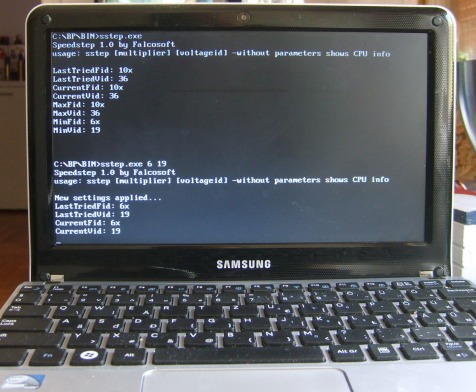
Yes, it should report lower Fid to minimum than to maximum. Like e.g. in this case:

speedstep_dos_rs.jpg

This way your CPU is restricted to a single P-state. I do not know how Speedstep works in WinXP this way.
1. Maybe the Intel PPM driver can reprogram the Speedstep registers under WinXP.
2. Actually there are more power saving features that can set lower multiplier on WinXP (like C1E). Maybe you see the result of C1E and not Speedstep.
You can try to disable C1E in BIOS and check if multiplier is still set to minimum when CPU is idle on Windows.

Website, Youtube
Falcosoft Soundfont Midi Player + Munt VSTi + BassMidi VSTi
VST Midi Driver Midi Mapper
x86 microarchitecture benchmark (MandelX)