VOGONS


First post, by leonardo

User metadata
Rank Oldbie
Rank
Oldbie
momaka wrote on 2025-07-12, 13:07:

...for Radeon 9700/9800 cards, the overall cooling of the card is just dismal, no matter which way you look at it. Anyone that runs these with the stock cooler is essentially asking for their card to die. On that note, if you put a massive heatsink on the GPUs, you'll notice that the RAM now also runs much cooler. So not only do you extend the life of the GPU, but also that of the RAM... though for better completeness, one should also install RAM heatsinks and actively cool them as well. Doing so should greatly extend the life of these cards. I have 2 that were reflown over 10 years ago that still work with my improvised oversized coolers. So I take that as good enough proof that these a last with good cooling. FWIW, reflowing of GPUs should not be considered a fix, but only a temporary revival. The fact that I can extend their service life as much goes to show that temperature is the enemy of these.

This is an off-shoot thread somewhat related to 'Saving defective chips with improvised cooling?'

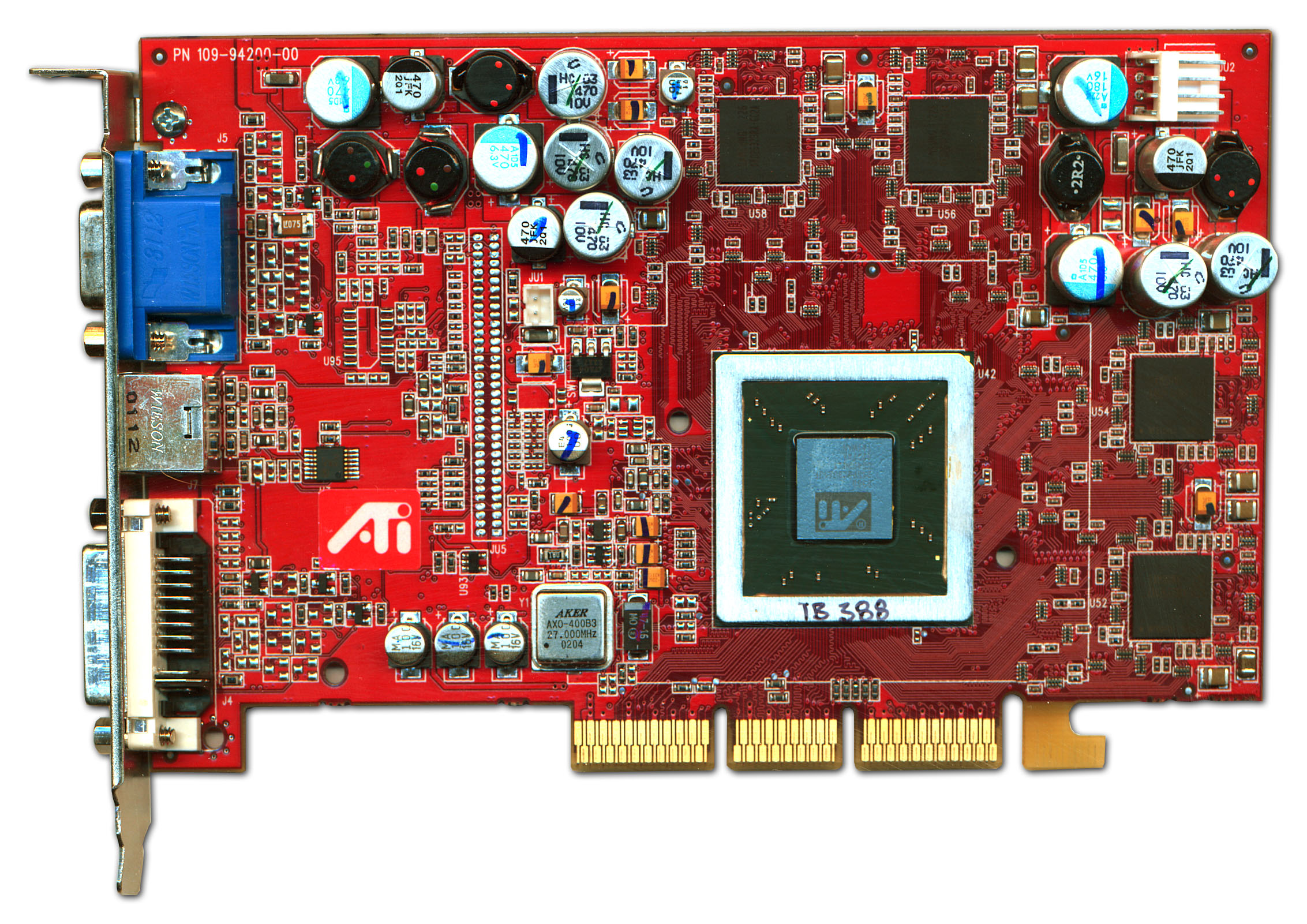
My lucky find of a discarded Radeon 9700 Pro off a flea-market brought with it much joy, but I've begun to worry that the card like its many brethren is going to meet an untimely demise due to the lackluster cooling. After both the card, and a Zalman VNF100 I also scored a while back spent over a year sitting on the shelf, I finally mustered the courage to attempt the replacement.

Why did it take so long? Because the heatsink seemed absolutely fixed despite me removing the push-pin locks and I didn't know what to do since the heatsink would absolutely not budge. Looking around for instructions, even the best illustrated (such as the one here) only showed the before- and after pictures, typically with little to no mention on what to do if the heatsink remained attached after the push-pins had been dealt with.

I bit my lip and placed a plastic spudger between the card and the heatsink in a place where it would not rest against capacitors or other components (a tough spot to find), bent the spudger pushing the heatsink away from the card, and to my shock and relief the heatsink came off with a loud pop:

The attachment r300_hsfmod_pt1.jpg is no longer available

I now understand why there are no pictures or video of anyone actually doing this part.

Anyway, my most recent conundrum has to do with the clean-up: I have fairly good success on top of the chip itself with alcohol, but there is a thick outer layer of the hardened yellow adhesive/compound which I'm not sure what to do with:

The attachment r300_hsfmod_pt2.jpg is no longer available

I guess I could leave the residue on the sides, as long as the top of the chip is clean so that new thermal paste can be applied? Or I could just whittle away at it slowly, applying small amounts of alcohol (I have reservations about just pouring a lot of alcohol on this)? What would you do, and if you'd remove it - how would you go about it?

Last edited by leonardo on 2026-08-05, 13:09. Edited 3 times in total.

[Install Win95 like you were born in 1985!] on systems like this or this.

Reply 1 of 19, by tehsiggi

User metadata
Rank Oldbie
Rank
Oldbie

Leave it, as long as it's not higher than the Die itself. Check if the shim and Die are on the same height - if so, you can easily use paste.

I usually use hot air (around 130°C) for heating up the cooler and then go for a slow twisting motion. Usually it comes off relatively easy.

AGP Card Real Power Consumption
AGP Power monitor - diagnostic hardware tool
Graphics card repair collection

Reply 2 of 19, by TELVM

User metadata
Rank Oldbie
Rank
Oldbie

^ As tehsiggi said.

Replacing the pathetic OEM heatsink with a real one in a 9800 Pro (from 5:25 onwards)

Besides improving point cooling for the GPU, don't forget about overall case ventilation.

In many vintage PC cases the OEM provision for ventilation is poor (relatively few spots for relatively small diameter fans). Then some users don't pay any attention to it, leaving said few spots unpopulated, etc.

Let the air flow!

Reply 3 of 19, by Grem Five

User metadata
Rank Oldbie
Rank
Oldbie

I would leave the yellow stuff as long as its lower or flush than the die.

You had better luck then I did on one of my cards as they put so much goop on it that it damaged 2 of the smds removing the HS....... card still worked. ATI 9700 Pro missing smds needed?

Reply 4 of 19, by Repo Man11

User metadata
Rank l33t
Rank
l33t

I had a 9800 SE where I had to put it in the freezer overnight because the decades had turned the (now?) yellow thermal paste into epoxy.

A lot of times when you first start out on a project you think, This is never going to be finished. But then it is, and you think, Wow, it wasn't even worth it. - Jack Handey

Reply 5 of 19, by tehsiggi

User metadata
Rank Oldbie
Rank
Oldbie
TELVM wrote on 2026-07-28, 16:53:
^ As tehsiggi said. […]
Show full quote

^ As tehsiggi said.

Replacing the pathetic OEM heatsink with a real one in a 9800 Pro (from 5:25 onwards)

Besides improving point cooling for the GPU, don't forget about overall case ventilation.

In many vintage PC cases the OEM provision for ventilation is poor (relatively few spots for relatively small diameter fans). Then some users don't pay any attention to it, leaving said few spots unpopulated, etc.

Ventilation is very important. Especially around 9700/9800 series. They don't do well well with thermal stress. Most noticeable with the memory (and it's bga solder joints) - so offer that card a decent airflow.

AGP Card Real Power Consumption
AGP Power monitor - diagnostic hardware tool
Graphics card repair collection

Reply 6 of 19, by leonardo

User metadata
Rank Oldbie
Rank
Oldbie
tehsiggi wrote on 2026-07-28, 15:08:

I usually use hot air (around 130°C) for heating up the cooler and then go for a slow twisting motion. Usually it comes off relatively easy.

I tried this, albeit unscientifically with a hair dryer at minimum heat. Despite the heatsink becoming too hot to touch, it did not wiggle at all. I was also concerned about applying force because if the heatsink would suddenly loosen, there were plenty of components right around its edges (and some even underneath, where it raises up!) that would have come clean off.

Repo Man11 wrote on 2026-07-28, 23:28:

I had a 9800 SE where I had to put it in the freezer overnight because the decades had turned the (now?) yellow thermal paste into epoxy.

This is another piece of advice I read, but it was also noted that it could potentially be hard on the card so I only had mine in for ~30min before I got paranoid and decided I'd just try to pry the heatsink off, landing at what I ended up doing. The paste is absolutely epoxy by now. It's like chipping at concrete.

tehsiggi wrote on 2026-07-28, 15:08:

Leave it, as long as it's not higher than the Die itself. Check if the shim and Die are on the same height - if so, you can easily use paste.

Grem Five wrote on 2026-07-28, 22:36:

I would leave the yellow stuff as long as its lower or flush than the die.

I was leaning in this direction already, and after sleeping on it I think this is what I will do. I'll finish the clean-up (the chip still has some residue on top of it) and then continue on to applying the new paste and cooler.

I'll report back and let you all know how it went. Thank you for the tips!

[Install Win95 like you were born in 1985!] on systems like this or this.

Reply 7 of 19, by Pino

User metadata
Rank Member
Rank
Member

Acetone will work great to remove the yellow stuff, just soak it and let it cook for a while.

Reply 8 of 19, by leonardo

User metadata
Rank Oldbie
Rank
Oldbie

So today I was going to resume, but as I began re-evaluating the cleanliness of the processing unit, my eye got caught on what appears to be some surface-components having broken off:

The attachment r300_hsfmod_pt3.jpg is no longer available
The attachment r300_hsfmod_pt4.jpg is no longer available

This is heart-breaking, because I thought I got off scot free taking the heatsink off. I know this didn't happen during the cleaning up of the chip earlier, because I only worked on the very center part which is why all that hardened yellow gunk can still be seen on the sides. At first I thought maybe there shouldn't be protruding parts on that spot, but looking at a reference image (for example here or here), it would appear that two components within the circled area appear to be missing.

Oh phooey. 🙁 We're in Louis Rossman territory now.

[Install Win95 like you were born in 1985!] on systems like this or this.

Reply 10 of 19, by leonardo

User metadata
Rank Oldbie
Rank
Oldbie
tehsiggi wrote on 2026-07-31, 18:44:

Do you need reference values? I have dead R300's from which I can derive the exact values, if you need. Could do that next week.

I'm not sure I understand.

A previous poster suggests that the card could in fact be functional as it is.

I don't have proper soldering equipment nor experience.

[Install Win95 like you were born in 1985!] on systems like this or this.

Reply 11 of 19, by tehsiggi

User metadata
Rank Oldbie
Rank
Oldbie
leonardo wrote on 2026-07-31, 19:00:
I'm not sure I understand. […]
Show full quote
tehsiggi wrote on 2026-07-31, 18:44:

Do you need reference values? I have dead R300's from which I can derive the exact values, if you need. Could do that next week.

I'm not sure I understand.

A previous poster suggests that the card could in fact be functional as it is.

I don't have proper soldering equipment nor experience.

Yep, it could work just fine.

I was just asking if you want to replace them and need the reference values. If not, all good.

Give it a shot without them, it'll probably do fine.

AGP Card Real Power Consumption
AGP Power monitor - diagnostic hardware tool
Graphics card repair collection

Reply 12 of 19, by swaaye

User metadata
Rank l33t++
Rank
l33t++

The yellow stuff is a phase change compound and it's supposed to be solid at room temp. It's a better gap filler than paste and has greater longevity.

Reply 13 of 19, by Grem Five

User metadata
Rank Oldbie
Rank
Oldbie

If you havent cleaned the yellow compound off the heat sink yet I would check it for the missing components, that is where mine were still stuck too.

I never reattached mine but still have it.

edit: BTW I dont think that is a 9700 pro but a non pro judging by the memory chips. I think the only one I have with those memory chips is my ATI Radeon 9700 TX actually.

Reply 14 of 19, by tehsiggi

User metadata
Rank Oldbie
Rank
Oldbie
Grem Five wrote on 2026-08-01, 02:14:

If you havent cleaned the yellow compound off the heat sink yet I would check it for the missing components, that is where mine were still stuck too.

I never reattached mine but still have it.

edit: BTW I dont think that is a 9700 pro but a non pro judging by the memory chips. I think the only one I have with those memory chips is my ATI Radeon 9700 TX actually.

3.3ns is a 9700 non-Pro, that is correct.

AGP Card Real Power Consumption
AGP Power monitor - diagnostic hardware tool
Graphics card repair collection

Reply 15 of 19, by leonardo

User metadata
Rank Oldbie
Rank
Oldbie
tehsiggi wrote on 2026-08-01, 04:48:
Grem Five wrote on 2026-08-01, 02:14:

BTW I dont think that is a 9700 pro but a non pro judging by the memory chips. I think the only one I have with those memory chips is my ATI Radeon 9700 TX actually.

3.3ns is a 9700 non-Pro, that is correct.

You guys are probably right. I was only going by the overall visual when looking at which card this might be. Windows was also helpfully tagging it as a Radeon 9500 Pro/9700 Pro in Device Manager... that's probably where I got the idea from. Not that a 9700 would make me any less happy. I was already capping out the framerates to monitor refresh on every game the card would run!

...and now onto the progress. After taking another breather I resumed. I decided to go through with the components missing. Installing the heatsink required a lot of focus (I was intent on not undoing any progress), so there aren't that many pictures, but once I felt I was closer to the finish line I did snap these two:

The attachment r300_hsfmod_pt5.jpg is no longer available

I used MX-6 for the actual core of the video card, and the Zalman supplied thermal paste for the heatpipe grooves. That stuff was quite thick and I didn't at first know how to properly spread it around, but I then discovered that a pin-head was just the right size to be placed inside the grooves. Moving it back and forth directionally worked out great.

Here is the setup before "locking in" the top half of the cooler, which secures the heatpipes in place:

The attachment r300_hsfmod_pt6.jpg is no longer available

After the card hat sat for a day, I then plugged it in:

The attachment r300_hsfmod_pt7.jpg is no longer available

However, it looked like the tip of one of the heatpipes was just coming into contact with the memory module in the DIMM-slot, so I moved the RAM to the second slot and vóla:

The attachment r300_hsfmod_pt8.jpg is no longer available

Hoping that the case exhaust fan placed right on top of the video card will pull air out from over the heatsink at a rate that satisfies it:

The attachment r300_hsfmod_pt9.jpg is no longer available

Coming up next - does the system POST...

[Install Win95 like you were born in 1985!] on systems like this or this.
Reply 17 of 19, by leonardo

User metadata
Rank Oldbie
Rank
Oldbie

Hmm... close but not a 100% success.

On first boot the system gave me one long and three short beeps, which to my understanding communicates video card error. I was disheartened, but on second boot attempt the system came right up, and was working perfectly. I tested it for a couple of hours and it ran without a hitch. 2D/3D et all. Tested 3DMark and a couple of games and saw no glitches or corruption of any sort. The heatpipes and the heatsink got warm to the touch, but not burning hot like the old one used to.

To clear the various drivers and other cruft that had been piling up on this system earlier I decided I'd reinstall Windows. After reinstallation everything was fine until at one point I restarted following the installation of sound card drivers, and then suddenly there was a Windows Protection Error. Following a restart the system came up again, but this time in 16-color mode, telling me it couldn't detect the video hardware. I immediately powered down and removed the card.

I think this one is in an in-between state and I'm not sure why it isn't 100% reliable now. If I had to guess, I wouldn't say overheating, but am just not sure.

[Install Win95 like you were born in 1985!] on systems like this or this.

Reply 18 of 19, by leonardo

User metadata
Rank Oldbie
Rank
Oldbie

Wait a minute... swapping the old card in I'm getting exactly the same kind of behavior as with the "busted" Radeon 9700. This is starting to look more like Windows/driver-shenanigans than a video card issue.

[Install Win95 like you were born in 1985!] on systems like this or this.

Reply 19 of 19, by leonardo

User metadata
Rank Oldbie
Rank
Oldbie

Yup... this has now become an issue of troubleshooting the drivers for the Aureal Vortex instead. Besides the occasional one-long three-quick beeps when cold-starting, the Radeon 9700 seems to be fine as well. Aren't these things fun?!

[Install Win95 like you were born in 1985!] on systems like this or this.