VOGONS


Unstable 486 - Need assistance in fixing it.

Topic actions

Reply 40 of 60, by rasz_pl

User metadata
Rank l33t
Rank
l33t

Lets use proper pin numbering. 386 no keyboard response, pinouts checked weird?
This is Wrong:
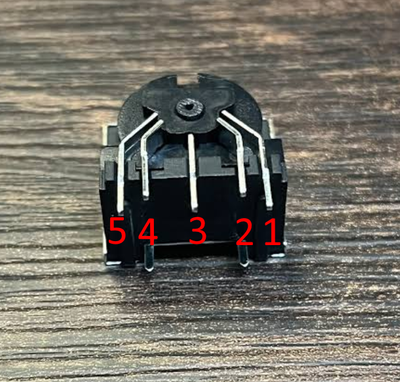
KBC_Con.png
PC AT DIN 5 pins go like this https://sharktastica.co.uk/topics/keyboard-co … tors#DINPinouts:
thumbnail?id=IjBsa10G

Your
54321 becomes
↓↓↓↓↓
14253

so your
>KB Connector Pin1 - NC to KBC (directy).
NC, good. What do you mean by "to KBC (directy)"?

>KB Connector Pin2 - KBC Pin: 40, 26, 25.
5V, good

>KB Connector Pin3 - KBC Pin: 39.
Data, good

>KB Connector Pin4 - KBC Pin: 2, 7, 20 and (mainboard GND).
GND, good

>KB Connector Pin5 - KBC Pin: 1.
Clock, good

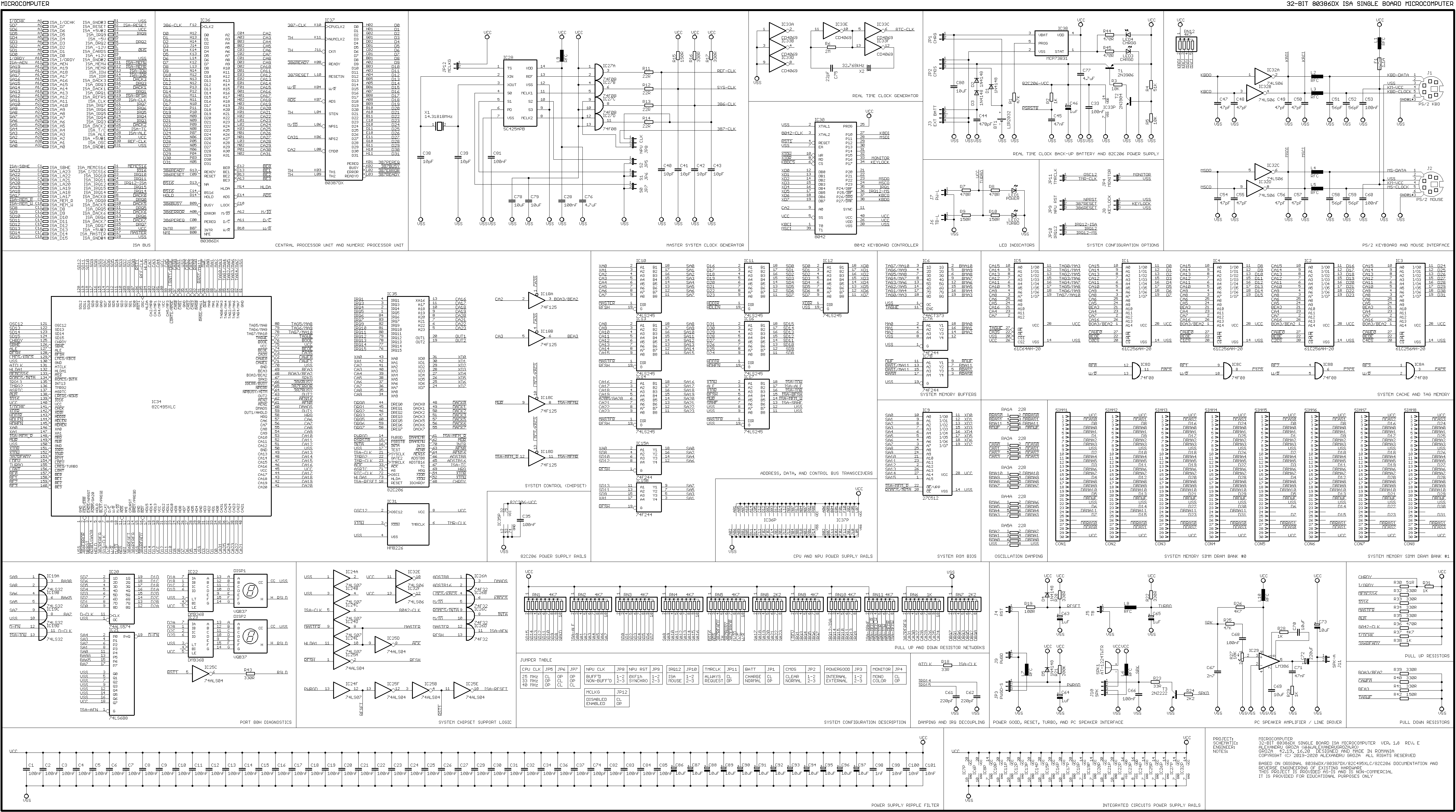
But this might not be all. Traditional Keyboard Controllers also need at least two output buffers connected to pins 37 38 like here
https://alexandrugroza.ro/microelectronics/sy … c-schematic.png
or here page 3 https://github.com/skiselev/mb386sx-rc2016/bl … hematic-1.0.pdf

AND most importantly two pullup resistors. Keyboard protocol uses open-collector wiring, meaning both KBC and keyboard signal by shorting data/clock wires to ground. This works because both Clock and Data are pulled up by resistors.
There is a slight possibility something might go wrong in case
- one of the resistors is somehow broken and reading 0 ohm = is permanently shorted to 5V
- KBC or keyboard has unusually strong buffer pulling to round
BUT this would have to be a strong mosfet to sink 5V on whole board, I would expect lots of smoke 😀

ergo when you say
>Measured voltage on the keyboard connector.

you are measuring something else because you numbered your pins weird? 😀

JAKra85 wrote on 2026-09-04, 11:38:

During boot it is near and around 0V a little above 0V (~0.2V).

WHICH PIN did you measure? and How did you measure? normal multimeter is too slow to notice, will have high hysteresis and will show you average from last ~second.
Im guessing you were measuring pins 1 and 2 clock/data, your pinout would be 3 5. This is perfectly normal.

JAKra85 wrote on 2026-09-04, 11:38:

By the time it posts, quite late... it rises to 4,96V.
When I press ANY button on the keyboard the voltage drops to 0.xV
It drops to 0.xV for around 3 seconds before rising back 4,96V.

yep, this is how communication works on PC Keyboard bus on clock/data pins.

Speaking of KBCs I noticed https://theretroweb.com/motherboards/s/matra-486-vip IkeFox picture has JETkey KBC, but your uploaded picture has some "ASII KB-100". Is this original KBC or was it missing and you fitted this one?

you could try https://www.computerhope.com/cttyhlp.htm and another computer connected using crossover serial cable. That way you should be able to simulate keyboard with serial link and see if computer still crashes. Mind you this will only work with basic dos software, most likely not memtest.

https://github.com/raszpl/sigrok-disk FM/MFM/RLL decoder
https://github.com/raszpl/FIC-486-GAC-2-Cache-Module (AT&T Globalyst)
https://github.com/raszpl/386RC-16 ram board
https://github.com/raszpl/Zenith_ZBIOS Zenith Z-386 MFM-300 ZBIOS disassembly


Reply 41 of 60, by JAKra85

User metadata
Rank Member
Rank
Member
rasz_pl wrote on 2026-09-04, 16:28:
Lets use proper pin numbering. 386 no keyboard response, pinouts checked weird? This is Wrong: https://www.vogons.org/thumbs/587 […]
Show full quote

Lets use proper pin numbering. 386 no keyboard response, pinouts checked weird?
This is Wrong:
KBC_Con.png
PC AT DIN 5 pins go like this https://sharktastica.co.uk/topics/keyboard-co … tors#DINPinouts:
thumbnail?id=IjBsa10G

Your
54321 becomes
↓↓↓↓↓
14253

so your
>KB Connector Pin1 - NC to KBC (directy).
NC, good. What do you mean by "to KBC (directy)"?

>KB Connector Pin2 - KBC Pin: 40, 26, 25.
5V, good

>KB Connector Pin3 - KBC Pin: 39.
Data, good

>KB Connector Pin4 - KBC Pin: 2, 7, 20 and (mainboard GND).
GND, good

>KB Connector Pin5 - KBC Pin: 1.
Clock, good

But this might not be all. Traditional Keyboard Controllers also need at least two output buffers connected to pins 37 38 like here
https://alexandrugroza.ro/microelectronics/sy … c-schematic.png
or here page 3 https://github.com/skiselev/mb386sx-rc2016/bl … hematic-1.0.pdf

AND most importantly two pullup resistors. Keyboard protocol uses open-collector wiring, meaning both KBC and keyboard signal by shorting data/clock wires to ground. This works because both Clock and Data are pulled up by resistors.
There is a slight possibility something might go wrong in case
- one of the resistors is somehow broken and reading 0 ohm = is permanently shorted to 5V
- KBC or keyboard has unusually strong buffer pulling to round
BUT this would have to be a strong mosfet to sink 5V on whole board, I would expect lots of smoke 😀

ergo when you say
>Measured voltage on the keyboard connector.

you are measuring something else because you numbered your pins weird? 😀

JAKra85 wrote on 2026-09-04, 11:38:

During boot it is near and around 0V a little above 0V (~0.2V).

WHICH PIN did you measure? and How did you measure? normal multimeter is too slow to notice, will have high hysteresis and will show you average from last ~second.
Im guessing you were measuring pins 1 and 2 clock/data, your pinout would be 3 5. This is perfectly normal.

JAKra85 wrote on 2026-09-04, 11:38:

By the time it posts, quite late... it rises to 4,96V.
When I press ANY button on the keyboard the voltage drops to 0.xV
It drops to 0.xV for around 3 seconds before rising back 4,96V.

yep, this is how communication works on PC Keyboard bus on clock/data pins.

Speaking of KBCs I noticed https://theretroweb.com/motherboards/s/matra-486-vip IkeFox picture has JETkey KBC, but your uploaded picture has some "ASII KB-100". Is this original KBC or was it missing and you fitted this one?

you could try https://www.computerhope.com/cttyhlp.htm and another computer connected using crossover serial cable. That way you should be able to simulate keyboard with serial link and see if computer still crashes. Mind you this will only work with basic dos software, most likely not memtest.

Thanks for the extensive reply.

What do you mean by "to KBC (directy)"?
- There is no (0Ω ) connection from keyboard connector to the keyboard controller.

If this is correct:
Your
54321 becomes
↓↓↓↓↓
14253

I measured 1 and 4 (5V Clock and Ground)

"you are measuring something else because you numbered your pins weird? 😀"
- Correct. I measured 5V Clock and Ground.

"Speaking of KBCs I noticed https://theretroweb.com/motherboards/s/matra-486-vip IkeFox picture has JETkey KBC, but your uploaded picture has some "ASII KB-100". Is this original KBC or was it missing and you fitted this one?"
- This is how I bought it from e-Bay.
- I currently use the same exact chip as the other board: JETkey V5.0G, had a spare. The other KBC is JETkey V3.0 from a 386.
- I have no history of this board. A few days ago when doing the closer visual examination I noticed that all chips used on the mainboard are made in 1995, except the KBC(1993). It could mean nothing, or it could mean someone already tried to fix this mainboard before. 😀

Now, I will
- measure GND and 5V on the keyboard connector.
- try out Ctty.

Last edited by JAKra85 on 2026-09-04, 19:03. Edited 2 times in total.

Retro PC Gallery:
https://docs.google.com/document/d/1ara32t4rV … nU/edit?tab=t.0

Reply 42 of 60, by JAKra85

User metadata
Rank Member
Rank
Member

Also, there is some damage visible on the back.
I measured them all yesterday and found no broken trace.

The attachment Screenshot 2026-09-04 205237.png is no longer available

Retro PC Gallery:
https://docs.google.com/document/d/1ara32t4rV … nU/edit?tab=t.0

Reply 43 of 60, by rasz_pl

User metadata
Rank l33t
Rank
l33t
JAKra85 wrote on 2026-09-04, 18:46:

I measured 1 and 4 (5V Clock and Ground)

yeah clock goes to ground during communication, its perfectly normal

JAKra85 wrote on 2026-09-04, 18:46:

- I currently use the same exact chip as the other board: JETkey V5.0G

so theory of using wrong KBC goes out the window

JAKra85 wrote on 2026-09-04, 18:46:

- I have no history of this board.

I was going to ask about BIOS next but retroweb one is from you 😀 and IkeFox had the same 2A4KCM03 so wrong bios is unlikely 🙁

JAKra85 wrote on 2026-09-04, 18:46:

- measure GND and 5V on the keyboard connector.

will be fine

Does it reliably crash with no CF card, just booting from floppy and typing some dos commands?

https://github.com/raszpl/sigrok-disk FM/MFM/RLL decoder
https://github.com/raszpl/FIC-486-GAC-2-Cache-Module (AT&T Globalyst)
https://github.com/raszpl/386RC-16 ram board
https://github.com/raszpl/Zenith_ZBIOS Zenith Z-386 MFM-300 ZBIOS disassembly
Reply 44 of 60, by JAKra85

User metadata
Rank Member
Rank
Member
rasz_pl wrote on 2026-09-04, 22:58:

will be fine

Yes, 5V is fine.

rasz_pl wrote on 2026-09-04, 22:58:

Does it reliably crash with no CF card, just booting from floppy and typing some dos commands?

It's not the actual DOS command that crash. Starting and closing programs crash. Example: starting a benchmark. Also, it crashed when exiting HWinfo. More importantly this is not reliable, it's random.
Reliable crash:
- Pressing "Esc" (restarting PC) in memtest+. - Crash 100%.
- Pressing Ctrl+Alt+Del in memtest+: Disconnects the keyboard, memtest continues to run. 😁
- Wrote a couple of loop scripts:
* Opens and exits a program. Crash.
* Loop only uses CPU and HDD. Crash.
* CPU only loop. Crash.
I have updated the first post with more details. When I added a counter to the loops, I noticed that system contunies to work. Unresponsive (looks like crash) to anything but restart button and Ctrl+Alt+Del restart. It this case Ctrl+Alt+Del does not disconnect the keyboard like in memtest+.

When running memtest+, CF(&IDE2CF) is disconnected with no effect.

Retro PC Gallery:
https://docs.google.com/document/d/1ara32t4rV … nU/edit?tab=t.0

Reply 45 of 60, by smoke86

User metadata
Rank Member
Rank
Member

What kind of RAM are you using?
I recently had weird instability and errors on 486 system and it turned out that switching from EDO to FPM solved the problem. And yes, my motherboard claimed to support EDO, which was only partially true (board was picky about EDO RAM).

Reply 47 of 60, by JAKra85

User metadata
Rank Member
Rank
Member

Update:

I tried using the Keyboard less and rely more on mouse (Serial port: COM1).
I disconnected the keyboard and only connected temporarily when required (Example: "Press Enter to continue").

Started Win95 setup, more crashes than with keyboard connected.
I could not even start Windows 95 installation; I got so many crashes.
Attached a few error messages with mouse on COM1.
These for me point to a memory centered issue.
I now have 3 memory options that boot, all FPMs:
- 2x4MB
- 4x4 MB
- 2x16MB
Issue persists with all 3 memory module configuration.

Removed mouse.
I could install Windows 95. Still unstable when running. (no mouse)

Retro PC Gallery:
https://docs.google.com/document/d/1ara32t4rV … nU/edit?tab=t.0

Reply 49 of 60, by Nexxen

User metadata
Rank l33t
Rank
l33t
JAKra85 wrote on 2026-09-06, 11:32:

With mouse connected the crashes happened when moving the mouse.
How can mouse movement (serial port dataflow) corrupt the memory in such a way?

Are data lines connected to any intermediate component before reaching the keyboard controller or the chipset?
If it fails to switch direction of signal it could create a conflict hence the crash.

This is a guess, really a hunch.

PC#1 Pentium 233 MMX - 98SE
PC#2 PIII-1Ghz - 98SE/W2K

- "One hates the specialty unobtainium parts, the other laughs in greed listing them under a ridiculous price" - kotel studios
- Bare metal ist krieg.

Reply 50 of 60, by JAKra85

User metadata
Rank Member
Rank
Member
Nexxen wrote on 2026-09-06, 11:49:

Are data lines connected to any intermediate component before reaching the keyboard controller or the chipset?

Yes.
COM1 is directly connected to the smaller Winbond chip.

The attachment Screenshot 2026-09-06 135618.png is no longer available

Retro PC Gallery:
https://docs.google.com/document/d/1ara32t4rV … nU/edit?tab=t.0

Reply 51 of 60, by Nexxen

User metadata
Rank l33t
Rank
l33t
JAKra85 wrote on 2026-09-06, 11:57:
Yes. COM1 is directly connected to the smaller Winbond chip. […]
Show full quote
Nexxen wrote on 2026-09-06, 11:49:

Are data lines connected to any intermediate component before reaching the keyboard controller or the chipset?

Yes.
COM1 is directly connected to the smaller Winbond chip.

The attachment Screenshot 2026-09-06 135618.png is no longer available

No capacitor or resistance connected to those lines?

PC#1 Pentium 233 MMX - 98SE
PC#2 PIII-1Ghz - 98SE/W2K

- "One hates the specialty unobtainium parts, the other laughs in greed listing them under a ridiculous price" - kotel studios
- Bare metal ist krieg.

Reply 53 of 60, by Nexxen

User metadata
Rank l33t
Rank
l33t
JAKra85 wrote on 2026-09-06, 12:40:
Nexxen wrote on 2026-09-06, 12:04:

No capacitor or resistance connected to those lines?

Correct.

Temperature of those chips? Are they bearable?
Can you put something cold on them and see if it changes anything?

Sorry I'm spitting low level stuff 😀

PC#1 Pentium 233 MMX - 98SE
PC#2 PIII-1Ghz - 98SE/W2K

- "One hates the specialty unobtainium parts, the other laughs in greed listing them under a ridiculous price" - kotel studios
- Bare metal ist krieg.

Reply 54 of 60, by rasz_pl

User metadata
Rank l33t
Rank
l33t

so crashed when
-keyboard input
-disk activity
-mouse movement

= interrupts handling

https://github.com/raszpl/sigrok-disk FM/MFM/RLL decoder
https://github.com/raszpl/FIC-486-GAC-2-Cache-Module (AT&T Globalyst)
https://github.com/raszpl/386RC-16 ram board
https://github.com/raszpl/Zenith_ZBIOS Zenith Z-386 MFM-300 ZBIOS disassembly

Reply 55 of 60, by JAKra85

User metadata
Rank Member
Rank
Member
Nexxen wrote on 2026-09-06, 13:20:

Temperature of those chips? Are they bearable?

You might be on to something.
This is the only chip that is VERY hot (70-80C).

I did a "tuchy-tuchy" temperature probe to all relevant chips.
All are quite cool after 5-10 minutes of working. I can keep the touch indefinitely.

Except this chip:
https://theretroweb.com/chips/4403

The attachment Screenshot 2026-09-06 135618.png is no longer available

I can only keep my touch for 5-10 secs, it's burning.

Retro PC Gallery:
https://docs.google.com/document/d/1ara32t4rV … nU/edit?tab=t.0

Reply 57 of 60, by Nexxen

User metadata
Rank l33t
Rank
l33t
JAKra85 wrote on 2026-09-06, 15:55:

Based on what I understand from the documentation, this is for COM1, COM2 and Game Port.
With nothing connected to it, I think this over 70C operation is not normal.

Let's go for broke, can you put a heatsink on it? something cold to put on top?
After this I'm out of ideas.
If it works colder probably it's dying. Thing is, is the replacement easy to find?

PC#1 Pentium 233 MMX - 98SE
PC#2 PIII-1Ghz - 98SE/W2K

- "One hates the specialty unobtainium parts, the other laughs in greed listing them under a ridiculous price" - kotel studios
- Bare metal ist krieg.

Reply 58 of 60, by rasz_pl

User metadata
Rank l33t
Rank
l33t

heatsink wont do anything other than mask the symptom
this chip is just line drivers. You can even desolder it completely for a test - obviously you will lose serial mouse
I would be very surprised if anything changed after desoldering it. It doesnt touch interrupt lines, its too small to affect 5V supply board vide, the worst it could do is glich superIO chip, but superIO is not responsible for IDE nor keyboard interrupts at all.

Interrupt controller is inside chipset.

https://github.com/raszpl/sigrok-disk FM/MFM/RLL decoder
https://github.com/raszpl/FIC-486-GAC-2-Cache-Module (AT&T Globalyst)
https://github.com/raszpl/386RC-16 ram board
https://github.com/raszpl/Zenith_ZBIOS Zenith Z-386 MFM-300 ZBIOS disassembly

Reply 59 of 60, by Shponglefan

User metadata
Rank l33t
Rank
l33t

A burning hot chip suggests it's internally shorted. I would remove and replace the chip if possible.

I just recently went through this repairing a P4 motherboard. It had a shorted Winbond SIO chip that once replaced, the board worked perfectly.

Pentium 4 Multi-OS Build
486 DX4-100 with 6 sound cards
486 DX-33 with 5 sound cards