VOGONS


Safe Opteron Tempatures

Topic actions

First post, by Darkman

User metadata
Rank Oldbie
Rank
Oldbie

Ive decided to build a Socket 939 system and have decided to go with an Opteron 148 as opposed to an Athlon64 FX. The board is an Abit AV8 (latest BIOS) and the CPU is recognised , however there is one issue regarding tempratures.

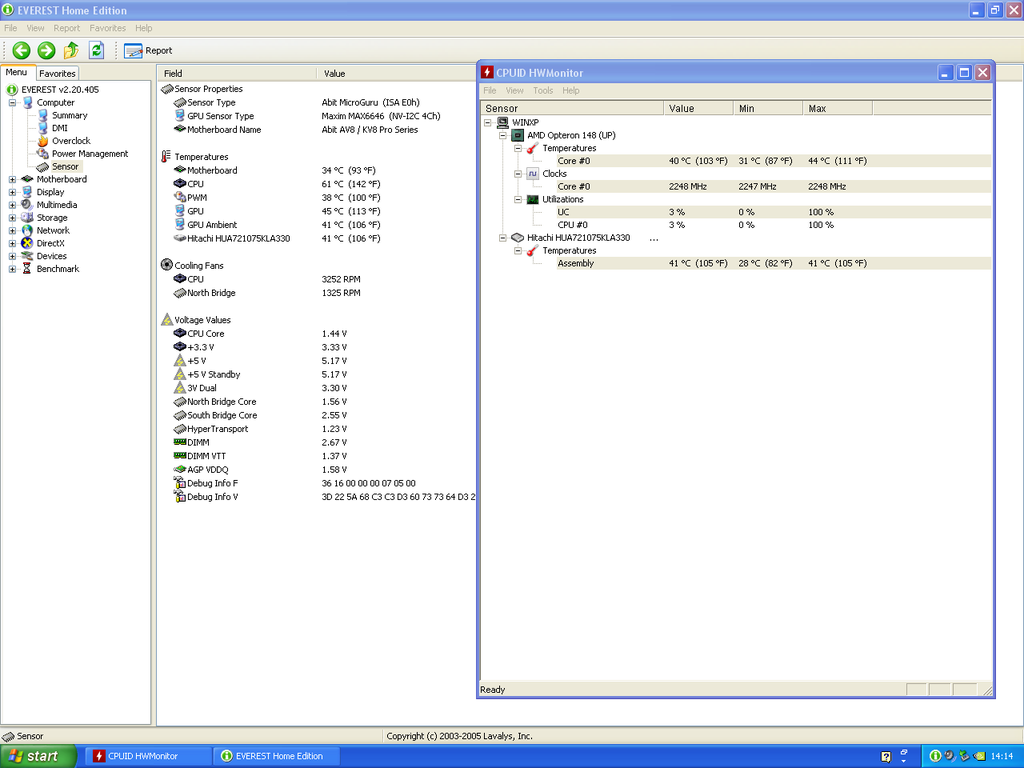
the system is giving me 2 different readings for the temperature of the CPU in the BIOS and in Everest shows a temperature of 60C or more under load , while in HWMonitor the temperature is a much lower 40C.
the CPU is using the stock AMD heatsink/fan , and the thermal paste Im using is Arctic Silver Ceramique. Furthermore the board is currently sitting outside of the case (still waiting for that one in the post), so there isnt a problem of airflow.

here is a screenshot of both Everest and HWMonitor giving me different readings (this was after installing and running Quake4 for about 15-20 minutes)
CPU%20Temps_zpsrrxkgpgo.png

So what is happening with these temp readings? 60 seems pretty high if its really that temperature (the heatsink doesn't feel particularly warm either)

Thanks in advance

Reply 1 of 9, by nforce4max

User metadata
Rank l33t
Rank
l33t

Could be reading different themp sensors so they both could be accurate but you will eventually to figure out if they are actual cpu temps or board temps. It is possible that it could be a glitch.

On a far away planet reading your posts in the year 10,191.

Reply 2 of 9, by Darkman

User metadata
Rank Oldbie
Rank
Oldbie

I have to wonder if part of the issue is that Opterons are not officially supported on this board , or at least are not mentioned on Abit's webpage, other sources do list them as compatible ( and it obviously does work , and is recognised as an Opteron 148 accordingly)

Reply 3 of 9, by agent_x007

User metadata
Rank Oldbie
Rank
Oldbie

See what BIOS thinks about Idle temp of your CPU, and compare it to what programs are showing you.

157143230295.png

Reply 4 of 9, by Darkman

User metadata
Rank Oldbie
Rank
Oldbie

as I said the BIOS readings tell me its 60C as well.

interestingly AIDA64 lists both temperatures (refering to it as "CPU" and "CPU Core"

Reply 5 of 9, by Kahenraz

User metadata
Rank l33t
Rank
l33t

When in doubt, get one of those hand-held laser temperature meters.

Reply 6 of 9, by PhilsComputerLab

User metadata
Rank l33t++
Rank
l33t++

40c sounds too low, but that's just my gut talking.

What is the CPU rated at? The cooler, does it have a copper core? What is the room temperature like? Got cool and quiet turned on in the BIOS and driver installed?

YouTube, Facebook, Website

Reply 7 of 9, by Darkman

User metadata
Rank Oldbie
Rank
Oldbie
PhilsComputerLab wrote:

40c sounds too low, but that's just my gut talking.

What is the CPU rated at? The cooler, does it have a copper core? What is the room temperature like? Got cool and quiet turned on in the BIOS and driver installed?

hmm, now that I think about it, the cooler doesn't have a copper core, its completely aluminium.

an ebay search got me a combo Opteron 170 (a dual core) and a stock AMD heatsink with a copper base (guess this one is for Opterons?) for cheap, we will see whether that combo ends up being a bit cooler, Though I do wonder if the performance will be as good as the 148 in games that dont utilize dual cores ,ie most of them (the 170 is a 2Ghz dual core, while the 148 is a 2.2Ghz single core)

Reply 8 of 9, by PhilsComputerLab

User metadata
Rank l33t++
Rank
l33t++

This one?

www.cpu-world.com/CPUs/K8/AMD-Dual-Core ... DBOX).html

110 W CPU?

The 60 to 70c is 95% the real reading. It might be throttling as well.

Rather than finding an authentic cooler, just get a 125 W Phenom II cooler. They look like this:

stock-hsf.jpg

Because it's AMD, they fit any AMD socket from 754 to AM3+ 😀

YouTube, Facebook, Website

