Indeed.
'Presumably' the manufacturer knows what the magic allocation unit size is, being the originator of that layout, and has selected this size with when preformatting the volume.
This is so the manufacturer can reliably and consistently hit the advertised speeds on the box.
This is why you should examine this 'from the factory' format, and make note of the starting sector of the first partition, and the allocation unit size selected, and write them on top of the card.
The alternative being using something like flashbench, to get the 'as best you can get from a black box' performance value, and 'hoping' it is correct.
The main thrust here, was that sdcards use as large of an atomic write size as they can get away with, because this simplifies the complexity of the flash controller, and keeps the media inexpensive to produce in bulk.
This translates into a need to use filesystem cluster sizes that otherwise are not appropriate for volumes of that size.
Due to the same need to keep cell complexity low that drives these cell designs, the wear leveling cannot have a finer granularity than this ideal cluster size, realistically. This means 4k writes, are being 'wear leveled' on 64k pages, a new page each time.
The media is better served, with fewer internal erase cycles, by committing 64k contiguous writes. (Assuming the magic number is 64k)
Again, this magic number is not disclosed on the packaging, it is not consistent across production runs of identically packaged product, and tends to favor 'very very large pages'.
As stated, this is not always achievable with a specific file system with cluster size alone, but there may be tricks one can use.
Take linux's ext family of filesystems. The RAID subsystem components of the filesystem can be abused, to cause the logical 4k clusters to be 'efficiently written' like raid stripes, at a specified size for the stripe. This ensures the block is 100% utilized on actual committal to disk, as several contiguous clusters are committed at once.
Setting that up is voodoo, and not normally done, since as you rightly point out, you kinda DO need to know what the magic number is.
Since that magic number can almost certainly be assumed to not be a FAT friendly size on anything new (i have seen 2mb clusters on factory formatted exfat volumes!), you can safely assume 'performance will be terrible.'
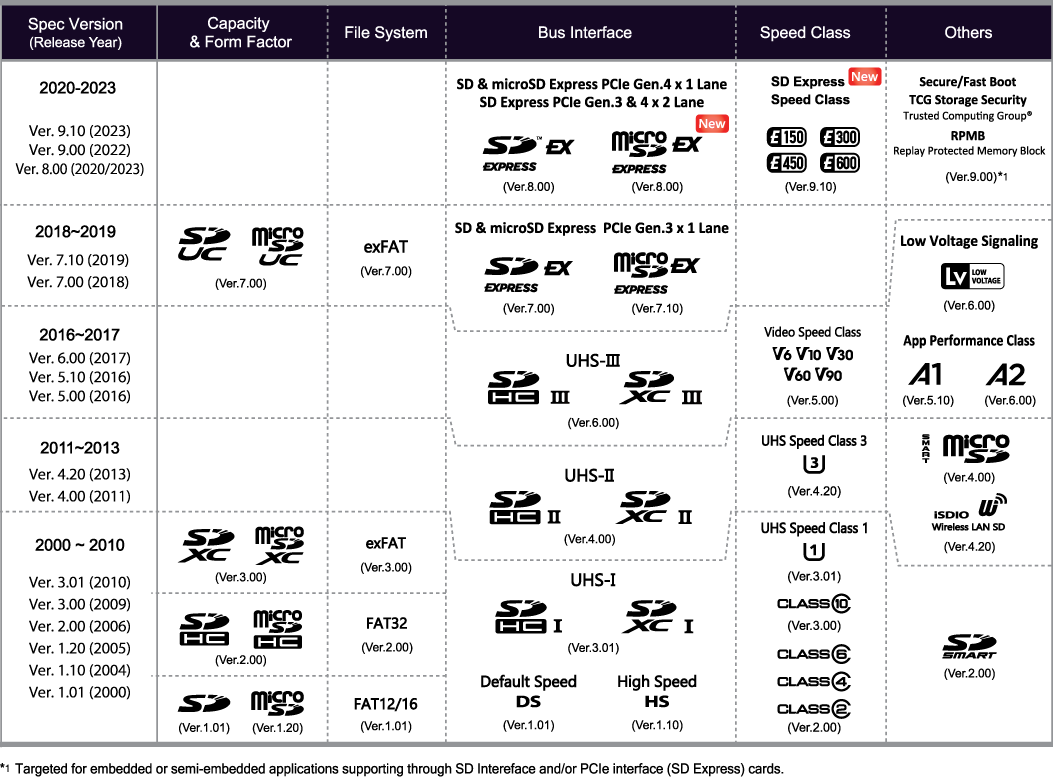
In fact, any sdcard newer than one made in 2010, is by spec, meant to be using exfat for this very reason. (Ability to define an enormous cluster size for a 'comparatively' small volume. Like 2MiB clusters, on a 512gb card, instead of 256kb clusters.)
https://www.sdcard.org/cms/wp-content/uploads … _img2021@2x.png
You only see FAT on very old cards.
This is why.