VOGONS


Are there any quick SD adapters?

Topic actions

First post, by Bobolaf

User metadata
Rank Newbie
Rank
Newbie

I am looking for a relatively fast solution to transfer relatively large files from a SD card to a older PC. So we are talking a motherboard with out a PCIe slot or USB 3.0 ports to use. Are there any relatively quick SD to IDE, Sata, CompactFlash, SCSI, FireWire or any other solutions that will better the usual USB 2.0 speeds for a older PC? I have tried a few no brand adapters but so far not found one that was bettering what I got from USB 2.0. Thanks

Reply 1 of 20, by douglar

User metadata
Rank l33t
Rank
l33t
Bobolaf wrote on 2024-02-01, 18:46:

I am looking for a relatively fast solution to transfer relatively large files from a SD card to a older PC. So we are talking a motherboard with out a PCIe slot or USB 3.0 ports to use. Are there any relatively quick SD to IDE, Sata, CompactFlash, SCSI, FireWire or any other solutions that will better the usual USB 2.0 speeds for a older PC? I have tried a few no brand adapters but so far not found one that was bettering what I got from USB 2.0. Thanks

What vintage PC are you using? What OS are you running on the retro PC?

All of the SD-IDE adapters that I've seen are based on the Sinitech silicon & firmware. Internally they are limited to SD "High Speed" transfer, 25/MBs. Fine if you are doing <= UDMA4. If you have a USB 3.0 SD card reader, they can usually do the UHS modes. Mine can do about 85MB/s on a reasonably nice SD.

The best CF's that I've worked with were usually limited to about 35MB/s when connected to legacy IDE controllers. Not much you can do to go faster than that.

Whatever the case, your best bet is probably going to be sneaker net.

  • Build your retro PC with a removable CF or SD storage panel.
  • Shut down the old PC
  • Carry the media to a fast system with a USB 3.0 device that can read the removable media.
  • Put the files in place
  • Return device to your retro PC
  • Power on
Last edited by douglar on 2024-02-01, 20:01. Edited 1 time in total.

Reply 2 of 20, by rasz_pl

User metadata
Rank l33t
Rank
l33t

USB 2.0 tops out at around 35MB/s, thats faster than most SD cards, pretty much only UHS-I and faster need better readers.
https://goughlui.com/2013/03/05/transcend-rdf … -0-card-reader/

https://github.com/raszpl/sigrok-disk FM/MFM/RLL decoder
https://github.com/raszpl/FIC-486-GAC-2-Cache-Module (AT&T Globalyst)
https://github.com/raszpl/386RC-16 ram board
https://github.com/raszpl/440BX Reference Design adapted to Kicad

Reply 3 of 20, by Bobolaf

User metadata
Rank Newbie
Rank
Newbie
douglar wrote on 2024-02-01, 19:56:

What vintage PC are you using? What OS are you running on the retro PC?

Thanks for the reply. It's an older Opteron based workstation currently with XP on but will probably be installing something a little newer.

douglar wrote on 2024-02-01, 19:56:

All of the SD-IDE adapters that I've seen are based on the Sinitech silicon & firmware. Internally they are limited to SD "High Speed" transfer, 25/MBs. "

That explains the results I was getting, thank you. I was hoping to avoid using another computer, but think you are probably right with your last option of just using a newer PC. It's a shame as I can get much quicker results over Firewire with CF cards but nothing for SD cards.

Reply 4 of 20, by Bobolaf

User metadata
Rank Newbie
Rank
Newbie
rasz_pl wrote on 2024-02-01, 19:58:

USB 2.0 tops out at around 35MB/s, thats faster than most SD cards

That is about what I am getting. So looks like there may be no easy options to improve it for that system. I guess my best option is just go make a cup of tea when transferring files.

Reply 5 of 20, by darry

User metadata
Rank l33t++
Rank
l33t++

Must the solution absolutely need to imply using an SD card ?

If the Opteron has an IDE port free, get a cheap SATA SSD and a IDE to SATA adapter . If it has SATA port, no need for the adapter.

If it has PCI or PCIE slots, a SATA controller + SATA SSD is an option. Another option is a USB 3.0 PCIE adapter along with a USB 3.0 SD card reader and fast SD card or a fast external USB 3.0 SSD/hard drive or even a USB 3.0 flash drive.

If the OS the machine does not support such hardware, booting Linux or a Windows PE build is an option from a USB flash drive (from native USB 2.0 ports).

Reply 6 of 20, by douglar

User metadata
Rank l33t
Rank
l33t
darry wrote on 2024-02-02, 02:14:

Must the solution absolutely need to imply using an SD card ?

Good point. If you have a GB ethernet port on the motherboard, should be able to transfer at up to 80GB/s with a cheap switch and a generic config, maybe 120MB/s if you have a good switch and you tweak some things.

Reply 7 of 20, by darry

User metadata
Rank l33t++
Rank
l33t++
douglar wrote on 2024-02-02, 02:37:
darry wrote on 2024-02-02, 02:14:

Must the solution absolutely need to imply using an SD card ?

Good point. If you have a GB ethernet port on the motherboard, should be able to transfer at up to 80GB/s with a cheap switch and a generic config, maybe 120MB/s if you have a good switch and you tweak some things.

That's an option too. The Opteron very likely has a network card onboard already and it is probably Gigabit Ethernet.

Reply 8 of 20, by kingcake

User metadata
Rank Oldbie
Rank
Oldbie
douglar wrote on 2024-02-02, 02:37:
darry wrote on 2024-02-02, 02:14:

Must the solution absolutely need to imply using an SD card ?

Good point. If you have a GB ethernet port on the motherboard, should be able to transfer at up to 80GB/s with a cheap switch and a generic config, maybe 120MB/s if you have a good switch and you tweak some things.

I got the cheapest 5-port unmanaged gigabit switch I could find on Amazona and I get ~110 megabytes per second between two machines that both use cheapo realtek gigabit chips. Gigabit is so mature now I'm not sure they make bad gigabit switches.

Reply 9 of 20, by rasz_pl

User metadata
Rank l33t
Rank
l33t
kingcake wrote on 2024-02-02, 04:42:

cheapo realtek gigabit chips

Realtek did great with NE1000 NE2000, then royalty screwed RealTek 8139 Re: Why are 3Com NICs in such high regard? Thankfully fixed issues when going 1Gbit and those cards are fast and problem free again. Intel on the other hand 😀 Intel i225-V is a garbage fire, never fixed despite numerous revisions.

https://github.com/raszpl/sigrok-disk FM/MFM/RLL decoder
https://github.com/raszpl/FIC-486-GAC-2-Cache-Module (AT&T Globalyst)
https://github.com/raszpl/386RC-16 ram board
https://github.com/raszpl/440BX Reference Design adapted to Kicad

Reply 10 of 20, by wierd_w

User metadata
Rank Oldbie
Rank
Oldbie

The issue with SDCards, is that they are NOT tailored to old DOS style writes. Smaller SDCards had FAT defined as the standard, with fairly large clusters, but anything over 64mb (IIRC?) is supposed to use ExFAT, which dos will tell you to pound sand over.

The reason is not that hard to understand; The flash memory in these things is kinda trash-- designed for mass market, and disposability, so the arrays are very large. These are most certainly NOT high performance SLC designs! As such, to get the stated thruput on these devices, you have to throw rather large blocks of data at it in consecutive blocks; this is where the ExFAT cluster size comes into play.

On anything recent, the erase block size on SDCard is in the neighborhood of 4mb in size, with a write buffer somewhere upward of 64kb. Getting the exact size of the write buffer is black magic voodoo, that you need to do forensic testing to derive after the fact. Usually, the "As formatted from the factory" ExFAT cluster size is the magic number there, and you should always write it on the top of your cards to keep track of it. The 4mb erase unit size, is why the partition table always has the start of the first partition align with the 1st 4mb.

These are things that DOS FDISK does **NOT** respect.

It is highly recommended to partition the device with a more modern operating system, but then FORMAT the partition with DOS with a full format.
Failure to keep partition location alignment, and ideally-- retaining large cluster sizes-- will result in lacklustre performance of *ANY* SDCard.

Even then, as others have pointed out-- there are hard limits on how fast a legacy PATA controller can communicate. Just be aware that SDCard media is not that great with random-access, and is tailored for big blocks of sequential access.

Reply 11 of 20, by kingcake

User metadata
Rank Oldbie
Rank
Oldbie
wierd_w wrote on 2024-02-02, 07:57:

The issue with SDCards, is that they are NOT tailored to old DOS style writes. Smaller SDCards had FAT defined as the standard, with fairly large clusters, but anything over 64mb (IIRC?) is supposed to use ExFAT, which dos will tell you to pound sand over.

Wut? This is fantastically false. ExFAT came out in 2006. There were 1GB SD Cards back in 2004.

Reply 12 of 20, by darry

User metadata
Rank l33t++
Rank
l33t++
kingcake wrote on 2024-02-02, 09:02:
wierd_w wrote on 2024-02-02, 07:57:

The issue with SDCards, is that they are NOT tailored to old DOS style writes. Smaller SDCards had FAT defined as the standard, with fairly large clusters, but anything over 64mb (IIRC?) is supposed to use ExFAT, which dos will tell you to pound sand over.

Wut? This is fantastically false. ExFAT came out in 2006. There were 1GB SD Cards back in 2004.

The push for exFAT came about when Microsoft limited the max size of a partition one could format as FAT32 to 32GB (starting with either Windows 2000 or XP, I forget which). This affects only formating using Windows bundled format tools and reading and writing >32GB FAT32 partitions is also not affected by this. Third party ones are not limited in such fashion. ExFAT is not readable under DOS or Windows 9x.

Reply 13 of 20, by Disruptor

User metadata
Rank Oldbie
Rank
Oldbie
kingcake wrote on 2024-02-02, 09:02:
wierd_w wrote on 2024-02-02, 07:57:

The issue with SDCards, is that they are NOT tailored to old DOS style writes. Smaller SDCards had FAT defined as the standard, with fairly large clusters, but anything over 64mb (IIRC?) is supposed to use ExFAT, which dos will tell you to pound sand over.

Wut? This is fantastically false. ExFAT came out in 2006. There were 1GB SD Cards back in 2004.

1) In history there have been SD adapters with a limit at 1 or 2 GB.
2) He surely meant the SDHC barrier at 32 GB.
3) 64 GB needs to have a SDXC compatible adapter. Those cards may use ExFAT file system instead of FAT32.

Reply 14 of 20, by kingcake

User metadata
Rank Oldbie
Rank
Oldbie
Disruptor wrote on 2024-02-02, 09:16:
1) In history there have been SD adapters with a limit at 1 or 2 GB. 2) He surely meant the SDHC barrier at 32 GB. 3) 64 GB need […]
Show full quote
kingcake wrote on 2024-02-02, 09:02:
wierd_w wrote on 2024-02-02, 07:57:

The issue with SDCards, is that they are NOT tailored to old DOS style writes. Smaller SDCards had FAT defined as the standard, with fairly large clusters, but anything over 64mb (IIRC?) is supposed to use ExFAT, which dos will tell you to pound sand over.

Wut? This is fantastically false. ExFAT came out in 2006. There were 1GB SD Cards back in 2004.

1) In history there have been SD adapters with a limit at 1 or 2 GB.
2) He surely meant the SDHC barrier at 32 GB.
3) 64 GB needs to have a SDXC compatible adapter. Those cards may use ExFAT file system instead of FAT32.

He said 64 megabytes. Reread the post.

Reply 15 of 20, by kingcake

User metadata
Rank Oldbie
Rank
Oldbie
darry wrote on 2024-02-02, 09:16:
kingcake wrote on 2024-02-02, 09:02:
wierd_w wrote on 2024-02-02, 07:57:

The issue with SDCards, is that they are NOT tailored to old DOS style writes. Smaller SDCards had FAT defined as the standard, with fairly large clusters, but anything over 64mb (IIRC?) is supposed to use ExFAT, which dos will tell you to pound sand over.

Wut? This is fantastically false. ExFAT came out in 2006. There were 1GB SD Cards back in 2004.

The push for exFAT came about when Microsoft limited the max size of a partition one could format as FAT32 to 32GB (starting with either Windows 2000 or XP, I forget which). This affects only formating using Windows bundled format tools and reading and writing >32GB FAT32 partitions is also not affected by this. Third party ones are not limited in such fashion. ExFAT is not readable under DOS or Windows 9x.

ExFAT came out in 2006. Not sure what you're saying in any way disputes that. Or what your seemingly random reply is trying to prove. No one is disputing what ExFAT is useful for. But ExFAT did not exist when 64 megabyte SD cards were common.

Reply 16 of 20, by wierd_w

User metadata
Rank Oldbie
Rank
Oldbie

The point was that the cluster size the card "wants", can and is, highly variable, even within products of the same capacity.

There was a significant change in these sizes at around the era when 64mb ceased being the prevailing "large" media, and 512mb and 1gb cards became vogue. This is not explicitly tied to being SDHC, but the change was contemporaneous. SDHC uses a different LBA spec from original SD/MMC spec.

The real deal, is about the expected cluster size. There is a maximum allowed clustersize for FAT and FAT32. For smaller devices, FAT and FAT32 can align with these expected "Ideal" write elements, which is why the SDCard Assn. defined those filesystems as the spec. Later cards have much larger element sizes, and need clusters that FAT32 cannot support. This is where ExFAT takes over in the spec.

Since that element size is not well published, and can change between cards within a size and brand, with otherwise identical markings, the best medicine is to examine the "From the factory" format for this cluster size, and write it on the top of the device. All future formatting of that card should have every effort taken to have the write element be either a fully divisible quantity of that element size, or ideally, BE that element size. This is not always achievable with some filesystems, but there are tricks one can often employ.

The alternative is to do the black magic voodoo with FlashBench, and do trial and error experimentation on media response times to empirically derive "Something close."

Reply 17 of 20, by wierd_w

User metadata
Rank Oldbie
Rank
Oldbie

As a followup-- Here is an archived page from the linaro wiki, courtesy of archive.org.

https://web.archive.org/web/20180425155017/ht … FlashCardSurvey
Note, that even cards in the 8gb size range, can have "Ideal allocation unit sizes" between 64kb (the absolute top end for FAT32) and 256kb (Which NEEDS ExFAT).

It was around the 64MB capacity, historically, that the ideal cluster size jumped from 16k (the MAX for FAT16, [for MS compliance, anyway. IIRC, FAT16 CAN use 32k cluster, but has... issues.]) to 32k, necessitating FAT32.

This is important when working with DOS, because DOS 6.22 does not speak FAT32.

Reply 18 of 20, by Disruptor

User metadata
Rank Oldbie
Rank
Oldbie

Number of clusters on FAT16 should be < 65524 (slightly below 64 k)
A FAT16 formatted drive can have:
Cluster size, Maximum disk size
512 ... 32 M
1k ... 64 M
2k ... 128 M
4k ... 256 M
8k ... 512 M
16k ... 1 G
32k ... 2 G (this is maximum partition size in DOS)
64k ... 4 G (this cluster size is not supported by DOS and WIN9x, but can be supported by Windows NT)
128k ... 8 G (just if sector size is >= 1k and just in NT 4)
256k ... 16 G (just if sector size is >= 2k and just in NT 4)

Number of clusters on FAT32 should be < 268435444 (slightly below 256 M)
However, Microsoft does not go to the limit.
Microsoft uses:
Cluster size, up to
512 ... 64 M
1k ... 128 M
2k ... 256 M
4k ... 8 G
8k ... 16 G
16k ... 32 G
32k ... 2 T (this setting can be used in NT 3.51, but not in NT 4 or later)

exFAT
4 k ... 256 M
32 k ... 32 G
128k ... 256 T

Source:
EN https://support.microsoft.com/en-us/topic/def … 8f-73169155af95
DE https://support.microsoft.com/de-de/top ... 169155af95

And on flash memory like SDcards that have wear levelling, you cannot do a forensic partial deletion. You may secure delete all (if there is a support) or find a way to omit wear levelling.
To have the perfect alignment even for write access, you need to know about the internal organisation of the chips. Perhaps you can find that out by testing alignment patterns. But that even may change within a single manufacturer. However, you need to find a way to omit write buffers.

Reply 19 of 20, by wierd_w

User metadata
Rank Oldbie
Rank
Oldbie

Indeed.

'Presumably' the manufacturer knows what the magic allocation unit size is, being the originator of that layout, and has selected this size with when preformatting the volume.

This is so the manufacturer can reliably and consistently hit the advertised speeds on the box.

This is why you should examine this 'from the factory' format, and make note of the starting sector of the first partition, and the allocation unit size selected, and write them on top of the card.

The alternative being using something like flashbench, to get the 'as best you can get from a black box' performance value, and 'hoping' it is correct.

The main thrust here, was that sdcards use as large of an atomic write size as they can get away with, because this simplifies the complexity of the flash controller, and keeps the media inexpensive to produce in bulk.

This translates into a need to use filesystem cluster sizes that otherwise are not appropriate for volumes of that size.

Due to the same need to keep cell complexity low that drives these cell designs, the wear leveling cannot have a finer granularity than this ideal cluster size, realistically. This means 4k writes, are being 'wear leveled' on 64k pages, a new page each time.

The media is better served, with fewer internal erase cycles, by committing 64k contiguous writes. (Assuming the magic number is 64k)

Again, this magic number is not disclosed on the packaging, it is not consistent across production runs of identically packaged product, and tends to favor 'very very large pages'.

As stated, this is not always achievable with a specific file system with cluster size alone, but there may be tricks one can use.

Take linux's ext family of filesystems. The RAID subsystem components of the filesystem can be abused, to cause the logical 4k clusters to be 'efficiently written' like raid stripes, at a specified size for the stripe. This ensures the block is 100% utilized on actual committal to disk, as several contiguous clusters are committed at once.

Setting that up is voodoo, and not normally done, since as you rightly point out, you kinda DO need to know what the magic number is.

Since that magic number can almost certainly be assumed to not be a FAT friendly size on anything new (i have seen 2mb clusters on factory formatted exfat volumes!), you can safely assume 'performance will be terrible.'

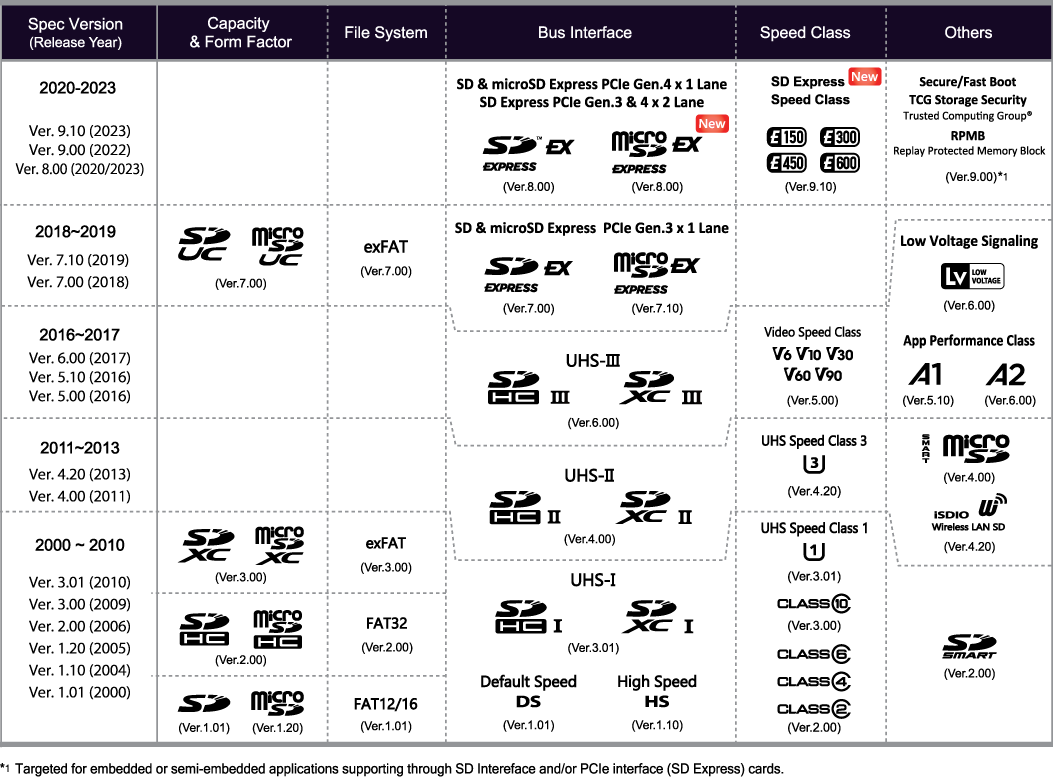
In fact, any sdcard newer than one made in 2010, is by spec, meant to be using exfat for this very reason. (Ability to define an enormous cluster size for a 'comparatively' small volume. Like 2MiB clusters, on a 512gb card, instead of 256kb clusters.)

https://www.sdcard.org/cms/wp-content/uploads … _img2021@2x.png

You only see FAT on very old cards.

This is why.