VOGONS


Asus board went nuts

Topic actions

First post, by Nemo1985

User metadata
Rank Oldbie
Rank
Oldbie

So here is the story, the very same board I done the comparison between different chipsets here or the fight against the abit here has gone nuts.
Literally I put it in a box 2 days ago, I took out before to do a comparison between different Riva 128zx cards and that was happened:
Initally the ps2 keyboard didn't get detected so it hanged up in the bios.
I tried to connect and disconnect it several time and I ended up connected a usb keyboard which worked fine (for a couple of reboots), I was able to modify some bios settings and also boot to dos.
I tried to: swap memory, swap cpus, reflash the bios, reset the bios settings.
My idea is that if there is a ps2 mouse or keyboard connected it just goes nuts. It does to a less extent if I use the usb keyboard, but I noticed that it automatically enable caps lock or scroll lock and if I try to disable them from the keyboard it starts to beep and stop responding, then after a couple of seconds it starts to get good again.

Video: https://youtu.be/GTTfY2VeZyA

Edit: Ok i'm so pissed off now... I found what the problem IS... this cheap chinese thing I used without issues since today:

The attachment Immagine.png is no longer available

And guess what? It killed another motherboard!
I was running the benchmarks in dos when the computer hanged up. It didn't boot for several time, when it came back to life, the memory count is now silly slow, it gives 16mb, then bios stop, then another 16mb and also on this mainboard the ps2 keyboard doesn't work anymore.
Now i'm really pissed off

Here is the problem with the killed BX Master: https://youtube.com/shorts/7PIG4lBFLhA

Reply 1 of 82, by Horun

User metadata
Rank l33t++
Rank
l33t++

Sorry to hear that a SD adapter ruined your boards. I will get flack for this but I never use them on anything of value. If I want a vintage computer it has to have semi vintage parts, yes I replaced the mfm/rll stuff with ide or scsi but obstain form CF, just me.
Sure there are good ones but if you have to trim and all and you really want the vintage experience then you want a true HD not memory card... again just me. FWIW Have a 200MB scsi in my one XT works and a XT-ide in another and works just fine.
Ok let the flack roll in but (edit) no one will never convert me to CF on valuable vintage gear.

Hate posting a reply and then have to edit it because it made no sense 😁 First computer was an IBM 3270 workstation with CGA monitor. Stuff: https://archive.org/details/@horun

Reply 2 of 82, by Nemo1985

User metadata
Rank Oldbie
Rank
Oldbie
Horun wrote on 2023-03-05, 04:11:

Sorry to hear that a SD adapter ruined your boards. I will get flack for this but I never use them on anything of value. If I want a vintage computer it has to have semi vintage parts, yes I replaced the mfm/rll stuff with ide or scsi but obstain form CF, just me.
Sure there are good ones but if you have to trim and all and you really want the vintage experience then you want a true HD not memory card... again just me. FWIW Have a 200MB scsi in my one XT works and a XT-ide in another and works just fine.
Ok let the flack roll in but you will never convert me to CF on valuable vintage gear.

Well I use cf cards from years and that's the first time such things happened. Usually I use the other model of CF card reader but I installed the last one I had in a build so I resorted to this one...

Any guess what it may have damaged?

Reply 3 of 82, by Horun

User metadata
Rank l33t++
Rank
l33t++

Just a guess but probably fried the South bridge. I do not see an interface chip, is it on the backside ?

Hate posting a reply and then have to edit it because it made no sense 😁 First computer was an IBM 3270 workstation with CGA monitor. Stuff: https://archive.org/details/@horun

Reply 4 of 82, by TrashPanda

User metadata
Rank l33t
Rank
l33t

You know what i do with the cheap Chinese CF/SD adapter cards ...I QC them under my scope before they ever get near a PC, you just cant trust something that you can buy 10 of for 20 bucks.

Usually they are fine but I have had one or two that required a bit of hot air rework to clean up bad soldering and missed solder joints.

Lately I have been buying the StarTech ones off Amazon, sure they cost more but their quality and speed are superior to the cheap Chinese ones.

The adapter in that picture really doesn't have great soldering, looks a bit sus to me.

Reply 6 of 82, by TrashPanda

User metadata
Rank l33t
Rank
l33t
Nemo1985 wrote on 2023-03-05, 04:28:
well it worked fine until yesterday, I used it in several builds... […]
Show full quote

well it worked fine until yesterday, I used it in several builds...

Back on topic:
Wow the southbridge nonethe less... no many hopes...
Maybe just the super i\o?
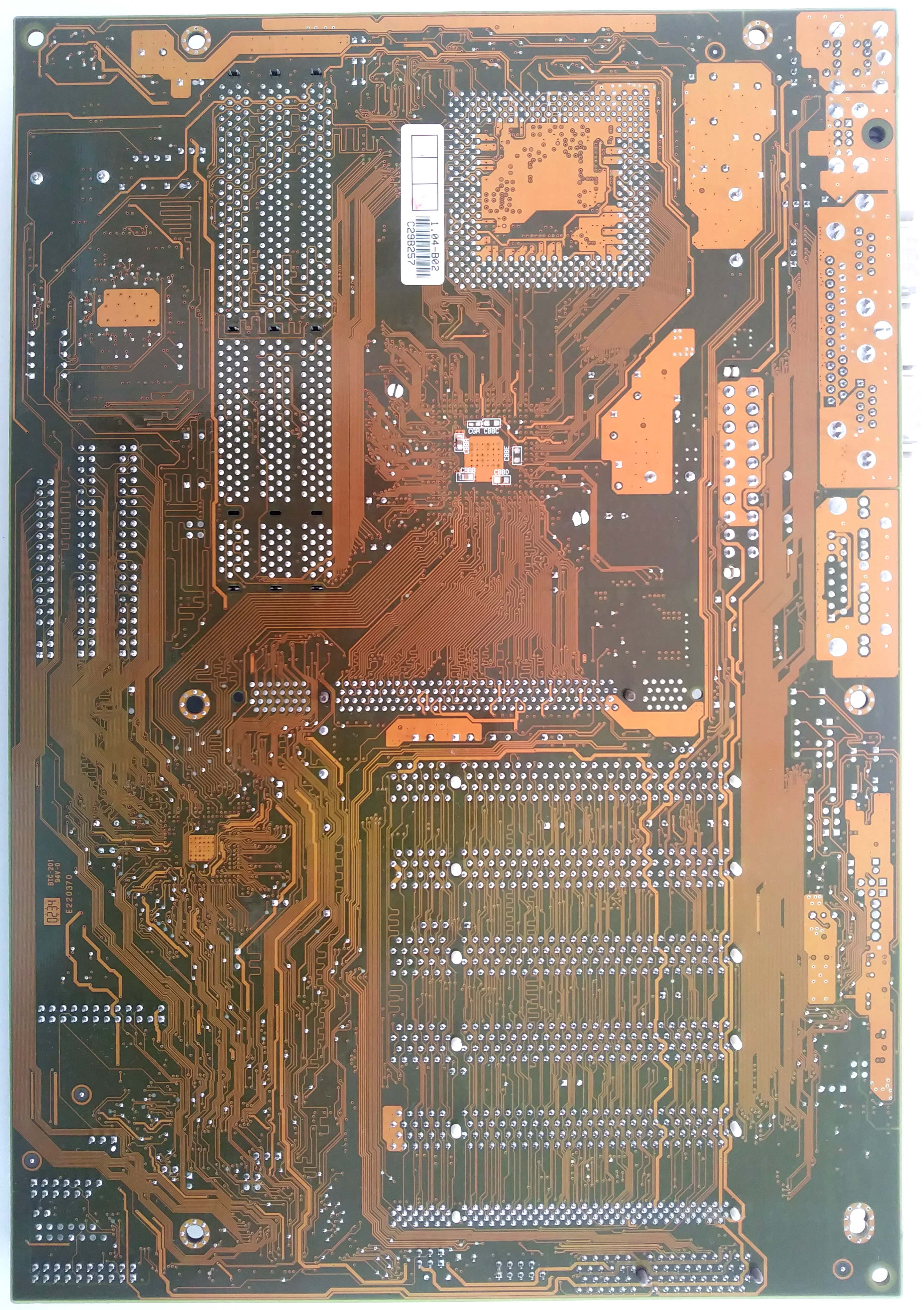
That's the backside of the tusl2-c: https://theretroweb.com/motherboard/image/asu … c5929533972.jpg
(courtesy of retroweb)

Do you have another adapter you can try ?> or a sacrificial board to test the sus adapter in, I mean it could be that some caps have gone bad on the board and the adapter is ok.

Reply 7 of 82, by Nemo1985

User metadata
Rank Oldbie
Rank
Oldbie
TrashPanda wrote on 2023-03-05, 04:31:
Nemo1985 wrote on 2023-03-05, 04:28:
well it worked fine until yesterday, I used it in several builds... […]
Show full quote

well it worked fine until yesterday, I used it in several builds...

Back on topic:
Wow the southbridge nonethe less... no many hopes...
Maybe just the super i\o?
That's the backside of the tusl2-c: https://theretroweb.com/motherboard/image/asu … c5929533972.jpg
(courtesy of retroweb)

Do you have another adapter you can try ?> or a sacrificial board to test the sus adapter in, I mean it could be that some caps have gone bad on the board and the adapter is ok.

Two motherboards that worked fine one until 4 days ago?
I have another adapter of the same kind (brand new) but definitely not another motherboard that can be damaged :\

Reply 8 of 82, by TrashPanda

User metadata
Rank l33t
Rank
l33t
Nemo1985 wrote on 2023-03-05, 04:33:
TrashPanda wrote on 2023-03-05, 04:31:
Nemo1985 wrote on 2023-03-05, 04:28:
well it worked fine until yesterday, I used it in several builds... […]
Show full quote

well it worked fine until yesterday, I used it in several builds...

Back on topic:
Wow the southbridge nonethe less... no many hopes...
Maybe just the super i\o?
That's the backside of the tusl2-c: https://theretroweb.com/motherboard/image/asu … c5929533972.jpg
(courtesy of retroweb)

Do you have another adapter you can try ?> or a sacrificial board to test the sus adapter in, I mean it could be that some caps have gone bad on the board and the adapter is ok.

Two motherboards that worked fine one until 4 days ago?
I have another adapter of the same kind (brand new) but definitely not another motherboard that can be damaged :\

Ahh I missed the bit about it nailing a second board, that is rather strange, makes me think its somehow sending voltage where it shouldn't be.

Does the CF card that was in it still function fine or was that also damaged ?

Last edited by TrashPanda on 2023-03-05, 04:37. Edited 1 time in total.

Reply 9 of 82, by TheMobRules

User metadata
Rank Oldbie
Rank
Oldbie
Horun wrote on 2023-03-05, 04:11:

Sorry to hear that a SD adapter ruined your boards. I will get flack for this but I never use them on anything of value. If I want a vintage computer it has to have semi vintage parts, yes I replaced the mfm/rll stuff with ide or scsi but obstain form CF, just me.
Sure there are good ones but if you have to trim and all and you really want the vintage experience then you want a true HD not memory card... again just me. FWIW Have a 200MB scsi in my one XT works and a XT-ide in another and works just fine.
Ok let the flack roll in but (edit) no one will never convert me to CF on valuable vintage gear.

I know it's almost a sin to speak against CF cards in this forum, but I agree 100% with you. Luckily I have amassed a sizable collection of working old HDDs that I can use for my retro machines. Most of them I got for free or salvaged from old PCs that come into my possession, so I think in the end it's been much cheaper than spending money on adapters and CF cards.

I've encountered some really strange issues with CF adapters/cards, in particular when using them with older I/O controller cards (say, pre-1994). In most cases it's issues with the floppy controller, either I get FDD controller error during POST or corruption/errors occur when accessing the floppy drive, as if something was messing up the bus. As soon as I get back to a regular HDD, all problems disappear. I think it may be related to the fact that the floppy and primary IDE controllers share some I/O address space (3F6H-3F7H) and the CF card is doing something there the controller card logic is not prepared for... but I never really explored this in detail.

I also had a couple of HDD controller cards suddenly die within a short period, the only thing in common was using the same CF adapter/card in both of them, while the rest of the system was different. Maybe anecdotal evidence, but my distrust of these things has only grown since then.

Reply 10 of 82, by Nemo1985

User metadata
Rank Oldbie
Rank
Oldbie
TrashPanda wrote on 2023-03-05, 04:35:
Nemo1985 wrote on 2023-03-05, 04:33:
TrashPanda wrote on 2023-03-05, 04:31:

Do you have another adapter you can try ?> or a sacrificial board to test the sus adapter in, I mean it could be that some caps have gone bad on the board and the adapter is ok.

Two motherboards that worked fine one until 4 days ago?
I have another adapter of the same kind (brand new) but definitely not another motherboard that can be damaged :\

Ahh I missed the bit about it nailing a second board, that is rather strange, makes me think its somehow sending voltage where it shouldn't be.

Does the CF card that was in it still function fine or was that also damaged ?

cf card works like a charme, all the data are intact

A test I could do is to connect the adapter to an at power supply and check the pins...

Reply 11 of 82, by TrashPanda

User metadata
Rank l33t
Rank
l33t
Nemo1985 wrote on 2023-03-05, 04:41:
TrashPanda wrote on 2023-03-05, 04:35:
Nemo1985 wrote on 2023-03-05, 04:33:

Two motherboards that worked fine one until 4 days ago?
I have another adapter of the same kind (brand new) but definitely not another motherboard that can be damaged :\

Ahh I missed the bit about it nailing a second board, that is rather strange, makes me think its somehow sending voltage where it shouldn't be.

Does the CF card that was in it still function fine or was that also damaged ?

cf card works like a charme, all the data are intact

A test I could do is to connect the adapter to an at power supply and check the pins...

If only out of curiosity, I would be wanting to know if it had a dead short or dead component and was sending angry pixies back to the io chip.

Reply 12 of 82, by Nemo1985

User metadata
Rank Oldbie
Rank
Oldbie
TrashPanda wrote on 2023-03-05, 04:59:
Nemo1985 wrote on 2023-03-05, 04:41:
TrashPanda wrote on 2023-03-05, 04:35:

Ahh I missed the bit about it nailing a second board, that is rather strange, makes me think its somehow sending voltage where it shouldn't be.

Does the CF card that was in it still function fine or was that also damaged ?

cf card works like a charme, all the data are intact

A test I could do is to connect the adapter to an at power supply and check the pins...

If only out of curiosity, I would be wanting to know if it had a dead short or dead component and was sending angry pixies back to the io chip.

It may help to troubleshoot so be it...
I've found 2 pins which has voltage:

The attachment 2b.png is no longer available
The attachment Immagine.png is no longer available

I checked the new one (still sealed) and obviously it doesn't send any voltage to those pins also the old one always has the power led on, while the new one doesn't.
Any suggestion about what pins are and where they delivered power? I still hope they damaged something that can be replaced (bad hope I feel).
So:
The killer adapter has the power light always on. The card detect led is on when a cf card is installed.
The new adapter has the card detect led on when there is the card installed but power led is always off.

Reply 13 of 82, by Nemo1985

User metadata
Rank Oldbie
Rank
Oldbie

Good people, good people!
Apparently the bx master came back to life!
it started with being fast again during the memory check, the first time it went to 70mb before the first slow down.
After a couple of reboots, I was able to enter the bios.
I disabled the ide controller saved and rebooted, then I went into bios and enabled it back.
I just heard a squeak (like boot beep but while windows was loading) but it works, I made a 3 run benchmarks on 3dmark2k and complete without issues.
It still does some beeps when it shouldn't like before turning off the computer the speaker squeaks and the num lock blinks. Same when windows 98 is booting.
I suppose this damage is for good.

The Tusl2-c is more problematic, apparently the more peripherals I connect, less problem it gives. With 2 videocards (1 agp and 1 pci, monitor connected to pci), first times it made the terrible noises, then it started to post the first screen almost fine.
The ps2 keyboard doesn't work AT ALL, while the usb one, first times hanged in the bios, then I was able to modify several settings, reboot once, it started to sound again like crazy and then the bios has corrupted (I can confirm that because when I verified the bios chip with the eeprom reader it found like 1500 different bits.
It is like if there is some dirty signals where they shouldn't be, maybe some filter smd\caps\whatever gave up because of the killer adapter?
Please take a look at this video: https://youtu.be/mzDs2Q4hr9Y
The noise you hear before the hard drive start to spin is the speaker, it is as there is some current where it shouldn't be, also the lights on the debug card blinks at the same time of the speaker noise.
Is it possible the the motherboard needs to run to clean the signal? I'm being meaningless?
After such nightmare night, I'm really thinking to quit the hobby and get rid of the stuff I collected in the last 5 years.

Reply 14 of 82, by rasz_pl

User metadata
Rank l33t
Rank
l33t
Nemo1985 wrote on 2023-03-05, 05:06:
I've found 2 pins which has voltage: 2b.png Immagine.png […]
Show full quote

I've found 2 pins which has voltage:
2b.png
Immagine.png

I checked the new one (still sealed) and obviously it doesn't send any voltage to those pins also the old one always has the power led on, while the new one doesn't.
Any suggestion about what pins are and where they delivered power? I still hope they damaged something that can be replaced (bad hope I feel).
So:
The killer adapter has the power light always on. The card detect led is on when a cf card is installed.

slow down. How do you test? with only power plugged into adapters? adapters plugged into motherboard with power? with card or without?

Nemo1985 wrote on 2023-03-05, 05:06:

The new adapter has the card detect led on when there is the card installed but power led is always off.

makes me thing the "good" one has broken led 😀

>Is it possible the the motherboard needs to run to clean the signal? I'm being meaningless?

no, but its possible you bend the board and some BGA solder joints popped off under south/northbridge, or power supply is bad

>After such nightmare night, I'm really thinking to quit the hobby and get rid of the stuff I collected in the last 5 years.

which hobby? collecting 20 year old stuff part seems fine, but you might recalibrate your expectations towards ancient components not meant to be used for more than 5-10 years without servicing.

https://github.com/raszpl/sigrok-disk FM/MFM/RLL decoder
https://github.com/raszpl/FIC-486-GAC-2-Cache-Module (AT&T Globalyst)
https://github.com/raszpl/386RC-16 ram board
https://github.com/raszpl/440BX Reference Design adapted to Kicad

Reply 15 of 82, by Nemo1985

User metadata
Rank Oldbie
Rank
Oldbie
rasz_pl wrote on 2023-03-05, 11:40:
slow down. How do you test? with only power plugged into adapters? adapters plugged into motherboard with power? with card or wi […]
Show full quote
Nemo1985 wrote on 2023-03-05, 05:06:
I've found 2 pins which has voltage: 2b.png Immagine.png […]
Show full quote

I've found 2 pins which has voltage:
2b.png
Immagine.png

I checked the new one (still sealed) and obviously it doesn't send any voltage to those pins also the old one always has the power led on, while the new one doesn't.
Any suggestion about what pins are and where they delivered power? I still hope they damaged something that can be replaced (bad hope I feel).
So:
The killer adapter has the power light always on. The card detect led is on when a cf card is installed.

slow down. How do you test? with only power plugged into adapters? adapters plugged into motherboard with power? with card or without?

Nemo1985 wrote on 2023-03-05, 05:06:

The new adapter has the card detect led on when there is the card installed but power led is always off.

makes me thing the "good" one has broken led 😀

>Is it possible the the motherboard needs to run to clean the signal? I'm being meaningless?

no, but its possible you bend the board and some BGA solder joints popped off under south/northbridge, or power supply is bad

>After such nightmare night, I'm really thinking to quit the hobby and get rid of the stuff I collected in the last 5 years.

which hobby? collecting 20 year old stuff part seems fine, but you might recalibrate your expectations towards ancient components not meant to be used for more than 5-10 years without servicing.

I don't want to sound harsh, but please...

I won't connect that motherboard killer in another just to try how it is. I connected the 4 pin floppy power connector to the card and took the values. The killer one has been tested with cf card and power, no ide connection. The new one with power without cf card just to measure if it also sends the voltage over the ide pins.

So let's see 2 motherboards one that was working until 4 days ago when I put it on storage in a antistatic bag inside a card box went bad, then I tried another motherboard that was fine and stored inside a case, it worked fine for few minutes and then it showed the very same problem of the first one, 2 motherboards and 2 solder joints in 2 hours. Power supply was different between the 2 motherboards, again one is in a case with his full complete build, the other isn't. After the capacitor plague we have the solder joints plague that also contaminate between 2 mb which where nowhere near each other.

whatever...

Reply 16 of 82, by rasz_pl

User metadata
Rank l33t
Rank
l33t
Nemo1985 wrote on 2023-03-05, 14:13:

I connected the 4 pin floppy power connector to the card and took the values. The killer one has been tested with cf card and power, no ide connection. The new one with power without cf card just to measure if it also sends the voltage over the ide pins.

so you didnt test the same thing

pin 39 where you measured 4.8V is DASP- [Drive Active/Slave Present]. Its 5V because its being pulled up to 5V inside the CF card. Every IDE drive does this.
pin 20 shouldnt be there at all, its KEY position/reserved and its unused. On few Asus motherboard boardviews I have access to its not connected to anything.

tldr: I dont see anything wrong with that converter

were you testing all of those computers with the same ps2 keyboard by any chance? those symptoms would fit broken keyboard spamming the port with garbage, slowing down post and generating beeps

>Please take a look at this video: https://youtu.be/mzDs2Q4hr9Y

too much connected, thats not how you diagnose hardware. Disconnect _everything_, leave only motherboard, psu, cpu and diag card
then add ram
then add vga
then add keybaord

https://github.com/raszpl/sigrok-disk FM/MFM/RLL decoder
https://github.com/raszpl/FIC-486-GAC-2-Cache-Module (AT&T Globalyst)
https://github.com/raszpl/386RC-16 ram board
https://github.com/raszpl/440BX Reference Design adapted to Kicad

Reply 17 of 82, by Nemo1985

User metadata
Rank Oldbie
Rank
Oldbie
rasz_pl wrote on 2023-03-05, 16:36:
so you didnt test the same thing […]
Show full quote
Nemo1985 wrote on 2023-03-05, 14:13:

I connected the 4 pin floppy power connector to the card and took the values. The killer one has been tested with cf card and power, no ide connection. The new one with power without cf card just to measure if it also sends the voltage over the ide pins.

so you didnt test the same thing

pin 39 where you measured 4.8V is DASP- [Drive Active/Slave Present]. Its 5V because its being pulled up to 5V inside the CF card.
pin 20 shouldnt be there at all, its KEY position. On few Asus motherboard boardviews I have access to its not connected to anything.

Uhm but when I tested the voltages the cf card wasn't installed.
Also I didn't measure from the holes but the connections. I tried to find the pinout of a IDE cable and (I could be very wrong), those are the 2 pins with voltages:
Pin 1 (reset) which measures v4,8
The other pin which is on the other side of the card, should be the pin 22? Which is ground (i'm not sure about this one).

A desperate idea, changing the super i\o may be of any help?

Reply 18 of 82, by rasz_pl

User metadata
Rank l33t
Rank
l33t
Nemo1985 wrote on 2023-03-05, 16:46:

Uhm but when I tested the voltages the cf card wasn't installed.

so you lied earlier ?
>The killer one has been tested with cf card
😀 j/k

>Pin 1 (reset) which measures v4,8

pin 39

Nemo1985 wrote on 2023-03-05, 16:46:

A desperate idea, changing the super i\o may be of any help?

I edited my previous post while you were replying, try those suggestions

https://github.com/raszpl/sigrok-disk FM/MFM/RLL decoder
https://github.com/raszpl/FIC-486-GAC-2-Cache-Module (AT&T Globalyst)
https://github.com/raszpl/386RC-16 ram board
https://github.com/raszpl/440BX Reference Design adapted to Kicad

Reply 19 of 82, by Nemo1985

User metadata
Rank Oldbie
Rank
Oldbie
rasz_pl wrote on 2023-03-05, 17:06:
so you lied earlier ? >The killer one has been tested with cf card :) j/k […]
Show full quote
Nemo1985 wrote on 2023-03-05, 16:46:

Uhm but when I tested the voltages the cf card wasn't installed.

so you lied earlier ?
>The killer one has been tested with cf card
😀 j/k

>Pin 1 (reset) which measures v4,8

pin 39

Nemo1985 wrote on 2023-03-05, 16:46:

A desperate idea, changing the super i\o may be of any help?

I edited my previous post while you were replying, try those suggestions

Sorry, I probably didn't explain myself.
When I measured the voltages it was with the power cable only. When I watched the led it was with the old card with and without cf installed. With the new one only without cf card installed.

Yes it's the same ps2 keyboard, but it worked fine, I mean I use it daily on my retro stuff.
On my previous video there was many things connected because apparently it worked better with many things than with nothing connected (I was thinking the silly idea that the garbage throwed in from the adapter needed to be cleaned up).
Now the motherboard doesn't answer to the keyboard, doesn't matter if it is the ps2 or the usb which was working before.
In my latest video, did you hear the buzz coming from the speaker at the same time the led on the debug card were blinking, as it there was voltage where it shouldn't be or something like that...

Here is another video, just with motherboard, one stick of memory and the debug card, same behaviour (I tried also to swap the memory slots and yes the ram stick works fine): https://www.youtube.com/watch?v=IXXueBhm8HU

Here is what happens without ram (not much obviously): https://www.youtube.com/watch?v=tqlD4UNNs9I