VOGONS


Error when Installing

Topic actions

First post, by The Nightbringer

User metadata
Rank Newbie
Rank
Newbie

Hello. I'm new to the whole DOSBOX scene, only having found out about it no more than 30 minutes ago. Originally I new it common fact that old games such as Gizmos and Gadgets could not be run on anything after Windows XP, and I came to accept that.. but recently I wathed a video on YouTube showing such an old game being played.. and I asked the uploader how they managed to do it, and they told me DOSBOX.

Sure enough I came here to download it and see what it was all about when a huge red flag was draped across it. For some reason when I try to inatall it, I get this error message:
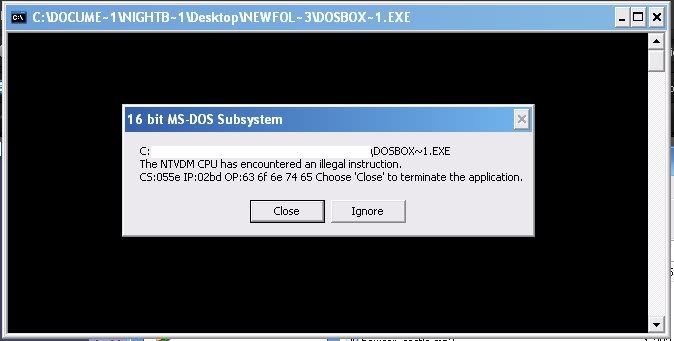
InstallationError.jpg

I looked through the readmes, FAQs, and search features (Which is a very, VERY broad search I may add..) and I could not find someone or a thread describing the same problems I have. The program just refuses to install in the first place. Is it my computer that can't handle it? Is it something I'm doing wrong? Or is there somewhere I didn't look for the answer?

Here are some specs of my computer:

Pentium 4 521 2.8GHz
256MB RAM, 80GB HDD
XP Media Center 2005

If there's anything else you need to know, just ask. If I slipped up on looking somewhere where my problem's already been answered please tell me. xD

Thanks in advance for your responses.

Reply 2 of 13, by The Nightbringer

User metadata
Rank Newbie
Rank
Newbie

Tried that, and just restarted... doesn't seem to work.. I also tried the xp_fix thing in the poster's sig and that still didn't alleviate it. Maybe it has to do with the OS I'm running? Or am I still doing something wrong?

Reply 3 of 13, by wd

User metadata
Rank DOSBox Author
Rank
DOSBox Author

Don't know, have no experience with XP media center myself.
Anyways, try re-downloading the dosbox installer (possibly from a
different sourceforge server), maybe even do a bitwise compare of
the old dosbox installer and the new one.

Reply 4 of 13, by The Nightbringer

User metadata
Rank Newbie
Rank
Newbie
wd wrote:
Don't know, have no experience with XP media center myself. Anyways, try re-downloading the dosbox installer (possibly from a di […]
Show full quote

Don't know, have no experience with XP media center myself.
Anyways, try re-downloading the dosbox installer (possibly from a
different sourceforge server), maybe even do a bitwise compare of
the old dosbox installer and the new one.

May I ask you to recommend some links to me please? I tried one alternate and it.. started some installer program that I don't necessarily trust..

Reply 5 of 13, by MiniMax

User metadata
Rank Moderator
Rank
Moderator

http://www.dosbox.com/download.php?main=1

DOSBox 60 seconds guide | How to ask questions
_________________
Lenovo M58p | Core 2 Quad Q8400 @ 2.66 GHz | Radeon R7 240 | LG HL-DT-ST DVDRAM GH40N | Fedora 32

Reply 6 of 13, by The Nightbringer

User metadata
Rank Newbie
Rank
Newbie

Okay, thank you for the link!

Unfortunately I am still getting the same error, and I have tried several mirrors already.

Reply 7 of 13, by collector

User metadata
Rank l33t
Rank
l33t

MCE has nothing to do with it. No issues on my laptop, which has MCE. What are you doing that is invoking the NTVDM? The NSIS installer is 32 bit, so it doesn't use it. Are you trying to run something from the command prompt? What exactly are you doing to install it?

Reply 8 of 13, by The Nightbringer

User metadata
Rank Newbie
Rank
Newbie
collector wrote:

MCE has nothing to do with it. No issues on my laptop, which has MCE. What are you doing that is invoking the NTVDM? The NSIS installer is 32 bit, so it doesn't use it. Are you trying to run something from the command prompt? What exactly are you doing to install it?

I am simply double-clicking it and the prompt comes up, runs and errors out. Am I not supposed to do this?

Reply 10 of 13, by Kippesoep

User metadata
Rank Oldbie
Rank
Oldbie

Quite true. For that reason, you may also want to check for viruses. (Sounds a bit like something has taken over the EXE association in the registry).

My site: Ramblings on mostly tech stuff.

Reply 11 of 13, by h-a-l-9000

User metadata
Rank DOSBox Author
Rank
DOSBox Author

This may happen when the downloaded file is corrupted. Maybe use some other program than currently to download it.

1+1=10

Reply 12 of 13, by The Nightbringer

User metadata
Rank Newbie
Rank
Newbie

Alright, well I'll try downloading it to another computer in the house, then sending it to this one. In the meantime I ran a virus check and nothing came up.. yet the .exe still won't install.

Quite true. For that reason, you may also want to check for viruses. (Sounds a bit like something has taken over the EXE association in the registry).

Is there a way I could manually go in and check/fix that if thats the case?

Reply 13 of 13, by Kippesoep

User metadata
Rank Oldbie
Rank
Oldbie
The Nightbringer wrote:

Is there a way I could manually go in and check/fix that if thats the case?

Yes. Mind you, it's only a guess and there might not actually be something wrong there. Click "run" from the start menu and enter "regedit". Navigate the tree-structure on the left to find

HKEY_CLASSES_ROOT\exefile\shell\open\command

The "(Default)" value in the right pane should be

"%1" %*

If it is, then great. If it's not, change it to match the above line.
(you may want to do the above in safe mode, if possible)

Disclaimer: editing the registry can cause a lot of trouble if you don't know what you're doing and make a mistake. While the above instructions are correct, I cannot be held responsible for any damage you do.
