VOGONS


i7 3770 and nvidia 3060ti

Topic actions

First post, by AlessandroB

User metadata
Rank Oldbie
Rank
Oldbie

My previous post probably had a lame title. Would this card work with this CPU?

What's the difference between these two combinations?

1) i7 3770 + nVIDIA 1080ti

2) i7 3770 + nVIDIA 3060ti

Is the CPU so underpowered that the 3060 feels throttled to the point of being a 1080? Or would there be a performance boost?

tnks

Reply 1 of 23, by pete8475

User metadata
Rank Oldbie
Rank
Oldbie
AlessandroB wrote on 2025-11-24, 22:55:
My previous post probably had a lame title. Would this card work with this CPU? […]
Show full quote

My previous post probably had a lame title. Would this card work with this CPU?

What's the difference between these two combinations?

1) i7 3770 + nVIDIA 1080ti

2) i7 3770 + nVIDIA 3060ti

Is the CPU so underpowered that the 3060 feels throttled to the point of being a 1080? Or would there be a performance boost?

tnks

1080ti seems to be superior in most specs according to these pages.

https://www.techpowerup.com/gpu-specs/geforce … x-1080-ti.c2877
https://www.techpowerup.com/gpu-specs/geforce … x-3060-ti.c3681

Reply 2 of 23, by AlessandroB

User metadata
Rank Oldbie
Rank
Oldbie
pete8475 wrote on 2025-11-24, 23:03:
1080ti seems to be superior in most specs according to these pages. […]
Show full quote
AlessandroB wrote on 2025-11-24, 22:55:
My previous post probably had a lame title. Would this card work with this CPU? […]
Show full quote

My previous post probably had a lame title. Would this card work with this CPU?

What's the difference between these two combinations?

1) i7 3770 + nVIDIA 1080ti

2) i7 3770 + nVIDIA 3060ti

Is the CPU so underpowered that the 3060 feels throttled to the point of being a 1080? Or would there be a performance boost?

tnks

1080ti seems to be superior in most specs according to these pages.

https://www.techpowerup.com/gpu-specs/geforce … x-1080-ti.c2877
https://www.techpowerup.com/gpu-specs/geforce … x-3060-ti.c3681

But the 3060 have 1000 more cuda core.... and aside from games the software I would like to use makes use of the cuda cores.

Reply 3 of 23, by cyclone3d

User metadata
Rank l33t++
Rank
l33t++

The 3060Ti is about the same speed as a 2080 which is quite a bit faster than a 1080Ti.

You are going to be CPU bottlenecked but the 3060Ti will pull less power and run cooler.

Yamaha modified setupds and drivers
Yamaha XG repository
YMF7x4 Guide
Aopen AW744L II SB-LINK

Reply 4 of 23, by Dan386DX

User metadata
Rank Member
Rank
Member
cyclone3d wrote on 2025-11-24, 23:38:

The 3060Ti is about the same speed as a 2080 which is quite a bit faster than a 1080Ti.

You are going to be CPU bottlenecked but the 3060Ti will pull less power and run cooler.

Yes, very much this.

If it's for gaming, particularly sub 1440p, results will be almost identical because the single core perf of the i7-3770 will hold both of these cards back. The 3060Ti supports DLSS which could be meaningful with an older CPU.

Which is better will depend on use case, the 1080Ti's VRAM might be useful for rendering, video editing, machine learning etc...

For gaming, get the 3060Ti but consider a platform upgrade next.

90s PC: IBM 6x86 120Mhz. 128MB/6GB. ATI Rage Pro 3D.
Boring modern PC: R9 3900X, RX 7800XT. 32GB/1TB.
Fixer upper project: NEC Powermate 486SX/25. 16MB/400MB.

Reply 5 of 23, by The Serpent Rider

User metadata
Rank l33t++
Rank
l33t++

Bottleneck is a meaningless word. 3060Ti will be useful for 4K even on 3770. And no, you don't need 4K monitor for that.

I must be some kind of standard: the anonymous gangbanger of the 21st century.

Reply 6 of 23, by Dan386DX

User metadata
Rank Member
Rank
Member
The Serpent Rider wrote on 2025-11-25, 00:35:

Bottleneck is a meaningless word. 3060Ti will be useful for 4K even on 3770. And no, you don't need 4K monitor for that.

Average FPS will be acceptable at 4k, but poor 1% lows and frame drops may be an issue if they're playing modern titles, plenty of which are quite CPU heavy in certain areas.

90s PC: IBM 6x86 120Mhz. 128MB/6GB. ATI Rage Pro 3D.
Boring modern PC: R9 3900X, RX 7800XT. 32GB/1TB.
Fixer upper project: NEC Powermate 486SX/25. 16MB/400MB.

Reply 7 of 23, by keenmaster486

User metadata
Rank l33t
Rank
l33t

i7-3770 is nothing to sneeze at. 4770 will fit in the same socket and be a significant upgrade though.

World's foremost 486 enjoyer.

Reply 8 of 23, by Dan386DX

User metadata
Rank Member
Rank
Member
keenmaster486 wrote on 2025-11-25, 03:50:

i7-3770 is nothing to sneeze at. 4770 will fit in the same socket and be a significant upgrade though.

Not quite, i7-4770 is Haswell on LGA 1150; the Ivy 3770 uses the older 1155 socket.

90s PC: IBM 6x86 120Mhz. 128MB/6GB. ATI Rage Pro 3D.
Boring modern PC: R9 3900X, RX 7800XT. 32GB/1TB.
Fixer upper project: NEC Powermate 486SX/25. 16MB/400MB.

Reply 9 of 23, by shevalier

User metadata
Rank Oldbie
Rank
Oldbie
AlessandroB wrote on 2025-11-24, 22:55:
My previous post probably had a lame title. Would this card work with this CPU? […]
Show full quote

My previous post probably had a lame title. Would this card work with this CPU?

What's the difference between these two combinations?

1) i7 3770 + nVIDIA 1080ti

2) i7 3770 + nVIDIA 3060ti

Is the CPU so underpowered that the 3060 feels throttled to the point of being a 1080? Or would there be a performance boost?

tnks

In 2025, a graphics card without Ray Tracing is a waste of money.
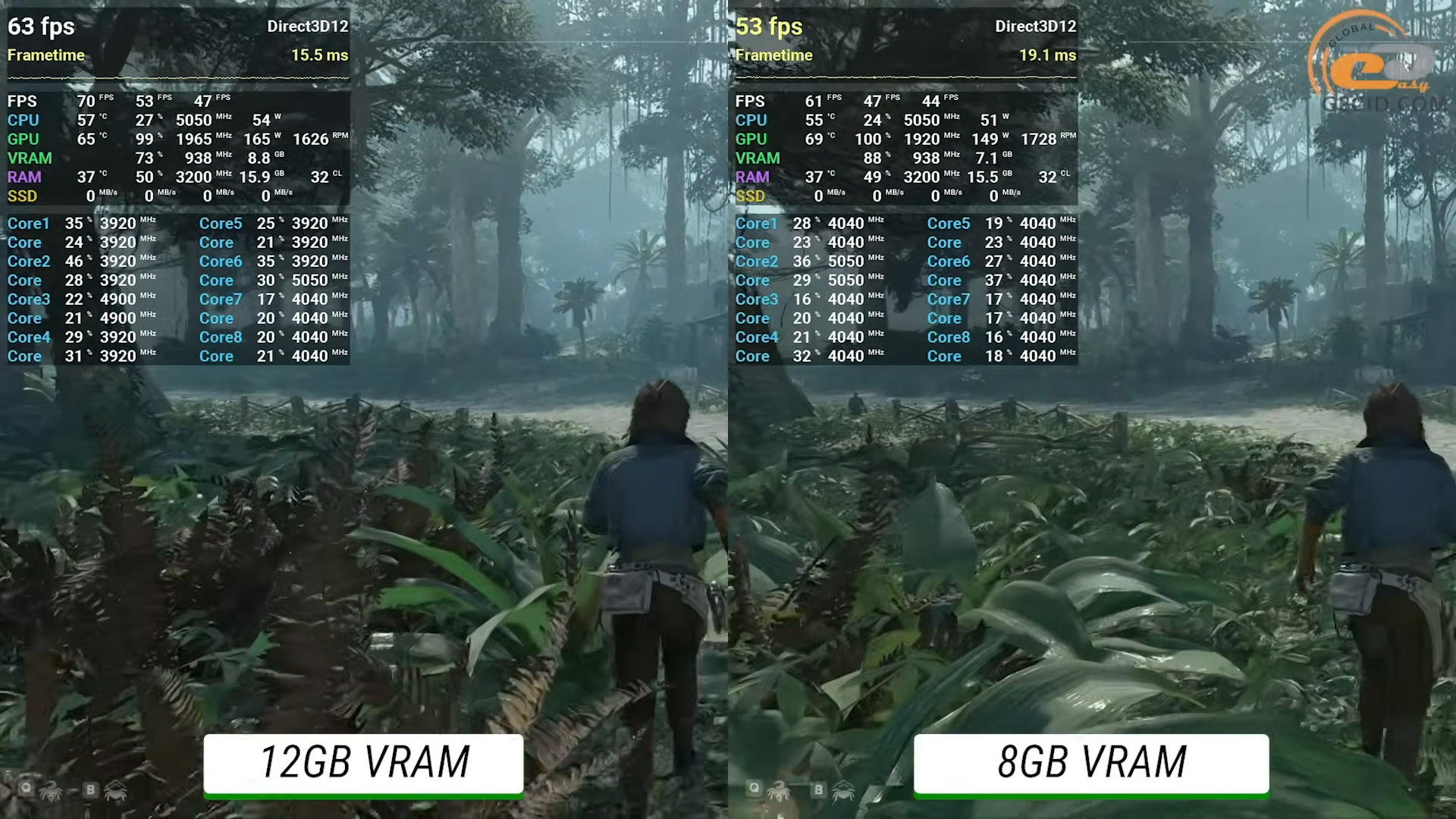
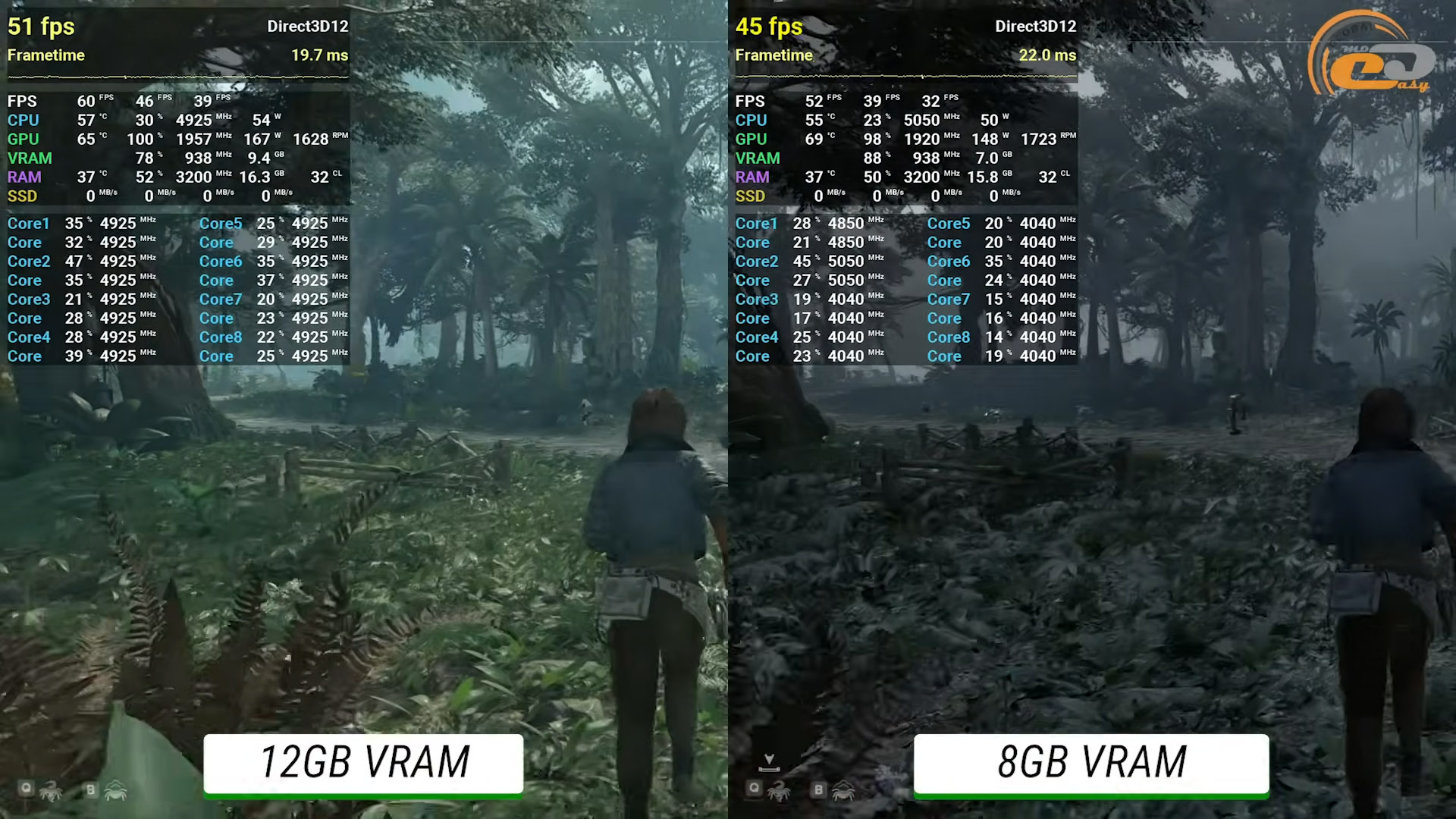
A comparison of 8 and 16 GB cards can be found on YouTube (8 GB is no longer acceptable; 12 GB is the minimum).
The 3770 has a PCI Express bus version 3.0.
Therefore, a card with a full version of PCI-e for 16 lines is required (the 4060 only has 8 lines. Nvidia has begun to economise on the size of the chip).
So, all that remains is to make a choice at the intersection of these requirements.

Aopen MX3S, PIII-S Tualatin 1133, Radeon 9800Pro@XT BIOS, Audigy 4 SB0610
JetWay K8T8AS, Athlon DH-E6 3000+, Radeon HD2600Pro AGP, Audigy 2 Value SB0400
Gigabyte Ga-k8n51gmf, Turion64 ML-30@2.2GHz , Radeon X800GTO PL16, Diamond monster sound MX300

Reply 10 of 23, by AlessandroB

User metadata
Rank Oldbie
Rank
Oldbie
shevalier wrote on 2025-11-25, 06:47:
In 2025, a graphics card without Ray Tracing is a waste of money. A comparison of 8 and 16 GB cards can be found on YouTube (8 G […]
Show full quote
AlessandroB wrote on 2025-11-24, 22:55:
My previous post probably had a lame title. Would this card work with this CPU? […]
Show full quote

My previous post probably had a lame title. Would this card work with this CPU?

What's the difference between these two combinations?

1) i7 3770 + nVIDIA 1080ti

2) i7 3770 + nVIDIA 3060ti

Is the CPU so underpowered that the 3060 feels throttled to the point of being a 1080? Or would there be a performance boost?

tnks

In 2025, a graphics card without Ray Tracing is a waste of money.
A comparison of 8 and 16 GB cards can be found on YouTube (8 GB is no longer acceptable; 12 GB is the minimum).
The 3770 has a PCI Express bus version 3.0.
Therefore, a card with a full version of PCI-e for 16 lines is required (the 4060 only has 8 lines. Nvidia has begun to economise on the size of the chip).
So, all that remains is to make a choice at the intersection of these requirements.

Interesting point of view… but we must consider this:

I'm not a gamer of modern games. I wanted to get a card that would allow me to use vmix better than I do now (I'm using it on a late 2013 MacBook Pro quite well on bootcamp) and at the same time maybe let me play a little bit of a game (in light mode) more recent than Doom 😂. But at the same time I don't want to overdo it because, as I said before, I'm not a keen gamer and the machine I would be installing it on is indeed an older CPU.

At the same time I wouldn't want to get a GPU that's too old for that, and if I needed something more serious for vmix (not for gaming) I'd just need to change the motherboard and CPU to pair with the 3060.

But it's all a test, I wouldn't even want to waste money on a graphics card that won't even let me try playing and that, with a recent CPU, is too weak on Vmix. The only game I'd like to try is Star Wars Squadron with VR, the rest of the games wouldn't matter to me if they didn't work well.


Reply 11 of 23, by shevalier

User metadata
Rank Oldbie
Rank
Oldbie
AlessandroB wrote on 2025-11-25, 07:37:
Interesting point of view… but we must consider this: […]
Show full quote
shevalier wrote on 2025-11-25, 06:47:
In 2025, a graphics card without Ray Tracing is a waste of money. A comparison of 8 and 16 GB cards can be found on YouTube (8 G […]
Show full quote
AlessandroB wrote on 2025-11-24, 22:55:
My previous post probably had a lame title. Would this card work with this CPU? […]
Show full quote

My previous post probably had a lame title. Would this card work with this CPU?

What's the difference between these two combinations?

1) i7 3770 + nVIDIA 1080ti

2) i7 3770 + nVIDIA 3060ti

Is the CPU so underpowered that the 3060 feels throttled to the point of being a 1080? Or would there be a performance boost?

tnks

In 2025, a graphics card without Ray Tracing is a waste of money.
A comparison of 8 and 16 GB cards can be found on YouTube (8 GB is no longer acceptable; 12 GB is the minimum).
The 3770 has a PCI Express bus version 3.0.
Therefore, a card with a full version of PCI-e for 16 lines is required (the 4060 only has 8 lines. Nvidia has begun to economise on the size of the chip).
So, all that remains is to make a choice at the intersection of these requirements.

Interesting point of view… but we must consider this:

I'm not a gamer of modern games. I wanted to get a card that would allow me to use vmix better than I do now (I'm using it on a late 2013 MacBook Pro quite well on bootcamp) and at the same time maybe let me play a little bit of a game (in light mode) more recent than Doom 😂. But at the same time I don't want to overdo it because, as I said before, I'm not a keen gamer and the machine I would be installing it on is indeed an older CPU.

At the same time I wouldn't want to get a GPU that's too old for that, and if I needed something more serious for vmix (not for gaming) I'd just need to change the motherboard and CPU to pair with the 3060.

But it's all a test, I wouldn't even want to waste money on a graphics card that won't even let me try playing and that, with a recent CPU, is too weak on Vmix. The only game I'd like to try is Star Wars Squadron with VR, the rest of the games wouldn't matter to me if they didn't work well.

3060 (not TI, those were 8GB) 12GB is the minimum graphics card from nVidia that is worth buying right now.

PS It will only get worse from here.
Especially on the PCI-e version 3.0
62.jpg
61.jpg

Aopen MX3S, PIII-S Tualatin 1133, Radeon 9800Pro@XT BIOS, Audigy 4 SB0610
JetWay K8T8AS, Athlon DH-E6 3000+, Radeon HD2600Pro AGP, Audigy 2 Value SB0400
Gigabyte Ga-k8n51gmf, Turion64 ML-30@2.2GHz , Radeon X800GTO PL16, Diamond monster sound MX300

Reply 12 of 23, by Munx

User metadata
Rank Oldbie
Rank
Oldbie

As others mentioned, the CPU will be a bottleneck in modern titles. 3060ti is the more powerful of the two, however both will be held back by the CPU. Personally I would go with the 1080ti as 8GB of VRAM is a bad choice for modern games. As an owner of an 8GB 3070ti I'm quite tired of having to turn down the textures to Medium.

My builds!
The FireStarter 2.0 - The wooden K5
The Underdog - The budget K6
The Voodoo powerhouse - The power-hungry K7
The troll PC - The Socket 423 Pentium 4

Reply 13 of 23, by shevalier

User metadata
Rank Oldbie
Rank
Oldbie
Munx wrote on 2025-11-25, 08:31:

As an owner of an 8GB 3070ti I'm quite tired of having to turn down the textures to Medium.

Nowadays, this is hardly the case, as the amount of video memory used depends only slightly on the size of the textures.
Modern development involves putting all the data into video memory, and letting the game engine figure it out.
Check out the 5060 8 vs. 16 test.
The whole internet was asking nVidia why they released an 8GB version in 2025.

Aopen MX3S, PIII-S Tualatin 1133, Radeon 9800Pro@XT BIOS, Audigy 4 SB0610
JetWay K8T8AS, Athlon DH-E6 3000+, Radeon HD2600Pro AGP, Audigy 2 Value SB0400
Gigabyte Ga-k8n51gmf, Turion64 ML-30@2.2GHz , Radeon X800GTO PL16, Diamond monster sound MX300

Reply 14 of 23, by Joseph_Joestar

User metadata
Rank l33t++
Rank
l33t++

As the owner of an RTX 3060 12GB (non-Ti), I can confirm that its extra VRAM can help quite a bit in some recent games. For example, I was able to play this year's FF7 Rebirth at 1080p with all in-game settings maxed, while using DLAA (not DLSS) on top of that. My average frame rate was between 40-55 FPS, but I manually capped it to 30 FPS for a more consistent experience. In contrast, I've seen reviewers on YouTube having to turn down settings on cards with only 8GB, and that game still get stuttered.

Also, obligatory meme. 😁

PC#1: Pentium MMX 166 / Soyo SY-5BT / S3 Trio64V+ / Voodoo1 / YMF719 / AWE64 Gold / SC-155
PC#2: AthlonXP 2100+ / ECS K7VTA3 / Voodoo3 / Audigy2 / Vortex2
PC#3: Core 2 Duo E8600 / Foxconn P35AX-S / X800 / Audigy2 ZS
PC#4: i5-3570K / MSI Z77A-G43 / GTX 980Ti / X-Fi Titanium

Reply 15 of 23, by shevalier

User metadata
Rank Oldbie
Rank
Oldbie
Joseph_Joestar wrote on 2025-11-25, 09:33:

As the owner of an RTX 3060 12GB (non-Ti), I can confirm that its extra VRAM can help quite a bit in some recent games.

Unreal Engine 5.0
It has been the de facto monopoly in the market for AAA-game engines for a couple of years now.
It seems we will have to get used to living with this.

Aopen MX3S, PIII-S Tualatin 1133, Radeon 9800Pro@XT BIOS, Audigy 4 SB0610
JetWay K8T8AS, Athlon DH-E6 3000+, Radeon HD2600Pro AGP, Audigy 2 Value SB0400
Gigabyte Ga-k8n51gmf, Turion64 ML-30@2.2GHz , Radeon X800GTO PL16, Diamond monster sound MX300

Reply 16 of 23, by AlessandroB

User metadata
Rank Oldbie
Rank
Oldbie

Be careful, though, because I didn't ask which card was better for gaming per se, but how they both performed with my current CPU. I should note that I'd primarily use it with vMix, where the most important thing is the CUDA cores. If it allows me to game a little, so much the better, but that's not its primary use. Let's say 70% vMix, 30% gaming. And it doesn't even have to be a card suited solely to my current CPU, because if my work with vMix were to progress, I'd have to get a new motherboard and CPU to pair with the Nvidia, and in that case, a 1080ti (which paired with my current CPU is fine) would be limiting compared to the 3060ti, I think... but these are my considerations; I'm asking you, who know much more about this. I'm open to other models, too, as long as they don't cost too much compared to the price of these two.

Reply 17 of 23, by MikeSG

User metadata
Rank Oldbie
Rank
Oldbie

It's hard to tell how they perform with the CPU. Often CPUs (and systems) bottleneck due to high polygon count, slow RAM speed, slow SSD speed.

Gen 3 NVMe SSDs are more important for loading speed than RAM, but you need a system that supports Gen 3 NVMe drives.

For reference on CPUs:
10th gen Intel is approx 2x 2nd gen Intel (i7).
11th gen Intel is approx 2x 10th gen Intel (i7).
11th gen (i5) is considered the minimum CPU for ultra high performance applications/games.

Only one way to find out if you have enough CPU is to test it... If you only need 60FPS most games are probably fine.

Reply 18 of 23, by keenmaster486

User metadata
Rank l33t
Rank
l33t
Dan386DX wrote on 2025-11-25, 04:01:

Not quite, i7-4770 is Haswell on LGA 1150; the Ivy 3770 uses the older 1155 socket.

I stand corrected.

World's foremost 486 enjoyer.

Reply 19 of 23, by The Serpent Rider

User metadata
Rank l33t++
Rank
l33t++

I doubt that modern games are on the menu with 3770, which can't be even overclocked. So VRAM is not a big issue, but additional features like AV1 decoding on RTX 3000 could be useful.
Also 1080 Ti is practically dead on Linux, because there's no open source drivers for anything lower than RTX 2000.

I must be some kind of standard: the anonymous gangbanger of the 21st century.