First post, by Gfrost
Good day, all.
Is it even possible to make this thing display 166 MHz?
Right now it's about 66 (which is, basically, absolutely correct since the config is P166MMX/Atrend ATC-5000 with the clock speed being 66 MHz).

Good day, all.
Is it even possible to make this thing display 166 MHz?
Right now it's about 66 (which is, basically, absolutely correct since the config is P166MMX/Atrend ATC-5000 with the clock speed being 66 MHz).

Don't see why not? Just adjust the jumpers to display whatever numbers you want, including the 1 digit.
Turbo XT 12MHz, 8-bit VGA, Dual 360K drives
Intel 386 DX-33, Speedstar 24X, SB 1.5, 1x CD
Intel 486 DX2-66, CL5428 VLB, SBPro 2, 2x CD
Intel Pentium 90, Matrox Millenium 2, SB16, 4x CD
HP Z400, Xeon 3.46GHz, YMF-744, Voodoo3, RTX2080Ti
Gfrost wrote on 2025-11-30, 20:21:Good day, all.
Is it even possible to make this thing display 166 MHz?
Right now it's about 66 (which is, basically, absolutely correct since the config is P166MMX/Atrend ATC-5000 with the clock speed being 66 MHz).
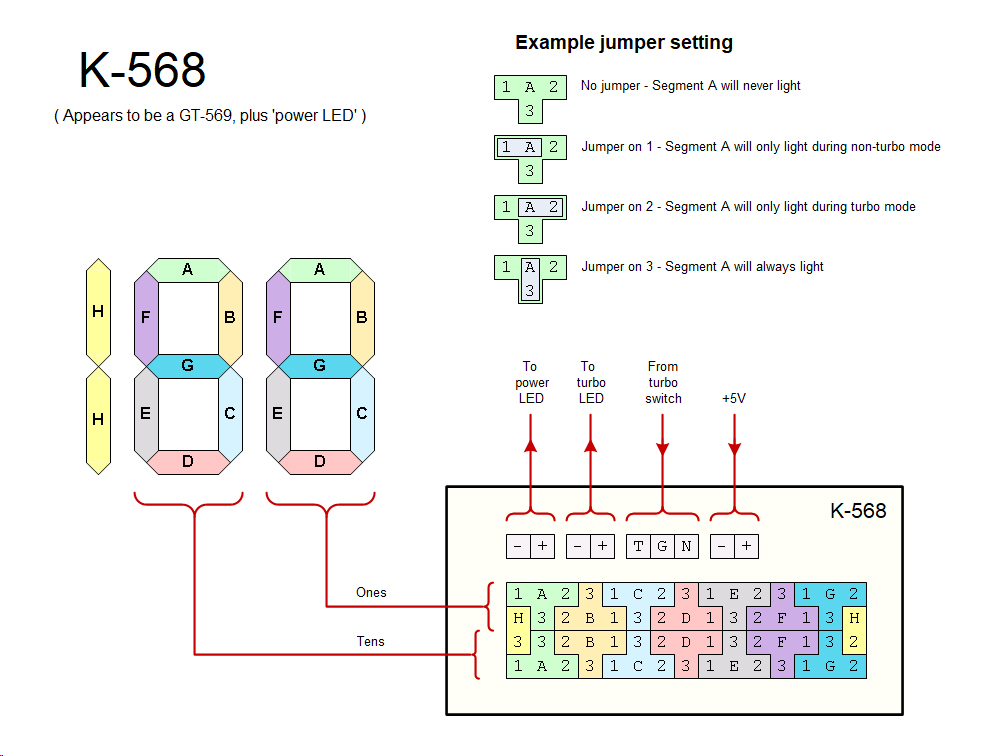
Try if moving the single jumper cap in the middle rows on the far right to the same position on the far left does what you want.
It is, since it's obviously a 3 digit display.
If you have a 5V power supply, you can hook it up and just try different jumpers while it's on to see which ones you would need to change.
My builds!
The FireStarter 2.0 - The wooden K5
The Underdog - The budget K6
The Voodoo powerhouse - The power-hungry K7
The troll PC - The Socket 423 Pentium 4
Thanks everybody and especially Dorunkāku!
It worked.
Try if moving the single jumper cap in the middle rows on the far right to the same position on the far left does what you want.
I don’t think I fully grasped the whole principle, so before I start randomly moving jumpers around, is it possible to identify the exact position of the jumpers to get 199?
It is not an exact match but you can use this diagram as a reference.