VOGONS


What retro activity did you get up to today?

Topic actions

Reply 30620 of 30642, by StriderTR

User metadata
Rank Oldbie
Rank
Oldbie
bakemono wrote on 2025-12-29, 19:35:

Following in the footsteps of llama98, someone has released an AI doohicky for CP/M. https://github.com/HarryR/z80ai

I downloaded GUESS.COM to my Z280 board and ran it there. I asked some questions, but ultimately lost interest before guessing the object. It takes a while for each response.

I wonder if I can get this running on my homebrew Z80-MBC2 build.... it meets the criteria. CP/M 3, 128K, and I have it running at blazing fast 8MHz. 🤣

I'm always looking for an excuse to play with my Z80. 😀

DOS, Win9x, General "Retro" Enthusiast. Professional Tinkerer. Technology Hobbyist. Expert at Nothing! Build, Create, Repair, Repeat!
This Old Man's Builds, Projects, and Other Retro Goodness: https://theclassicgeek.blogspot.com/

Reply 30621 of 30642, by luckybob

User metadata
Rank l33t++
Rank
l33t++

I heard my name. Who summoned me?

Once men turned their thinking over to machines in the hope that this would set them free. But that only permitted other men with machines to enslave them. - Reverend Mother Gaius Helen Mohiam

Reply 30622 of 30642, by PcBytes

User metadata
Rank l33t
Rank
l33t
myne wrote on 2026-01-04, 12:15:

Special server chipsets have existed more or less since day 1.

Iirc there were dual 486s too. Possibly more. NT multiprocessor x86 had to be developed on something after all.
Probably managed that similarly to the way someone like serverworks got more than 4 ppros running.

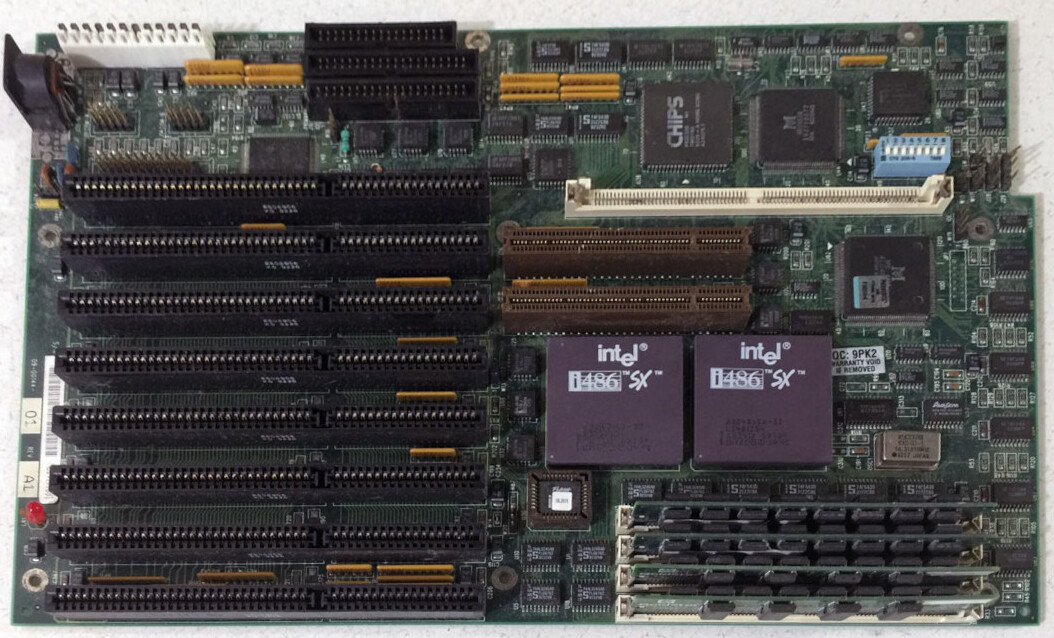
Micronics did a dual 486 as far as I found, so likely those were used for creating the NT multiprocessor kernel for x86.

dual-486-motherboard-611ea9abb1549701220215.jpg

"Enter at your own peril, past the bolted door..."
Main PC: i5 3470, GB B75M-D3H, 16GB RAM, 2x1TB
98SE : P3 650, Soyo SY-6BA+IV, 384MB RAM, 80GB

Reply 30623 of 30642, by Kahenraz

User metadata
Rank l33t
Rank
l33t

Windows NT 3.0/3.1 must have felt like a time warp compared to what was contemporary at the time. The only thing comparable would have been high-end UNIX workstations and mini computers, I believe.

Imagine using Windows 3.1 and the coming home to your budget Compaq DOS PC.

Reply 30624 of 30642, by Disruptor

User metadata
Rank Oldbie
Rank
Oldbie
Kahenraz wrote on 2026-01-04, 18:27:

Windows NT 3.0/3.1 must have felt like a time warp compared to what was contemporary at the time. The only thing comparable would have been high-end UNIX workstations and mini computers, I believe.

Imagine using Windows 3.1 and the coming home to your budget Compaq DOS PC.

There was no Windows NT 3.0
It started at 3.1, followed by 3.5, 3.51, 4.0, 5.o aka 2000, 5.1 aka XP, 5.2 aka 2003 (Server) and XP 64 bit, 6.0 aka Vista, 7, 8, 8.1, 10 and 11.

But, yes, there were some HALs for early multiprocessing systems.

Reply 30625 of 30642, by Disruptor

User metadata
Rank Oldbie
Rank
Oldbie
PcBytes wrote on 2026-01-04, 17:24:
Micronics did a dual 486 as far as I found, so likely those were used for creating the NT multiprocessor kernel for x86. […]
Show full quote
myne wrote on 2026-01-04, 12:15:

Special server chipsets have existed more or less since day 1.

Iirc there were dual 486s too. Possibly more. NT multiprocessor x86 had to be developed on something after all.
Probably managed that similarly to the way someone like serverworks got more than 4 ppros running.

Micronics did a dual 486 as far as I found, so likely those were used for creating the NT multiprocessor kernel for x86.

dual-486-motherboard-611ea9abb1549701220215.jpg

Well, I've looked at that board and I got doubts but was uncertain whether it was a fake.
I've edited that post.
I've edited it again. It IS a FAKE.

It is NOT a dual 486 motherboard.
It is this board:
https://theretroweb.com/motherboards/s/micron … 86v-09-00169-xx
https://theretroweb.com/motherboards/s/micron … bus-09-00144-xx
It has a 486 (PGA-168) and a 487SX (PGA-169) socket.

Reply 30626 of 30642, by MattRocks

User metadata
Rank Member
Rank
Member
Joseph_Joestar wrote on 2026-01-04, 11:38:

I just watched this episode of The Computer Chronicles from 1993 where they talk about the Pentium processor in detail.

About 13 minutes in, they show a server which had 64MB RAM, and could host up to 1GB at maximum. Didn't realize that was even a thing back then. When asked who is buying these systems, the salesman answers: people who are working on neural networks and AI. I had to do a double take on that.

The idea goes way-way back and was discredited by the boldness of the claims its founders made. They called a neutron, a perceptron. The original perceptron network was proposed in the late 1950s and consisted of a single layer of perceptrons.

The inventors claimed their perceptron networks could identify objects in photographs. Militaries tested this with photos of tanks and trucks, which the perceptron networks correctly classified.

But the computers of their time could not consider all pixels, and the hype stretched far beyond what the machines could read. It later emerged the perception networks succeeded by assuming that blue sky meant one type of object was in the photo, and a green background meant another object was in the photo.

For the next decade or two AI research focussed on alternative approaches such as Logic Programming or methods of finding ways around maps.

There's a book called Perceptrons, 1969. I found it very helpful in setting new questions on the limits of neural networks, and later convolutional neural networks.

Reply 30627 of 30642, by Nexxen

User metadata
Rank l33t
Rank
l33t

1. tested a few video cards with Necroware's video memory test: it works wonders.
2. soldered a new connector on a wifi card, IPX4 size
3. soldered new ram to a Rage 128 Pro; that was boring 😀

Nice evening here 😀

PC#1 Pentium 233 MMX - 98SE
PC#2 PIII-1Ghz - 98SE/W2K

- "One hates the specialty unobtainium parts, the other laughs in greed listing them under a ridiculous price" - kotel studios
- Bare metal ist krieg.

Reply 30629 of 30642, by MattRocks

User metadata
Rank Member
Rank
Member

The recent RetroBus ATI Rage 120 Pro revisit got me thinking about a problem I keep running into when rebuilding retro PCs.

Compatibility doesn’t always reproduce the intended experience. Some games technically run but still feel off: input timing, frame pacing, or general “feel” never quite lines up, even on period-correct hardware.

I wrote up some field notes on how hardware, OS/API stacks, and performance constraints interacted to shape how those games were originally played.

If it’s useful to anyone working through similar rebuilds, the first set is here: https://computing-culture.github.io/essays/

Reply 30630 of 30642, by Nexxen

User metadata
Rank l33t
Rank
l33t

Yesterday I replaced the SIO on my 939 A8N5X.
From 7.5 ohms between +5V and Ground, now I'm at 200 ohms but should be on the thousands.

Before it would go instant ON when PSU switched ON; now it doesn't but a mild current is going through anyway, no +12 no +5... :
- chipset fan won't move but if pushed with a finger it would spin (not enough juice to turn but enough to sustain movement)
- if I try a lot of times, it'll turn on fully: PSU would start issuing +12 +5...

Probably it wasn't the SIO but a component in between. I have to replace a LM324.
It took me a to solder the SIO as the leads were probably oxidized and I didn't check before soldering...... (shame on me).

---

Tried to revive 2 2TB HDDs, no go. One spins but not recognized - adapter senses something but not showing "no media" inserted, the other doesn't spin correctly and adapter shows "no media".

---

Needed to reball a DDR2 chip before soldering as the balls it came with, pre applied, are lead free.

---

Trying to solve a DDR1 1GB issue: gives errors in Memtest @ 512,6 -768,6 MB (3rd 256MB block) but not sure of the order on the stick.
From some diagrams it's U1 to U9 (U5 is skipped) from pin 1 to 93; but IDK if on the back U9 is followed by U10 on pin 94 or not.
I hae another faulty 1GB stick, maybe I can swap chips to get one working. I want to prove a point.

Long post 😀

PC#1 Pentium 233 MMX - 98SE
PC#2 PIII-1Ghz - 98SE/W2K

- "One hates the specialty unobtainium parts, the other laughs in greed listing them under a ridiculous price" - kotel studios
- Bare metal ist krieg.

Reply 30631 of 30642, by Ozzuneoj

User metadata
Rank l33t
Rank
l33t

Well, this is a bit out of the norm for me, but if anyone is familiar with Atari ST systems, I have a question...

Is there any kind of fairly simple and inexpensive way to get a mouse hooked up to an Atari 1040STf?

I have read about how there are similarities to some Bus mice for PCs as well as Amiga mice. I do not have an Amiga mouse, but I have an old bus mouse that came in the box with an ATi VGA Wonder. It isn't being used currently, so if there is a way to make a passive adapter for something like that, that would be nice, but as always, the issue is getting a female connector that accepts a 9-pin din bus mouse plug so I can build an adapter. Cutting the end off of this very rare old PC mouse is not an option.

I also have some of these little ATMEGA32U4 boards (the purple USB-C 3-15v ones) that I bought to adapt old Nintendo and Sega controllers to USB, but I have near zero experience with that kind of thing, so I have no idea if one of those can be used for what I need... for example, in the opposite direction with a USB mouse connected to an Atari ST. I kind of doubt this is possible with one of these boards, but I figured it would be worth asking.

There are premade Atari ST mouse solutions available, but it seems that the vast majority of Atari ST stuff is in the UK or Europe, and the prices are already too high for me to want to bother. I don't really want to spend $50-$60 (shipped) on a mouse for this ST when I have several dozen mice on hand already. Also, the one being sold in the US uses a huge serial mouse connector which I believe would be way too big to fit the cramped connectors on the bottom of the 1040STf.

EDIT: Oh, wow, I think this is actually the right pin layout...
https://www.aliexpress.us/item/3256809608153573.html
Anyone know of any devices that use a cable like that? Maybe I can find one under a different name so I don't have to wait a few weeks to get one from Aliexpress.
... Ah, also found one on Amazon.
https://www.amazon.com/jasavdio-Female-Extens … T/dp/B0DQXS82HS

So, maybe I just need to get one of those, lop the male end off and figure out how to wire the rest up to a DE9 connector with the correct pinout for a bus mouse like this one? Maybe the pinout here is correct? I really don't want to kill the mouse or the ST... heh.

Now for some blitting from the back buffer.
Reply 30632 of 30642, by Mu0n

User metadata
Rank Member
Rank
Member

I finally produced a video that showcases a C program I've been doing. It plays VGM files and sends data meant for the YM3812 (OPL2) or YMF262 (OPL3) to a YMF262 sitting inside a F256K2, an 8-bit computer based on the 65C816. Everything I've learned over the past months about FM synth can also be applied on the vintage PC side - in fact, I made a thread about something I made in Borland C to take in MIDI in and send it to the PC speaker, opl2 sound cards or MIDI out.

My program's main thing is that while a vgm file plays, you can pause it and explore the current status of the opl3 channels and test what they sound like. it'll populate the data across a maximized amount of channels so you can do MIDI in polyphony, then switch to another instrument and try that one out. I really liked that functionality in adlib tracker II (arguably a more obscure format) and wanted to reproduce it for vgm files.

https://youtu.be/XonPYyjqCdM

1Bit Fever Dreams: https://www.youtube.com/channel/UC9YYXWX1SxBhh1YB-feIPPw
AnyBit Fever Dreams: https://www.youtube.com/channel/UCIUn0Dp6PM8DBTF-5g0nvcw

Reply 30633 of 30642, by MattRocks

User metadata
Rank Member
Rank
Member
Ozzuneoj wrote on Yesterday, 08:47:

Anyone know of any devices that use a cable like that?

That pin layout reminds me of the Commodore 16, but not sure pin count/arrangement would match. Google'd the C16 adapter below and it mentions Atari...

https://www.ebay.co.uk/itm/320702646294?chn=p … ction=view_item

As a former C16 user, I can verify that using adapters was always standard practice because native round-pin peripherals were rare.

Reply 30634 of 30642, by Ozzuneoj

User metadata
Rank l33t
Rank
l33t
MattRocks wrote on Yesterday, 13:03:
That pin layout reminds me of the Commodore 16, but not sure pin count/arrangement would match. Google'd the C16 adapter below […]
Show full quote
Ozzuneoj wrote on Yesterday, 08:47:

Anyone know of any devices that use a cable like that?

That pin layout reminds me of the Commodore 16, but not sure pin count/arrangement would match. Google'd the C16 adapter below and it mentions Atari...

https://www.ebay.co.uk/itm/320702646294?chn=p … ction=view_item

As a former C16 user, I can verify that using adapters was always standard practice because native round-pin peripherals were rare.

I would need a cable with a 9pin female connector for my bus mouse. Also, that type of DE9 plug is too thick to fit the cramped connectors on the STf.

Now for some blitting from the back buffer.

Reply 30635 of 30642, by BitWrangler

User metadata
Rank l33t++
Rank
l33t++
Ozzuneoj wrote on Yesterday, 15:42:
MattRocks wrote on Yesterday, 13:03:
That pin layout reminds me of the Commodore 16, but not sure pin count/arrangement would match. Google'd the C16 adapter below […]
Show full quote
Ozzuneoj wrote on Yesterday, 08:47:

Anyone know of any devices that use a cable like that?

That pin layout reminds me of the Commodore 16, but not sure pin count/arrangement would match. Google'd the C16 adapter below and it mentions Atari...

https://www.ebay.co.uk/itm/320702646294?chn=p … ction=view_item

As a former C16 user, I can verify that using adapters was always standard practice because native round-pin peripherals were rare.

I would need a cable with a 9pin female connector for my bus mouse. Also, that type of DE9 plug is too thick to fit the cramped connectors on the STf.

If you have 3rd party Amiga mice around some of those were Atari/Amiga switchable.

I am guessing you need DE9 without the lugs, found on joysticks in the 80s. So you might scratch up a DE9 joystick y splitter from somewhere and use the plug off that. Or you could get a solder bucket terminal DE9 and snip the lugs off with shears or snips, then wrap with heatshrink etc. Occasionally you find lugless gender changers, so stacking those might work.

If I were figuring out the wiring myself I would look in Aminet's hardware directory for Amiga to Atari mouse conversion, and busmouse to Amiga and work backwards from one to the other. i.e. reverse the amiga to atari then apply to busmouse to amiga, if you catch my drift.

Unicorn herding operations are proceeding, but all the totes of hens teeth and barrels of rocking horse poop give them plenty of hiding spots.

Reply 30636 of 30642, by Ozzuneoj

User metadata
Rank l33t
Rank
l33t
BitWrangler wrote on Yesterday, 16:26:
If you have 3rd party Amiga mice around some of those were Atari/Amiga switchable. […]
Show full quote
Ozzuneoj wrote on Yesterday, 15:42:
MattRocks wrote on Yesterday, 13:03:

That pin layout reminds me of the Commodore 16, but not sure pin count/arrangement would match. Google'd the C16 adapter below and it mentions Atari...

https://www.ebay.co.uk/itm/320702646294?chn=p … ction=view_item

As a former C16 user, I can verify that using adapters was always standard practice because native round-pin peripherals were rare.

I would need a cable with a 9pin female connector for my bus mouse. Also, that type of DE9 plug is too thick to fit the cramped connectors on the STf.

If you have 3rd party Amiga mice around some of those were Atari/Amiga switchable.

I am guessing you need DE9 without the lugs, found on joysticks in the 80s. So you might scratch up a DE9 joystick y splitter from somewhere and use the plug off that. Or you could get a solder bucket terminal DE9 and snip the lugs off with shears or snips, then wrap with heatshrink etc. Occasionally you find lugless gender changers, so stacking those might work.

If I were figuring out the wiring myself I would look in Aminet's hardware directory for Amiga to Atari mouse conversion, and busmouse to Amiga and work backwards from one to the other. i.e. reverse the amiga to atari then apply to busmouse to amiga, if you catch my drift.

Yeah, I don't have any Atari or Amiga computer peripherals.

I was overthinking this a bit though. I don't need to make a dedicated one-piece adapter that connects from the bus mouse to the Atari's DE9.

For the end that plugs into the Atari ST I can just get one of these to extend it out:
https://www.amazon.com/dp/B0819PGQ1X

And then I'll cut the male end off of one of these, and solder and assemble a standard big-fat-DE9 connector, which I have several of:
https://www.amazon.com/jasavdio-Female-Extens … B0DQXS82HS?th=1
EDIT: Fixed link... somehow ended up pasting the same link twice. And yes, I'm aware that it incorrectly says that it is S-video. They seem to be producing cables without even knowing what they are used for.

I keep forgetting that a normal "PC" type DE9 connector fits on the Atari\Sega DE9 despite looking so different. So, that should be easy.

It will just come down to getting the correct pinout to go from the bus mouse to the Atari DE9.

Last edited by Ozzuneoj on 2026-01-09, 02:24. Edited 1 time in total.

Now for some blitting from the back buffer.

Reply 30637 of 30642, by jtchip

User metadata
Rank Member
Rank
Member
Ozzuneoj wrote on Yesterday, 18:38:

It will just come down to getting the correct pinout to go from the bus mouse to the Atari DE9.

Dark_Lord previously posted about BusMousOMatic, sounds like that's exactly what you need.

Reply 30638 of 30642, by Ozzuneoj

User metadata
Rank l33t
Rank
l33t
jtchip wrote on Yesterday, 23:58:
Ozzuneoj wrote on Yesterday, 18:38:

It will just come down to getting the correct pinout to go from the bus mouse to the Atari DE9.

Dark_Lord previously posted about BusMousOMatic, sounds like that's exactly what you need.

That's really cool! A bit overkill for my current needs though. I just need to wire up an adapter for one mouse to go to one type of computer. In the future if I get more computers that use bus mice I may have to build one of those. I will bookmark it for later. 😀

I am having trouble figuring out if Microsoft In-Port is 100% the same thing and has the same pinout as a generic din-9 "bus mouse" like the one on the ATi VGA Wonder. I think so, since the box for the VGA Wonder says that a "Microsoft compatible bus mouse" is included. I just don't want to damage anything and it's tough to track this information down because of the rather generic words and the fact that so many posts online use vague terms.

The bus mouse wiki page has a pinout...
https://en.wikipedia.org/wiki/Bus_mouse
But for some inexplicable reason it does not show the pin numbering in the connector. One would assume it starts at the upper left corner, but... well... 🤷

So, I guess I can just match those pins up to the ST pinout below...
https://trumouse.com/atari-st-joystick-pinout/

Now for some blitting from the back buffer.
Reply 30639 of 30642, by RetroLizard

User metadata
Rank Member
Rank
Member

I tested out an Aztech Sound Galaxy Nova 16 card. It works well enough, though I'm having some trouble getting it to work in Windows. Is 3.1 different from WfW3. 11 as far as drivers are concerned?