VOGONS


ZuluIDE: A proper IDE device emulator for retro PCs

Topic actions

Reply 200 of 231, by aperezbios

User metadata
Rank Newbie
Rank
Newbie

For all ZuluIDE V2 users, please ensure you upgrade to https://github.com/ZuluIDE/ZuluIDE-firmware/r … tag/v2025.12.08, which I released this morning.

For ZuluIDE RP2040 (V1) users, there's no need to upgrade to this release if you've already upgraded to the v2025.12.06 firmware release.

Reply 201 of 231, by iMacOSx

User metadata
Rank Newbie
Rank
Newbie

Hi. I'm new to the group, and I was drawn here by your project, which is truly well-developed and has impressive capabilities.
I use a lot of retro audio equipment, and among other things, I'm looking for a CD-ROM emulator. Let me explain what exactly I'm looking for. I'm interested in the ability to create a folder named (for example, "1.iso9660") and place MP3 files in it. I connect Zulu in place of the original CD-Audio reader from my Denon DN-S5000 DJ player, which supports CD-Audio and MP3. After inserting an SD card with such a folder, Zulu emulates an ISO 9660 disc and provides direct access to MP3 files in folder SD card.
What I mean is that all CD-ROM emulators offer disk image playback, I need native MP3 playback that supports most older DJ equipment, so I don't have to create ISO images, I just put the MP3 on the SD card (ex fat or another format)in a folder and play. Zulu would emulate the ISO 9660 environment CD. I hope you understand what I mean.
Regards.

Reply 202 of 231, by aperezbios

User metadata
Rank Newbie
Rank
Newbie
iMacOSx wrote on 2025-12-20, 16:12:
Hi. I'm new to the group, and I was drawn here by your project, which is truly well-developed and has impressive capabilities. […]
Show full quote

Hi. I'm new to the group, and I was drawn here by your project, which is truly well-developed and has impressive capabilities.
I use a lot of retro audio equipment, and among other things, I'm looking for a CD-ROM emulator. Let me explain what exactly I'm looking for. I'm interested in the ability to create a folder named (for example, "1.iso9660") and place MP3 files in it. I connect Zulu in place of the original CD-Audio reader from my Denon DN-S5000 DJ player, which supports CD-Audio and MP3. After inserting an SD card with such a folder, Zulu emulates an ISO 9660 disc and provides direct access to MP3 files in folder SD card.
What I mean is that all CD-ROM emulators offer disk image playback, I need native MP3 playback that supports most older DJ equipment, so I don't have to create ISO images, I just put the MP3 on the SD card (ex fat or another format)in a folder and play. Zulu would emulate the ISO 9660 environment CD. I hope you understand what I mean.
Regards.

That's an extremely niche use case, and one that would not be trivial to actually implement. It's easy to ask for features like this when you don't have to consider the actual challenges associated with implementing the functionality.

While it's not impossible to implement, it's not something that we've ever considered putting on the roadmap. I can see several technical/compute-related challenges that would arguably make it difficult enough to implement, given the constraints of the microcontroller hardware and memory capabilities of the microcontroller itself. There just isn't enough processing power to do what you're asking for, along with the other real-time tasks that the device must already perform for it to function as an Optical Disc Emulator.

Reply 203 of 231, by it9exm

User metadata
Rank Newbie
Rank
Newbie

I wonder if V2 can support higher UDMA speeds with the new RP2350 over time.

Reply 204 of 231, by aperezbios

User metadata
Rank Newbie
Rank
Newbie
it9exm wrote on 2025-12-25, 08:16:

I wonder if V2 can support higher UDMA speeds with the new RP2350 over time.

It already does! ZuluIDE V2 supports ATA/33 (UDMA2) and is significantly more performant, relative to the first-generation RP2040/FPGA-based ZuluIDE.

ZuluIDE V2 delivers up to 28 megabytes per second for reads, for both Optical Disc Emulation as well as ATAPI Zip drive and Hard Drive emulation. It's a huge improvement over V1, nearly 20 megabytes per second faster than the original ZuluIDE RP2040. It hauls ass 😀

Reply 205 of 231, by TgamesFR

User metadata
Rank Newbie
Rank
Newbie
aperezbios wrote on 2026-01-01, 18:33:

It already does! ZuluIDE V2 supports ATA/33 (UDMA2) and is significantly more performant, relative to the first-generation RP2040/FPGA-based ZuluIDE.

ZuluIDE V2 delivers up to 28 megabytes per second for reads, for both Optical Disc Emulation as well as ATAPI Zip drive and Hard Drive emulation. It's a huge improvement over V1, nearly 20 megabytes per second faster than the original ZuluIDE RP2040. It hauls ass 😀

@aperezbios
Does there is any change on write speed in USB mass storage mode on the new model ?

Reply 206 of 231, by aperezbios

User metadata
Rank Newbie
Rank
Newbie
TgamesFR wrote on 2026-01-10, 13:50:

@aperezbios
Does there is any change on write speed in USB mass storage mode on the new model ?

Unfortunately not. This is a hardware limitation of the RP2350B microcontroller itself.

Reply 207 of 231, by TgamesFR

User metadata
Rank Newbie
Rank
Newbie
aperezbios wrote on 2026-01-10, 16:52:

Unfortunately not. This is a hardware limitation of the RP2350B microcontroller itself.

Ok thanks for your reply, i've not noticed any issue with the read speed with the V1 hardware, i mean it's never bottleneck by any ISO or CUE/BIN files i've ever tested.
Tested around 300 games so far to this day and it's rock solid even at lower read speeds (can't notice it even at all, for games in my case, probably for others usages it will be noticeable).

But yes the write speed is really noticeable, it's the main bottleneck when uploading images, but i can deal with it and do something else while it uploads.
In real conditions i have around 600kb/s max when it upload images with a Sandisk Extreme A2 Card.
I don't know if the 1MB/s are really possible (in normal conditions) or prob with small files.

Reply 208 of 231, by aperezbios

User metadata
Rank Newbie
Rank
Newbie
TgamesFR wrote on 2026-01-10, 17:00:

But yes the write speed is really noticeable, it's the main bottleneck when uploading images, but i can deal with it and do something else while it uploads.
In real conditions i have around 600kb/s max when it upload images with a Sandisk Extreme A2 Card.
I don't know if the 1MB/s are really possible (in normal conditions) or prob with small files.

It may be possible to improve write performance by a small amount (maybe 150-200 kilobytes/second) but it may or may not bear fruit, and there's no way to know in advance.

Beyond that, I have some ideas for how we could significantly improve this, but it would require additional hardware/semiconductors on a revised ZuluIDE board.

As always, the fastest way to read and write to an SD card is directly, by removing it from the ZuluIDE and copying files directly to the SD card.

Reply 209 of 231, by dreamblaster

User metadata
Rank Oldbie
Rank
Oldbie

The latest firmware release (https://github.com/ZuluIDE/ZuluIDE-firmware/releases) now supports startup sound playback -- just place startup.wav on the micro sd card.
This is handy for testing, I will be updating all boards to this latest version, and created a ZuluIDE testing song :
https://youtu.be/Hn2aNQI-Ogc?si=zq8FZfeWNNU60_Sg

Visit http://www.serdashop.com for retro sound cards, video converters, ...
DreamBlaster X2, S2, S2P, HDD Clicker, ... many projects !
New X2GS SE & X16GS sound card : https://www.serdashop.com/X2GS-SE ,
Thanks for your support !

Reply 210 of 231, by TgamesFR

User metadata
Rank Newbie
Rank
Newbie

I've just bought the ZuluIDE V2 to support the project, as i was very happy with the V1 and the support is great on Github.
Will do many tests once i get it and post the results here.

I will be able to try that UDMA 2 (ATA-33) that only the V2 support as my mobo also support ATA-33.

Fun fact the ZuluIDE V2 is the only device who support that speed. Even the new PicoIDE is limited to max MWDMA 2 (16,7 Mo/s) vs the ZuluIDE V2 UDMA2 (33 Mo/s).

Reply 211 of 231, by trunk70

User metadata
Rank Newbie
Rank
Newbie

Hello, has anyone here already added an interface with an OLED screen and rotary encoder? If so, could you provide links to the hardware used? I like the web version, but having direct control from my PC would be much more useful. Thanks!

Vous devriez voir ce que je vois.

Reply 212 of 231, by TgamesFR

User metadata
Rank Newbie
Rank
Newbie
trunk70 wrote on 2026-01-30, 11:17:

Hello, has anyone here already added an interface with an OLED screen and rotary encoder? If so, could you provide links to the hardware used? I like the web version, but having direct control from my PC would be much more useful. Thanks!

Probably even a DOS app to communicate with the ZuluIDE may be possible in the future if you prefer something without web.
On the PicoIDE they did that.

Reply 213 of 231, by trunk70

User metadata
Rank Newbie
Rank
Newbie
trunk70 wrote on 2026-01-30, 11:17:

Hello, has anyone here already added an interface with an OLED screen and rotary encoder? If so, could you provide links to the hardware used? I like the web version, but having direct control from my PC would be much more useful. Thanks!

Page 4... Sorry for asking.

It's a shame that we can't buy it officially and that this isn't clearly stated on the official website (on the store page). 🙁

Vous devriez voir ce que je vois.

Reply 214 of 231, by dreamblaster

User metadata
Rank Oldbie
Rank
Oldbie
trunk70 wrote on 2026-01-31, 12:05:
trunk70 wrote on 2026-01-30, 11:17:

Hello, has anyone here already added an interface with an OLED screen and rotary encoder? If so, could you provide links to the hardware used? I like the web version, but having direct control from my PC would be much more useful. Thanks!

Page 4... Sorry for asking.

It's a shame that we can't buy it officially and that this isn't clearly stated on the official website (on the store page). 🙁

I'm working on a Serdashop version of the panel - I estimate it will be available in March.

Visit http://www.serdashop.com for retro sound cards, video converters, ...
DreamBlaster X2, S2, S2P, HDD Clicker, ... many projects !
New X2GS SE & X16GS sound card : https://www.serdashop.com/X2GS-SE ,
Thanks for your support !

Reply 215 of 231, by mbalmer

User metadata
Rank Newbie
Rank
Newbie
trunk70 wrote on 2026-01-31, 12:05:
trunk70 wrote on 2026-01-30, 11:17:

Hello, has anyone here already added an interface with an OLED screen and rotary encoder? If so, could you provide links to the hardware used? I like the web version, but having direct control from my PC would be much more useful. Thanks!

Page 4... Sorry for asking.

It's a shame that we can't buy it officially and that this isn't clearly stated on the official website (on the store page). 🙁

Front-panel board designer and enclosure designer here.

Part of the reason it wasn't there from the start is that when the ZuluIDE was first conceived, a front panel wasn't seen as needed because the initial assumption was that it would largely be used in cases where the media wasn't being changed often or where the media could be cycled using the OS's software-eject mechanism (think Mac OS 9, OS X, modern Windows and Linux versions).

Obviously, that assumption didn't hold up very long. 🤣

At the same time, one of the major pushes that we've been trying to make has been largely in the realm of device speed -- which, as you noted earlier, is the best amongst the bunch of IDE device emulators out there -- something we're definitely proud of.

That said, the consistent need for a hardware-based front panel is definitely something we're on. It's DIY at the moment primarily for a few reasons: first, getting it to work consistently at the start wasn't particularly simple and it's needed a lot of internal revisions to get to the point where it's as polished as it is; second, much like the DAC add-on board, not everyone wanted it, and the number of people who did want it and couldn't make their own with a small amount of effort was very, very small -- to the point where I've actually made a few of them myself and shipped them to a couple of folks who contacted me privately in that circumstance; third, because so much of the codebase is shared with the sister ZuluSCSI project, we've actually been trying to marry the two devices together in that regard so that both the ZuluIDE and the ZuluSCSI have workable, functional front panel controls.

If you're in the US (or really, anywhere that the US can ship to) you can always PM me and I will be happy to look up how much it would take for me to make up a front panel board on its own or a full 3D-printed 5.25" drive bay enclosure for you and ship it to you. Just please be aware that if I have to ship it internationally, there may be additional duties necessary for you to receive it.


Reply 216 of 231, by trunk70

User metadata
Rank Newbie
Rank
Newbie
mbalmer wrote on 2026-01-31, 23:58:
Front-panel board designer and enclosure designer here. […]
Show full quote
trunk70 wrote on 2026-01-31, 12:05:
trunk70 wrote on 2026-01-30, 11:17:

Hello, has anyone here already added an interface with an OLED screen and rotary encoder? If so, could you provide links to the hardware used? I like the web version, but having direct control from my PC would be much more useful. Thanks!

Page 4... Sorry for asking.

It's a shame that we can't buy it officially and that this isn't clearly stated on the official website (on the store page). 🙁

Front-panel board designer and enclosure designer here.

Part of the reason it wasn't there from the start is that when the ZuluIDE was first conceived, a front panel wasn't seen as needed because the initial assumption was that it would largely be used in cases where the media wasn't being changed often or where the media could be cycled using the OS's software-eject mechanism (think Mac OS 9, OS X, modern Windows and Linux versions).

Obviously, that assumption didn't hold up very long. 🤣

At the same time, one of the major pushes that we've been trying to make has been largely in the realm of device speed -- which, as you noted earlier, is the best amongst the bunch of IDE device emulators out there -- something we're definitely proud of.

That said, the consistent need for a hardware-based front panel is definitely something we're on. It's DIY at the moment primarily for a few reasons: first, getting it to work consistently at the start wasn't particularly simple and it's needed a lot of internal revisions to get to the point where it's as polished as it is; second, much like the DAC add-on board, not everyone wanted it, and the number of people who did want it and couldn't make their own with a small amount of effort was very, very small -- to the point where I've actually made a few of them myself and shipped them to a couple of folks who contacted me privately in that circumstance; third, because so much of the codebase is shared with the sister ZuluSCSI project, we've actually been trying to marry the two devices together in that regard so that both the ZuluIDE and the ZuluSCSI have workable, functional front panel controls.

If you're in the US (or really, anywhere that the US can ship to) you can always PM me and I will be happy to look up how much it would take for me to make up a front panel board on its own or a full 3D-printed 5.25" drive bay enclosure for you and ship it to you. Just please be aware that if I have to ship it internationally, there may be additional duties necessary for you to receive it.
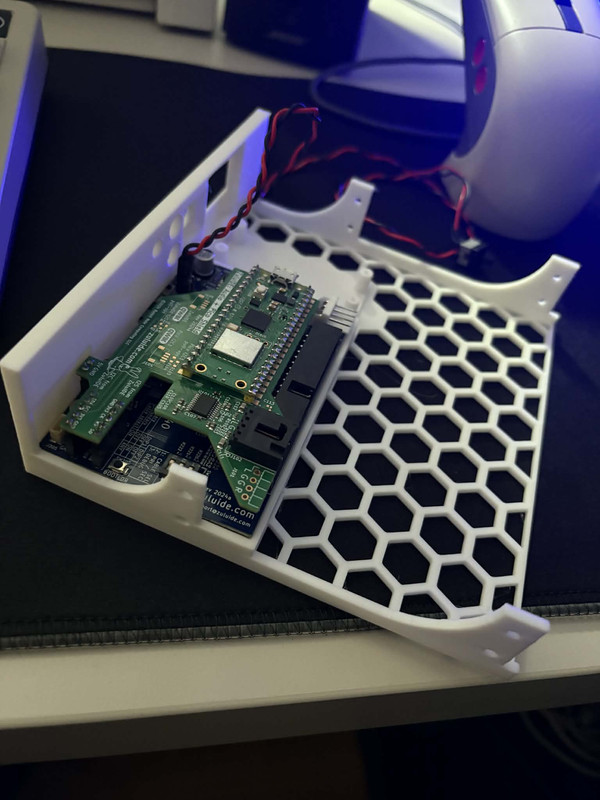
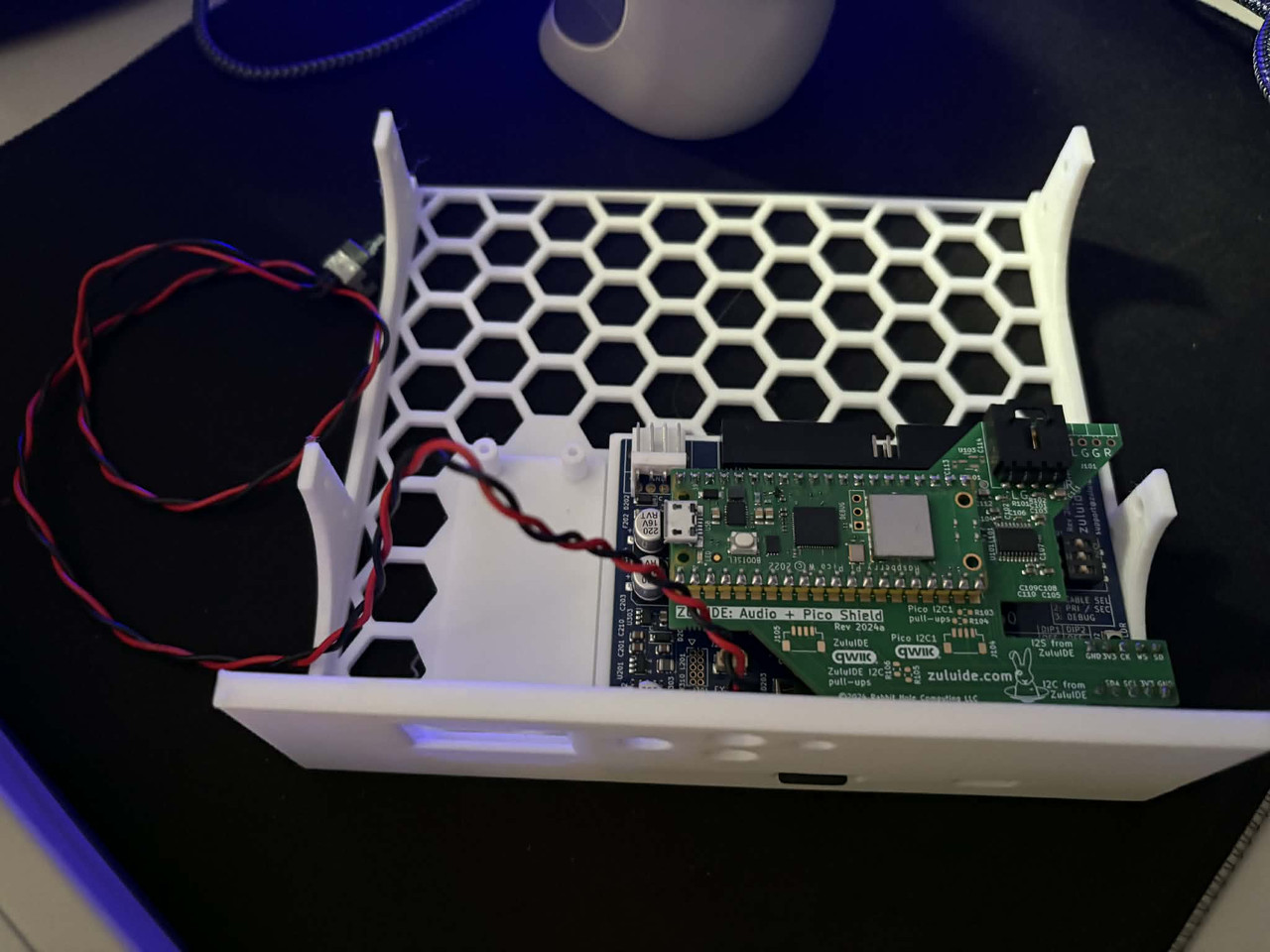
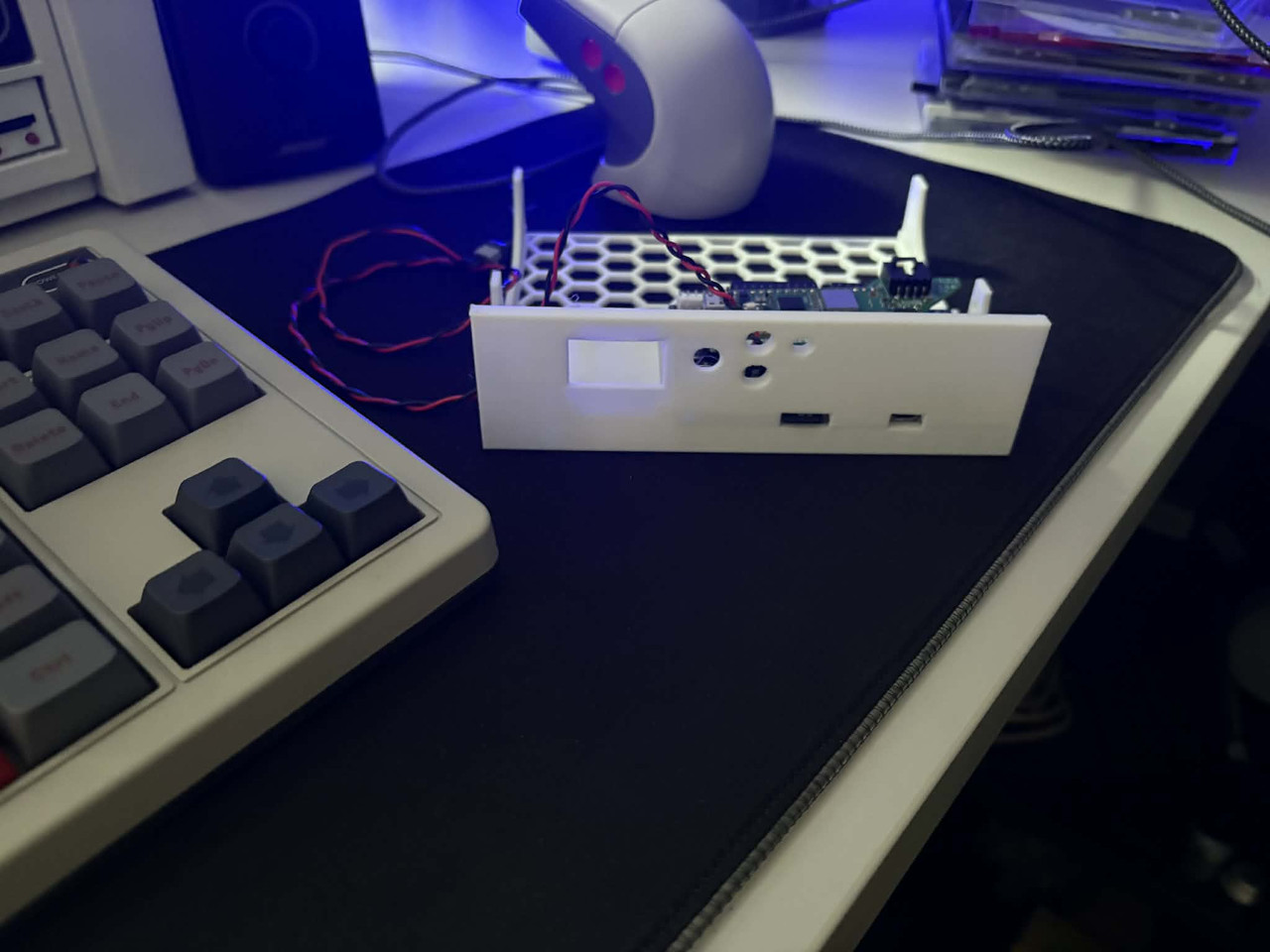
Oh thank you! But i live in Europe (Belgium) and I already have 3D printed the 5.25 enclosure 😀 (I'm new in 3D Printing, Bambulab P2S 😉 ).

0a6981a6_9a20_4424_b7e5_1ab528749b5e.jpg
0c008569_0e4e_4884_9908_1a91d34897a0.jpg
e5089b4d_13a3_429f_a70e_5c5f7f835ac5.jpg

I need the parts :

-Oled screen
-Rotary Encoder
-Push buttons

But I don't know what and where to order (I have the Zulu IDE V1 + DAC + PICO) and how to assemble the all parts. I don't understand very well the use of Qwiic port.

The final goal is to put the Zulu IDE in my main MS-DOS machine (i don't like the web interface and i switch often CD-ROM for my testing purpose).

Thanks 😀

Vous devriez voir ce que je vois.

Reply 217 of 231, by TgamesFR

User metadata
Rank Newbie
Rank
Newbie
mbalmer wrote on 2026-01-31, 23:58:

Part of the reason it wasn't there from the start is that when the ZuluIDE was first conceived, a front panel wasn't seen as needed because the initial assumption was that it would largely be used in cases where the media wasn't being changed often or where the media could be cycled using the OS's software-eject mechanism (think Mac OS 9, OS X, modern Windows and Linux versions).

Obviously, that assumption didn't hold up very long. 🤣

@mbalmer,

On my side it's the opposite i'm very happy the ZuluIDE was made without front panel.
Like this i can use it in a micro-ATX case who already have front panel occuped by a real CD-ROM and a floppy (so no space available).
It's very conveniant to hide it internally and control it outside with the web (would be even greater if one day you add a DOS program to communicate to switch images too).
And i've connected the USB port of the ZuluIDE to a front panel USB like this i can do easy updates/copy images without have to disassemble the PC (it's very very very useful 🤣).

I like my retro PC to looks like a retro PC, having 3D-printed parts visible from the exterior i'm not very fan of it.
It's like a retro console, i like seeing "originals" parts visible from the exteriour and mods inside 😀.
So really it's great everything was thinked to install it internally, make it working hided inside the PC (like a hardrive).

So far i've compared few days ago all features of the ZuluIDE vs PicoIDE.
And the ZuluIDE is far superior to me (speeds (UDMA support), design to install it internally and it's very clean, compatibility, updates as the device is there since years many bugs are already fixed).
The only downsides of the ZuluIDE (but completely fixable) are the Web UI is very basic (but it's not really a issue as here it only does images switching) and will be great to have a DOS program to switch images (to not be forced to have internet connection).

Reply 218 of 231, by DivByZero

User metadata
Rank Newbie
Rank
Newbie

On the topic of controlling image switching with a DOS program, I treated myself to a ZuluIDE v2 for my birthday, and it arrived last week. Haven't had a chance to even plug it in yet, but I bought it specifically to develop this feature, as it's of little use to me without it. Can't guarantee timeframes, but I'm hoping to be able to have a crack at it in the near future. If I pull it off, a firmware revision and the program itself will be made available on GitHub, which I hope to contribute back to the main project. If you're interested, watch this space, as I'm sure to want others to help with testing it.

Reply 219 of 231, by TgamesFR

User metadata
Rank Newbie
Rank
Newbie
DivByZero wrote on 2026-02-01, 19:13:

On the topic of controlling image switching with a DOS program, I treated myself to a ZuluIDE v2 for my birthday, and it arrived last week. Haven't had a chance to even plug it in yet, but I bought it specifically to develop this feature, as it's of little use to me without it. Can't guarantee timeframes, but I'm hoping to be able to have a crack at it in the near future. If I pull it off, a firmware revision and the program itself will be made available on GitHub, which I hope to contribute back to the main project. If you're interested, watch this space, as I'm sure to want others to help with testing it.

Yes sure i can help you on testing when you start it =).
It's a feature i really need, because my wifi is hard to catch by Raspberry Pi Pico so i prefer be able to switch images under a DOS program.