VOGONS


First post, by Shadic95

User metadata
Rank Newbie
Rank
Newbie

Greetings, I am working on upgrading my Windows 98SE machine once more, and I seem to be running into an issue with EMM386 not loading... but then saying it is? It's quite strange, and I have recorded footage of my PC booting up, so you can see what the boot process currently looks like: https://youtu.be/R8oPUsLYO4U

To try and give the best chance of someone maybe being able to help me, I'll provide as much info as I can about my machine.

My machine is using this Motherboard: https://theretroweb.com/motherboards/s/anigma-andover

The info that CPU-Z spat out can be found here: https://pastebin.com/tMsRY0Ys

The contents of my Autoexec and Config file can be found here: https://pastebin.com/0ZGqVbPa

I currently have the following expansion cards installed:

Diamond Stealth III S540 PCI 32MB – S3 Savage4 Pro (Top Slot)
Linksys LNE100TX LAN Card (Second Slot)
Adaptec AHA-2940 Ultra (Bottom Slot, the third slot is not being used)

And the Audio being used is the onboard audio, which is an Ensoniq ES1371.

I am fairly sure the SCSI card is causing the issue here, but I would like to try and find a solution where I can keep it in, as I want to get a ZuluSCSI Blaster down the line, since I have a feeling it might perform better than the CF2IDE solution I currently have. I also plan on getting a Creative DXR3, since even though I read somewhere that the S540 was fine with DVD, at least using PowerDVD V4 from WinWorld, it just didn't seem to quite reach full speed, and I feel like that should be no issue with a dedicated decoder card (Unless the issue I was having was just the software sucking ass).

If I am missing any info that may help, I'll try and provide more. I would deeply appreciate if someone might be able to help me get this resolved, and I thank anyone who reads this for their time.

EDIT: Serial Port 2 and the Parallel Port are disabled, btw. Not sure if that matters. I only have one serial port enabled, since I use that for my Dial Up modem.
Reply 1 of 10, by wierd_w

User metadata
Rank Oldbie
Rank
Oldbie

The scsi card may well be causing the issue.

What EMM386 *does*, what the error means, and why this is probably the case:

What EMM386 *DOES*:

EMM386 is an Expanded memory manager. It provides VCPI memory services, and EMS services. It does this by dynamically allocating Extended memory (XMS, usually provided by Himem.sys), and then remapping a window of memory address to point to a portion of that allocated memory. This window is called the Page Frame, and it is 64kb in size. It sits in the space between the top of conventional memory at 640kb, and the top of realmode address space, at 1MB. (A 384kb region called the Adapter Rom Region, or the Upper Memory Area, depending on which source you ask. This region is used as the location space in which system option roms, and memory mapped IO devices can communicate with a realmode dos CPU.

Traditionally, a few well known bits of this space are used for specific things. C000-CC00/CFFF is used to house the VGA display adapter's option rom, for instance. F000-FFFF is used to house the system bios, as another.

Generally speaking, this area is between A000 and FFFF, and is usually managed in blocks.

A000-AFFF is used by the VGA display adapter.
B000-BFFF is used traditionally by the monochrome display adapter, or to display text modes.
C000-CC00/CFFF is used by the VGA display bios.
Dooo-DFFF is usually "Unused/Free"
E000-EFFF is usually "Unused/Free"
F000-FFFF is the system bios.

Each of those ranges is 64kb in size.

What the error means:
EMM386 throws this error when it cannot find 64kb of continuous memory address that is unused in this region to use to create the EMS page frame window. The page frame must be 64kb in size, and must be somewhere in the upper memory area.

Why the SCSI card is probably the problem:
In your video, I can clearly see that your adaptec scsi card executes an option rom that enables it to boot from SCSI drives attached to the controller. This is accomplished by mapping that option rom into the upper memory area into a bit of address space there that is not used by anything else. It is possible that one of two things is happening:

The SCSI option rom consumes the last bit of free upper memory address space, leaving nothing free for EMM386 to use to create the page frame

The SCSI option rom's memory address is poorly chosen, and it 'straddles' unused upper memory address locations in such a way that the free chunks are all smaller than 64k in size, which prevents EMM386 from using that free address space to create the pageframe.

[For example, let's say the SCSI option rom is 64kb in size, but starts at D800. That is between D000 and DFFF, meaning the option rom straddles the D000 and E000 ranges, leaving 32k on either side. One 32k chunk between D000-D7FF, and another between E800-EFFF.]

Both of those conditions would create this error.

Things you might try:

On your win9x install CD, you will find a utility called Microsoft Diagnostics. Copy it off the CDRom to your system's hard drive.
Remove the scsi adapter.
Boot the computer CLEANLY by holding down F5 on boot, then run MSD, and check the (M)emory page. Take a picture of the output.

Put the SCSI card back in, boot using F5, look at the (M)emory page a second time, and take another picture. Compare how the two pictures represent the Upper Memory Area, and look to see if there are no unused bits, or if the option rom splits free bits of address down the middle.

If it consumes the entire upper memory area, leaving nothing free, your only options for EMS would be something like EMS Magic, using a bit of conventional memory... OR-- disabling the option rom on the card completely, and losing SCSI boot support.

If there is 64kb of upper memory address free, but it is split down the middle because the option rom is being mapped at a poorly chosen address--- then look for jumpers on the card to set this location, and set it so that this kind of split does not occur.

Reply 2 of 10, by Shadic95

User metadata
Rank Newbie
Rank
Newbie

Thanks for the detailed reply! I have gone ahead and taken the pictures you suggested I should.

Below are the pictures for without the card (going to avoid embedding these, since... they're very big):

https://maniac95.info/misc_stuff/without_scsi … 01.MP.COVER.jpg

And then with the card installed:

https://maniac95.info/misc_stuff/with_scsi_ca … 01.MP.COVER.jpg

Admittedly, I do struggle to fully understand all of this for myself, but, what I can tell you is that when the computer is booted without the SCSI card, the error vanishes outright, meaning it's 100% the SCSI card's fault, which is... really sad.

The reason I am so insistent about having it in, is because the ZuluSCSI Blaster promises super fast speeds on cards that support Ultra, like mine does. In theory, that should be way better than my current CF2IDE solution. It doesn't matter which of the two IDE controllers I use on the board, or how many devices are on each (right now, one controller is the CF2IDE, the other is the DVD ROM), I get really mediocre speeds vs what I know the CF Card itself can do. I did a CrystalDiskMark bench on it, if you want an idea of how rough it is: https://crystalmarkdb.com/retro/scores/10833? … rystalMarkRetro

Though... maybe it's all just a fools errand. While I *think* the ZuluSCSI Blaster could be faster than what I have now, I won't know unless someone else tells me, or until I spend the money to try it myself...

At any rate, is there any ideal way I could make things work with the card in, or based off of what I've sent, is that just not possible? Sorry again if I am being really dumb with any of this. I really do appreciate your help and insight on things, and hope I am not being too overwhelming.

Reply 3 of 10, by LSS10999

User metadata
Rank Oldbie
Rank
Oldbie

IMO using external disk controllers (IDE, SCSI, SATA, etc.) that have their own BIOS for booting support is hardly a good idea for a system targeting DOS usage.

Does your SCSI card has its own BIOS (to support booting as well as advanced stuffs such as RAID)? Some controllers' BIOS footprint can be quite large that you won't be able to enable EMS at all, because it cannot find a suitable place (64KB contiguous UMB) to put its page frame, as those controllers' BIOSes will also place their own stuffs in the upper memory area, significantly limiting the amount of UMBs available for use.

And I see you're using EMM386.EXE without arguments. I wonder if this activates EMS by default. IIRC the RAM argument is used for EMS-enabled circumstances and I hardly run EMM386 (or variants) without any argument. You can try enable UMB (e.g. DOS=HIGH,UMB) and use NOEMS for EMM386 to see how much UMB you normally have in this environment.

Though I remember Creative SBPCI's DOS TSRs certainly require EMS be present and will refuse to work without it.

Reply 4 of 10, by Shadic95

User metadata
Rank Newbie
Rank
Newbie

The primary use case for the system is Windows games, though some DOS support would still be nice.

I believe it has it's own BIOS. In the first YouTube video I linked, you can see it spends a good 10-20 seconds on initializing the card, and it eventually says the BIOS is not installed, because I don't yet have any devices to use with it (Used to have a Jaz drive and disks, but they were junk, and unreliable). Despite that, it still seems to take up *some* kind of memory, even though it claims it isn't installed, so idk what that is all about.

I had tried the RAM argument before with the EMM program, after finding some ancient forum posts from like the year 2000, but it made no change. The main reason the EMM386 is there is because it just... was, I guess? IDK if it's always there on a fresh install of Windows, or if it was added when I installed the drivers for my onboard audio.

Those UMB settings and such fly a bit over my head. Where exactly would I put those parameters, and how would I format them? Would it help things out, or not really? Sorry again for being... uninformed with a lot of this. As I said before, I would love if there was some ideal way to get this working with the SCSI card, with little to no compromise to the DOS performance of the machine (with the DOS audio working right, primarily), but, if there is no way, I'd either have to sacrifice DOS support, or *possibly* getting faster hard disk speeds. Really makes me wish I could get an answer without having to buy the ZuluSCSI Blaster, but I don't really think most people are using them for this purpose anyways.

Reply 5 of 10, by LSS10999

User metadata
Rank Oldbie
Rank
Oldbie
Shadic95 wrote on 2026-02-28, 08:51:

The primary use case for the system is Windows games, though some DOS support would still be nice.

I believe it has it's own BIOS. In the first YouTube video I linked, you can see it spends a good 10-20 seconds on initializing the card, and it eventually says the BIOS is not installed, because I don't yet have any devices to use with it (Used to have a Jaz drive and disks, but they were junk, and unreliable). Despite that, it still seems to take up *some* kind of memory, even though it claims it isn't installed, so idk what that is all about.

I think these BIOSes would not be released from memory once loaded, so they permanently take up UMB regardless of whether its functionality has been installed or not.

Same applies to other kinds of option ROMs such as PXE. Back then I had a board with the BIOS modded, swapped the onboard PXE ROM with Plop Boot Manager so it will never be overwritten by others. I stopped doing so when I realized it would permanently occupy 40KB of UMB if I actually booted it.

Some IDE/SATA controllers can be used without any BIOS, either by erasing or desoldering the ROM chip. Just that the controller won't be usable without correct drivers for the OS, so no booting or advanced features until OS loaded, but will leave the UMA untouched, and no time would be spent on their initialization during POST. This way is ideal for situations where the disks you're connecting to such controllers are only to be used in Windows/Linux as data storage.

The BIOS footprint varies among controller models and vendors. Some models occupy less while others more.

Shadic95 wrote on 2026-02-28, 08:51:

I had tried the RAM argument before with the EMM program, after finding some ancient forum posts from like the year 2000, but it made no change. The main reason the EMM386 is there is because it just... was, I guess? IDK if it's always there on a fresh install of Windows, or if it was added when I installed the drivers for my onboard audio.

I think some Windows 98 installs did add "EMM386.EXE" without argument when setting it up, though EMM386 was never mandatory for Windows (3.x or 9x) use cases and in some cases might interfere.

I hardly use EMM386 without any argument, however. My first experience with EMM386 was on DOS 6.22 through MEMMAKER. That one used "RAM" argument if EMS enabled.

Shadic95 wrote on 2026-02-28, 08:51:

Those UMB settings and such fly a bit over my head. Where exactly would I put those parameters, and how would I format them? Would it help things out, or not really? Sorry again for being... uninformed with a lot of this. As I said before, I would love if there was some ideal way to get this working with the SCSI card, with little to no compromise to the DOS performance of the machine (with the DOS audio working right, primarily), but, if there is no way, I'd either have to sacrifice DOS support, or *possibly* getting faster hard disk speeds. Really makes me wish I could get an answer without having to buy the ZuluSCSI Blaster, but I don't really think most people are using them for this purpose anyways.

For old boards lacking high-speed IDE/SATA channels and/or proper LBA support, PCI disk controllers might help with such cases, just that you'll lose a chunk of UMB which might be needed for EMM386 to enable EMS.

I think you need preferably "DOS=HIGH,UMB" specified in CONFIG.SYS to allow usage of UMB once enabled by tools such as EMM386 or UMBPCI. For MS-DOS it's okay to put it on the top lines of CONFIG.SYS.

If EMS is optional or you simply don't have enough UMB for the purpose, use NOEMS argument for EMM386, which disables EMS and allows more UMB to be usable.

Shadic95 wrote on 2026-02-28, 08:23:
Below are the pictures for without the card (going to avoid embedding these, since... they're very big): […]
Show full quote

Below are the pictures for without the card (going to avoid embedding these, since... they're very big):

https://maniac95.info/misc_stuff/without_scsi … 01.MP.COVER.jpg

And then with the card installed:

https://maniac95.info/misc_stuff/with_scsi_ca … 01.MP.COVER.jpg

BTW: I just checked your MSD pictures. It seems the Adaptec controller BIOS is taking up about 16KB in the D000-D3FF range compared to the MSD picture when without the controller.

I'm curious about those "Possibly Available" areas though, as the MSD pictures aren't showing more details. Would EMM386 use them as UMB? Loading EMM386.EXE with NOEMS might reveal how much UMB EMM386 would allow use.

After loading EMM386 with NOEMS, and without other TSRs loaded high, check the total Upper memory size reported by "MEM /C", as well as the largest available upper memory block size. Ideally, without any TSR taking up in the upper memory area, you should have an upper memory block of at least 64KB. If not, then you cannot enable EMS because there's no place to place the page frame.

Reply 6 of 10, by wierd_w

User metadata
Rank Oldbie
Rank
Oldbie

Since this is a slot1 that does not have an AHCI/SATA controller (these use E000 for mysterious purposes), you can *probably* force-include a lot of the Upper Memory Area, and instruct EMM386 to use it for the pageframe.

Try this, just to humor me.

DEVICE=C:\WINDOWS\EMM386.EXE RAM I=B000-B7FF ROM=C000-CFFF ROM=D000-D3FF X=D400-D7FF I=D800-DFFF I=E000-EFFF FRAME=E000

That indludes the monochrome display buffer area, shadows the roms on your video card and scsi cards, excludes that odd bit of memory just after the scsi card's rom (card does MMIO there? Let's not poke the bear), includes the safe remainder of D000 segment, forcibly includes the 'maybe something in it?' E000 segment, then explicitly tells EMM386 to put the pageframe at E000.

There is a chance the system will hang, since we dont know for sure that 'something' isnt living in E000.

But this is a slot1 board, it *should* be free.

If it hangs on boot, use F5 to skip config.sys, then comment it out.

Reply 7 of 10, by weedeewee

User metadata
Rank l33t
Rank
l33t
Shadic95 wrote on 2026-02-28, 08:51:
The primary use case for the system is Windows games, though some DOS support would still be nice. […]
Show full quote

The primary use case for the system is Windows games, though some DOS support would still be nice.

I believe it has it's own BIOS. In the first YouTube video I linked, you can see it spends a good 10-20 seconds on initializing the card, and it eventually says the BIOS is not installed, because I don't yet have any devices to use with it (Used to have a Jaz drive and disks, but they were junk, and unreliable). Despite that, it still seems to take up *some* kind of memory, even though it claims it isn't installed, so idk what that is all about.

I had tried the RAM argument before with the EMM program, after finding some ancient forum posts from like the year 2000, but it made no change. The main reason the EMM386 is there is because it just... was, I guess? IDK if it's always there on a fresh install of Windows, or if it was added when I installed the drivers for my onboard audio.

Those UMB settings and such fly a bit over my head. Where exactly would I put those parameters, and how would I format them? Would it help things out, or not really? Sorry again for being... uninformed with a lot of this. As I said before, I would love if there was some ideal way to get this working with the SCSI card, with little to no compromise to the DOS performance of the machine (with the DOS audio working right, primarily), but, if there is no way, I'd either have to sacrifice DOS support, or *possibly* getting faster hard disk speeds. Really makes me wish I could get an answer without having to buy the ZuluSCSI Blaster, but I don't really think most people are using them for this purpose anyways.

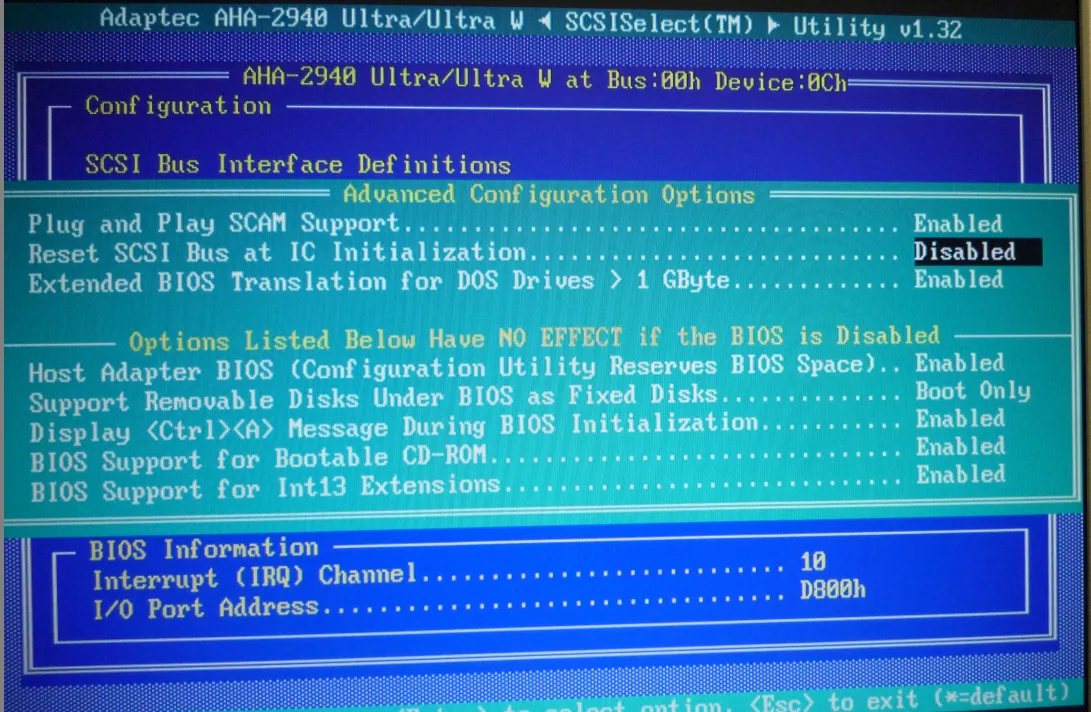
even though the message doesn't appear, I think you can press Ctrl-A when the scsi bios text appears to enter the scsi bios setup. in there you can completely disable the scan for devices which, I think, will stop the bios from taking up memory space. don't worry about any scsi devices. the scsi bios is only needed if you want to boot from a scsi harddrive or cdrom (if the scsi bios allows it)

Right to repair is fundamental. You own it, you're allowed to fix it.
How To Ask Questions The Smart Way
Do not ask Why !
https://www.vogonswiki.com/index.php/Serial_port

Reply 8 of 10, by wierd_w

User metadata
Rank Oldbie
Rank
Oldbie

If 'Disable the SCSI bios' is the plan of attack, and you CANT disable it on the card, you can also 'map it out' with an explicit include.

(Just MAKE SURE you are not USING that rom in some way. Iirc,bthe option rom ALSO enumerates int13 device table entries for scsi hard disks for DOS, even if they are not booted, and provides the scsi service routine)

Reply 9 of 10, by weedeewee

User metadata
Rank l33t
Rank
l33t
wierd_w wrote on 2026-02-28, 16:09:

If 'Disable the SCSI bios' is the plan of attack, and you CANT disable it on the card, you can also 'map it out' with an explicit include.

(Just MAKE SURE you are not USING that rom in some way. Iirc,bthe option rom ALSO enumerates int13 device table entries for scsi hard disks for DOS, even if they are not booted, and provides the scsi service routine)

Oh FFS
26197-f139f51bb0d9e6d0c131bae6a5fde166a0b74fbd9ec835ca7756d4ebd2a38366-variant.webp
I hope the image loads, anyway, it's part of the scsi bios setup which one can reach by pressing CTRL-A during the scsi bios message on bootup.

Right to repair is fundamental. You own it, you're allowed to fix it.
How To Ask Questions The Smart Way
Do not ask Why !
https://www.vogonswiki.com/index.php/Serial_port

Reply 10 of 10, by Shadic95

User metadata
Rank Newbie
Rank
Newbie

Hi, sorry for the lack of response for a while. Things have changed a decent bit since I last posted.

I found an old Promise Ultra 100 TX2 Card which I honestly thought I tossed out, but, I gave it a shot, and after configuring my BIOS right (to boot from a "SCSI Card", which I glanced past too many times, since it's an IDE card, not SCSI), it worked, and provided speeds so much better than the onboard controller. In truth, the poor speeds of the onboard controller could be my fault, since I was using 80 pin cables, on a board which probably didn't support them. Even back when I put the 80 pin cables in, I noticed things were slower, but tried to lie to myself and say it was normal, mostly because I already tossed out the old 40 pin cable. Well, at least the 80 pin cables are now doing their job well, thanks to the Promise card!

Now, that EMM386 error kept happening, but that issue has also been sorted, kinda sorta? I'm not really sure. You see, before any of this, I was using an AWE64 Gold, but I wanted a super specific setup of a GPU, MPEG2 Decoder, Ethernet, and Controller Card, so I forewent my AWE64 Gold, putting it in storage, thinking the onboard audio would be good enough. But, I was having issues with Worms Armageddon, where UI sounds were just largely not playing back. As Worms Armageddon is one of my favorite games, I could not stand this, and decided to take the Ethernet Card out, and put my AWE64 Gold back in. Now when booting into Windows, there is no error about EMM386, which I think means the problem has been solved, so to speak? I'd probably want to try a DOS game to verify, but, I'm sure that time will come at some point, or something, IDK, 🤣.

Anyways, thank you all for the helpful information, and sorry that this thread ended in such a weird, unexpected way. At any rate, this is some helpful info that may prove useful down the line, should I ever have to switch back to the onboard audio, due to a dying sound card or something, so, thank you all, once more!