VOGONS


First post, by fix_metal

User metadata
Rank Newbie
Rank
Newbie

Hello everyone,

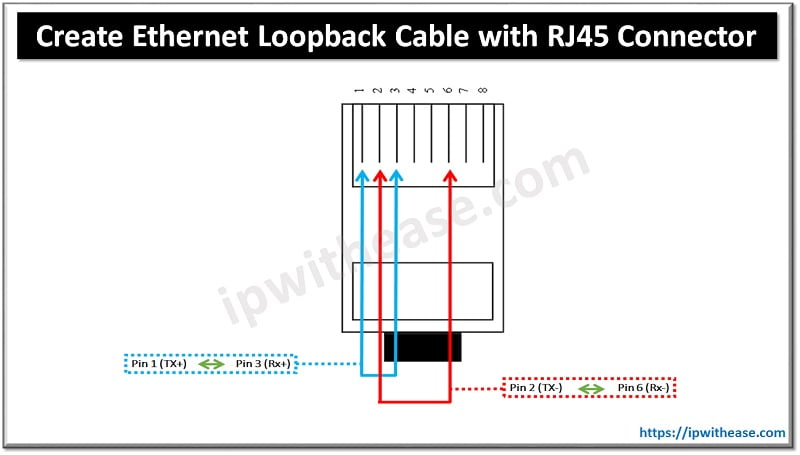
some time back I've tried making up a RJ45 loopback connector [0] in order to solve the Wfw 3.11 closing with no actual cable connected issue [1] . Wfw simply refused to start the network, and I let it be. I never bothered ever since tbh.

Today I had the need to connect to my internal FTP, and the PC simply freezed every time I would have plugged in the actual RJ45 cable. At first I though about an IRQ/DMA conflict as lately I've set up the I/O card(s) to have 2 x COMs and 2 x LPTs , just for fun. So I've runned the RST8019.EXE utility, and it's not really picking up conflicts. Though, by testing with cable plugged the card, any packet would just fail. See the photo attached.

I took the internet for granted, as everyone was saying the RJ45 loopback connector is harmless, but now I'm questioning this...the card was working just perfectly fine (yet, prior to installing multiple COMs LPTs). Any take, other than the obvious "just try and remove the additional COMs, and LPTs"?

[0] https://ipwithease.com/wp-content/uploads/202 … pback-Cable.jpg
[1] WFW 3.11 with RTL8019AS card doesn't close properly

Last edited by fix_metal on 2026-03-25, 08:55. Edited 1 time in total.

Reply 1 of 3, by Horun

User metadata
Rank l33t++
Rank
l33t++

It says you are using IRQ3, try disabling just the COM port using IRQ3 (usually COM2) and see if it solves the problem.

Hate posting a reply and then have to edit it because it made no sense 😁 First computer was an IBM 3270 workstation with CGA monitor. Stuff: https://archive.org/details/@horun

Reply 2 of 3, by fix_metal

User metadata
Rank Newbie
Rank
Newbie
Horun wrote on 2026-03-23, 02:01:

It says you are using IRQ3, try disabling just the COM port using IRQ3 (usually COM2) and see if it solves the problem.

I've tried setting it up to any IRQ shown available by RSET8019 utility, but I'll give that a try as well. Need to open the PC.

Reply 3 of 3, by fix_metal

User metadata
Rank Newbie
Rank
Newbie

Yesterday night I've dealt with it. I'm not entirely sure what I did, as the only major modification has been disabling LPT1 on the 2nd I/O card, then it started working - only after swapping the NIC to another ISA bus. I found 2 ISA bus wouldn't make the card detectable at all. In the end I've tested all of them, and eventually put the card back to its original position, and it works. Moved base address to 0x300 and IRQ to 15 for safety, FTP copy worked.

Not really sure what was wrong, even by picking any free base address/IRQ it just didn't work previously. Maybe it was having bad connections at slot level? Not sure. It works now. I'm just glad it didn't brick because of the loopback connector I've made.

Thanks for the ideas.