VOGONS


ATI Radeon 9700 PRO - help with repair

Topic actions

Reply 20 of 25, by Retronerd878

User metadata
Rank Newbie
Rank
Newbie

Did another attempt on the chip. With another fresh chip with new balls. This time the mask scratched off or something as some of the traces are slightly exposed. This is definitely not a good thing as the balls can migrate into the wrong spot. I gave it a try nonetheless. This time I measured the temps on the card and it seems that i need to set the preheater to 220 C, so the board reaches 130 C. This time I got really excited as the artifacts were gone when booting, yet we still have errors. It reverted to the initial state - ish.
Initially that chip had errors MDC0 28 30 31 and now MDC0 28 29 30 31.

However, what I find interesting is that the artifacts disappeared, just like when I first booted the card when i got it. Maybe heating up the card really good made it behave the same way. I'm thinking it's not the ram. Why do I have the feeling that it's the GPU that needs re-balling and swapping the ram chips will not solve this.

Is my assumption plausible? I'm thinking of replacing the other chip with problems and if the same bits remain, then it's clearly the gpu or something in between the gpu and ram.
Thoughts?

Reply 21 of 25, by Dothan Burger

User metadata
Rank Member
Rank
Member
tehsiggi wrote on 2026-04-14, 17:17:
Dothan Burger wrote on 2026-04-14, 11:49:

I remember having to deshim my 9700 or the GPU die wouldn't make contact with the cooler. Maybe something similar happened with this card.

The default thermal compound between cooler and GPU took that into account.

That compound had the thermal conductivity of a piece of chewing gum. The paste would be completely useless now, so what was it replaced with.

Reply 22 of 25, by tehsiggi

User metadata
Rank Oldbie
Rank
Oldbie
Dothan Burger wrote on Today, 12:30:
tehsiggi wrote on 2026-04-14, 17:17:
Dothan Burger wrote on 2026-04-14, 11:49:

I remember having to deshim my 9700 or the GPU die wouldn't make contact with the cooler. Maybe something similar happened with this card.

The default thermal compound between cooler and GPU took that into account.

That compound had the thermal conductivity of a piece of chewing gum. The paste would be completely useless now, so what was it replaced with.

That compound was initially (when shipped) not too bad. Unless you removed the cooler back then, there was no need to repaste it. I emphasize on "back then". Most 9700s I had did not have an issue with the shim.

Retronerd878 wrote on Today, 10:25:
Did another attempt on the chip. With another fresh chip with new balls. This time the mask scratched off or something as some o […]
Show full quote

Did another attempt on the chip. With another fresh chip with new balls. This time the mask scratched off or something as some of the traces are slightly exposed. This is definitely not a good thing as the balls can migrate into the wrong spot. I gave it a try nonetheless. This time I measured the temps on the card and it seems that i need to set the preheater to 220 C, so the board reaches 130 C. This time I got really excited as the artifacts were gone when booting, yet we still have errors. It reverted to the initial state - ish.
Initially that chip had errors MDC0 28 30 31 and now MDC0 28 29 30 31.

However, what I find interesting is that the artifacts disappeared, just like when I first booted the card when i got it. Maybe heating up the card really good made it behave the same way. I'm thinking it's not the ram. Why do I have the feeling that it's the GPU that needs re-balling and swapping the ram chips will not solve this.

Is my assumption plausible? I'm thinking of replacing the other chip with problems and if the same bits remain, then it's clearly the gpu or something in between the gpu and ram.
Thoughts?

Hmm.. no real change at all is too much of a coincidence.

The attachment mdc.PNG is no longer available

The affected pins are at the edge of the GPU.
However if the connectivity between GPU and Memory would be bad, I'd somewhat expect MDC1 to appear with errors on the same bits.

AGP Card Real Power Consumption
AGP Power monitor - diagnostic hardware tool
Graphics card repair collection

Reply 23 of 25, by Retronerd878

User metadata
Rank Newbie
Rank
Newbie

I'm doing the other ram chip see if we have any progress. Will report later

Reply 24 of 25, by Retronerd878

User metadata
Rank Newbie
Rank
Newbie

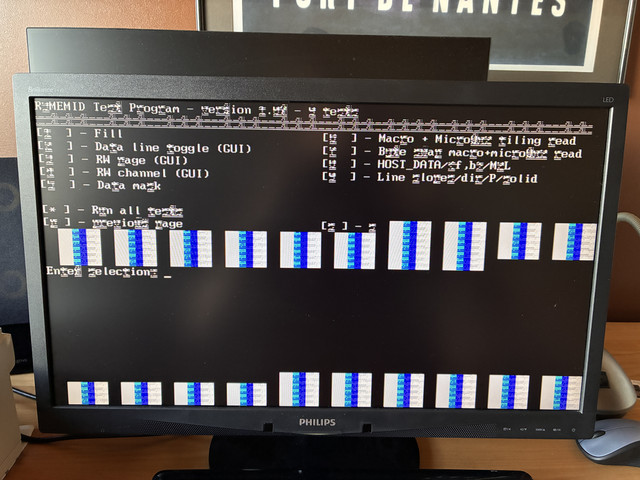
R3MEMID version 1.07, (c) Copyright ATI Technologies Inc, 2003
Log file generation enabled to .\R3MEMID.LOG ...
Reference data file (RDF) loading disabled ...
No wait on error enabled (not effected by '-s') ...
TEST RESULT SUMMARY:
====================
R300 (0x4e44) detected.
128M video memory.
Test suite ran 1 of 1 times.
Checking test status array ...
[1 ] Fill : FAIL
Error ID 0VB001
1024 x 768 - 32 bpp ( 60 Hz): TEST FAILURE
failing bit : MDC0 28 29 30 31

[2 ] Data line toggle (GUI) : FAIL
Error ID 0VB023
1024 x 768 - 32 bpp ( 60 Hz): TEST FAILURE
failing bit : MDC0 28 29 30 31

[3 ] RW page (GUI) : FAIL
Error ID 0VB025
1024 x 768 - 32 bpp ( 60 Hz): TEST FAILURE
failing bit : MDC0 28 29 30 31

[4 ] RW channel (GUI) : FAIL
Error ID 0VB028
1024 x 768 - 32 bpp ( 60 Hz): TEST FAILURE
failing bit : MDC0 28 29 30 31

[5 ] Data mask : FAIL
Error ID 0VB006
1024 x 768 - 32 bpp ( 60 Hz): TEST FAILURE
failing bit : MDC0 28 29 30 31

[6 ] Macro + Micro8x2 tiling read : PASS
[7 ] Byte swap macro+micro8x2 read : FAIL
Error ID 0VC018
1024 x 768 - 32 bpp ( 60 Hz): TEST FAILURE
failing bit : MDC0 28 29 30 31

[8 ] HOST_DATA/<f,b>/M2L : FAIL
Error ID 0TR014
640 x 480 - 8 bpp ( 75 Hz): TEST FAILURE
failing bit : MDC0 29 MDD0 32 33 34 35 36 37 38 39 ...

640 x 480 - 15 bpp ( 75 Hz): TEST FAILURE
failing bit : MDC0 29 MDD0 32 33 34 35 36 37 38 39 ...

640 x 480 - 16 bpp ( 75 Hz): TEST FAILURE
failing bit : MDC0 29 MDD0 32 33 34 35 36 37 38 39 ...

640 x 480 - 32 bpp ( 75 Hz): TEST PASSED
800 x 600 - 8 bpp ( 75 Hz): TEST FAILURE
failing bit : MDC0 29 MDD0 32 33 34 35 36 37 38 39 ...

800 x 600 - 15 bpp ( 75 Hz): TEST FAILURE
failing bit : MDC0 29 MDD0 32 33 34 35 36 37 38 39 ...

800 x 600 - 16 bpp ( 75 Hz): TEST FAILURE
failing bit : MDC0 29 MDD0 32 33 34 35 36 37 38 39 ...

800 x 600 - 32 bpp ( 75 Hz): TEST PASSED
1024 x 768 - 8 bpp ( 75 Hz): TEST FAILURE
failing bit : MDC0 29 MDD0 32 33 34 35 36 37 38 39 ...

1024 x 768 - 15 bpp ( 75 Hz): TEST FAILURE
failing bit : MDC0 29 MDD0 32 33 34 35 36 37 38 39 ...

1024 x 768 - 16 bpp ( 75 Hz): TEST FAILURE
failing bit : MDC0 29 MDD0 32 33 34 35 36 37 38 39 ...

1024 x 768 - 32 bpp ( 75 Hz): TEST PASSED
[9 ] Line slopes/dir/P/solid : FAIL
Error ID 0TR010
640 x 480 - 8 bpp ( 75 Hz): TEST FAILURE
failing bit : MDC0 29 MDD0 32 33 34 35 36 37 38 39 ...

640 x 480 - 15 bpp ( 75 Hz): TEST FAILURE
failing bit : MDC0 29 MDD0 32 33 34 35 36 37 38 39 ...

640 x 480 - 16 bpp ( 75 Hz): TEST FAILURE
failing bit : MDC0 29 MDD0 32 33 34 35 36 37 38 39 ...

640 x 480 - 32 bpp ( 75 Hz): TEST PASSED
800 x 600 - 8 bpp ( 75 Hz): TEST FAILURE
failing bit : MDC0 29 MDD0 32 33 34 35 36 37 38 39 ...

800 x 600 - 15 bpp ( 75 Hz): TEST FAILURE
failing bit : MDC0 29 MDD0 32 33 34 35 36 37 38 39 ...

800 x 600 - 16 bpp ( 75 Hz): TEST FAILURE
failing bit : MDC0 29 MDD0 32 33 34 35 36 37 38 39 ...

800 x 600 - 32 bpp ( 75 Hz): TEST PASSED
1024 x 768 - 8 bpp ( 75 Hz): TEST FAILURE
failing bit : MDC0 29 MDD0 32 33 34 35 36 37 38 39 ...

1024 x 768 - 15 bpp ( 75 Hz): TEST FAILURE
failing bit : MDC0 29 MDD0 32 33 34 35 36 37 38 39 ...

1024 x 768 - 16 bpp ( 75 Hz): TEST FAILURE
failing bit : MDC0 29 MDD0 32 33 34 35 36 37 38 39 ...

1024 x 768 - 32 bpp ( 75 Hz): TEST PASSED
Failure detected.

Tried hot airing without the kapton tape and I think I saw the chip settle this time without the kapton tape in the way (if my eyes haven't glitched). One nearby resistor did flew off, but I soldered it back.
There is definitely an improvement now. No artifacts at all in the dos prompt. However, there are still errors.
Now I don't understand if my bga chip solder is bad, or it's something else.


Reply 25 of 25, by pete8475

User metadata
Rank Oldbie
Rank
Oldbie
tehsiggi wrote on 2026-04-14, 17:17:
Dothan Burger wrote on 2026-04-14, 11:49:

I remember having to deshim my 9700 or the GPU die wouldn't make contact with the cooler. Maybe something similar happened with this card.

The default thermal compound between cooler and GPU took that into account.

Absolutely not.

All those cars with the shim that was too large would cook themselves.

aka pete4237.5