VOGONS


First post, by Choppo51

User metadata
Rank Newbie
Rank
Newbie

Hi all, I have the following Turbo Display in my AT case:
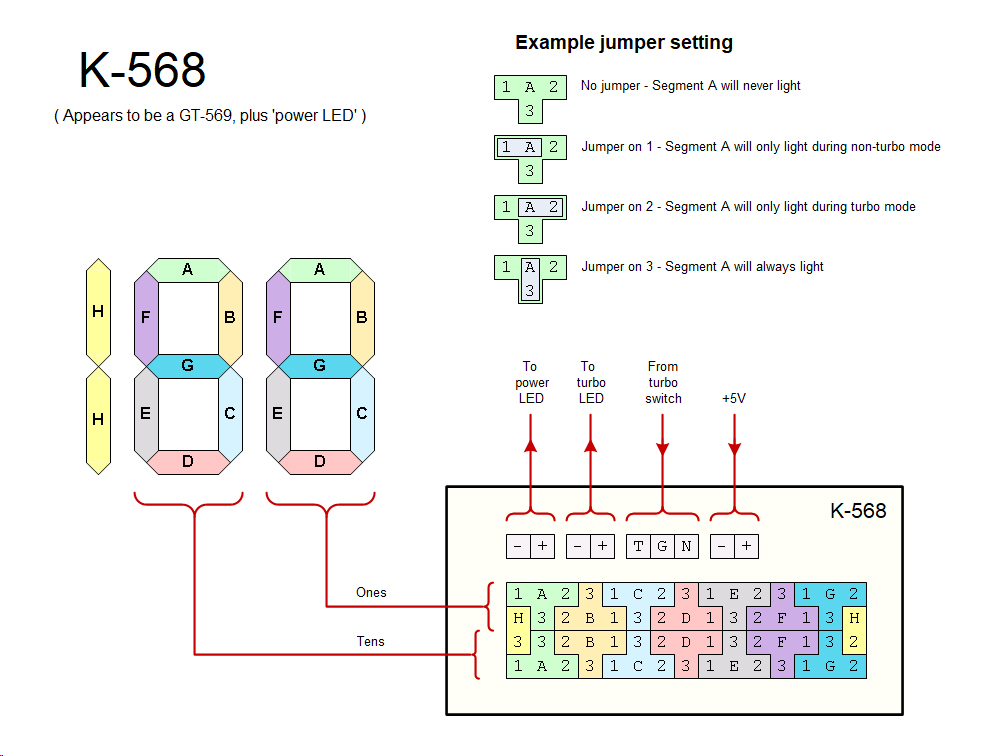
LED%20display%20-%20K-568.jpg

I've searched on Vogons to try and work out how to set the jumpers but I cannot for the life of me understand/work out the explanations I found on here 🙁

Basically I want to set it so that it displays 100 or 66, depending on whether the Turbo button is on or not...

Can someone please advise me on what the set the jumpers as to achieve this?

Thanks in advance!
Reply 1 of 4, by PARKE

User metadata
Rank Oldbie
Rank
Oldbie

Try this:

The attachment LEDdispl.jpg is no longer available

Reply 2 of 4, by HwAoRrDk

User metadata
Rank Newbie
Rank
Newbie

For "100" in turbo mode, and "66" otherwise, you want the following jumpers installed:

Middle: H2
Top row: A3, B2, C3, D3, E3, F3, G1
Bottom row: (same as top)

Reply 3 of 4, by Choppo51

User metadata
Rank Newbie
Rank
Newbie
HwAoRrDk wrote on 2026-05-09, 20:31:
For "100" in turbo mode, and "66" otherwise, you want the following jumpers installed: […]
Show full quote

For "100" in turbo mode, and "66" otherwise, you want the following jumpers installed:

Middle: H2
Top row: A3, B2, C3, D3, E3, F3, G1
Bottom row: (same as top)

Thank you very much, this worked perfectly. I still have no idea how it corresponds to what it displays/how you determine where to place the jumpers.. hehehe

Reply 4 of 4, by HwAoRrDk

User metadata
Rank Newbie
Rank
Newbie
Choppo51 wrote on 2026-05-10, 10:08:

I still have no idea how it corresponds to what it displays/how you determine where to place the jumpers.. hehehe

It's not that complicated. 😀 It just looks intimidating at first blush.

The alphabetic letters correspond to the individual segments of the display digits, with each row controlling one digit. For each segment you have 4 choices: never lit, lit only in non-turbo, lit only in turbo, or always lit regardless of mode. Each segment is associated with a 'T' shape, with the letter in the centre, and you can place a jumper between the centre pin and one of the 'branches' of the 'T' to make the choice (or leave the jumper off entirely).

It helps to look at it the following way:

The attachment turbo-leds.png is no longer available

Figure out which segments are common to both non-turbo and turbo modes - those are "always on" (position 3). Then figure out which segments are never on in either mode - those are "always off" (no jumper). Then figure out which are on only in one mode or the other (positions 1 or 2).