VOGONS


First post, by Omarkoman

User metadata
Rank Member
Rank
Member

I have acquired this wonderful socket 4 motherboard for my collection, been looking for one for a while and managed to get one within reasonable cost along with a Pentium 60Mhz and 32MB RAM (2x16mb) and I installed 256kb cache as it didnt have any.

Model no - PWA-PB5500C

https://theretroweb.com/motherboards/s/mitac- … gon-pwa-pb5500c

The issue is, there seems to be a limit in BIOS that will detect drives only up to 2GB, I was hoping it can see at least up to 8GB using NIC with XT-IDE but its not working.

I tried few different ISA controllers (eg classic prime 2c mkiii) and 3 different VLB controllers. VLB controllers with their own BIOS (eg Promise) wont acknowledge XT-IDE is present at all so clearly there is some BIOS conflict there. The ISA controllers vary and XT-IDE does appear on boot or not depending which one I use and the ones that do, after recognising the Master drive connected correctly, it just hangs and does not proceed to boot. I have HDD set to None in BIOS when using XT-IDE.

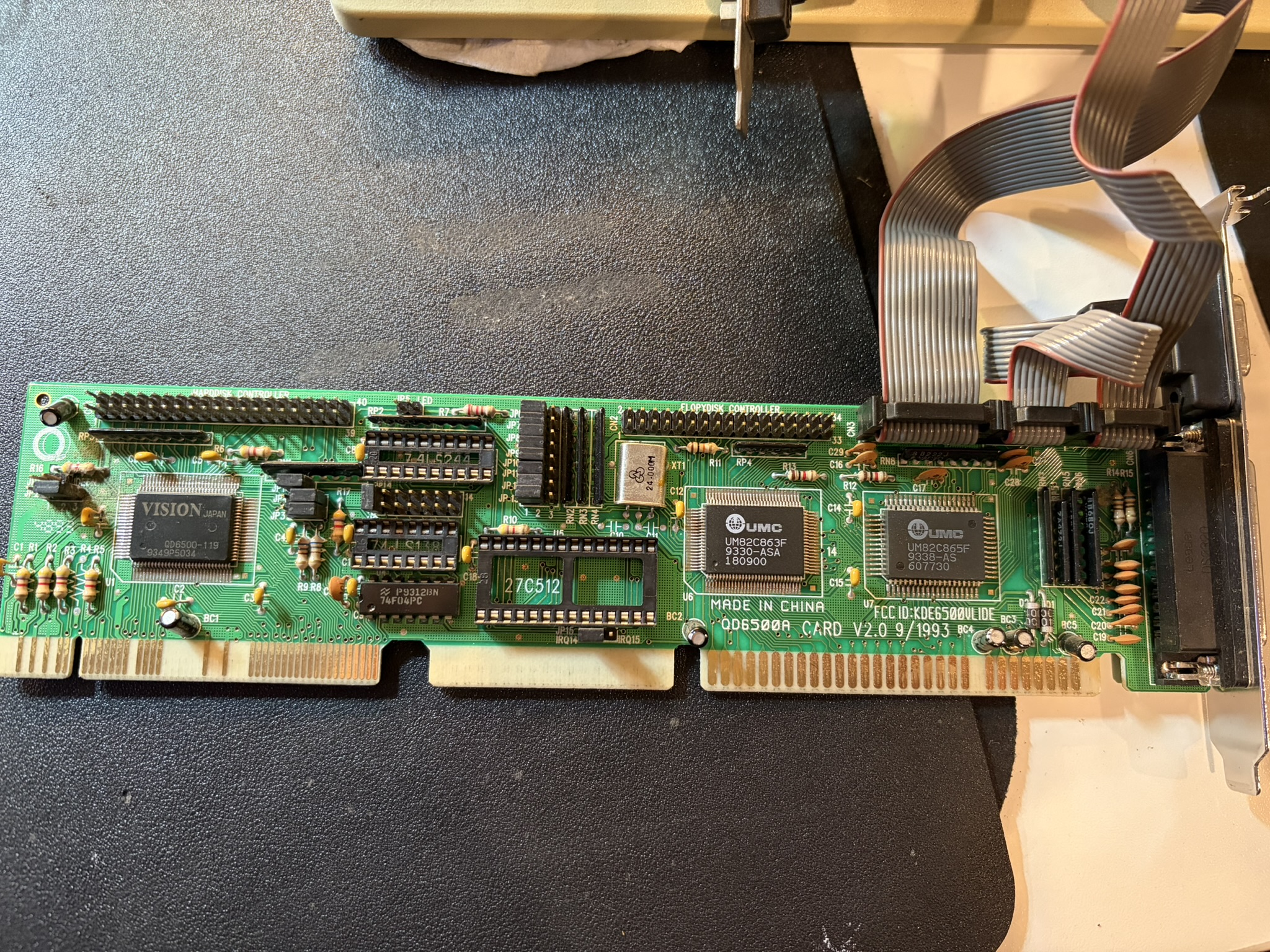
When using a VLB controler like this one :

https://i.postimg.cc/z56DJYY7/IMG-4014.jpg

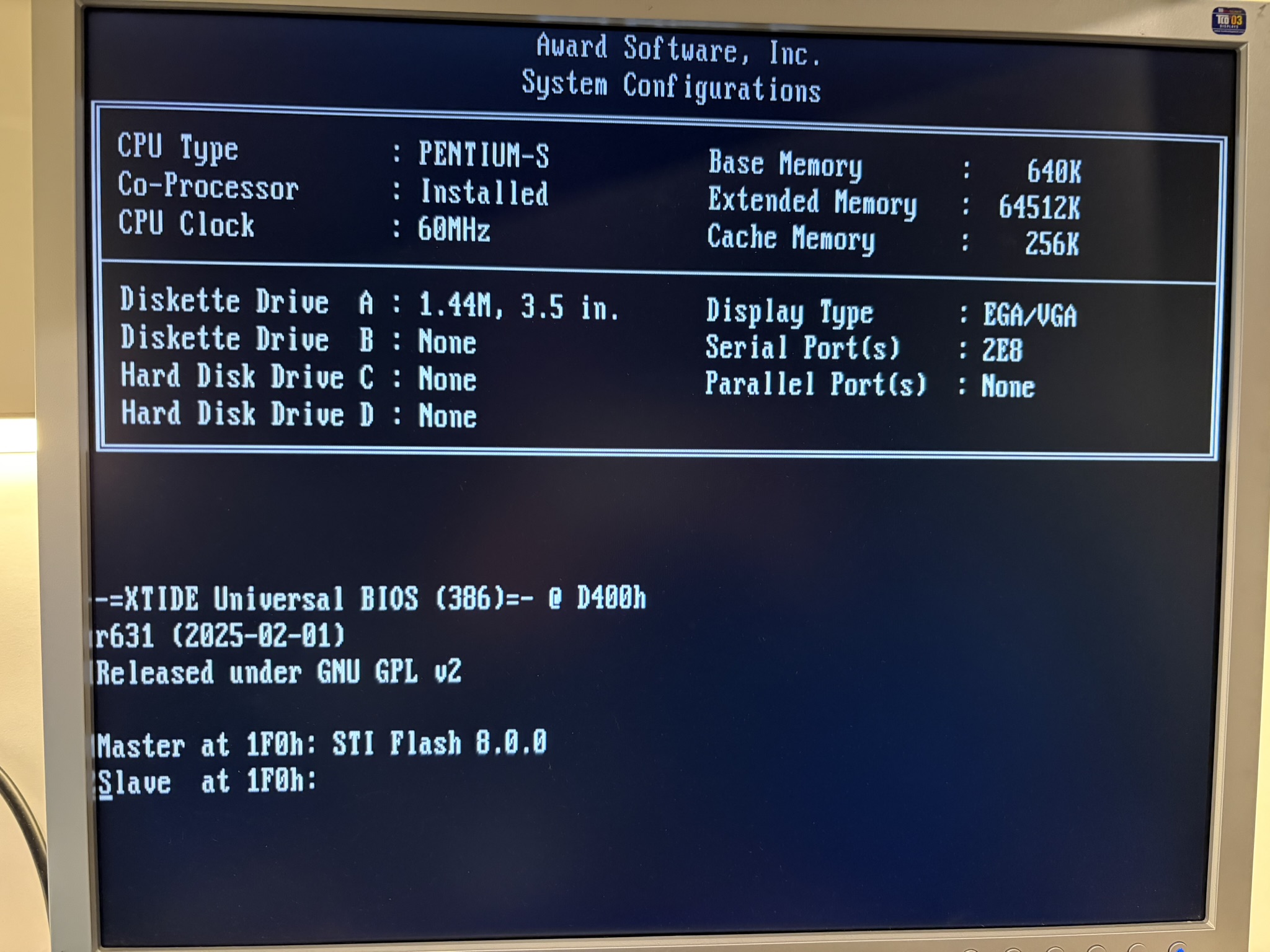
without BIOS chip, the XT-IDE works and detects the HDD/ CF connected but it just hangs, see photo:

https://i.postimg.cc/Q8RLrsKQ/IMG-4008.jpg

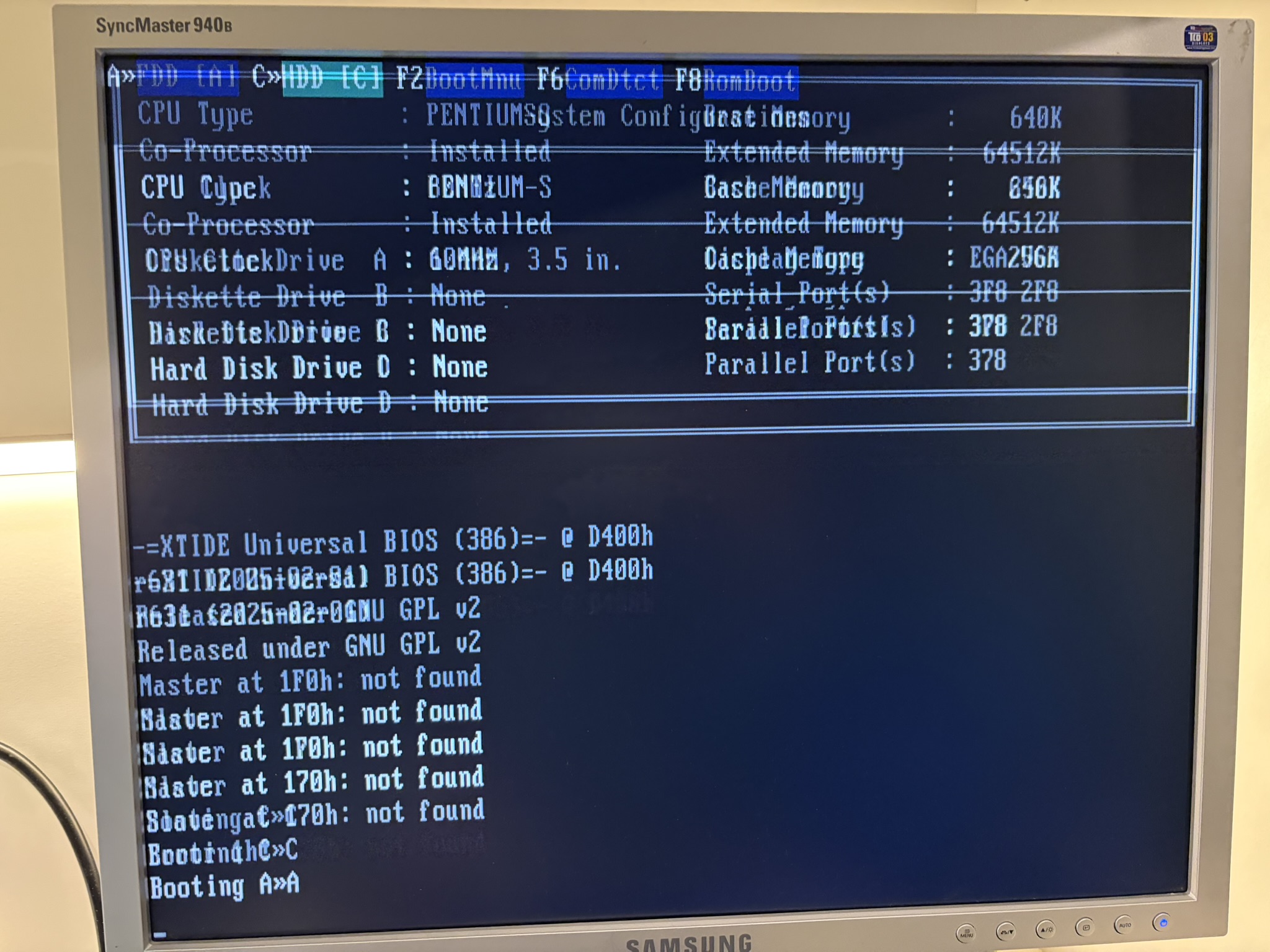
Also what is strange, there is no menu at the top like XT IDE normally shows when a HDD is connected to the controller.

See what I mean re: no menu when no hdd is connected in this photo:

https://i.postimg.cc/Tfv87dXz/IMG-4010.jpg

So what options do I have to get a 8GB drive recognised correctly in this system ? If I have to, I can live with a 2GB max drive size which is plenty for DOS (this will be a purely DOS machine, maybe win 3.11) but still, I cant help it and want to try figure it out.

When using a smaller than 2GB drive, without NIC with XT-IDE, everything seems to work just fine.

Is it possible to ge the BIOS modified to see larger HDDs? Or is there a hardware limitation being a socket 4 board which had very limited life span.


Reply 1 of 17, by MagefromAntares

User metadata
Rank Member
Rank
Member

Hi,

AFAIK, the socket itself has nothing to do with HDD size detection, it is most likely a BIOS issue, or maybe a chipset limitation.

When using this motherboard be aware that the earliest Pentiums had a floating point calculation bug, but if you only use the board for purely gaming purposes then this doesn't matter. 😀

EDIT:
Can you post a screenshot of the HDD configuration in the BIOS? It should be inside the "STANDARD CMOS SETUP" menu.

"A process cannot be understood by stopping it. Understanding must move with the flow of the process, must join it and flow with it." - Dune

Reply 2 of 17, by jakethompson1

User metadata
Rank l33t
Rank
l33t

As the hang is in the middle of detecting drives, in the interest in troubleshooting, why don't you use xtidecfg to set the number of controllers to 1 (to get rid of the secondary controller), then go into primary IDE controller->slave drive->disable detection [Yes] to get rid of the "slave" drive.

It should be printing "not found" there, obviously.

Reply 3 of 17, by jakethompson1

User metadata
Rank l33t
Rank
l33t
Omarkoman wrote on 2026-05-09, 23:23:

So what options do I have to get a 8GB drive recognised correctly in this system ? If I have to, I can live with a 2GB max drive size which is plenty for DOS (this will be a purely DOS machine, maybe win 3.11) but still, I cant help it and want to try figure it out.

Depending on the exact Award BIOS and what bugs it does or doesn't have, there were some that properly support drives up to the 8.4GB limit, but that have a purely cosmetic bug where they miscalculate the displayed size. If you're lucky, it's that.

Reply 4 of 17, by Omarkoman

User metadata
Rank Member
Rank
Member
MagefromAntares wrote on 2026-05-10, 00:13:

Can you post a screenshot of the HDD configuration in the BIOS? It should be inside the "STANDARD CMOS SETUP" menu.

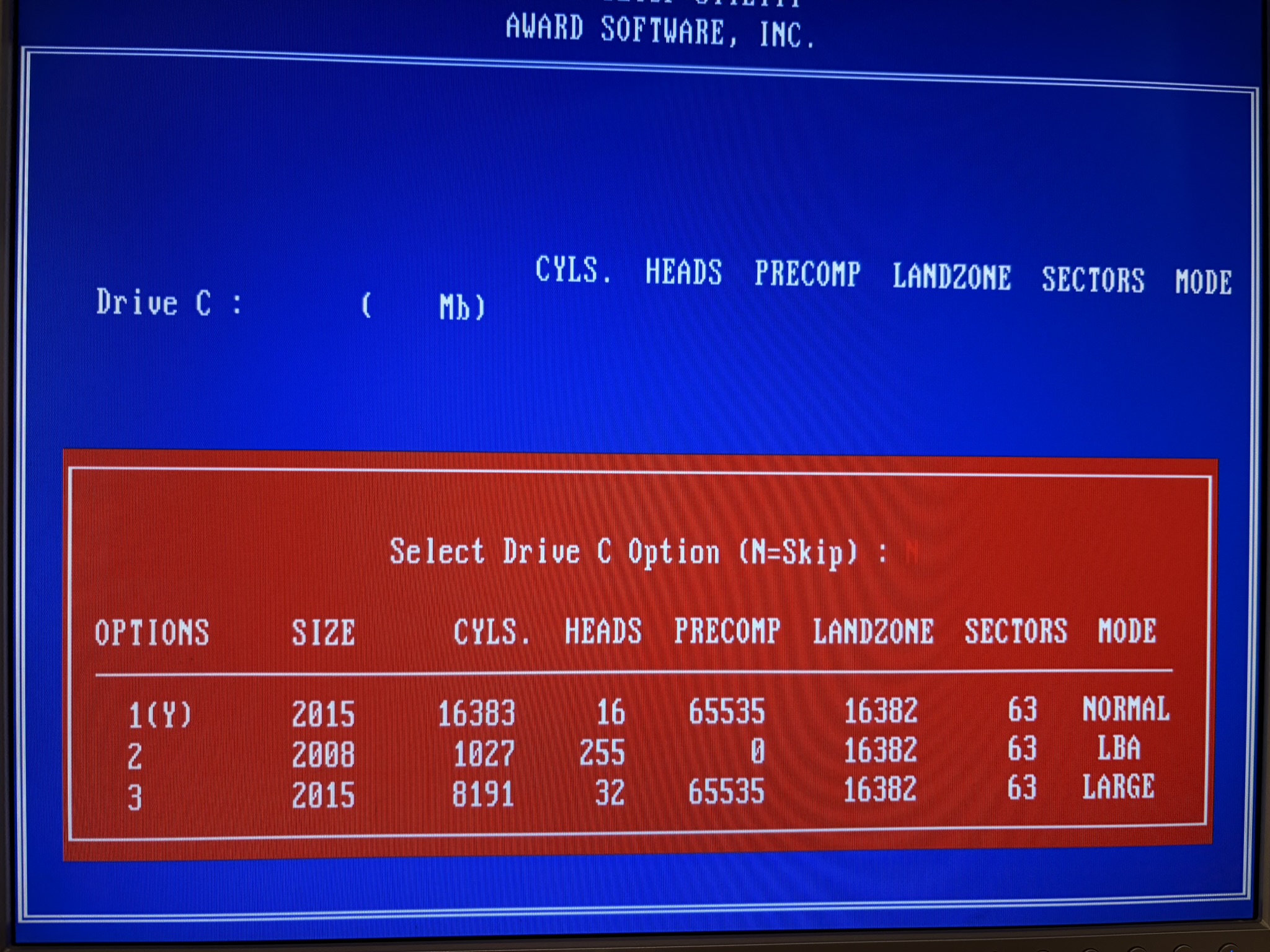
here is a pic of a HDD and how its detected in BIOS:

https://i.postimg.cc/cZ1HXGQC/IMG-3968.jpg

https://i.postimg.cc/yB6dvCFd/IMG-3969.jpg

Reply 5 of 17, by MagefromAntares

User metadata
Rank Member
Rank
Member
Omarkoman wrote on 2026-05-10, 01:50:
here is a pic of a HDD and how its detected in BIOS: […]
Show full quote
MagefromAntares wrote on 2026-05-10, 00:13:

Can you post a screenshot of the HDD configuration in the BIOS? It should be inside the "STANDARD CMOS SETUP" menu.

here is a pic of a HDD and how its detected in BIOS:

https://i.postimg.cc/cZ1HXGQC/IMG-3968.jpg

https://i.postimg.cc/yB6dvCFd/IMG-3969.jpg

This is the first HDD I assume, its addressing mode is set to NORMAL in the BIOS, but to have more than 2.1 GB accessible that needs to be set to either LARGE or LBA, the HDD has LBA printed on it, so I think that should be the correct choice.

"A process cannot be understood by stopping it. Understanding must move with the flow of the process, must join it and flow with it." - Dune

Reply 7 of 17, by douglar

User metadata
Rank l33t
Rank
l33t

Doesn’t seem like the usual bugs where the bios config program or int13h have trouble with too many cylinders. Or the phoenix 2gb bug where the bios config tool crashes if you go over a capacity > 32bit signed int.

Looks like XTide universal bios is crashing.

Maybe there is something in your system that’s not completely compatible with XTide.

Or maybe something is wrong with your rom or the card where you mounted the rom.

Reply 8 of 17, by Omarkoman

User metadata
Rank Member
Rank
Member

I have multiple NICs with XT-IDE ROM on them , I tried 3, they all behave same.

I will try to setup the HDD (the mechanical one) as BIOS detects, select LBA and see what DOS fdisk can see, I'll report back shortly. I'll also download the xtidecnf utility, I havent used it before but lets see.

thanks for all the questions / suggestions so far !

Reply 9 of 17, by jakethompson1

User metadata
Rank l33t
Rank
l33t
Omarkoman wrote on 2026-05-10, 02:10:

I will try to setup the HDD (the mechanical one) as BIOS detects, select LBA and see what DOS fdisk can see, I'll report back shortly.

Don't forget the pre Win95B DOS fdisk will apply its own 2GB per partition limit because of FAT16, and that isn't an indication of any Award bug.

Reply 10 of 17, by Omarkoman

User metadata
Rank Member
Rank
Member

I am using dos 6.22 and normally partition the 8gb drive into 4x2gb partitions as thats max 6.22 dos can do and i dont like to use higher versions / freedos.

And yes, you were correct! Its only cosmetic in bios! The drive reports full size in fdisk!!! Wow, so weird!

Reply 11 of 17, by jakethompson1

User metadata
Rank l33t
Rank
l33t

Nice. The thing is, other than for the GUI, the BIOS only cares about maximum cylinder/head/sector, and doesn't care about how many megabytes the drive is.

I haven't looked at the actual bug. But, if you multiply 16383*16, truncate that result to 16 bits (as if looking at ax only instead of dx:ax), and multiply by 63, and then divide that 32 bit result by 2048 to convert from sectors to megabytes, you indeed get 2015.

Reply 12 of 17, by youxiaojie

User metadata
Rank Newbie
Rank
Newbie

I tried few different ISA controllers (eg classic prime 2c mkiii) and 3 different VLB controllers. VLB controllers.....
do you have vlb ide controller's bios dumpped?if you have could you share with me?

Reply 13 of 17, by Omarkoman

User metadata
Rank Member
Rank
Member

Sorry no I dont have any of the BIOS dumped.

Reply 14 of 17, by Chkcpu

User metadata
Rank Oldbie
Rank
Oldbie
jakethompson1 wrote on 2026-05-10, 02:28:

I haven't looked at the actual bug. But, if you multiply 16383*16, truncate that result to 16 bits (as if looking at ax only instead of dx:ax), and multiply by 63, and then divide that 32 bit result by 2048 to convert from sectors to megabytes, you indeed get 2015.

Hi jakethompson1,

Your reasoning and calculations are spot on. This is exactly what happens with this 2GB display limit bug.

The routine that calculates the drive size loads the Cylinders count in AX and the number of heads in CL. The CH register is zeroed so that a MUL CX instruction puts the Cyl*Heads product in DX:AX.
Then the CL register is loaded with the Sectors/Track count and another MUL CX instruction is executed, multiplying AX by CX. This is where the 16-bit truncation happens because the value in DX is ignored.
Now CX is loaded with 0x800 (2048), followed by a DIV CX instruction. This will correctly divide DX:AX by CX, producing the drive size in MB in AX.

I found this routine in pre-translating Award BIOSes as well, where it worked fine because of the 504MB limit then. But by truncating the 32-bit result of the first multiplication to 16-bit, this logic is only good up to CHS values of 4095x16x63 (2015MB).

Note that due to the values used, the MB value calculated by the above routine is the binary 1024x1024 MiB type, the same a shown by FDISK.
Around that 1994/1995 time, BIOS vendors started to use the decimal 1000x1000 MB value for drive size indication, and a slightly altered routine was used. But curiously, this altered BIOS routine by Award still had the same 16-bit truncation.
Only by the end of 1995, Award properly fixed this bug.

In my DIY BIOS modding guide, I show a fix for both cases. These fixes work by altering the multiplication sequence, so the truncation will not occur.
I will send the OP a fixed PB5500c BIOS with proper drive size indications up to 8GB.

Cheers, Jan

CPU Identification utility
The Unofficial K6-2+ / K6-III+ page

Reply 15 of 17, by Omarkoman

User metadata
Rank Member
Rank
Member

Thank you Jan !!!!!!!!!!!!!

Reply 16 of 17, by Chkcpu

User metadata
Rank Oldbie
Rank
Oldbie

Hi Omarkoman,

The patched MiTAC/Trigon PWA-PB5500C Rev 1.02 BIOS is ready and here is a zipped copy:

The attachment PB5500C_J1.zip is no longer available

The filename of this patch J.1 BIOS is 5500C_J1.BIN, and in the zip-file I’ve added a PATCH.TXT file that lists the changes I’ve made.

Apart from fixing the 2GB HDD size display limit bug, I found a lot of hidden BIOS Setup options, specifically for L2 cache and DRAM timings.
I even found a completely hidden PCI CONFIGURATION SETUP menu!
I’ve enabled all these hidden options, so you now have a lot more possibilities to tweak the chipset settings. 😀

Enjoy your new BIOS, and I love to hear how it works for you.

Cheers, Jan

CPU Identification utility
The Unofficial K6-2+ / K6-III+ page

Reply 17 of 17, by Omarkoman

User metadata
Rank Member
Rank
Member

amazing, thank you so much !

I will give it a whirl and report back !