VOGONS


Controller Recommendations

Topic actions

Reply 20 of 32, by DustyShinigami

User metadata
Rank l33t
Rank
l33t
CharlieFoxtrot wrote on 2026-05-13, 16:36:

Few years ago I got NOS Thrustmaster Rage 3D and although it looks little bit weird, it is probably my favourite gamepad of the era due to the dual use digital/analog d-pad:
https://www.pcgamingwiki.com/wiki/Controller: … tmaster_Rage_3D

It is most often this controller I plug in when I want a controller and analog is really good for certain type of games.

Hmm. Interesting design. I’ll have to keep my eye out on eBay for one of those.

OS: Windows 98 SE
CPU: Slot 1 Pentium III Coppermine 933MHz (SL448)
RAM: Kingston 256MB 133MHz
GPU: Nvidia 16MB Riva TNT/128MB Geforce 4 Ti 4200
Motherboard: ABit AB-BE6-II Intel 440BX
Sound Card: Sound Blaster Live Value CT4670

Reply 21 of 32, by DustyShinigami

User metadata
Rank l33t
Rank
l33t
RandomStranger wrote on 2026-05-13, 16:24:
I'm using a QuickShot QS-6218 […]
Show full quote

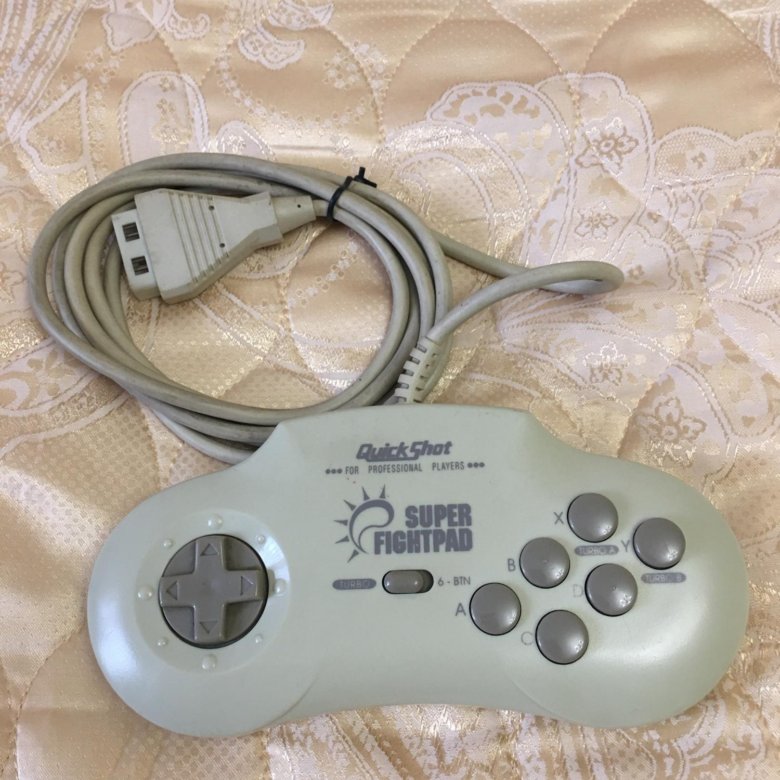
I'm using a QuickShot QS-6218

5ea6c4c266fb07323e2a6313.jpg

I don't have a reference, this is the only period correct controller I ever tried, but it does it's job and not difficult to set up.

Nice. Reminds me of the Mega Drive controller. 😄

OS: Windows 98 SE
CPU: Slot 1 Pentium III Coppermine 933MHz (SL448)
RAM: Kingston 256MB 133MHz
GPU: Nvidia 16MB Riva TNT/128MB Geforce 4 Ti 4200
Motherboard: ABit AB-BE6-II Intel 440BX
Sound Card: Sound Blaster Live Value CT4670

Reply 22 of 32, by RetroGamer4Ever

User metadata
Rank Oldbie
Rank
Oldbie
DustyShinigami wrote on 2026-05-13, 16:15:

Okay, I got the Logitech F310 today, and it works straight out of the box once Windows configures it. Easy to set up, too. 😀 Only snag I have, and I'm not sure if there's any tool out there that would fix the issue, is related to the deadzone...? So if I try and walk/run in a direction and then try and turn mid-run, the character stops.

You have to configure the directional controls and separate the move and turn functions, so that they don't overlap or conflict. It took me a bit of work to get a working config in Skyrim.

Reply 23 of 32, by dukeofurl

User metadata
Rank Member
Rank
Member

I use an original gravis gamepad. It only has four buttons, but if you really need a lot more than that for a PC game, you're probably better off using the keyboard.

Reply 24 of 32, by Law212

User metadata
Rank Oldbie
Rank
Oldbie
DustyShinigami wrote on 2026-05-09, 17:12:

What are some good period accurate controllers for Windows 98/games?

I was very surprised to learn that the PS5 controller is recognised and configured by 98, but sadly, for Resident Evil 3 it’s too sensitive…? Whenever I try to assign a button, it keeps assigning the same one automatically. Usually Axis X+ or something. Button presses don’t seem to register at all. So it looks like getting something more suitable is in order.

Thanks

Sidewinder Gamepad. Its not THE best. but its works amazingly well for most games . I played street fighter alpha 1 and 2, resident evil 2 and 3 , and many other games on it and it was great.

Reply 25 of 32, by DustyShinigami

User metadata
Rank l33t
Rank
l33t
RetroGamer4Ever wrote on 2026-05-13, 16:57:
DustyShinigami wrote on 2026-05-13, 16:15:

Okay, I got the Logitech F310 today, and it works straight out of the box once Windows configures it. Easy to set up, too. 😀 Only snag I have, and I'm not sure if there's any tool out there that would fix the issue, is related to the deadzone...? So if I try and walk/run in a direction and then try and turn mid-run, the character stops.

You have to configure the directional controls and separate the move and turn functions, so that they don't overlap or conflict. It took me a bit of work to get a working config in Skyrim.

Ahh, I see. Is that with the Logitech Gaming Software? I did find version 4.60, which works with Windows 98. Also, how would you get XInput to work and does that work any better? I did try toggling it, but Resident Evil 3 and the PC doesn't appear to recognise the controller if I enable that.

EDIT: Okay, been reading through this thread - Logitech F310 on Windows 98? - and I'll give this a try:

https://msfn.org/board/topic/119841-xbox360-c … iver-for-win98/

EDIT 2: Bugger. Link is dead.

OS: Windows 98 SE
CPU: Slot 1 Pentium III Coppermine 933MHz (SL448)
RAM: Kingston 256MB 133MHz
GPU: Nvidia 16MB Riva TNT/128MB Geforce 4 Ti 4200
Motherboard: ABit AB-BE6-II Intel 440BX
Sound Card: Sound Blaster Live Value CT4670

Reply 26 of 32, by Law212

User metadata
Rank Oldbie
Rank
Oldbie
badmojo wrote on 2026-05-10, 07:12:

The Interact MakoPad is the best DOS / Win9x pad I've found, it's one of the few that give you a working stick in DOS. Also still easy to find on eBay, often brand new.

I found one at a thrift store a while back brand new in box. I havent used it much yet though

Reply 27 of 32, by DustyShinigami

User metadata
Rank l33t
Rank
l33t
RetroGamer4Ever wrote on 2026-05-13, 16:57:
DustyShinigami wrote on 2026-05-13, 16:15:

Okay, I got the Logitech F310 today, and it works straight out of the box once Windows configures it. Easy to set up, too. 😀 Only snag I have, and I'm not sure if there's any tool out there that would fix the issue, is related to the deadzone...? So if I try and walk/run in a direction and then try and turn mid-run, the character stops.

You have to configure the directional controls and separate the move and turn functions, so that they don't overlap or conflict. It took me a bit of work to get a working config in Skyrim.

I don't appear to have an option to separate the move and turn functions with the Logitech Gaming Software. Also, still no luck finding these unofficial Xbox 360 controller drivers. Every link I've come across has been dead. 🙁

OS: Windows 98 SE
CPU: Slot 1 Pentium III Coppermine 933MHz (SL448)
RAM: Kingston 256MB 133MHz
GPU: Nvidia 16MB Riva TNT/128MB Geforce 4 Ti 4200
Motherboard: ABit AB-BE6-II Intel 440BX
Sound Card: Sound Blaster Live Value CT4670

Reply 28 of 32, by DaveDDS

User metadata
Rank Oldbie
Rank
Oldbie
DustyShinigami wrote on 2026-05-09, 17:12:

... I was very surprised to learn that the PS5 controller is recognised ...

I think this goes back a ways - I picked up a third party PS3 controller (back when the PS3 was a "new thing") - "Intec" not Bluetooth but came with a USB "dongal".

And... it works quite well as a PC controller - so I think Ms and Sony controller protocols must be pretty much the same!

- Dave ; https://dunfield.themindfactory.com ; "Daves Old Computers" ; SW dev addict best known:
ImageDisk: rd/wr ANY floppy PChardware can ; Micro-C: compiler for DOS+ManySmallCPU ; DDLINK: simple/small FileTrans(w/o netSW)via Lan/Lpt/Serial

Reply 29 of 32, by DustyShinigami

User metadata
Rank l33t
Rank
l33t
DaveDDS wrote on 2026-05-13, 20:39:
DustyShinigami wrote on 2026-05-09, 17:12:

... I was very surprised to learn that the PS5 controller is recognised ...

I think this goes back a ways - I picked up a third party PS3 controller (back when the PS3 was a "new thing") - "Intec" not Bluetooth but came with a USB "dongal".

And... it works quite well as a PC controller - so I think Ms and Sony controller protocols must be pretty much the same!

I see. I did read briefly that the PS3 controller isn't one that's easy to get working, but that's likely because of the Bluetooth then. Though mine does have one of those micro USB cables.

OS: Windows 98 SE
CPU: Slot 1 Pentium III Coppermine 933MHz (SL448)
RAM: Kingston 256MB 133MHz
GPU: Nvidia 16MB Riva TNT/128MB Geforce 4 Ti 4200
Motherboard: ABit AB-BE6-II Intel 440BX
Sound Card: Sound Blaster Live Value CT4670

Reply 30 of 32, by jmarsh

User metadata
Rank Oldbie
Rank
Oldbie

PS3 controllers use bluetooth but they require a non-standard initialization sequence which makes them a PITA to get working wirelessly. Otherwise using a USB cable there are official drivers from Sony or Steam can support the pad allowing any game that uses Steam input to work.

Reply 31 of 32, by Fazeshift

User metadata
Rank Newbie
Rank
Newbie
leileilol wrote on 2026-05-09, 17:23:

Be aware that some vintage PC pads may possibly not hold up in tactileness (InterAct) or are dangerous to use (Gravis) over 25 years of time!

Dangerous? Are you referring to capacitors?

Shponglefan wrote on 2026-05-09, 17:56:

Growing up I used the Gravis Gamepad Pro, Suncom SFX and Suncom F-15E Talon.

The Suncom gamepads and joysticks were nice because they keyboard passthrough, so you could use them with games that didn't officially support joysticks.

The Suncom SFX was my favorite, for its keyboard emulation. The D-pad had a much better feel than the original Gravis Gamepad, more buttons, and the layout combined both Super Nintendo (shoulder L R) and Sega Genesis (6-button) so it felt familiar. Unfortunately, the double-sided DIN plug didn't withstand the weight/strain of using PS/2 adapters on both sides of it. I wish it was more common. Several friends went looking for it after trying mine, and could never find one.

The Gravis Gamepad Pro (aka Grip) was my replacement. I still have a couple, and only recently discovered it could do keyboard emulation in DOS via TSR. That isn't as easy or flexible as the Suncom though.

Reply 32 of 32, by CC-Adam

User metadata
Rank Newbie
Rank
Newbie
bjrnx wrote on 2026-05-10, 07:59:

The pad from Interact seems to have different names, maybe regionally. The one here is labeled "PC Powerpad Pro SV-234" and looks the same.

The attachment PXL_20260510_075411178.jpg is no longer available
The attachment PXL_20260510_075417789.jpg is no longer available

I had this exact pad in the 90's, played through Interstate 76 with this.. I wish I still had it! I think mine was a different brand but can't quite remember it, was in that exact blue colour though.