VOGONS


First post, by RetroPCCupboard

User metadata
Rank Oldbie
Rank
Oldbie

Hi All,

I am currently testing a Geforce 4 MX 460 with a Thunderbird 1.4Ghz on a KT7A-RAID motherboard. Using nVidia driver 45.23

Performance I am getting is:

3DMark 99 = 7264 GPU, 19668 CPU
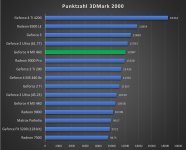
3DMark 2000 = 7761

I was expecting somewhere around 11-12000 on 3dMark 2000. I
Do you think the CPU is bottlenecking it, or could something else be wrong?

Reply 1 of 17, by Joseph_Joestar

User metadata
Rank l33t++
Rank
l33t++
RetroPCCupboard wrote on Yesterday, 06:34:

I was expecting somewhere around 11-12000 on 3dMark 2000. I
Do you think the CPU is bottlenecking it, or could something else be wrong?

Seems pretty normal to me. I was getting slightly higher results when using an MX460 with an AthlonXP 1700+ which runs at ~1.4 GHz.

Those early 3DMark versions are very CPU dependent. Also, the default 1024x768 16-bit color test of 3DMark 2000 isn't exactly going to tax the MX460. For a better comparison, try running Quake 3 at 1280x1024 32-bit (or higher) and compare that to other people's scores.

My retro builds

Reply 2 of 17, by RetroPCCupboard

User metadata
Rank Oldbie
Rank
Oldbie
Joseph_Joestar wrote on Yesterday, 07:40:

Seems pretty normal to me. I was getting slightly higher results when using an MX460 with an AthlonXP 1700+ which runs at ~1.4 GHz.

Those early 3DMark versions are very CPU dependent. Also, the default 1024x768 16-bit color test of 3DMark 2000 isn't exactly going to tax the MX460. For a better comparison, try running Quake 3 at 1280x1024 32-bit (or higher) and compare that to other people's scores.

I am just going by scores that PhilsComputerLab got in his review:

https://youtu.be/_qWvc94DjJE?si=iAC4QUjdLG5cCB_z

He doesn't mention the platform used, but I am guessing that it must be Athlon 64 or Pentium 4.

Anyway, I have just tried Quake III as suggested. I change resolution to 1280x1024 and bit depth to 32. Left everything else on default. It scored 108.9fps. Is that what you'd expect?

If CPU is a limitation I was wondering if a Geforce 2 GTS may perform better. I know it's a slower card, but the drivers should be much leaner?

Reply 3 of 17, by Joseph_Joestar

User metadata
Rank l33t++
Rank
l33t++
RetroPCCupboard wrote on Yesterday, 08:18:

I am just going by scores that PhilsComputerLab got in his review:

https://youtu.be/_qWvc94DjJE?si=iAC4QUjdLG5cCB_z

He doesn't mention the platform used, but I am guessing that it must be Athlon 64 or Pentium 4.

Yeah, Phil usually went for the most powerful CPU he had, so that it wouldn't be a bottleneck when testing GPUs. I'm not sure what system he used exactly, but it might be this one.

RetroPCCupboard wrote on Yesterday, 08:18:

Anyway, I have just tried Quake III as suggested. I change resolution to 1280x1024 and bit depth to 32. Left everything else on default. It scored 108.9fps. Is that what you'd expect?

I don't have that system anymore, or rather I repurposed it for an overpowered Voodoo 3 rig, so I can't really provide a direct comparison. All I had left are my notes, which don't contain all the benchmark results. Also, people typically fully max out all Quake 3 settings while benchmarking, at least from what I've seen here.

RetroPCCupboard wrote on Yesterday, 08:18:

If CPU is a limitation I was wondering if a Geforce 2 GTS may perform better. I know it's a slower card, but the drivers should be much leaner?

I think the LightSpeed Memory Architecture II of the GeForce 4 cards (MX versions have it too) would make up for any driver overhead advantage of the GeForce 2 GTS, but I'm not really sure. It would be fun to see a direct comparison, so go for it if you have both cards.

My retro builds

Reply 4 of 17, by asdf53

User metadata
Rank Member
Rank
Member

I know it's not great, but here's an old Anandtech Quake III benchmark (q3 1.16, demo001, 640x480 I believe) using KT133A boards, a Thunderbird 1000 C and a Geforce 2 GTS (driver 5.22): https://web.archive.org/web/20170602161011/ht … com/show/786/17

You could downclock to 1000 MHz and benchmark at 640x480 to compare. Your GF4 should be faster than a GF2 so you should at least match these scores.

With a fast CPU, using older drivers is of not much benefit. For old games, the performance gains are negligible, and for newer games, the performance will often be worse because you miss out on optimizations and bug fixes that the newer drivers have. I remember getting lots of graphics glitches using the old drivers with games from 2000-2002 and often 10-20% lower FPS.

Reply 5 of 17, by RetroPCCupboard

User metadata
Rank Oldbie
Rank
Oldbie

I have just been looking into possibilities of upgrading the CPU. It seems possible that I can put a Thoroughbred-B 2600+ that I have into this motherboard. Its not officially supported but I may be able to undervolt it and run it at 1.666Ghz. That would be easier on my PSU also, which I think is probably close to it's limits. It is rated for 5v@20A.

Reply 6 of 17, by RetroPCCupboard

User metadata
Rank Oldbie
Rank
Oldbie
asdf53 wrote on Yesterday, 08:47:

You could downclock to 1000 MHz and benchmark at 640x480 to compare. Your GF4 should be faster than a GF2 so you should at least match these scores.

If I downclock my CPU to 1000Mhz and do the benchmark at 640x480 at 16 bit I get 102.5 FPS.

This is far slower than this review suggests It should be. It should be 150fps?

This is actually slower than I got at 1280x1024 at 32-bit with the CPU at 1400Mhz.

If I run at 640x480 16 bit with CPU at 1400Mhz I get 135FPS. If I am reading this correctly that means both GPU and CPU are limiting it? Decreasing clock speed and increasing resolution both reduce the framerate....

Joseph_Joestar wrote on Yesterday, 08:38:

I think the LightSpeed Memory Architecture II of the GeForce 4 cards (MX versions have it too) would make up for any driver overhead advantage of the GeForce 2 GTS, but I'm not really sure. It would be fun to see a direct comparison, so go for it if you have both cards.

Yeah, I will dig it out to see.

Reply 7 of 17, by asdf53

User metadata
Rank Member
Rank
Member

Hmmm. Seems a bit odd, yes. Here's another Q3 benchmark:

https://www.retrohardware-reviews.de/review-abit-kt7a-raid/ (scroll to the bottom for Quake 3 benchmark)

Again it's not the greatest match because only a Geforce 4 4200 and a Voodoo 5 5500 were tested, but at least as a sanity check, your result should fall inbetween.

Settings used in the benchmark: Thunderbird 1200C @ 1200 MHz, Quake 3 1.32, demo four, default graphics preset, 1024x768 16-bit

Reply 8 of 17, by RetroPCCupboard

User metadata
Rank Oldbie
Rank
Oldbie
asdf53 wrote on Yesterday, 09:39:
Hmmm. Seems a bit odd, yes. Here's another Q3 benchmark: […]
Show full quote

Hmmm. Seems a bit odd, yes. Here's another Q3 benchmark:

https://www.retrohardware-reviews.de/review-abit-kt7a-raid/ (scroll to the bottom for Quake 3 benchmark)

Again it's not the greatest match because only a Geforce 4 4200 and a Voodoo 5 5500 were tested, but at least as a sanity check, your result should fall inbetween.

Settings used in the benchmark: Thunderbird 1200C @ 1200 MHz, Quake 3 1.32, demo four, default graphics preset, 1024x768 16-bit

Hmm. I don't have a demo 4. Only demo 1 and demo 2. It is version 1.17. Basically as it came after installing from CD.

Anyhow, with demo 1, 1024x768 16 bit I get 129FPS

Reply 9 of 17, by asdf53

User metadata
Rank Member
Rank
Member
RetroPCCupboard wrote on Yesterday, 12:24:
asdf53 wrote on Yesterday, 09:39:
Hmmm. Seems a bit odd, yes. Here's another Q3 benchmark: […]
Show full quote

Hmmm. Seems a bit odd, yes. Here's another Q3 benchmark:

https://www.retrohardware-reviews.de/review-abit-kt7a-raid/ (scroll to the bottom for Quake 3 benchmark)

Again it's not the greatest match because only a Geforce 4 4200 and a Voodoo 5 5500 were tested, but at least as a sanity check, your result should fall inbetween.

Settings used in the benchmark: Thunderbird 1200C @ 1200 MHz, Quake 3 1.32, demo four, default graphics preset, 1024x768 16-bit

Hmm. I don't have a demo 4. Only demo 1 and demo 2. It is version 1.17. Basically as it came after installing from CD.

Anyhow, with demo 1, 1024x768 16 bit I get 129FPS

It's complicated... That demo (four.dm_68) was introduced with a later patch (1.32 I believe) and became the standard benchmark demo. Quake 3 had several patches that each introduced a new demo format, and they are incompatible with each other, so if you install the 1.32 patch, you'll get the "four" demo, but the old "demo001" won't work anymore.

Anyhow, that score seems low again. I believe the four demo is more demanding than the old demo001, so you should probably be getting at least 150-160 FPS.

Also, the 3DMark99 result from retrohardware-reviews with a GF 4 4200 and a Voodoo 5 is around 9000-10000, and you're only getting 7200, and that's with the CPU clocked 200 MHz higher. That definitely seems off. Have you tried the older 28.32 drivers?

Reply 10 of 17, by RetroPCCupboard

User metadata
Rank Oldbie
Rank
Oldbie
asdf53 wrote on Yesterday, 13:35:

Anyhow, that score seems low again. I believe the four demo is more demanding than the old demo001, so you should probably be getting at least 150-160 FPS.

Also, the 3DMark99 result from retrohardware-reviews with a GF 4 4200 and a Voodoo 5 is around 9000-10000, and you're only getting 7200, and that's with the CPU clocked 200 MHz higher. That definitely seems off. Have you tried the older 28.32 drivers?

So, I have now tried Geforce 4 MX 460. Geforce 2 Ti and Geforce 2 GTS. I tried drivers 45.23, 23.11, 5.32. The highest scores I obtained were actually with the Geforce 2 Ti and driver 23.11. It scored 8205 in 3DMark 2000. This is compared to 7761 with the Geforce 4 MX 460 with 45.23 driver.
Even so, these are still lower scores than they should be.

I also tried a Geforce 4 4200. 3DMark 99 score was the same as the MX460 (7280). The 3DMark 2000 score was higher, 8940.

Quake III scores were basically identical
With all cards and driver versions. About 130FPS.

I have gone back to the MX460 now and driver 45.23. I have found a couple of options in the BIOS that helped slightly. It defaulted to AGP 4X mode being disabled. So I have enabled that now. It now scores a bit over 8000.

I tried to put in my thoroughbred-B 2600+, but the motherboard wouldn't boot. I haven't yet checked if BIOS is the latest. I assume that's the next thing to try.

Reply 11 of 17, by asdf53

User metadata
Rank Member
Rank
Member

I believe the KT7A (don't know about the KT7A-RAID) has an older revision that only works with Palomino Athlon XP, and a newer revision that works with Thoroughbred.

I have a KT7A with a Thunderbird 1400 and a Geforce 2 GTS (but no Geforce 4 MX), so I could benchmark it tomorrow and compare with your scores above.

There's something else you can try - Quake 3 benchmarks are a lot slower with sound enabled, and it's influenced by the sound driver, so I believe it was traditionally benchmarked with the sound off back in the day. The command is "s_initsound 0" in q3config.cfg.

You should also return to https://www.retrohardware-reviews.de/review-abit-kt7a-raid/ and compare your machine clocked at 1200 MHz with some of the CPU and memory benchmarks to see if everything checks out. There's also the Final Reality AGP bandwidth test.

3DMark99 at 800x600 is mostly CPU/memory limited, so if your scores are way too low there, it might not be a graphics card problem after all.

Finally, here are some old benchmarks from my notes that you can also compare against, using a Geforce 4 TI 4200 and driver 43.45:

QDI Kinetiz 7E, KT133A, Athlon Thunderbird 1200 MHz (9 x 133), 512mb DDR CL2, Geforce 4 4200, via 4.56, nvid 43.45:
3dmark 99: 9590
3dmark 99 cpu: 19030
3dmark00: 8829
3dmark00 high poly 1 light: 26906
3dmark 01: 7774
3dmark 03: 1156
final reality agp test: 237.76
memory everest 2.20: 984 378 178ns (read/write/access)
memory aida bios 2 bank interleave: 995 1025 144
memory aida bios 4 bank interleave: 995 1027 143
ut99 utbench.dem: min 25.3, avg 43.91
ut99 benchmark.dem: min 44.25, avg 84.02
q3 1.16 demo001: 154.3 (all q3 results are with sound disabled)
q3 1.16 nv15: 37.3
q3 1.32 four: 148.3 (640x480), 151.3 (normal preset 1024x768)

A great test you can do first is the memory benchmark in Everest 2.20, it's really good to quickly compare CPU and memory performance between similar systems. Your results should at least match mine here, since the KT7A is quite a bit faster than the QDI Kinetiz I used.

Reply 12 of 17, by [GPUT]Carsten

User metadata
Rank Newbie
Rank
Newbie

I found a user-written retro article on computerbase.de (for whom I wrote articles over 20 years ago):
https://www.computerbase.de/forum/threads/gef … n-flop.2182310/
Here's the 3DMark2000-score:
https://pics.computerbase.de/forum/attachment … hash=YZaR5CZWdX
(don't know if you can see it without being logged in, fwiw, the MX 460 scores roughly 12000 points. But this is with an Core 2 Duo E6600, so vastly faster than anything period correct like your setup.

In my review of the MX 440 (https://www.computerbase.de/artikel/grafikkar … test.62/seite-5), it scored around 8800 points on an XP1700+ with a SiS745 chipset, so not the fastest setup imaginable.

As others have pointed out, 3DMark2000 is pretty CPU dependent, so i would say your system is not too far off it's mark.

Reply 13 of 17, by RetroPCCupboard

User metadata
Rank Oldbie
Rank
Oldbie
[GPUT]Carsten wrote on Today, 14:52:

it scored around 8800 points on an XP1700+ with a SiS745 chipset, so not the fastest setup imaginable.

As others have pointed out, 3DMark2000 is pretty CPU dependent, so i would say your system is not too far off it's mark.

Interesting. The XP 1700+ runs at 1467Mhz, and probably has a higher IPC than mine also. So maybe you are right. I have got the score up to 8426 now by changing memory timings.

Reply 14 of 17, by RetroPCCupboard

User metadata
Rank Oldbie
Rank
Oldbie
asdf53 wrote on Yesterday, 19:07:

I believe the KT7A (don't know about the KT7A-RAID) has an older revision that only works with Palomino Athlon XP, and a newer revision that works with Thoroughbred.

I have a KT7A with a Thunderbird 1400 and a Geforce 2 GTS (but no Geforce 4 MX), so I could benchmark it tomorrow and compare with your scores above.

If you dont mind, that would be interesting. But I am getting the impression now that my scores are about as expected for this system.

asdf53 wrote on Yesterday, 19:07:

There's something else you can try - Quake 3 benchmarks are a lot slower with sound enabled, and it's influenced by the sound driver, so I believe it was traditionally benchmarked with the sound off back in the day. The command is "s_initsound 0" in q3config.cfg.

Thanks. That's a good point. I will try that.

asdf53 wrote on Yesterday, 19:07:

You should also return to https://www.retrohardware-reviews.de/review-abit-kt7a-raid/ and compare your machine clocked at 1200 MHz with some of the CPU and memory benchmarks to see if everything checks out. There's also the Final Reality AGP bandwidth test.

3DMark99 at 800x600 is mostly CPU/memory limited, so if your scores are way too low there, it might not be a graphics card problem after all.

Thanks. Yeah, it is looking like my CPU performance was lower than it should be. I have tweaked memory timings and it has improved a bit now. A bit over 8400 in 3DMark 2000 now. Still possibly slightly slower than expected, but an improvement for sure

asdf53 wrote on Yesterday, 19:07:
Finally, here are some old benchmarks from my notes that you can also compare against, using a Geforce 4 TI 4200 and driver 43.4 […]
Show full quote

Finally, here are some old benchmarks from my notes that you can also compare against, using a Geforce 4 TI 4200 and driver 43.45:

QDI Kinetiz 7E, KT133A, Athlon Thunderbird 1200 MHz (9 x 133), 512mb DDR CL2, Geforce 4 4200, via 4.56, nvid 43.45:
3dmark 99: 9590
3dmark 99 cpu: 19030
3dmark00: 8829

When I put Gefirce 4200 in I score 8948. So, pretty much the same as you then.

asdf53 wrote on Yesterday, 19:07:
3dmark00 high poly 1 light: 26906 3dmark 01: 7774 3dmark 03: 1156 final reality agp test: 237.76 memory everest 2.20: 984 378 1 […]
Show full quote

3dmark00 high poly 1 light: 26906
3dmark 01: 7774
3dmark 03: 1156
final reality agp test: 237.76
memory everest 2.20: 984 378 178ns (read/write/access)
memory aida bios 2 bank interleave: 995 1025 144
memory aida bios 4 bank interleave: 995 1027 143
ut99 utbench.dem: min 25.3, avg 43.91
ut99 benchmark.dem: min 44.25, avg 84.02
q3 1.16 demo001: 154.3 (all q3 results are with sound disabled)
q3 1.16 nv15: 37.3
q3 1.32 four: 148.3 (640x480), 151.3 (normal preset 1024x768)

A great test you can do first is the memory benchmark in Everest 2.20, it's really good to quickly compare CPU and memory performance between similar systems. Your results should at least match mine here, since the KT7A is quite a bit faster than the QDI Kinetiz I used.

Thanks! That's a lot of benchmarks. I dont have any of these installed at the moment, so need to get them first, and will report back.

Reply 15 of 17, by Repo Man11

User metadata
Rank l33t
Rank
l33t

IIRC the only KT7A revision that officially supported the Athlon was the 1.3 - anything prior to that, it might work normally, it might have issues powering on requiring you to hit the reset button, or it might not work at all. I had a Rev. 1.1 and it worked with with a Palomino XP1600. I later had a pair of KT7E boards paired with XP2100 Throughbreds that were used as parts lookup computers for techs (in maybe 2006?) after reading this thread years earlier. https://www.overclockers.com/forums/threads/t … ghz-now.158672/

After watching many YouTube videos about older computer hardware, YouTube began recommending videos about trains - are they trying to tell me something?

Reply 16 of 17, by asdf53

User metadata
Rank Member
Rank
Member

It's still not normal that your 3DMark99 score is lower than your 3DMark00 score. Could it be that you ran it with Vsync enabled?

Reply 17 of 17, by RetroPCCupboard

User metadata
Rank Oldbie
Rank
Oldbie
asdf53 wrote on Today, 18:57:

It's still not normal that your 3DMark99 score is lower than your 3DMark00 score. Could it be that you ran it with Vsync enabled?

I haven't set vsync to be on, but maybe it defaults to that. I will check. I am surprised that 3DMark doesn't disable vsync?