VOGONS


Bought these (retro) hardware today

Topic actions

Reply 59280 of 59300, by Alesia

User metadata
Rank Newbie
Rank
Newbie

2 weeks ago I saw that my local tech recyclers had just gotten a 486 in but they had not wiped the drive so they wouldn't let it go or price it. I came back this week and to my suprise it was still there, and priced at only $30, on a week I had $30 of money I could spend on whatever I wanted. I never thought I would be able to complete my MS-DOS/Windows line-up with a 486 era machine but everything came together after many years of searching. Let me introduce the Zeos 486.
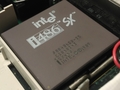
Featuring a Zeos Upgradable Systems Motherboard, 486DX on a daughter board, a Diamond Stealth VRAM, and Pro Audio Spectrum 16, Seagate ST3491A, and the weight of the core of a white dwarf it is the 486 of my dreams....kind of. It is missing the Intel Cache Module these could come with and that is a big bummer. They seem to be unobtainium and probably extremely expensive if there were any available, maybe someone super smart will figure out a homebrew replacement somehow eventually. The 4.5V CMOS battery is also proving to be a nightmare to find replacements for. Making a DYI battery holder requires tools that are somewhat expensive (for me) and no one seems to be selling pre-made ones on ebay which struck me as odd. It is also not the VLB capable motherboard that this same model could come with but I'm sure I'll figure that out as well if the Diamond card proves to be unsatisfactory. I couldn't find any real info on the performance of the Diamond card so I guess I'll see. Worst case it gets replaced with something faster (IDK what) and I can put the Diamond card in my 286 which is currently using a very slow integrated Trident graphics setup.

However, it came with all the core parts and it does just work despite having to punch in hard drive parameters in every time I turn it on, and the bios settings corrupting on reset (to the point of a soft-lock at times!) I got DOS 5.0 installed and I'm working on picking out a list of software/games I want to have on it. Also fixed the cable management and cleaned out the psu fan and the intake(!) fan as it has intake slots and does something other then move hot air around. Currently planning to hunt down 16-32mb of memory and run Windows 3.1 on it, probably upgrade to a 486DX2 which is the max the board can support aside from exotic things like overdrive chips. Also installed a CD-drive and figured out some jumper setting conflicts with the hard drive but I haven't gotten drivers installed to test it out yet. I have Red Baron CD and Dragon's Lair CD on hand to test everything out when I get all the core drivers and software figured out and stable. I know I've complained a lot here but new machine always equals new issues. I am jittery levels of excited over finally getting a 386/486 class machine and I can't wait for when I get it fully up and running even without any upgrades.

EDIT: Spammed the thread somehow, alerted the mods as the website won't let me remove the junk posts for some reason. Sorry everyone.

YjSKVOH.jpeg
NDTqkKe.jpeg
8fBE9C9.jpeg
XgS0Qo6.jpeg
yPxAmfE.jpeg
tuFp8j9.jpeg
UmLhSKR.jpeg

Reply 59281 of 59300, by Aui

User metadata
Rank Member
Rank
Member

Congratulations! A beautiful machine and a true bargain! I cant read the CPU label but I assume it is a DX33 (which I would absolutely keep over a DX2 66) I also would not worry about the Cache - it is mostly a homeopatic increase in speed. If you can forget about FPS for a while this machine covers a huge compatibility range. Another 4MB RAM would be perhaps the most usefull upgrade (Themepark, Settlers and quite a few other titles are running just better) 4.5 Volts are available in this form factor:

The attachment 45V.jpg is no longer available

Reply 59282 of 59300, by amadeus777999

User metadata
Rank Oldbie
Rank
Oldbie

The ZEOS486 is looking sweet and the sound card is a good one too!
Relating to another post concerning 486 vesa local systems - a board that can be run with 50mhz, all settings max'd(as far as I can remember), is the GA-486VS.
Concerning acqusitions - among the parts is a neat VOBIS / SkyTower - unfortunately an ATX version where I will put in an Biostar M5ALA board(which was a total steal). So I still have to seek out an AT version of this noice case.

Reply 59283 of 59300, by Alesia

User metadata
Rank Newbie
Rank
Newbie
Aui wrote on 2026-06-19, 10:00:

Congratulations! A beautiful machine and a true bargain! I cant read the CPU label but I assume it is a DX33 (which I would absolutely keep over a DX2 66) I also would not worry about the Cache - it is mostly a homeopatic increase in speed. If you can forget about FPS for a while this machine covers a huge compatibility range. Another 4MB RAM would be perhaps the most usefull upgrade (Themepark, Settlers and quite a few other titles are running just better) 4.5 Volts are available in this form factor:

The attachment 45V.jpg is no longer available

I had to go and mega zoom my photos and it does seem to say "SX419" so 33 mhz. Any reason you would keep a 33mhz over upgrading to a DX2? This 486 is kind of a in a weird position in my collection where it's sandwiched between a 12mhz 286 w/4mb of ram and a Pentium 200 machine capability wise. And yeah I was looking at those. I could probably solder the old leads onto the new battery holder but doing it "right" by making a new connector seems to require a special crimping tool for the Dupont connectors. I'll probably end up just soldering the old leads on until I can scrap up the money to get the connectors + tool and do it more securely.

Reply 59284 of 59300, by Aui

User metadata
Rank Member
Rank
Member

The DX33 is from the original 486 lineup. It is much more appropriate for the machine you have. And it predates the DX2 66 by more than 3 years. It is also more compatible with speed sensitive classic DOS games (e.g. Monkey Island 1 usually wont run properly on a DX2 66 out of the Box) And with a Pentium 200 you have the late DOS era covered anyway. You can of course swap in a DX2 66 at any time just for fun, but I have a similar machine and I like the original DX33 much more

Reply 59285 of 59300, by BitWrangler

User metadata
Rank l33t++
Rank
l33t++
Alesia wrote on 2026-06-19, 11:36:
Aui wrote on 2026-06-19, 10:00:

Congratulations! A beautiful machine and a true bargain! I cant read the CPU label but I assume it is a DX33 (which I would absolutely keep over a DX2 66) I also would not worry about the Cache - it is mostly a homeopatic increase in speed. If you can forget about FPS for a while this machine covers a huge compatibility range. Another 4MB RAM would be perhaps the most usefull upgrade (Themepark, Settlers and quite a few other titles are running just better) 4.5 Volts are available in this form factor:

The attachment 45V.jpg is no longer available

I had to go and mega zoom my photos and it does seem to say "SX419" so 33 mhz. Any reason you would keep a 33mhz over upgrading to a DX2? This 486 is kind of a in a weird position in my collection where it's sandwiched between a 12mhz 286 w/4mb of ram and a Pentium 200 machine capability wise. And yeah I was looking at those. I could probably solder the old leads onto the new battery holder but doing it "right" by making a new connector seems to require a special crimping tool for the Dupont connectors. I'll probably end up just soldering the old leads on until I can scrap up the money to get the connectors + tool and do it more securely.

I don't know if you are overthinking it, had this happened to me back in the day when it was early in a college semester and away from tools/equipment, I'd have just stripped the leads with my teeth, twisted them together and insulated with scotch/sello -tape.

Unicorn herding operations are proceeding, but all the totes of hens teeth and barrels of rocking horse poop give them plenty of hiding spots.

Reply 59286 of 59300, by rasz_pl

User metadata
Rank l33t
Rank
l33t
Alesia wrote on 2026-06-19, 09:11:

Featuring a Zeos Upgradable Systems Motherboard, 486DX on a daughter board

https://theretroweb.com/motherboards/s/zeos-u … stems-mainboard

Alesia wrote on 2026-06-19, 09:11:

missing the Intel Cache Module these could come with and that is a big bummer. They seem to be unobtainium and probably extremely expensive if there were any available, maybe someone super smart will figure out a homebrew replacement somehow eventually.

would need someone with actual module or really good pictures to even start thinking about it

Alesia wrote on 2026-06-19, 09:11:

Currently planning to hunt down 16-32mb of memory

30pin 4MB simms are rare and expensive if not made DIY Newly made 4MB 30pin SIMMs

Since its one of those 386 chipset with 486 CPU boards could you please run cachechk (https://www.dosdays.co.uk/topics/mem_utilities.php) on it? Wonder how it looks compared to 386/486 hubrid boards (with two or more sockets) questions.

https://github.com/raszpl/sigrok-disk FM/MFM/RLL decoder
https://github.com/raszpl/FIC-486-GAC-2-Cache-Module (AT&T Globalyst)
https://github.com/raszpl/386RC-16 ram board
https://github.com/raszpl/Zenith_ZBIOS Zenith Z-386 MFM-300 ZBIOS disassembly

Reply 59287 of 59300, by Alesia

User metadata
Rank Newbie
Rank
Newbie
Aui wrote on 2026-06-19, 13:58:

The DX33 is from the original 486 lineup. It is much more appropriate for the machine you have. And it predates the DX2 66 by more than 3 years. It is also more compatible with speed sensitive classic DOS games (e.g. Monkey Island 1 usually wont run properly on a DX2 66 out of the Box) And with a Pentium 200 you have the late DOS era covered anyway. You can of course swap in a DX2 66 at any time just for fun, but I have a similar machine and I like the original DX33 much more

I'm actually considering keeping it now as well, after figuring out a bios setting that was dragging the performance into the dirt (see below), I think I'll be perfectly happy with the 486DX.

rasz_pl wrote on 2026-06-19, 15:09:
https://theretroweb.com/motherboards/s/zeos-u … stems-mainboard […]
Show full quote
Alesia wrote on 2026-06-19, 09:11:

Featuring a Zeos Upgradable Systems Motherboard, 486DX on a daughter board

https://theretroweb.com/motherboards/s/zeos-u … stems-mainboard

Alesia wrote on 2026-06-19, 09:11:

missing the Intel Cache Module these could come with and that is a big bummer. They seem to be unobtainium and probably extremely expensive if there were any available, maybe someone super smart will figure out a homebrew replacement somehow eventually.

would need someone with actual module or really good pictures to even start thinking about it

Alesia wrote on 2026-06-19, 09:11:

Currently planning to hunt down 16-32mb of memory

30pin 4MB simms are rare and expensive if not made DIY Newly made 4MB 30pin SIMMs

Since its one of those 386 chipset with 486 CPU boards could you please run cachechk (https://www.dosdays.co.uk/topics/mem_utilities.php) on it? Wonder how it looks compared to 386/486 hubrid boards (with two or more sockets) questions.

I'm in the US thankfully, the 30 pin simms seem to be about $40 for 16mb here. High and enough to make me think hard on it, but not out-of-reach-voodoo-card-high. I actually have 4mb worth of 30 pin simms but they are 2(?)3(?) chip sticks while the ones in the machine currently are 9 chip. I tried it at some point and the computer posted but removed them during other troubleshooting (CPU daughterboard had come detached while installing the ram and caused a freeze in bios?), not entirely sure how well the mix would work out in practice. 8mb ram would be nice though.

As for cachechk, see attached photo. While trying to get any kind of performance in games or software I found that the onboard cache controller has to be turned on in bios or else the cpu has terrible performance and the turbo button does not function. (pressing it or not did nothing at all) I assumed that selection was just for the Intel add-on cache but apparently not in this case. Cachechk was ran with the cache controller active in bios.

GB5twDQ.jpeg

Reply 59288 of 59300, by rasz_pl

User metadata
Rank l33t
Rank
l33t

Thank you for the cachechk picture.
That thing you were turning on in BIOS was L1 CPU cache. Maybe Award named it wrong or linked enabling L2 cache together with L1. Turbo in 486 systems is often implemented by turning off L1 or constant force flushing Write-Through L2.
Lack of L2 is really hurting performance of this platform 🙁 Ram is running extremely slow, barely faster than with 386DX40 and almost 2x slower than 486DX33 on full 486 motherboard. Are there any BIOS ram speed options available?

https://github.com/raszpl/sigrok-disk FM/MFM/RLL decoder
https://github.com/raszpl/FIC-486-GAC-2-Cache-Module (AT&T Globalyst)
https://github.com/raszpl/386RC-16 ram board
https://github.com/raszpl/Zenith_ZBIOS Zenith Z-386 MFM-300 ZBIOS disassembly

Reply 59289 of 59300, by BitWrangler

User metadata
Rank l33t++
Rank
l33t++
rasz_pl wrote on 2026-06-19, 18:13:

Lack of L2 is really hurting performance of this platform 🙁 Ram is running extremely slow, barely faster than with 386DX40 and almost 2x slower than 486DX33 on full 486 motherboard. Are there any BIOS ram speed options available?

Maybe it never goes faster than a 386, considering it seems to be a 486 on a 386 chipset if this is the right board...
https://theretroweb.com/motherboards/s/zeos-u … stems-mainboard

Unicorn herding operations are proceeding, but all the totes of hens teeth and barrels of rocking horse poop give them plenty of hiding spots.

Reply 59290 of 59300, by Ahrle

User metadata
Rank Newbie
Rank
Newbie
BitWrangler wrote on 2026-06-16, 12:42:

Wow, that's a lot to spend without having a 133 Mhz Cyrix 5x86 upgrade a Mach 64 2MB VLB and a Voodoo 1 in it. (That's just an "easy" $1000 worth, not a recommendation) You must have had very specific hardware in mind.

eBay... 😁
Soundblaster CT3900: $434
4x16MB SIMM for above (and an SB32 in collection): $82
Lo-Tech MIF-IPC-B: $73
MPU-401: $383
SC-55 MK2: $203
SC-88 Pro: $255
Gainward Et4000 W32 (non-i, wasn't aware): $208
Miditower case: $252
DFI 386 board w/ socketed AMD 33 MHz and 8MB RAM for the old case: $191

= $2078,63 + $120,86 in customs and additional fees = 2200, not 2300 as mentioned.
Quite price inefficient, more a 35 year crisis build and a "f*** this, let's do it once for all" build.

Also had an MT-32 and SC-55 MK1 since quite a while, and managed to get hold of a Yamaha TG-300 locally.
There was an SC-88 VL available locally, but it would probably always leave desire for a Pro. So went that triple price eBay route instead.
At least, hopefully keeps away from buying more anytime soon, only cables left to hook this crap up 😁

The attachment IMG_20260619_232847051.jpg is no longer available
BitWrangler wrote on 2026-06-16, 12:42:

VLB... two random cards have a chance that they will only play nice at 33. Random single cards, you might find only like 33 by themselves, where if they'll do 40 they are glitchy even with the wait states set. Back in the later 90s, when VLB were $1 a piece out of computer fair junk boxes, I was able to determine that by mixing and matching and cherrypicking, that you could indeed match VGA and I/O that would do 50 and even 60 together. It's not such a viable option now when they get to $150 a piece for tested/working cards. The most viable candidates though will do 40 by themselves with no wait states, tightest timings. Find a VGA and i/o that do that and there's a good chance they will pair at 50 with wait states set. In general the most willing VGAs I found for higher speeds had GD5428 or GD5429 VGA chipsets and 60ns SOJ RAM on. The i/o cards were typically UMC based. I think one pair I had that went well were a PT-429 VGA and a PT-426 i/o both from Pine, could still be a coin flip though. Also I am poor at model number recall for my ultimate 60mhz pair, might have been one of the Pine cards and one similar. Card models may be less relevant than "silicon lottery" of the chipsets, only tested a dozen or so, not the thousand you need to figure that out. 66Mhz may even have been possible with my golden pair, I could boot at 66, but being at the raggedy edge with the motherboard, CPU, RAM, cache etc does not give you much clue about what particular component is the weak link, and it would crash on almost everything in a short time. Motherboard also may be a factor, either in model or silicon lottery, so a perfect pair of VLB might not do 50, or even 40 on a "bad" motherboard.

Thanks for explanation.
I probably confused it with VLB + PCI setup, where PCI bridge counts as a device and penalties are given when three devices are present.
Had an initial idea to pair Voodoo1 with ET4000 in a VLB + PCI system.

Got the 386 board today, totally didn't notice that also needed an HDD controller. So that's great, ordered an el cheapo Promise VLB to finalize both systems.

BitWrangler wrote on 2026-06-16, 12:42:

Board to case fit. One of the standoff holes, think it was one of the ones in the middle, near ISA slot length distance from back, would have a somewhat random variance in position. Some cases might have a long slot for the hole, some might only support one position, but it was always a maybe it will, maybe it won't thing. Thus frequently necessary to use a standoff with the bottom nub cut off, so it just sat freely on the backplate. One of the corner screw to standoff holes was also not entirely standardised, many boards have an ovalled or double hole there. If a board doesn't and doesn't screw down straight, might be necessary to drill and tap a new standoff hole to suit. The two "most standard" holes seem to be the one on the back right, and the middle back, get those two aligned and then work on fudging, relocating, working around any that don't align after you've got those in. Be aware that sometimes the card slot frame is screwed on and can have minor variance in position, which may require loosening screw and tapping into place.

Did an arrangement of long screws through most holes at first, then started guessing there was probably an idea to mount it from the back side. Frustrating 😀

Looks like this from behind:

The attachment IMG_20260605_210520036.jpg is no longer available

Project 357575: ECS U4914-G | i486DX2-66 | ET4000/W32 | CT3900
Main: IBM PC300PL | PIII 750 | Viper AGP + V2 SLi | CT4500

Reply 59291 of 59300, by Ahrle

User metadata
Rank Newbie
Rank
Newbie

Don't want to spam too much, but today saw the arrival of the DFI 386 board.
Quite a looker with those red accents imo!
Purchased to make use of the 486's lemmings (desktop case, CT1740, Tseng ET3000 as the 4000 got zapped)

Purchase argument was to see how long it's physically possible for a Win95 installation to take.
Unpushed turbo button, downgraded clock crystal and no cache should probably make the FDD an overachiever 😁

Only awaiting HDD controller for the 486, and this 386 will recieve the Winbond ISA unit.

The attachment IMG_20260619_100900441[1].jpg is no longer available
The attachment IMG_20260619_113121131[1].jpg is no longer available
The attachment IMG_20260619_115506659[1].jpg is no longer available

Project 357575: ECS U4914-G | i486DX2-66 | ET4000/W32 | CT3900
Main: IBM PC300PL | PIII 750 | Viper AGP + V2 SLi | CT4500

Reply 59292 of 59300, by Repo Man11

User metadata
Rank l33t
Rank
l33t
Repo Man11 wrote on 2026-06-18, 00:44:
MattRocks wrote on 2026-06-17, 19:38:
Repo Man11 wrote on 2026-06-17, 19:04:

A Craigslist ad within driving distance for a vintage computer - decent mid 2000s case, 754 motherboard, but most importantly, a 9800 Pro with an aftermarket cooler. Asking $50.00! I immediately sent an email, but as of this morning, no reply. I sent another this morning from a different account just in case the other was caught in a spam filter. Still no reply. The ad is still up?

Some people become frustrated and block the whole marketplace.

I find myself wondering if all of the replies to his ad are hitting his spam filter? Another oddity is that he has an ad for the whole computer for $50.00 then a separate ad in "Computer parts" for just the case for $20.00.

IDGI, the ad is still up and though I've sent three emails from two different accounts he hasn't responded.

A lot of times when you first start out on a project you think, This is never going to be finished. But then it is, and you think, Wow, it wasn't even worth it. - Jack Handey

Reply 59293 of 59300, by Alesia

User metadata
Rank Newbie
Rank
Newbie
rasz_pl wrote on 2026-06-19, 18:13:

Thank you for the cachechk picture.
That thing you were turning on in BIOS was L1 CPU cache. Maybe Award named it wrong or linked enabling L2 cache together with L1. Turbo in 486 systems is often implemented by turning off L1 or constant force flushing Write-Through L2.
Lack of L2 is really hurting performance of this platform 🙁 Ram is running extremely slow, barely faster than with 386DX40 and almost 2x slower than 486DX33 on full 486 motherboard. Are there any BIOS ram speed options available?

I took a look at the Bios settings and it dawned on me that the timing option was probably cpu + ram tuning and it sure seems to be. (I've not used this era of stuff and my 286 only has no wait states or wait states with no other options, this is all all a little new to me)

Lowest Values seem to be 20mhz, 80ns. Highest is 50mhz, 53ns. I selected 33mhz, 53ns as that SEEMs to be what my ram is labeled at and took a new cachechk reading. IDK how off cachechk is when things are in protectedmode/v86/whatever but the numbers did change when the bios setting was changed. Either it's actually at 63ns, or it's at 53 as advertised an cachechk is just 10ns off, idk. Here's the new results + bios pics.

XTvBlVO.jpeg
zYlxJeM.jpeg
OH5gsoR.jpeg
QvtpADe.jpeg

Reply 59294 of 59300, by pentiumspeed

User metadata
Rank l33t
Rank
l33t

I can recall, one day, I happened to have a cache module that looks like one but buyer says not that it. Years later, I found out why. Turns out it is a 64K daughter board cache using intel 485 cache controller. Compaq also used same type of design 64K with intel 485 cache controller in a small card that plugs into a slot, that is only for busy chipsets in all sizes on one motherboard.

Again that extremely rare too.

Not the same thing that compaq used same form factor card 128K module (no controller) that is made now new selectable 256K, 512K and 1MB but this is only for compaq motherboards using VLSI chipset.

Cheers,

Great Northern aka Canada.

Reply 59295 of 59300, by BitWrangler

User metadata
Rank l33t++
Rank
l33t++
Ahrle wrote on 2026-06-19, 22:01:
eBay... :D Soundblaster CT3900: $434 4x16MB SIMM for above (and an SB32 in collection): $82 Lo-Tech MIF-IPC-B: $73 MPU-401: $383 […]
Show full quote
BitWrangler wrote on 2026-06-16, 12:42:

Wow, that's a lot to spend without having a 133 Mhz Cyrix 5x86 upgrade a Mach 64 2MB VLB and a Voodoo 1 in it. (That's just an "easy" $1000 worth, not a recommendation) You must have had very specific hardware in mind.

eBay... 😁
Soundblaster CT3900: $434
4x16MB SIMM for above (and an SB32 in collection): $82
Lo-Tech MIF-IPC-B: $73
MPU-401: $383
SC-55 MK2: $203
SC-88 Pro: $255
Gainward Et4000 W32 (non-i, wasn't aware): $208
Miditower case: $252
DFI 386 board w/ socketed AMD 33 MHz and 8MB RAM for the old case: $191

= $2078,63 + $120,86 in customs and additional fees = 2200, not 2300 as mentioned.
Quite price inefficient, more a 35 year crisis build and a "f*** this, let's do it once for all" build.

Also had an MT-32 and SC-55 MK1 since quite a while, and managed to get hold of a Yamaha TG-300 locally.
There was an SC-88 VL available locally, but it would probably always leave desire for a Pro. So went that triple price eBay route instead.
At least, hopefully keeps away from buying more anytime soon, only cables left to hook this crap up 😁

The attachment IMG_20260619_232847051.jpg is no longer available
BitWrangler wrote on 2026-06-16, 12:42:

VLB... two random cards have a chance that they will only play nice at 33. Random single cards, you might find only like 33 by themselves, where if they'll do 40 they are glitchy even with the wait states set. Back in the later 90s, when VLB were $1 a piece out of computer fair junk boxes, I was able to determine that by mixing and matching and cherrypicking, that you could indeed match VGA and I/O that would do 50 and even 60 together. It's not such a viable option now when they get to $150 a piece for tested/working cards. The most viable candidates though will do 40 by themselves with no wait states, tightest timings. Find a VGA and i/o that do that and there's a good chance they will pair at 50 with wait states set. In general the most willing VGAs I found for higher speeds had GD5428 or GD5429 VGA chipsets and 60ns SOJ RAM on. The i/o cards were typically UMC based. I think one pair I had that went well were a PT-429 VGA and a PT-426 i/o both from Pine, could still be a coin flip though. Also I am poor at model number recall for my ultimate 60mhz pair, might have been one of the Pine cards and one similar. Card models may be less relevant than "silicon lottery" of the chipsets, only tested a dozen or so, not the thousand you need to figure that out. 66Mhz may even have been possible with my golden pair, I could boot at 66, but being at the raggedy edge with the motherboard, CPU, RAM, cache etc does not give you much clue about what particular component is the weak link, and it would crash on almost everything in a short time. Motherboard also may be a factor, either in model or silicon lottery, so a perfect pair of VLB might not do 50, or even 40 on a "bad" motherboard.

Thanks for explanation.
I probably confused it with VLB + PCI setup, where PCI bridge counts as a device and penalties are given when three devices are present.
Had an initial idea to pair Voodoo1 with ET4000 in a VLB + PCI system.

Got the 386 board today, totally didn't notice that also needed an HDD controller. So that's great, ordered an el cheapo Promise VLB to finalize both systems.

BitWrangler wrote on 2026-06-16, 12:42:

Board to case fit. One of the standoff holes, think it was one of the ones in the middle, near ISA slot length distance from back, would have a somewhat random variance in position. Some cases might have a long slot for the hole, some might only support one position, but it was always a maybe it will, maybe it won't thing. Thus frequently necessary to use a standoff with the bottom nub cut off, so it just sat freely on the backplate. One of the corner screw to standoff holes was also not entirely standardised, many boards have an ovalled or double hole there. If a board doesn't and doesn't screw down straight, might be necessary to drill and tap a new standoff hole to suit. The two "most standard" holes seem to be the one on the back right, and the middle back, get those two aligned and then work on fudging, relocating, working around any that don't align after you've got those in. Be aware that sometimes the card slot frame is screwed on and can have minor variance in position, which may require loosening screw and tapping into place.

Did an arrangement of long screws through most holes at first, then started guessing there was probably an idea to mount it from the back side. Frustrating 😀

Looks like this from behind:

The attachment IMG_20260605_210520036.jpg is no longer available

That motherboard tray/backplate doesn't look like it's sitting in there quite right. I have some doubts it is the right one for that case as the metal finish is different on the tray and the drive cage, and between tray and rest of case.

Unicorn herding operations are proceeding, but all the totes of hens teeth and barrels of rocking horse poop give them plenty of hiding spots.

Reply 59296 of 59300, by rasz_pl

User metadata
Rank l33t
Rank
l33t
Alesia wrote on 2026-06-19, 23:09:

Lowest Values seem to be 20mhz, 80ns. Highest is 50mhz, 53ns. I selected 33mhz, 53ns as that SEEMs to be what my ram is labeled at and took a new cachechk reading.

Now ram is running at ok speed for 33MHz 486.

https://github.com/raszpl/sigrok-disk FM/MFM/RLL decoder
https://github.com/raszpl/FIC-486-GAC-2-Cache-Module (AT&T Globalyst)
https://github.com/raszpl/386RC-16 ram board
https://github.com/raszpl/Zenith_ZBIOS Zenith Z-386 MFM-300 ZBIOS disassembly

Reply 59297 of 59300, by pentiumspeed

User metadata
Rank l33t
Rank
l33t

I remembered from the computer magazine back in that day, ran short ad saying about 53ns memory for full performance by Zeos if I recall correctly. This was very special memory speed hand picked from the memory maker.
At that time it was 386 and 486 era so average memory spec was mostly 70ns and some sold 60ns there and that. So that 53ns is standout from the rest. Nobody else used that speed.

Cheers,

Great Northern aka Canada.

Reply 59298 of 59300, by Socket3

User metadata
Rank Oldbie
Rank
Oldbie
spunky_h0rn wrote on 2026-06-17, 02:03:

I got a Diamond Viper V550, a TNT, for a Pentium 2 300 machine. I wanted to get an ATI card initially, since I had one many years ago. But, reading that they don't support table fog (correctly?), I went with the nvidia. This will replace a failing M64 which will sometimes work, but will sometimes lose vsync repeatedly.

I spent less than 30 US shipped, and I'm happy that these cards still go for those kinds of prices. I have been out of the retro game for a while and assumed that things went a little nuts.

The TNT2 has no hardware table fog support whatsoever as far as I know. The rage 128 pro 4x (rage fury pro / rage fury ultra) have partial hardware support for table fog. It's very apparent in Dungeon Keeper and Homeworld 1, games that look better and score better on ATi hardware.

Results here: ATi Rage 128 series benchmarks and performance comparrison

Reply 59299 of 59300, by spunky_h0rn

User metadata
Rank Newbie
Rank
Newbie
Socket3 wrote on Yesterday, 19:35:
spunky_h0rn wrote on 2026-06-17, 02:03:

I got a Diamond Viper V550, a TNT, for a Pentium 2 300 machine. I wanted to get an ATI card initially, since I had one many years ago. But, reading that they don't support table fog (correctly?), I went with the nvidia. This will replace a failing M64 which will sometimes work, but will sometimes lose vsync repeatedly.

I spent less than 30 US shipped, and I'm happy that these cards still go for those kinds of prices. I have been out of the retro game for a while and assumed that things went a little nuts.

The TNT2 has no hardware table fog support whatsoever as far as I know. The rage 128 pro 4x (rage fury pro / rage fury ultra) have partial hardware support for table fog. It's very apparent in Dungeon Keeper and Homeworld 1, games that look better and score better on ATi hardware.

Results here: ATi Rage 128 series benchmarks and performance comparrison

Well, egg on my face, I guess I misunderstood something.

I read a bit about the topic when I needed a new card, and I based my decision in part on this page: https://www.vogonswiki.com/index.php/List_of_ … ble_Fog_support

But I'm also reading that the TNT has only an emulation of table fog. Not sure what that looks like.

Shogo and Heavy Gear 2 are big draws and the page says they use table fog, so I'll see for myself. I'll also give Homeworld a shot since it's been on my radar for some time.

One pain point I've had over the years is how scant information can be about how games ought to look or run. There's really straightforward stuff like 320x200 VGA games being displayed at 16:10. But, how do I know how an old game should look, when it seems like half of the cards around at the time are missing features they might use? I can find footage on youtube, but I just don't know who's got what configured "right."