VOGONS


sanyo MBC...

Topic actions

Reply 20 of 30, by rasz_pl

User metadata
Rank l33t
Rank
l33t
Vlodek_d wrote on 2026-06-24, 09:53:

3) xtramtest by David Giller and Adrian Black gives the following result - see photo 3
Unfortunately, I did not find a detailed description of xtramtest, so I still do not understand the reasons for the errors it found.

EM column is for March-U test https://github.com/ki3v/xtramtest/blob/bbf9c3 … marchu.asm#L167
EB is for Bit tests https://github.com/ki3v/xtramtest/blob/bbf9c3 … ganssle.asm#L94
No idea why those labels were chosen, what does the E even stand for? 😀

So your board is failing March-U tests on every second bank while passing bit pattern ones. Normal ram tests will miss this almost every time and claim good ram. SuperSoft is very guilty of this while labeling itself a diagnostic tool.

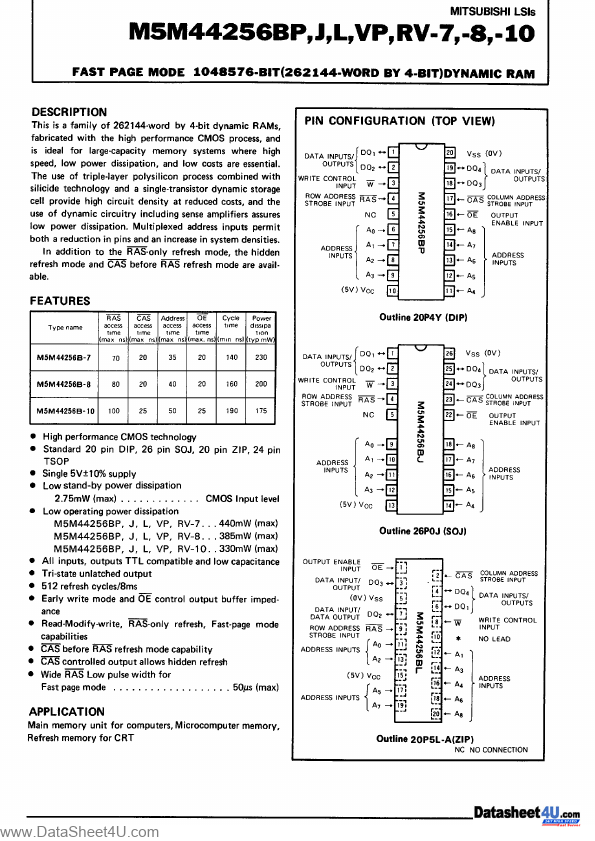
Now the weird thing is its failing on both base 512KB, which Im guessing is provided by 4x M5M44256 U22 U23 U24 U25, AND also on the extra bit between 576KB and 640KB coming from second bank.
When its failing its on all bits all at once.
Afaik on Sanyo MBC-17Plus (from pictures of pcb on theretroweb) ODD bits are provided by U22 U23 U31 U32. Even bits U24 U25 U33 U34.
Im also guessing all Address lines will be common for all ram chips in a bank, with banks having separate RAS/CAS. Address lines are most likely buffered with U17 U18 and U37 per bank, as those are closest to U20 labeled "MEM CONTL".

This makes it impossible for one bad ram chip to produce such failure. What is much more likely than all 8 bad ram chips is one bad Address line.
You only need first 7 working address lines to address 64KB when using 4x M5M44256 per bank.

I would highly suspect A7 from the computer side, it can be any of the lines on ram chips side) line going to https://datasheet4u.com/pdfhtml/0315/1111256/page-000001.png Ram chips.

Scope would be handy at this point to check if all Address lines are wiggling on ram chip pins during the ram test.
Without scope you can do passive measurements. Continuity test between ram chips A0-A8 and pins of U17 U18 U37. Between U17 U18 U37 and U20. Also between all of those chips and RM09 RM10 RM11 RM12 - those presumably pullups are critical for signal stability.
Best to draw a connection map so you dont get lost. For example mspaint on top of https://theretroweb.com/motherboard/image/1-6 … 46809793866.jpg like here
Re: OG VGA 1987 IBM PERSONAL SYSTEM/2 DISPLAY ADAPTER ram wiring question. https://oummg.com/manual/imgs/IBM_VGA_75X9017XM/closeup/

In theory:
With A7 missing Bit test would run fine because they would be testing same first 64KB of every 128KB region, and since ram is ram they wont notice a difference. Wrote 5, read 5 back, test good.
March test on the other hand should notice we arent really writing to address 1C000 because whatever we write here also magically appears at 0C000, thus is mirrored.

Vlodek_d wrote on 2026-06-24, 09:53:

Still, I am not sure that "AT is just a fatter XT with different CPU" - maybe AT (especially with such a strange chipset) should be tested a little differently?

The more modern chipset the higher the chance it will require additional Bios initialization to enable memory controller or unlock an extra bank (example https://github.com/ki3v/xtramtest/issues/12) but in your case it appears ram works out of the box.

https://github.com/raszpl/sigrok-disk FM/MFM/RLL decoder
https://github.com/raszpl/FIC-486-GAC-2-Cache-Module (AT&T Globalyst)
https://github.com/raszpl/386RC-16 ram board
https://github.com/raszpl/Zenith_ZBIOS Zenith Z-386 MFM-300 ZBIOS disassembly

Reply 21 of 30, by Vlodek_d

User metadata
Rank Newbie
Rank
Newbie

Good day!
“And without hope, I hoped” – (c) a famous Ukrainian poetess.
Another attempt to somehow boot on Sanyo SBC-17. After unsuccessful attempts to boot from FDD, IDE, XT-IDE, MFM/RLL – I tried the last option. SCSI. The result is still the same. Everything freezes on the "Starting MS-DOS" notification.
I'm in a stupor.
Not wanting to dismantle all the memory chips just yet, I decided to use an oscilloscope to check all the signals related to the DRAM. I didn't find anything strange or unusual, all the signals (Axx, Dxx, \RAS, \CS_\OE) are exactly as they should be. The photos of the oscillograms were taken while XTRAMTEST was running.

Reply 22 of 30, by Babasha

User metadata
Rank Oldbie
Rank
Oldbie

Strange very strange
I can look at it if you give-up
Im in Ukraine (Kyiv)

Need help? Begin with photo and model of your hardware 😉

Reply 23 of 30, by rasz_pl

User metadata
Rank l33t
Rank
l33t

If XTRAMTEST is right you only have first 64KB of ram working correctly. After that its every second 64KB block bad.
Funny idea - Edit the bios to limit available ram to 64KB and try booting MS-DOS 1.x <- those early DOSes supposedly were able to boot on 64KB IBM 5150.
theretroweb is missing BIOS for Sanyo MBC-17PLUS. If you upload one I can try modding it to only report 64KB of ram.

https://github.com/raszpl/sigrok-disk FM/MFM/RLL decoder
https://github.com/raszpl/FIC-486-GAC-2-Cache-Module (AT&T Globalyst)
https://github.com/raszpl/386RC-16 ram board
https://github.com/raszpl/Zenith_ZBIOS Zenith Z-386 MFM-300 ZBIOS disassembly

Reply 24 of 30, by Vlodek_d

User metadata
Rank Newbie
Rank
Newbie
rasz_pl wrote on 2026-06-29, 23:33:

If XTRAMTEST is right you only have first 64KB of ram working correctly. After that its every second 64KB block bad.
Funny idea - Edit the bios to limit available ram to 64KB and try booting MS-DOS 1.x <- those early DOSes supposedly were able to boot on 64KB IBM 5150.
theretroweb is missing BIOS for Sanyo MBC-17PLUS. If you upload one I can try modding it to only report 64KB of ram.

Good afternoon!
The idea with MS-DOS 1.x also occurred to me! Especially since, as stated, it generally requires at least 32 Kb of RAM. But I did not guess that first you need to adjust the BIOS. Therefore, apparently, the result of attempts to boot into DOS 1.25 turned out to be disappointing.
Then - just funny. My TL866-3G programmer refuses to see the original Sanyo MBC-17 BIOS chips at all! Although they look like ordinary TMS27C128. -Maybe some kind of copy protection was used in those days? - but it is not clear for what? - after all, it is elementary to make a BIOS dump, having a working computer!
I found the Sanyo MBC-17 BIOS dumps here: https://forum.classic-computing.de/. True, a slightly older version than mine (2.03 versus 2.09). I think it's not important. They are flashed and working, I checked.
Unfortunately, my knowledge and skills were not enough to adjust the BIOS in terms of determining the amount of RAM. So I would be grateful if you kindly help me.

Last edited by Vlodek_d on 2026-06-30, 12:41. Edited 1 time in total.

Reply 25 of 30, by Vlodek_d

User metadata
Rank Newbie
Rank
Newbie

A few more observations. In order to make sure that XTRAMTEST also correctly tests 286 motherboards, I took a few other motherboards off the shelf.
The first is a known working, “correct”, “reference” 286. VLSI 82C10x chipset. XTRAMTEST did not find any flaws! (see photo 1, with CGA)
The second is a known problematic 286. Headland HT12/A chipset. It has been lying on the shelf for more than a year, because it has problems with RAM, waiting for its turn to be investigated. XTRAMTEST immediately gave a whole mountain of errors ! (see photo2, with HGC)
So, I concluded that my doubts about XTRAMTEST not working properly with 286 boards were unfounded.

The attachment VLSI_CGA.JPG is no longer available
The attachment Headland_HGC.JPG is no longer available

Reply 26 of 30, by Vlodek_d

User metadata
Rank Newbie
Rank
Newbie

One more observation. I took a ROM with AMI BIOS chips of one of the oldest versions (v 1.02, if I'm not mistaken). Almost all 286 boards that I have ever had my hands on work with this BIOS. I inserted them instead of the "native" BIOS from Sanyo SBC-17 and got the message "INVALID SWITCH/MEMORY FAILURE SYSTEM HALTED". To be honest, I have already received similar messages before when trying to start Sanyo SBC-17 with various old BIOSes. But I explained it by the peculiarities of the chipset and only one RAM configuration switch.
Now I don't think so anymore. So, there is nothing left but to unsolder all the memory, solder sockets instead, test, etc. If I'm very lucky, the problem will be found only in one or several 44с256 chips (maybe also in 41с256 - but then I would get at least some Parity Error ). If I'm very unlucky, the problem will be in the M60030-0101FP Mem Contl or M60030-0103FP Adr Contl chips. In that case, I'll be at a dead end (((

Reply 27 of 30, by rasz_pl

User metadata
Rank l33t
Rank
l33t

Sorry for replying with such a delay. I procrastinated 😐
What a weird bios this Sanyo is. Some highlights:
- uses some 286P Opcodes IDA doesnt like, bios refused to disassemble in 286P mode 😮 no idea wtf going on, switched to 386P to continue.
- very weird code. For example instead of just calling Int15 its doing a song and dance routine of manually loading IVT_SYSTEM_SERVICES_offset (0x54) into BX and calling 'call dword ptr [bx]'.
- bonkers jumptable trampolines. I still dont understand the second kind they used 😀
- bios fully supports HDDs, but as most early bioses cant define custom ones
- one of the very first things it does is setup stack meaning memory controller automagically provides ram without initialization
- ram test routine is laughable, its pretty much ram presence check not ram test
- no rom checksum check

Patching ram limit was super easy. 4 bytes changed at 031B and 032F https://github.com/raszpl/SANYO_BIOS/commit/c … 17cc827eb82fe31

Tested booting "Microsoft MS-DOS 1.25 [CDP OEM R2.11] and Basic (5.25)" from winworldpc. DEBUG.COM is tiny and works well, will elt you peek and poke at ram to see if its really broken on every second 64KB block.

fingers crossed

https://github.com/raszpl/sigrok-disk FM/MFM/RLL decoder
https://github.com/raszpl/FIC-486-GAC-2-Cache-Module (AT&T Globalyst)
https://github.com/raszpl/386RC-16 ram board
https://github.com/raszpl/Zenith_ZBIOS Zenith Z-386 MFM-300 ZBIOS disassembly

Reply 28 of 30, by Vlodek_d

User metadata
Rank Newbie
Rank
Newbie

Good afternoon!
Unfortunately, I didn't wait for your answer - and took up the soldering iron.
I completely dismantled all the RAM (including parity) from my Sanyo SBC-17. As I dismantled, I checked all the chips, including passing the March-B test. All of them (as I feared! ) turned out to be completely functional. I used this tester: https://github.com/schlae/pico-dram-tester . Moreover, the 44256-10 chips turned out to be 70-nanosecond!
I inserted the dismantled RAM kit into another, known good 286 motherboard - and no flaws were found. Additionally, I checked the 44256 chips in the TVGA9440-VLB video card, they work perfectly.
I soldered the sockets in place of the dismantled microcircuits, inserted a known good RAM... To no avail - everything is the same….

Reply 29 of 30, by Vlodek_d

User metadata
Rank Newbie
Rank
Newbie

Then I saw your post, to which you attached a modified Sanyo BIOS. I immediately flashed the BIOS you provided into two ROM chips and inserted them into the board. The result is the same... I tried to download several different versions of DOS 1.xx from winworld - the same thing....
I guess I'll take a break from my studies of this board. The most I'll do is carefully examine it under a microscope again for cracks in the tracks or poor contact at the soldering points. Although I've already looked at it twice...

Reply 30 of 30, by rasz_pl

User metadata
Rank l33t
Rank
l33t

so it froze at this screen and didnt even print "MS-DOS version 1.25"? that would mean either I screwed something, 86box is masking whatever would prevent booting on real hardware, or you are booting wrong DOS 1.25 versions.

I sanity checked again, and the easiest way to make it freeze at ram count with cursor blinking is to try booting with no floppy inserted - it just sits there indefinitely
with "MS-DOS 1.25 [CDP OEM R2.11] (5.25-320k) 1.25 [CDP OEM R2.11] English x86 399.9KB" inserted and 86box set to emulate 360K floppy it boots right up
changed to "MS-DOS 1.25 [CDI DOT] (3.5-SSDD)" original image for 3.5 floppies and changed emulated drive to 1.44 and it freezes like with no disk, 86box shows constant disk activity but screen frozen. Tried floppy type 3.5 720KB and 5.25 360K but "MS-DOS 1.25 [CDI DOT] (3.5-SSDD)" simply refuses to boot

changed back to "MS-DOS 1.25 [CDP OEM R2.11] (5.25-320k)" image and it boots no matter what floppy I configure , no matter what is set in Sharps BIOS.

I would definitely try this exact Dos version,. downloaded file should be called "Microsoft MS-DOS 1.25 [CDP OEM R2.11] and Basic (5.25).7z"

edit: also just tried "MS-DOS 1.25 [Sanyo MBC-550 OEM r1.00] (5.25-160k)" and that also doesnt boot so trying correct version is crusial

https://github.com/raszpl/sigrok-disk FM/MFM/RLL decoder
https://github.com/raszpl/FIC-486-GAC-2-Cache-Module (AT&T Globalyst)
https://github.com/raszpl/386RC-16 ram board
https://github.com/raszpl/Zenith_ZBIOS Zenith Z-386 MFM-300 ZBIOS disassembly