First post, by Roman555
Hi All,
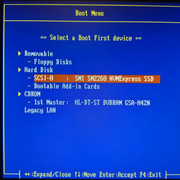
Some time ago I got an alive instance of ASUS A8N-SLI SE (now it is not). I was interested if it is possible to add NVME SSD booting support into a such old motherboard modifying its BIOS.
I managed it but it's partly only.
Modified NVME OpROM (SMI 2260 ver 109) doesn't tie to one model SSD as it is usually done for legacy BIOSes but it tries to detect first installed NVME SSD isntead.
As result Windows 7 was loaded from cheap Chinese NVME SSD. Speed was not so impressive because the most suitable slot PCIEX4_1 has only two PCIe lanes:
SSD in PCIEX4_1 slot: Max Read is about 420MB/s, Max Write ~ 365MB/s
SSD in PCIEX16_1 slot: Max Read ~ 834MB/s, Max Write ~ 730MB/s
It's pity the NVME OpROM didn't detect Intel Optane M10 16GB.
For Optane I had to use another way using a discrete PCI network card with a special PXE-NVME bootrom to make Optane bootable. Anyway it didn't help me install Windows XP for some unknown reason. And then the motherboard just tired. Luckily I finished testing the BIOS-MOD before. Maybe once I'll repair the board (it has faulty chipset).
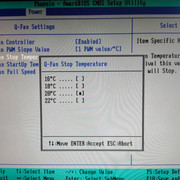
The system was built just on the desk and I really hated its fans noise. It made me look into the code of the Q-Fan function that controls speed of fans and change it the way I like.
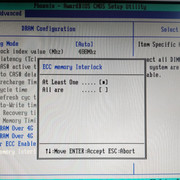
Another problem was that my high density RAM (2GB registered ECC DIMM) was overheating. I was unpleasantly surprised by DDR voltage level of 2.80v that the motherboard set by default! Simplifying "Premium" model to "SE" one Asus engineers made a mistake I guess (it may be correct only for hardware revision 1.10G that is at my hands): BIOS settings DDR voltage 2.70v set in fact to 2.8v, 2.80v - 2.7v. So the bios-mod sets 2.60v by default.
If you'd like to do similar experiment with your A8N-SLI SE and install OS onto NVME SSD do everything at your own risk. Good luck!





[ MS6168/PII-350/YMF754/98SE ]
[ 775i65G/E5500/9800Pro/Vortex2/ME ]