Wow, that's really cool. I didn't know it was possible to use a CLAP to VST2 wrapper in that way. I've just been testing out Nuked SC-55 in the new DOSBox Staging release and it is really impressive. I'm amazed at the quality of the emulation. Thanks for the tip.
"There are only 10 types of people in the world; those who understand binary, and those who don't."
1. Added workarounds in order Nuked SC55 CLAP plugin + CLAP to VST2 wrapper to work properly.
2. Fixed vstmidiproxy client list when MS Midi 2.0 stack is active.
3. Added option to hide the driver's tray icon.
4. Fixed port names of client list in vstmidiproxy.
Thank you for the update. It's strange, but I get different results from Nuked SC55 CLAP depending on whether I play it in Foobar2000 or whether I play the same MIDI in your MIDI player. It sounds more correct in your player, but I find it strange that I would get different results from one player to the other. I guess I will have to play around with the settings and investigate further to try to figure out what's going on. Thanks again for the update to your VST Midi Driver.
"There are only 10 types of people in the world; those who understand binary, and those who don't."
First of all: Thanks a ton for the new version - I have been waiting for this since quite a while! Sadly, when trying to set it up, I can't make the SC-55 CLAP plugin work with the new VST MIDI Driver.
What I did:
- Download the CLAP2VST plugin, choose the x64 version and rename it to Nuked-SC55.dll
- Place Nuked-SC55.dll in the same directory as Nuked-SC55.clap (x64 version)
- Make sure there is a subdir Nuked-SC55-Resources\ROMs\SC-55mk2-v1.01, containing the proper ROM files (rom_sm.bin, rom1.bin, rom2.bin, waverom1.bin, waverom2.bin)
- Go though the VSTi Driver Configuration (x64) and select Nuked-SC55.dll
I would only get a popup saying "This is NOT a VSTi synth!" and that's it. Am I doing anything wrong here?
Trelokkwrote on 2026-09-02, 10:55:First of all: Thanks a ton for the new version - I have been waiting for this since quite a while! Sadly, when trying to set it […] Show full quote
First of all: Thanks a ton for the new version - I have been waiting for this since quite a while! Sadly, when trying to set it up, I can't make the SC-55 CLAP plugin work with the new VST MIDI Driver.
What I did:
- Download the CLAP2VST plugin, choose the x64 version and rename it to Nuked-SC55.dll
- Place Nuked-SC55.dll in the same directory as Nuked-SC55.clap (x64 version)
- Make sure there is a subdir Nuked-SC55-Resources\ROMs\SC-55mk2-v1.01, containing the proper ROM files (rom_sm.bin, rom1.bin, rom2.bin, waverom1.bin, waverom2.bin)
- Go though the VSTi Driver Configuration (x64) and select Nuked-SC55.dll
I would only get a popup saying "This is NOT a VSTi synth!" and that's it. Am I doing anything wrong here?
One bigger problem with the CLAP version of Nuked SC-55 is that it requires all known ROM versions in order to work
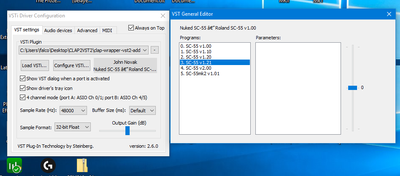
(it wants to make fixed 6 sub-instances according to ROM versions as you can see on the screenshot).
On the Github page of Nuked SC-55 CLAP there is a link for the ROM package that is needed for this plugin: https://archive.org/details/nuked-sc-55-clap-rom-files
You should copy the ROMs exactly the way you can find them in that package.
BTW, before testing it with the CLAP to VST2 wrapper it's always a good idea to test the native CLAP version first. E.g. new versions of Reaper support CLAP plugins natively.
Alright, that was an important hint. Thanks! Had no idea all ROMs are needed, not only the one you actually want to use. Now it works as intended - DOOM for the first time with SC-55 emulation without using pre-recorded tracks. At long last!
One thing I noticed, still:
When trying to use SC-55mk2-v1.01 ROM files with CTF patch applied, the VST MIDI Driver refuses to save the config.
*UPDATE*
Disregard. It seems I've made a mistake during the patching process. While the patcher accepts patching rom2.bin, waverom1.bin and waverom2.bin, it appears the only file you REALLY need to update is rom2.bin. Grieferus pointed it out in this Github issue. With just one file patched, everything works fine.
Another issue I have encountered:
While playing Doom with this, I had hanging notes in E1M4. Is there anything that can be done to prevent this? I tried with the SC-55 v1.21 ROM. Settings in VST MIDI Driver currently are as follows: 48 kHz sample rate, 80ms buffer size, 32bit sample format. Driver mode is WinMM WaveOut. In advanced settings, single port 32-ch mode is activated, also "Keep host open even if ports are closed".
Another issue I have encountered:
While playing Doom with this, I had hanging notes in E1M4. Is there anything that can be done to prevent this? I tried with the SC-55 v1.21 ROM. Settings in VST MIDI Driver currently are as follows: 48 kHz sample rate, 80ms buffer size, 32bit sample format. Driver mode is WinMM WaveOut. In advanced settings, single port 32-ch mode is activated, also "Keep host open even if ports are closed".
I do not know. The best test would be to try the same level in DosBox staging using the native Nuked SC-55 CLAP plugin. This test would tell if this problem has anything to do with the wrapper or the driver. https://github.com/dosbox-staging/dosbox-staging/pull/4090
You can also test the same level with FSMP while FSMP uses the same wrapper + Nuked SC-55 CLAP plugin. This test could tell if the problem is VST Midi driver specific.
BTW, check that the wrapper's file version is 1.0.0.2. If not then re-download the warepper from my site. The 1.0.0.1 version had a problem when FSMP's 'Send Start/Stop/Clock Info' compatibility setting was enabled.
Looks like I'm already using latest version of the wrapper. For now I "escaped" to the MK2 ROM (with CTF patch applied) which seems to work better for now. I will do that stress-test with DosBox staging later, anyway, just to be sure.
Update:
Checking how the SC55 CLAP plugin behaves if used in DOSBox-Staging natively. It automatically picks the v1.21 ROM if present, so that's what I am using there in Doom right now. I am making sure it's not using the Windows synth by confirming via mixer /listmidi. I am currently playing through the first Doom episode in DOSBox and could not confirm any hanging notes, at least not so far. This may indicate it's an issue with the MIDI Driver, but I don't want to make a final verdict until I have done more extensive testing.
Update:
Checking how the SC55 CLAP plugin behaves if used in DOSBox-Staging natively. It automatically picks the v1.21 ROM if present, so that's what I am using there in Doom right now. I am making sure it's not using the Windows synth by confirming via mixer /listmidi. I am currently playing through the first Doom episode in DOSBox and could not confirm any hanging notes, at least not so far. This may indicate it's an issue with the MIDI Driver, but I don't want to make a final verdict until I have done more extensive testing.
I have just played half an hour with DOOM using DosBox staging and VST Midi driver and I could not reproduce a single hanging note. I selected ROM 1.21. BTW, I used ASIO2WASAPI shared mode output with 30 ms buffer.
In your case hanging notes while playing DOOM also happens with another plugin (e.g. SC-VA) or only with Nuked SC-55+ Clap2VST2 wrapper?
For clarification, the issue occurred when I was playing the game through the Woof! sourceport, with the SC-55 1.21 as global system synth routed through a combo of Coolsoft MIDI Mapper + VST MIDI Driver + CLAP2VST wrapper. In DOSBox-Staging I have yet to encounter the problem. Maybe the trick is to use ASIO2WASAPI, which I have always ignored until now (I am using FastDoom here, but that shouldn't matter). I will do further checks, also with other VSTs.
Today I had the issue in Doom again, this time in E3M2, using the Woof! port. I am not able to reproduce the issue with a specific song reliably, but it doesn't seem to occur in DOSBox-Staging. There I am using the CLAP plugin with the SC-55 v1.21 ROM natively, with sourceport MBF 2.0.3.
I have switched to BassASIO instead of WinMM WaveOut in the VST MIDI Driver. When the hanging notes occurred, I changed the buffer from 30 to 80 ms. However, after reading the driver documentation, it seems this setting is rather influencing music playback slowdowns during heavier CPU loads. Guess I should rather leave that at "Default" and/or 30 ms, as before.
One observation was that the song fixed itself when it looped, i.e. the hanging note stopped playing and also did not return later on.
I can only speculate, but maybe it's something with the CLAP2VST wrapper? That one at least is still rather new and more likely to be flawed than the MIDI Driver itself. I also wouldn't exclude a problem with the way Woof handles MIDI (it has settings for MIDI reset and reset delay, for example). What's sure is that playback in Woof! goes through a pretty long chain: Windows MIDI/WinMM → CoolSoft MIDI Mapper → VST MIDI Driver → BassASIO → CLAP2VST → Nuked-SC55 CLAP → SC-55 ROM. A lot of things could go wrong here, I'd wager...
In case it might be relevant, here are my current MIDI-related settings in woof.cfg:
1[("")] MIDI Player string
2midi_player_string           "CoolSoft MIDIMapper"
3
4[0-2(1)] [Native MIDI] Compatibility level (0 = Vanilla; 1 = Standard; 2 = Full)
5midi_complevel               1
6
7[0-3(1)] [Native MIDI] Reset type (0 = No SysEx; 1 = GM; 2 = GS; 3 = XG)
8midi_reset_type              1
9
10[-1-2000(-1)] [Native MIDI] Delay after reset (-1 = Auto; 0 = None; 1-2000 = Milliseconds)
11midi_reset_delay             -1
12
13[0-1(1)] [Native MIDI] Fix invalid instruments by emulating SC-55 capital tone fallback
14midi_ctf                     1
15
16[0-1(0)] [Native MIDI] Use SysEx messages to control volume
17midi_sysex_volume            0
18
19[-20-0(0)] [Native MIDI] Gain [dB]
20midi_gain                    0
Last edited by Trelokk on 2026-09-08, 07:58. Edited 2 times in total.
Trelokkwrote on Yesterday, 20:48:Today I had the issue in Doom again, this time in E2M2, using the Woof! port. I am not able to reproduce the issue with a specif […] Show full quote
Today I had the issue in Doom again, this time in E2M2, using the Woof! port. I am not able to reproduce the issue with a specific song reliably, but it doesn't seem to occur in DOSBox-Staging. There I am using the CLAP plugin with the SC-55 v1.21 ROM natively, with sourceport MBF 2.0.3.
I have switched to BassASIO instead of WinMM WaveOut in the VST MIDI Driver. When the hanging notes occurred, I changed the buffer from 30 to 80 ms. However, after reading the driver documentation, it seems this setting is rather influencing music playback slowdowns during heavier CPU loads. Guess I should rather leave that at "Default" and/or 30 ms, as before.
One observation was that the song fixed itself when it looped, i.e. the hanging note stopped playing and also did not return later on.
I can only speculate, but maybe it's something with the CLAP2VST wrapper? That one at least is still rather new and more likely to be flawed than the MIDI Driver itself. I also wouldn't exlude a problem with the way Woof handles MIDI (it has settings for MIDI reset and reset delay, for example). What's sure is that playback in Woof! goes through a pretty long chain: Windows MIDI/WinMM → CoolSoft MIDI Mapper → VST MIDI Driver → BassASIO → CLAP2VST → Nuked-SC55 CLAP → SC-55 ROM. A lot of things could go wrong here, I'd wager...
In case it might be relevant, here are my current MIDI-related settings in woof.cfg:
1[("")] MIDI Player string
2midi_player_string           "CoolSoft MIDIMapper"
3
4[0-2(1)] [Native MIDI] Compatibility level (0 = Vanilla; 1 = Standard; 2 = Full)
5midi_complevel               1
6
7[0-3(1)] [Native MIDI] Reset type (0 = No SysEx; 1 = GM; 2 = GS; 3 = XG)
8midi_reset_type              1
9
10[-1-2000(-1)] [Native MIDI] Delay after reset (-1 = Auto; 0 = None; 1-2000 = Milliseconds)
11midi_reset_delay             -1
12
13[0-1(1)] [Native MIDI] Fix invalid instruments by emulating SC-55 capital tone fallback
14midi_ctf                     1
15
16[0-1(0)] [Native MIDI] Use SysEx messages to control volume
17midi_sysex_volume            0
18
19[-20-0(0)] [Native MIDI] Gain [dB]
20midi_gain                    0
Unfortunately I still could not reproduce any hanging notes problems. I checked the wrapper but I could not find an obvious problem with it. Here is a little bit more optimized one if you want to try it but I doubt it can help (file version is 1.0.0.3): https://falcosoft.hu/clap2vst2_10.zip
Would you try the warapper + Nuked SC55 CLAP plugin with another VST2 host? It can be either FSMP or SAVIHost. This could be useful since VST Midi driver always hosts 2 instances of the actual plugin for A and B ports and Nuked SC-55 CLAP has a substantial CPU usage even when no Midi messages have to be processed at all. Contrary FSMP and SAVIHost only use one instance that can result in some differences.
One more thing: Please, play the attached stress test Midi file that on your current problematic setup and report back if you can experience any hanging notes problem. The stress test file has way more note polyphony than any DOOM tracks yet on my setup it does not produce any hanging notes problem. Actually Nuked SC-55 cannot even handle that much notes properly so you should ignore the improper rendering you should only concentrate on the hanging notes problem.
The attachment freeze-2.zip is no longer available
What I have tried now was playing back all the problematic MIDI files with FSMP 6.6. To make sure I used proper versions of the DOOM MIDIs, I converted them from .mus to .mid via SLADE3.
As expected, I did not notice any hanging notes whatsoever (using your latest wrapper version, 1.0.0.3). Also the test MIDI from your last post turned up nothing, besides the expected silence in large parts of the track. I'm still gonna run through some MIDIs from other games, such as Dark Forces, Rise of the Triad, Duke3D and Descent, but I doubt it'll make any difference.
Maybe it'd help if you provided me with the exact settings you are using in FSMP and the VST MIDI Driver when loading the SC-55 CLAP plugin. I'm almost sure I didn't make any significant mistake, but you never know.
Advanced:
- "Enable single port 32ch mode" checked
- "Keep host open even if ports are closed" checked
- VST editor: System enhanced
- Global Proxy Ports: Ports A/B