VOGONS


Formatting Atari Floppy Disks

Topic actions

Reply 20 of 48, by wierd_w

User metadata
Rank l33t
Rank
l33t

/T: Specifies number of Tracks
/N: specifies NumberSectors per track

Sectors are always 512byte in size. (For disks made on a PC floppy controller. Amiga disks can use 256byte, if I recall correctly.)

Resulting disk size is a result of 512byte * Number Sectors * Number Tracks

Reply 21 of 48, by Donald Duck

User metadata
Rank Newbie
Rank
Newbie
wierd_w wrote on Today, 00:15:
/T: Specifies number of Tracks /N: specifies NumberSectors per track […]
Show full quote

/T: Specifies number of Tracks
/N: specifies NumberSectors per track

Sectors are always 512byte in size. (For disks made on a PC floppy controller. Amiga disks can use 256byte, if I recall correctly.)

Resulting disk size is a result of 512byte * Number Sectors * Number Tracks

/T:80 Specifies number of Tracks

/N:9 specifies NumberSectors per track

So we have 9 sectors of 512 bytes each X 80 tracks

512 bytes X 9 sectors = 4608 bytes X 80 tracks = 720 sectors = 368,840 bytes

368/9 KB disk space cant be right!

If you look at my screen shot on page 1 then they are 1024 bytes per sector

1,024 bytes in each allocated unit
704 allocated units available on the disk

(assuming that an allowcated unit is a sector and allocated units available are trakcs)

Reply 22 of 48, by wierd_w

User metadata
Rank l33t
Rank
l33t
Donald Duck wrote on Today, 00:41:
/T:80 Specifies number of Tracks […]
Show full quote
wierd_w wrote on Today, 00:15:
/T: Specifies number of Tracks /N: specifies NumberSectors per track […]
Show full quote

/T: Specifies number of Tracks
/N: specifies NumberSectors per track

Sectors are always 512byte in size. (For disks made on a PC floppy controller. Amiga disks can use 256byte, if I recall correctly.)

Resulting disk size is a result of 512byte * Number Sectors * Number Tracks

/T:80 Specifies number of Tracks

/N:9 specifies NumberSectors per track

So we have 9 sectors of 512 bytes each X 80 tracks

512 bytes X 9 sectors = 4608 bytes X 80 tracks = 720 sectors = 368,840 bytes

368/9 KB disk space cant be right!

If you look at my screen shot on page 1 then they are 1024 bytes per sector

1,024 bytes in each allocated unit
704 allocated units available on the disk

(assuming that an allowcated unit is a sector and allocated units available are trakcs)

Allocation unit, and sector, ARE NOT THE SAME THING.

For FAT formatted volumes, the number of sectors used in an allocation unit can vary. For Fat12 (used by diskettes), the allocation unit is 1024 bytes. That is 2 sectors.

It CAN be much more than that. On Fat32, you have have up to 96kb per allocation unit!

Reply 23 of 48, by Donald Duck

User metadata
Rank Newbie
Rank
Newbie
wierd_w wrote on Today, 00:46:

For FAT formatted volumes, the number of sectors used in an allocation unit can vary. For Fat12 (used by diskettes), the allocation unit is 1024 bytes. That is 2 sectors.

/T:80 X /N:9= 720 X 1024 bytes = 737280 bytes
Is that right then?

Reply 24 of 48, by wierd_w

User metadata
Rank l33t
Rank
l33t

Appears to be. Dividing that number of 1024 will give you the number of kilobytes. Should be 720.

Reply 25 of 48, by DaveDDS

User metadata
Rank Oldbie
Rank
Oldbie
Donald Duck wrote on Yesterday, 23:53:

Do you have a link to it please?

If you just search "Daves Old Computers" the site will be the first result.

... or ...

Go to my personal site (link in my sig - bottom of this msg)

Bottom of main page -> "Daves Old Computers"

Near bottom (it's a big page) -> Download "Software/Images"

Download link for "ImageDisk 1.20" is on that page.

If you need it, also grab the "bootable diskette" for running on NON-DOS

What are on the disk is of no importance to me. But when formatting I am getting bad
sectors and not full capacity of the disks (please see attachment above)

If a disks fails to format, there are several possible reasons:

1. Wrong media type.

DD and HD disks are NOT the same media. If you format a DD as HD or HD as DD - it may appear to somewhat work, but the digital bits will not be written correctly. The most common symptom of doing this is "bad sectors" on fresh format.

For 3.5" disks you can usually tell. If there are two square holes at the sides near the top (end away from the media sliding cover), it is most likely HD If there's only one, it's likely DD.

The "extra" hole will be the density indicator and is almost always a fairly clean square opening on both top and bottom sides. This will be in the left side (looking from top with media sliding cover toward you) and will be the edge with a small slant at that bottom.

The "always" hole on the right side is write-protect and will look the same from the top, but from the bottom it usually has a sliding tab to block it (to allow write) - sometimes this tab will be missing which means a permanently write protected disk and the slot where the tab would have gone is usually visible. (you can enable write by covering that hole with a bit of opaque tape)

- On a related note, almost all disks are standard DD or HD media - but I have seen a few for oddball systems (not PCs) which with enough difference in coercitivity that they were not reliable in DD or HD drives - these are VERY rare as they also mean the system needs a non-standard drive!

-

2. *Most common* dirt/crud on the disk surface.

Not always visible, but this can interfere with the head contact/magnetic coupling to the disk. This stuff builds up with daily use and is VERY common on old disks!

Solution is easy - clean it. You can (or at least could) get "head cleaning disks" which instead of media, have a stiff cloth-like ring which can absorb some alcohol and wipes the head as it spins. under it.

Most commonly used by activating the drive (with something like trying to list files) - this isn't very effective as the head seeks to track0 and stays there as the system tries to read the disk (and fails).

ImageDisk has a very good head-cleaning function where it will not only spin the disk, but scrubs the head back and forth over the cleaning media as it spins.

-

3. Disk is damaged.

This can be visible marks like you would get by dropping something on or otherwise physically damaging the surface, or it can be "hidden" as the media ages bits of the actual magnetic material can flake off ... sometimes you can see this as apparent "bands" of different color on the disk surface (it usually happens first where the head stays during a track read) - sometimes you need a microscope to see it.

Last edited by DaveDDS on 2026-09-28, 02:43. Edited 1 time in total.

https://dunfield.themindfactory.com ; "Daves Old Computers" ; SW dev addict best known:
ImageDisk: rd/wr ANY floppy PChw can ; Micro-C: compiler for DOS+ManySmallCPU ; DDLINK: simple/small filetransfer(w/o netSW)via Lan/Lpt/Com

Reply 26 of 48, by DaveDDS

User metadata
Rank Oldbie
Rank
Oldbie
Donald Duck wrote on Today, 00:13:

I wanted to ask you what the T80 and N9 mean?

This is where you kinda have ot know a bit about the way it works.

Data is written to disks in "sectors" - on a PC this is 512 byte blocks. Some OS will treat multiple sectors as effectively one larger block making for a "allocation unit" - this does not alter the capacity of a disk or affect its low-level format.

Sectors are written by heads - PC DD and HD drives both have 2 heads.

A head writes magnetic data in a "ring" which circles the disk - there can be multiple rings which the head can move between (by a thing called a stepper motor - you can hear it "click" softly as it formats, and buzz loudly when it steps from inside to out (or vice versa)

This rings of data are called "tracks"

The size (amount of data) that can be stored on a disk is #tracks x #heads x #sectors/track x sector size

3.5" HD: 80 tracks x 2 heads x 18 sectors/track x 512 bytes = 1,474,560 = 1.44m

3.5" DD: 80 tracks x 2 heads x 9 sectors/track x 512 bytes = 737,280 = 720k

5.25" HD: 80 tracks x 2 heads x 15 sectors/track x 512 bytes = 1,228,800 = 1.2m

5.25" DD: 40 tracks x 2 heads x 9 sectors/track x 512 bytes = 368,640 = 360k

Single sided drives were never used on a PC - so FORMAT assumes 2 heads.

The T:80 means 80 tracks, N:9 means 9 sectors/track

https://dunfield.themindfactory.com ; "Daves Old Computers" ; SW dev addict best known:
ImageDisk: rd/wr ANY floppy PChw can ; Micro-C: compiler for DOS+ManySmallCPU ; DDLINK: simple/small filetransfer(w/o netSW)via Lan/Lpt/Com

Reply 27 of 48, by DaveDDS

User metadata
Rank Oldbie
Rank
Oldbie
wierd_w wrote on Today, 00:46:

Allocation unit, and sector, ARE NOT THE SAME THING.
For FAT formatted volumes, the number of sectors used in an allocation unit can vary. For Fat12 (used by diskettes), the allocation unit is 1024 bytes. That is 2 sectors.
It CAN be much more than that. On Fat32, you have have up to 96kb per allocation unit!

Allocation units are the "cheap and dirty" way of dealing with:

Block numbers getting to big for the processor to easily deal with (never a problem on floppies but large FAT32 partitions can have a LOT of sectors) - if you make the blocks bigger the numbers you have to deal with gets smaller.

This also affects the size of the allocation table. Too many blocks and you need to "waste" more space keeping track of how each one is allocated.

The downside is that minimum allocation becomes larger which can "waste" space at the end of files.
Eg: If allocation-unit is 16 sectors - a file with 1 byte in it takes 16x512 (8k) of disk space.

It's always a "balancing act" as to where/how you "waste" space - fortunately there are better file systems than FAT.

https://dunfield.themindfactory.com ; "Daves Old Computers" ; SW dev addict best known:
ImageDisk: rd/wr ANY floppy PChw can ; Micro-C: compiler for DOS+ManySmallCPU ; DDLINK: simple/small filetransfer(w/o netSW)via Lan/Lpt/Com

Reply 28 of 48, by Donald Duck

User metadata
Rank Newbie
Rank
Newbie
DaveDDS wrote on Today, 02:39:
Donald Duck wrote on Today, 00:13:

I wanted to ask you what the T80 and N9 mean?

3.5" HD: 80 tracks x 2 heads x 18 sectors/track x 512 bytes = 1,474,560 = 1.44m

FORMAT A: /T:80 /N:9

Is a track the same as a race track where each track is a full circle of the disk and each track sits inside of each other. So we have 80 tracks from inside of the disk to out side of the disk (if single sideded) and each track is broken down into 9 allocation units and each allocated unit is broken down into 2 sectors (because of FAT12) each of 512 bytes?

Reply 29 of 48, by wierd_w

User metadata
Rank l33t
Rank
l33t

Not quite.

there are 2 heads. One on the top side of the media, and one on the bottom side.

So, for 80 tracks, 2 heads, 9 sectors per track, and a sector size of 512byte, you get:

80 x 2 x 9 x 512 = 737280 bytes.

Allocation unit is a thing with filesystems. It is the amount of space that useage accounting deals with.

For FAT, there is a table (and its backup copy) that contains filenames, and a list of allocation units that file occupies.

The FAT contains a header that specifies the number of sectors used per allocation unit.

The parlance for allocation unit on FAT was traditionally called 'cluster'.

Clustersize == allocation unit size. They are the same thing.

The formatting information Dave is giving is 'before' any filesystem is placed there. It's the raw number of readable/writable locations on the medium itself, after the sector and track markings are laid down.

Reply 30 of 48, by Donald Duck

User metadata
Rank Newbie
Rank
Newbie
wierd_w wrote on Today, 18:05:

Not quite.

there are 2 heads. One on the top side of the media, and one on the bottom side.

that makes no sence what so ever!

Reply 31 of 48, by wierd_w

User metadata
Rank l33t
Rank
l33t
Donald Duck wrote on Today, 18:13:
wierd_w wrote on Today, 18:05:

Not quite.

there are 2 heads. One on the top side of the media, and one on the bottom side.

that makes no sence what so ever!

In what way?

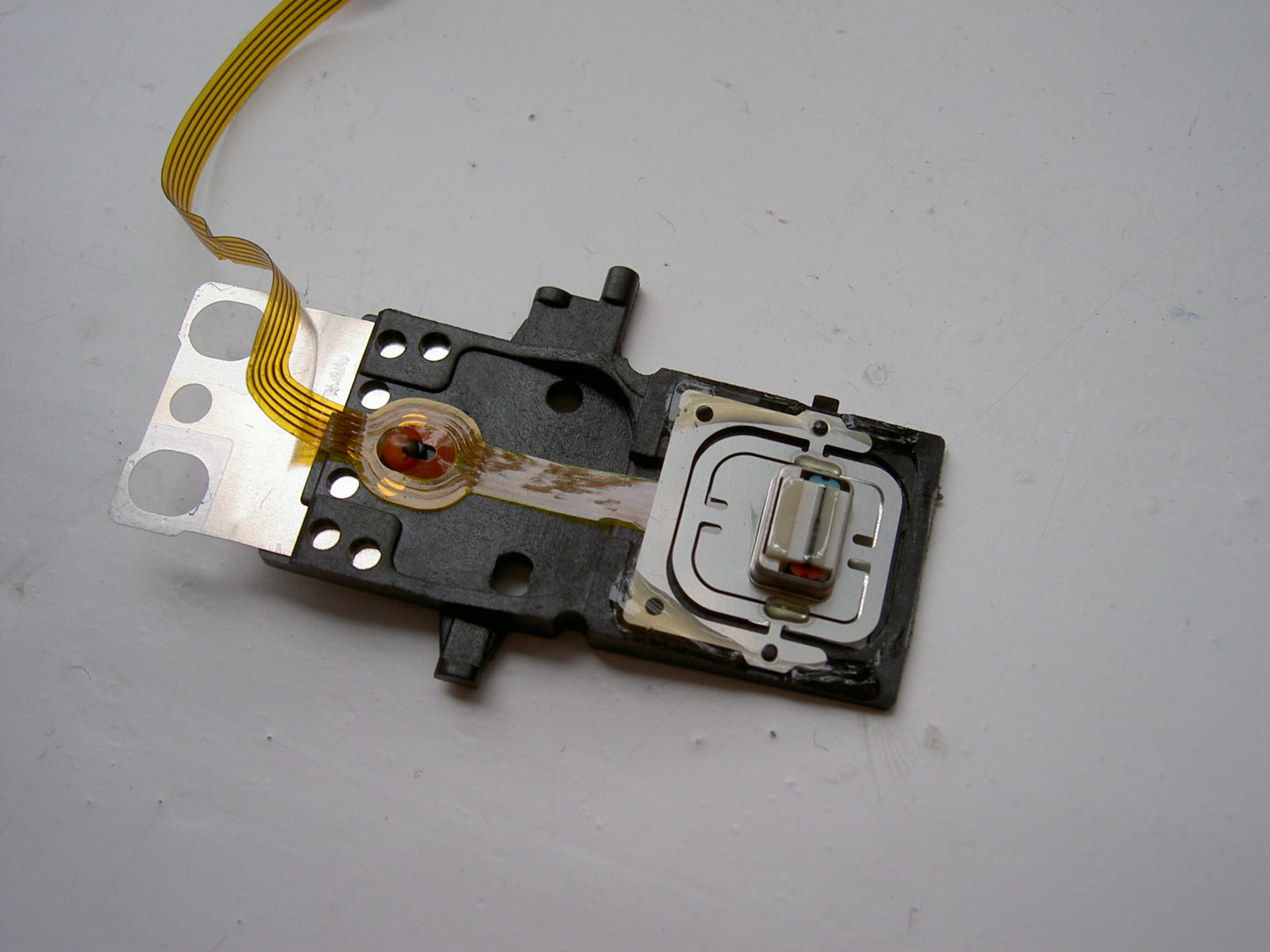
This is one of the heads, in a 3.5" diskette drive's head assembly.

Floppy_disk_drive_read-write_head.jpg

There are two of these in the head carriage. One on top, one on the bottom. The media surface then sits between them.

They close over the disk surface when a disk is inserted.

Each track contains 9 sectors.
there are 80 tracks.

the whole geometry is also done on the other side of the disk, with the other head.

Last edited by wierd_w on 2026-09-28, 18:39. Edited 1 time in total.

Reply 32 of 48, by DaveDDS

User metadata
Rank Oldbie
Rank
Oldbie
Donald Duck wrote on Today, 16:32:

Is a track the same as a race track where each track is a full circle of the disk and each track sits inside of each other. So we have 80 tracks from inside of the disk to out side of the disk (if single sideded) and each track is broken down into 9 allocation units and each allocated unit is broken down into 2 sectors (because of FAT12) each of 512 bytes?

Close, tracks are concentric and don't overlap - inner tracks are inside.
(There are some rare oddball drives and formats which take advantage of the larger outer tracks to store more data on them - at higher speed - drive/controller needs selectable write speed - very rare)

"from inside to out" is basically the reverse of how they are actually references. Track 0(1) is at the outer most edge of the media and Track 79(80) is at the inner edge (nearest the spindle)

https://dunfield.themindfactory.com ; "Daves Old Computers" ; SW dev addict best known:
ImageDisk: rd/wr ANY floppy PChw can ; Micro-C: compiler for DOS+ManySmallCPU ; DDLINK: simple/small filetransfer(w/o netSW)via Lan/Lpt/Com

Reply 33 of 48, by DaveDDS

User metadata
Rank Oldbie
Rank
Oldbie
Donald Duck wrote on Today, 18:13:

that makes no sence what so ever!

Originally drives were single-sided with only one head on one side - then they were two sided with a head on each side of the same media.

----v
-------------
----^

The "disc" is a thin layer of flexible plastic with the actual magnetic writable media bonded to the sides - this makes for two separate layers of media one of each side which can be written independently.

Early single-sided disks only had the magnetic material bonded to one side - presumably to save cost - but this proved enough of a challenge in manufacturing that often "single sided" disks were actually double sided - the top side just wasn't tested/guaranteed.

The AppleII had an interesting controller which didn't use the index signal - and 5.25" disks are the opposite of 3.5" when it comes to write-protect. Covering the slot in a 5.25" disc write protects it - it was VERY common to see 5.25" disks with the WP slot manually cut/punched out of the "wrong" side - which made the disk "flippable" - you could put it in upside down and effectively have two distinct disks!

https://dunfield.themindfactory.com ; "Daves Old Computers" ; SW dev addict best known:
ImageDisk: rd/wr ANY floppy PChw can ; Micro-C: compiler for DOS+ManySmallCPU ; DDLINK: simple/small filetransfer(w/o netSW)via Lan/Lpt/Com

Reply 34 of 48, by DaveDDS

User metadata
Rank Oldbie
Rank
Oldbie

Regarding two heads - I should probably also mention that the heads are in a carrier which is moved back and forth (outside<>inside) by a stepper motor to position them at different tracks, and the upper head "floats" with spring pressure to give suitable contact with both heads (they are opposite to one another - so it one pushes on the media - so does the other)

And the upper head (on the floating spring mount) is lifted away from the media when the drive is opened - this allows the media to be inserted/removed from open drives without "catching" on the head - note that the whole disk (3.5") or the upper part of the spindle (5.25") is also lifted when the drive is opened - again to make room for insertion/removal.

https://dunfield.themindfactory.com ; "Daves Old Computers" ; SW dev addict best known:
ImageDisk: rd/wr ANY floppy PChw can ; Micro-C: compiler for DOS+ManySmallCPU ; DDLINK: simple/small filetransfer(w/o netSW)via Lan/Lpt/Com

Reply 35 of 48, by Donald Duck

User metadata
Rank Newbie
Rank
Newbie
wierd_w wrote on Today, 18:36:
In what way? […]
Show full quote
Donald Duck wrote on Today, 18:13:
wierd_w wrote on Today, 18:05:

Not quite.

there are 2 heads. One on the top side of the media, and one on the bottom side.

that makes no sence what so ever!

In what way?

This is one of the heads, in a 3.5" diskette drive's head assembly.

Floppy_disk_drive_read-write_head.jpg

There are two of these in the head carriage. One on top, one on the bottom. The media surface then sits between them.

I thought we where talking about the capacity of the disk and not the driver. the disk is round right

wierd_w wrote on Today, 18:36:

the whole geometry is also done on the other side of the disk, with the other head.

But this is single sided, 720mb right?

Reply 36 of 48, by wierd_w

User metadata
Rank l33t
Rank
l33t

720k is dual sided.

Single sided disks were usually 5.25" ones, and held 180k, usually.

(There *are* instances of single sided 3.5" diskettes. They are not used by PCs. Digitally programmable knitting machines, especially ones made by the Brother corporation, used a novel external disk drive that is both disk drive, and disk controller, all in one package. It was also used by the Tandy 100, and a few other systems. It formats and uses only one side of a 3.5" diskette. Mentioned only for completeness. It is not to be confused with the 'flippy disks' of an Apple II.)

More info: single sided 3.5"
https://cowlark.com/fluxengine/doc/disk-fb100.html

Apple II computers used single sided disks, as dave mentions.

Many apple II users would buy dual sided disks, cut a notch on the other side of the dust jacket, then just 'remove and flip' the disk, when told to switch to disk 2 of a 2 disk set.

The disk media is indeed round. It's a disk.

There is a top side, and a bottom side. Head 0 reads one side, head 1 reads the other.

The heads move together in tandem on the head sled, since they are mechanically driven by the same stepper motor. Head 0 is always opposing head 1.

The media spins, gliding/floating between them.

When tracks are laid down, head 0 and head 1 alternate which is working. Trackmarks are laid, then sectors. Then the head carriage advances to the next track.

Last edited by wierd_w on 2026-09-28, 19:21. Edited 2 times in total.

Reply 37 of 48, by Donald Duck

User metadata
Rank Newbie
Rank
Newbie
DaveDDS wrote on Today, 18:50:
Donald Duck wrote on Today, 18:13:

that makes no sence what so ever!

Originally drives were single-sided with only one head on one side - then they were two sided with a head on each side of the same media.

So you are saying that when he was refering to 2 X heads he ment both sides of the disk

DaveDDS wrote on Today, 18:50:

The "disc" is a thin layer of flexible plastic with the actual magnetic writable media bonded to the sides - this makes for two separate layers of media one of each side which can be written independently.

So you are saying that each side of the disk can now take 2 X sets of tracks one ontop of theother

DaveDDS wrote on Today, 18:50:

The AppleII had an interesting controller which didn't use the index signal - and 5.25" disks are the opposite of 3.5" when it comes to write-protect. Covering the slot in a 5.25" disc write protects it - it was VERY common to see 5.25" disks with the WP slot manually cut/punched out of the "wrong" side - which made the disk "flippable" - you could put it in upside down and effectively have two distinct disks!

Like an audio cassete

Reply 38 of 48, by DaveDDS

User metadata
Rank Oldbie
Rank
Oldbie
Donald Duck wrote on Today, 19:03:

... But this is single sided, 720mb right?

The PC never used single-sided disks. The main difference is DD (Double Density) .vs. HD (High Density)

The original XT had 5.25" DD drives - 40x2x9x512 = 360k
When translated to 3.5" that adds 40 more tracks: 80x209x512 = 720k

With the AT the floppy controller and drives were changed - now 5.25" disks had 80 tracks, and higher write speed (on different media) ment more sectors/track: 80x2x150512 = 1.2m

When transferred to 3.5" things were improved enough to get 18 sectors: 80x2x18x512 = 1.4m

The difference is in the media and write-speed - all PC drives have 2 heads.

Single sided (1-head) drives only occurred in the infancy of the industry (I still have a couple Sughart SA-400s - the first 5.25" drive, 35 tracks and 1 head.
These were for my Altair - with an early single-density floppy disk controller - a whopping 90k per disk! (still WAY better than tape storage)
Later editions of the SA-400 were the SA-400L which had 40 tracks - and basically defined the industry!

https://dunfield.themindfactory.com ; "Daves Old Computers" ; SW dev addict best known:
ImageDisk: rd/wr ANY floppy PChw can ; Micro-C: compiler for DOS+ManySmallCPU ; DDLINK: simple/small filetransfer(w/o netSW)via Lan/Lpt/Com

Reply 39 of 48, by DaveDDS

User metadata
Rank Oldbie
Rank
Oldbie
Donald Duck wrote on Today, 19:10:

So you are saying that each side of the disk can now take 2 X sets of tracks one ontop of theother

Not exactly - each side can only have one set of tracks, but you can have another whole set of matching tracks on the other side.

2 heads is one track on each side (at the same radial distance from the spindle)
Technically such "stacked" tracks are called "cylinders" - a PC 1.4m drive has 80 cylinders containing 160 tracks.

https://dunfield.themindfactory.com ; "Daves Old Computers" ; SW dev addict best known:
ImageDisk: rd/wr ANY floppy PChw can ; Micro-C: compiler for DOS+ManySmallCPU ; DDLINK: simple/small filetransfer(w/o netSW)via Lan/Lpt/Com