Reply 440 of 449, by dr.zeissler
RetroErik made a Demonstration Video on PicoMEM2 on EuroPC.
Retro-Gamer 😀 ...on different machines
RetroErik made a Demonstration Video on PicoMEM2 on EuroPC.
Retro-Gamer 😀 ...on different machines
You have to disclose it in the post.
Yeah, I get it, but there is no way to edit the post, or is it?
Vivid Warthog wrote on 2026-10-12, 22:35:You have to disclose it in the post.
Yeah, I get it, but there is no way to edit the post, or is it?
Just click on the pencil icon in the upper right corner of the post to edit it, right?
If that icon is not visible to you for whatever reason, maybe a forum admin can assist you with that?
digger wrote on 2026-10-13, 04:33:Vivid Warthog wrote on 2026-10-12, 22:35:You have to disclose it in the post.
Yeah, I get it, but there is no way to edit the post, or is it?
Just click on the pencil icon in the upper right corner of the post to edit it, right?
If that icon is not visible to you for whatever reason, maybe a forum admin can assist you with that?
AFAIK there is a minimum post count for the edit feature to be available, I think 20
98/DOS Rig: BabyAT AladdinV, K6-2+/550, V3 2000, 128MB PC100, 20GB HDD, 128GB SD2IDE, SB Live!, SB16-SCSI, PicoGUS, WP32 McCake, iNFRA CD, ZIP100
XP Rig: Lian Li PC-10 ATX, Gigabyte X38-DQ6, Core2Duo E6850, ATi HD5870, 2GB DDR2, 2TB HDD, X-Fi XtremeGamer
NeoG_ wrote on 2026-10-13, 04:38:digger wrote on 2026-10-13, 04:33:Vivid Warthog wrote on 2026-10-12, 22:35:Yeah, I get it, but there is no way to edit the post, or is it?
Just click on the pencil icon in the upper right corner of the post to edit it, right?
If that icon is not visible to you for whatever reason, maybe a forum admin can assist you with that?
AFAIK there is a minimum post count for the edit feature to be available, I think 20
Indeed, the edit feature is not available, there is no edit icon.
dr.zeissler wrote on 2026-10-12, 20:57:RetroErik made a Demonstration Video on PicoMEM2 on EuroPC.
Also consider a) removing the card/cleaning socket and edge connector b) removing the config file if used the PicoMEM on another machine c) try anohter SD card at some point.
HTH
Picked this up from work last week.
Cleaned it up a bit. Was sitting in warehouse attic for about 15 years.
After using 1 gallon of alcohol to clean it all up, fired right up.
System ended up newer than what I was told. Was told 486 but was a P3 450mhz system. Oops.
ATI Rage 3D junk video.
128 mb of ram.
5gb tape drive.
Replaced the aged cd-rom with a DVD burner...
Slapped in two voodoo2 cards for now ( not using but been sitting in a box since 2000? ... older brother bought em )
I had a network card i put in to test, but I wanted WIFI.
I had an old IDE 120gb drive I had but it ran hot. Didn' fail but man was it hot.
Sooooo I picked up a PicoMem2 for it. Get my wifi, get some poor man's SSD and now I can use it as my 3rd DOS machine for DOS Bridge AI stuff.
The Picomem2 is working wonders! Removed both jumpers for DMA and IRQ5 and now using the onboard sound.
Works really well and so far, so good. No issues I can find yet on the latest firmware. Which fixed a WIFI issue after reboot.
Now the P3 box is in an AI drive Wolf3d deathmatch with 2 other Dos machines ( 486 and v30 8086) and 1 bot ... for the next 8 hours to test the WIFI out.
While ISA ... I ponder if A PCI version ever in the future? 😀
This makes for a great WIFI solution card + other goodies even for even beyond 486 systems that still have an ISA slot.
One thing to point out maybe...
On my IBM PS2 Model 30 8086 system, the card works great. But it kinda has to sit at an angle to clear things now.
The USB-C port can't be accessed without pulling the card out. It wants to sit below the metal frame.
The wifi poking out now kinda in way too but clears enough because it sits at a slight angle.
USB-A port clears, but mostly due to card at a slight angle, other wise its a bit tight to fit.
On the Pentium 3 machine, it fits nice enough. Close but clears.
I assume maybe due to "standards" back in then, things where a little bit lose maybe?
It would be nice if there is a picomem3 in the future had an elevated USB-A/USB-C port and Wi-Fi antenna?
https://gct.co/connector/usb4800 for example for the USB-C? For the Wi-Fi and USB-A... not sure what can be done to make that sit up just a little higher... if similar solutions exists?
But I think this could help fit some of the older systems better maybe?

NeilKnows wrote on 2026-10-13, 10:26:dr.zeissler wrote on 2026-10-12, 20:57:RetroErik made a Demonstration Video on PicoMEM2 on EuroPC.
Also consider a) removing the card/cleaning socket and edge connector b) removing the config file if used the PicoMEM on another machine c) try anohter SD card at some point.
HTH
I tried cleaning the ISA slot with contact cleaner similar to DeOxit, and removed the picomem.cfg file from the card. I will need to get another SD card and try it also.
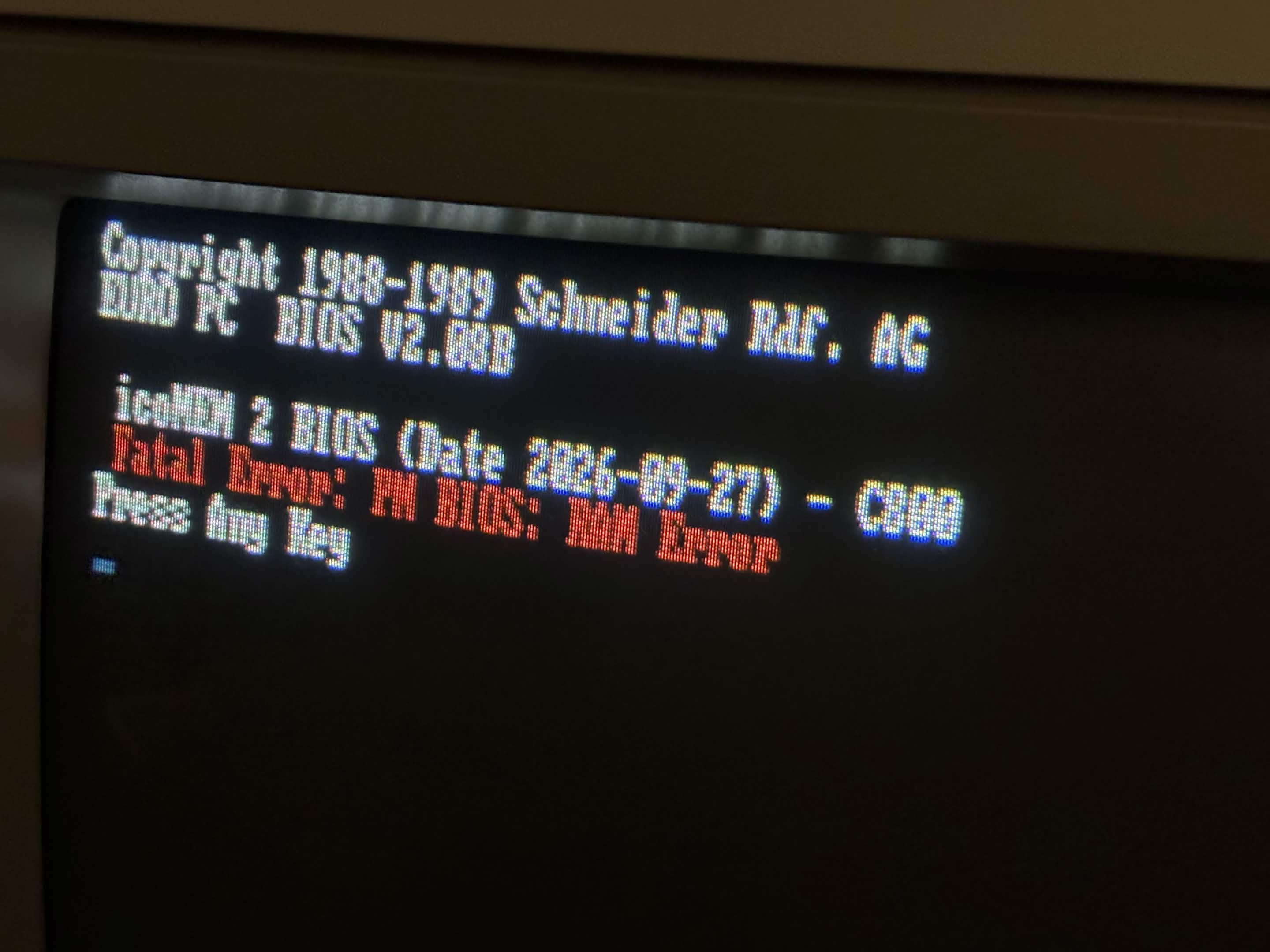
After installing the latest firmware, the Picomem ”splash” text is still slightly corrupted, but it says ”C800” at the end:

I’ve tried C800 also, but with that the card doesn’t get recognized. CD00 gives ROM checksum error like CE00.
Out of curiosity. If I leave the config.txt blank, did PicoMem have some default address for its BIOS code?
RetroBard wrote on Today, 15:53:Out of curiosity. If I leave the config.txt blank, did PicoMem have some default address for its BIOS code?
Pretty sure it's C800 by default...