VOGONS


First post, by andres

User metadata
Rank Newbie
Rank
Newbie

I somehow can't get the : button to work. I've pressed ctrl-F1 button to see the keymap, but it doesn't appear on that and I can't edit out one of the keys not needed to use DosBox and replace it with the colon : either.

Anyone who knows how to go about this? It used to work on my old cpu with XP, but according to the FAQ it should work just fine with vista as well.

Got the munchies for old time games now.

I've even tried to edit the autoexec.bat as well, but Windows Vista can't seem to find it where it's supposed to be (root of c:\, and I've checked the box for windows to show hidden maps/files as well).

Can anyone please help me so that I can enjoy DosBox to the fully extent again? 😀

Reply 1 of 11, by MiniMax

User metadata
Rank Moderator
Rank
Moderator

DOSBox don't have, don't need, and don't support an C:\AUTOEXEC.BAT file. Anything you want to do when DOSBox starts is configured inside the dosbox.conf file.

Reading the excellent README-file that came with DOSBox is known to help people figuring out such things.

DOSBox 60 seconds guide | How to ask questions
_________________
Lenovo M58p | Core 2 Quad Q8400 @ 2.66 GHz | Radeon R7 240 | LG HL-DT-ST DVDRAM GH40N | Fedora 32

Reply 2 of 11, by andres

User metadata
Rank Newbie
Rank
Newbie

Well, I did, but I guess I misread it then. My apologies, no need to snap, dude...

Reply 3 of 11, by MiniMax

User metadata
Rank Moderator
Rank
Moderator

Oh noes - you haven't seen me snap just a tiny bit. If I had snapped at you, you would be crying your eyes out in your psychotherapists office.

DOSBox 60 seconds guide | How to ask questions
_________________
Lenovo M58p | Core 2 Quad Q8400 @ 2.66 GHz | Radeon R7 240 | LG HL-DT-ST DVDRAM GH40N | Fedora 32

Reply 4 of 11, by andres

User metadata
Rank Newbie
Rank
Newbie

dude, you need to relax 😀

Reply 5 of 11, by wd

User metadata
Rank DOSBox Author
Rank
DOSBox Author

No he doesn't, because he is relaxed. His first reply was on the point.

Reply 6 of 11, by Kreshna Aryaguna Nurzaman

User metadata
Rank l33t
Rank
l33t

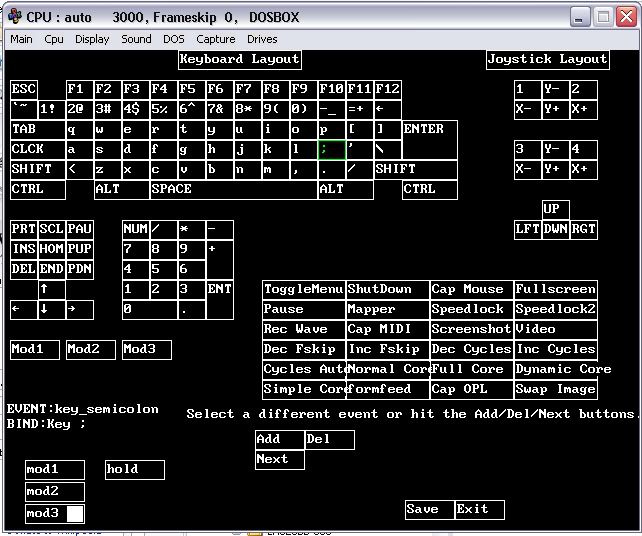
Unfortunately, this is a problem I cannot solve either. See, the following is DOSBOX keymapper:

DOSBOX-keymapper.jpg

The keymapper only gives you lowercase characters (for example, 'a' instead of 'A', semicolon instead of colon). When you want to get key_a event, for example, you click on the virtual keyboard and get the key_a event.

Question is: what are you supposed to do when you want to get key_A event instead of key_a? I have read the 'Mapper' section in DOSBOX README, as well as DOSBOX wiki, yet I still couldn't figure how to get uppercase event. I have experimented with things like mod3 and hold, but nope.

On the other hand, messing around with keymapper is not something I need to do very often.

Never thought this thread would be that long, but now, for something different.....
Kreshna Aryaguna Nurzaman.

Reply 7 of 11, by wd

User metadata
Rank DOSBox Author
Rank
DOSBox Author

Keymapper is for remapping physical keys. So it is NOT possible to discern
between A and a, and this would make no sense as they are the same key.

Reply 8 of 11, by thievingtaffer

User metadata
Rank Newbie
Rank
Newbie

I'm in this poor man's boat too, and I have read through the ReadMe to no avail. I need to add an even (key_colon i would guess) but it seems one can only add binds and mods.

I know who ate all the donuts.

Reply 9 of 11, by thievingtaffer

User metadata
Rank Newbie
Rank
Newbie

I managed a workaround by putting in the commands under the 'autoexec' part of the .cfg file as suggested in another thread. But I would still like an answer to this colon issue.

I know who ate all the donuts.

Reply 10 of 11, by wd

User metadata
Rank DOSBox Author
Rank
DOSBox Author

Works for me.

Reply 11 of 11, by thievingtaffer

User metadata
Rank Newbie
Rank
Newbie

I figured it out. dosbox only gives you caps if you use the left shift key unless you set it otherwise. This is odd because it wasn't always this way, and through me off. Whatever.

I know who ate all the donuts.