VOGONS


CGA graphics

Topic actions

First post, by Alexquatermain

User metadata
Rank Newbie
Rank
Newbie

Hello everyone,

I have been trying to get Kings Quest to display how it did on my machine when I was little, and have read the following article:

http://ipggi.wordpress.com/2008/03/16/dosbox- … -pcjr-hercules/

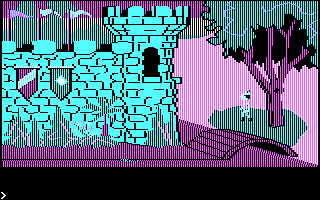
By some stroke of luck it is using KQ as an example, but it doesn't explain how to get Dosbox to display the cyan magenta and white colour mode.. In fact it seems to show it as an error - but that's how my machine used to display the game... Any ideas on how to recreate the "error"?

This is the colour mode I am aiming towards...

http://ipggi.files.wordpress.com/2008/03/boot … png?w=320&h=200

Thanks,

Alex

Reply 1 of 4, by Kippesoep

User metadata
Rank Oldbie
Rank
Oldbie

With the pre-AGI version of King's Quest, all you need to do is set machine=svga_s3 (rather than machine=cga) and boot the image. With the AGI version, you can force the selection of the CGA driver by also setting machine=svga_s3 and then starting the game using "sierra -c". (Note that this uses that palette but will look slightly different than those screenshots simply because Sierra changed the graphics ever so slightly for being able to support EGA. This is quite noticeable in the first screen where the outlines of the bricks and the shadow inside the tree are lighter).

Reply 2 of 4, by Tsyu

User metadata
Rank Newbie
Rank
Newbie

The -c tag is for the CGA composite mode, which was meant to be used with a TV set. The -r tag uses the CGA RGB mode. In DOSBox, the -c tag requires the cga machine to display properly. Playing King's Quest with the cga machine, without any tags, uses the composite mode.

Also, I'm pretty sure that all versions of King's Quest (except the 1990 SCI remake), even the non-EGA versions, used a version of the AGI engine.

Reply 3 of 4, by Alexquatermain

User metadata
Rank Newbie
Rank
Newbie

Thankyou Kippesoep and Tsyu, it's working perfectly now!

Reply 4 of 4, by Kippesoep

User metadata
Rank Oldbie
Rank
Oldbie

In game, you can switch between RGB and composite mode using Ctrl-R. What he asked for was to have the regular CGA palette, rather than the RGB palette. The only way to get that is to disable CGA emulation and overriding EGA detection. Hence the -c.

And yes, it was AGI (which was invented specifically for KQ). The terminology on that page calls it pre-AGI, which is the booter version.

My site: Ramblings on mostly tech stuff.