VOGONS


Some test results

Topic actions

First post, by Ruediger

User metadata
Rank Newbie
Rank
Newbie

Last months I worked hard with DOS Box 0.73 and I still got some problems:

1) I get a crash of the DOSBox when entering deep directory structures with the DOS Program.

2) DOSBox handles special characters at file names more restrictive then native DOS. So some Install programs or archive programs fail, because they cannot extract their files. *) The host file system does not have a problem with these files. At my opinion nearly all characters should be allowed, except ":" , "\" , "/" , "?" , "*" , "," and more then one ".".

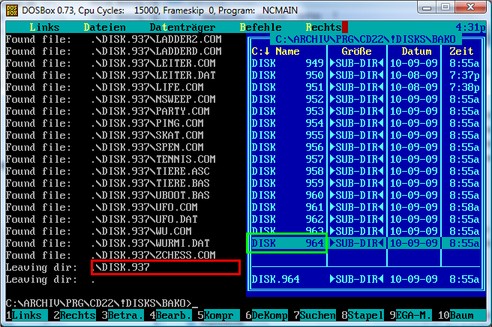
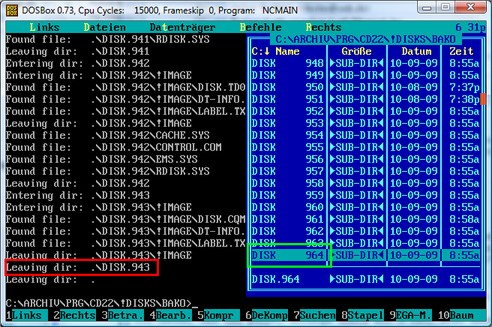
3) Programs scanning the directory structure (e.g. Pascal programs using the findnext command) stop their file search anywhere far away from the last file. It seems I get different results with each start of these programs. Using the RESCAN command before does not better the situation. Only sometimes I get the wanted result, whatever it depends from.

4) It would be good to have the possibility to automate the work of the RESCAN command. Actually I often need to close a DOS program, only because I have added a file at the host file system and DOSBox does not recognize it.

5) Drives created by the SUBST command cannot be removed (and newly defined) until the DOSBox is restarted.

6) Actually all programs supporting the mouse always get a mouse cursor. Although I don’t always want it. Is there a way to disable the mouse support?

7) Increasing the CPU cycles lead to massive processor consumption, although the DOS program inside the DOS Box does not calculate something. Especially when running on a portable computer it leads to fast accumulator unload.
Anyhow the “speedlock” hotkey seems not working: I always get the same program speed like before it.

8 ) It would be good the increase the DOSBox window height when switching from 25 lines text mode to 35 lines text mode rather then decreasing the font size.
Can I generally influence the font size of the text mode anyhow?

9) The RETURN key sometimes does not work. I get this problem typically when going into a directory with the Norton Commander and trying to load a file via extension file association. Typing some TAB keys seems to help at this situation.

10 ) And of course there is still the problem with the file date, which are set to actual date instead the original one. *) Any solution there is welcome (I’m using DOSBox at Vista).

*) It’s the only reason that I still must keep my second computer using native DOS.

Reply 1 of 12, by Qbix

User metadata
Rank DOSBox Author
Rank
DOSBox Author

1) You might hit the pathlenght limit. (maximum characters). DOS had quite conservative limits itself btw.
2) Correct, We do this for selfprotection as not to open files when the memory has become corrupt and not having to deal with international filenames and codepages
3) That is odd. Could you provide an example program ? There is one issue that I know of with FindFirst/Next, but that shouldn't influence that.
4) We would have to rewrite rescan to be less agressive for that to work. With rescan partial searches are cleared as well which breaks certain operations if it was done at a wrong momen
5) mount -u should work
6) By clearing out the mouse interrupt handler (4 bytes in memory)
7) doing nothing isn't the same as idle. If you increase the cycle that dosbox will emulate idle more often, but that doesn't mean idling as we still need to emulate it.
😎 sure set any videomode you want with a program. However the default is the same as under dos.
9) Odd, shouldn't happen
10) Known problem. Not easy to solve because of timezones

Water flows down the stream
How to ask questions the smart way!

Reply 2 of 12, by TheOdds

User metadata
Rank Newbie
Rank
Newbie

"7) doing nothing isn't the same as idle. If you increase the cycle that dosbox will emulate idle more often, but that doesn't mean idling as we still need to emulate it. "

I have been thinking about this before and I do admit that I really don't know what I'm talking about, but wouldn't it be possible to issue HLT (halt) instruction to the idle parts and get a lower CPU usage from DOSBox when the emulation is idling?

Reply 4 of 12, by DosFreak

User metadata
Rank l33t++
Rank
l33t++

To you it appears that the program is doing nothing but it is doing something. If you ran the same program in MS-DOS or NTVDM it would still eat up processor time (but of course the program would be faster).

Only way to know exactly what it's doing is to debug it and see. Usually it's input. If it bothers you that much just force the affinity to a seperate processor. Also verify that you are using dynamic core.

How To Ask Questions The Smart Way
Make your games work offline

Reply 5 of 12, by Ruediger

User metadata
Rank Newbie
Rank
Newbie

1) You might hit the pathlenght limit. (maximum characters).
DOS had quite conservative limits itself btw.

I know that's because the path length limit.
DOS does not perform the ChangeDir, if the path is too long. But it does not crash.

2) Correct, We do this for selfprotection as not to open files
when the memory has become corrupt and not having to deal with international filenames and codepages

And what can I do at this situation?
I think the forbidden characters are at the same position at all character sets, isn't it?

3) That is odd. Could you provide an example program ?

I've written a small example program: http://www.robotrontechnik.de/ablage/TREE.PAS
Or do you prefer the compiled version?
Start it at the root of a bigger file structure. You can also redirect the output to a text file.
It seems the problem does not occur with small file structures.

Results of 2 runs (directly started one after another) at my computer (2064 directories, 12200 files) you can see here:
http://www.robotrontechnik.de/ablage/TREE_1.jpg
and
http://www.robotrontechnik.de/ablage/TREE_2.jpg

You can see the same problem using the FIND FILE function of the Norton Commander.

5) mount -u should work

Yes, it works. Thank you.

6) By clearing out the mouse interrupt handler (4 bytes in memory)

What about an additional line in the configuration file? 😀

9) Odd, shouldn't happen

Can you reproduce it?

10) Known problem. Not easy to solve because of timezones

More significant for me is the date.
The time shifted some hours is not so important for me.

Reply 6 of 12, by Qbix

User metadata
Rank DOSBox Author
Rank
DOSBox Author
Ruediger wrote:

1) You might hit the pathlenght limit. (maximum characters).
DOS had quite conservative limits itself btw.

I know that's because the path length limit.
DOS does not perform the ChangeDir, if the path is too long. But it does not crash.

I missed the crash part. we shouldn't do that

2) Correct, We do this for selfprotection as not to open files
when the memory has become corrupt and not having to deal with international filenames and codepages

And what can I do at this situation?
I think the forbidden characters are at the same position at all character sets, isn't it?

Well if you don't specify which characters are forbidden and that you need. but basicly a large portion of the ascii table differs for each character set. especially the upper part.

3) That is odd. Could you provide an example program ?

I've written a small example program: http://www.robotrontechnik.de/ablage/TREE.PAS Or do you prefer the compiled version? Start […]
Show full quote

I've written a small example program: http://www.robotrontechnik.de/ablage/TREE.PAS
Or do you prefer the compiled version?
Start it at the root of a bigger file structure. You can also redirect the output to a text file.
It seems the problem does not occur with small file structures.

Results of 2 runs (directly started one after another) at my computer (2064 directories, 12200 files) you can see here:
http://www.robotrontechnik.de/ablage/TREE_1.jpg
and
http://www.robotrontechnik.de/ablage/TREE_2.jpg

You can see the same problem using the FIND FILE function of the Norton Commander.

A compiled version would be handy, I only have a turbo C compiler installed currently

6) By clearing out the mouse interrupt handler (4 bytes in memory)

What about an additional line in the configuration file? 😀

Change the value of the autolock value. it does more or less what you want in a different way. I see no use for games for a configuration switch.

9) Odd, shouldn't happen

Can you reproduce it?

Well I didn't try as I don't have norton commander installed.

10) Known problem. Not easy to solve because of timezones

More significant for me is the date.
The time shifted some hours is not so important for me.

Well if we support I want to support it properly as else I am sure I will a lot more people complaining about that time is wrong.

Water flows down the stream
How to ask questions the smart way!

Reply 7 of 12, by robertmo

User metadata
Rank l33t++
Rank
l33t++

"7b (...) Anyhow the “speedlock” hotkey seems not working: I always get the same program speed like before it."

You have to keep it pressed. And also you need to have free cpu resources, so won't work with cycles=max. The more free cpu resources you have the faster Fast Forward will be.

I think it should be mentioned in the readme as I also had this problem before.

Reply 8 of 12, by Ruediger

User metadata
Rank Newbie
Rank
Newbie

Well if you don't specify which characters are forbidden and that you need. but basicly a large portion of the ascii table differs for each character set. especially the upper part.

It's hard to specify, which files I will get in future.
At my opinion all characters between 20h and FFh should be allowed except: colon, slash, backslash, asterisk, question tag, blank.

It is no problem for me, if a file name is displayed in the file list with the wrong character set: I can rename it if necessary.

A compiled version would be handy, I only have a turbo C compiler installed currently

Here it is:
http://www.robotrontechnik.de/ablage/TREE.EXE

Well I didn't try as I don't have norton commander installed.

What can we do here? Should I send you an NC?

Reply 9 of 12, by wd

User metadata
Rank DOSBox Author
Rank
DOSBox Author

At my opinion all characters between 20h and FFh should be allowed

This will not happen as 0x80+ characters depend on the codepage and
thus would need a dos to host translation. But feel free to try it.

Reply 10 of 12, by Ruediger

User metadata
Rank Newbie
Rank
Newbie

Let me compare both situations for those objects:

Actually Situation:
-Files created by the host system are displayed in the DOS file list.
There is no way to open them at DOS via command line and via file manager

-Directories created by the host system are displayed in the DOS file list.
There is no way to enter it at DOS via command line and via file manager

-DOS programs are not able to create those files

-DOS programs are not able to create those directories

When allowing nearly all characters:
-Files created by the host system are displayed in the DOS file list.
It is possible to handle them via file manager
It is hard to handle them via command line, if the keyboard does not contain the affected keys or if the affected characters are displayed with the wrong character set

-Directories created by the host system are displayed in the DOS file list.
It is possible to enter them via file manager
It is hard to enter them via command line, if the keyboard does not contain the affected keys or if the affected characters are displayed with the wrong character set

-DOS programs can create those files.
It is possible to access them via file manager
It is hard to access them via command line, if the keyboard does not contain the affected keys or if the affected characters are displayed with the wrong character set

-DOS program can create those Directories.
It is possible to enter them via file manager
It is hard to enter them via command line, if the keyboard does not contain the affected keys or if the affected characters are displayed with the wrong character set


I think the second situation is much better, especially if a matching character set ist used.

Typical characters, which make actually problems for me, are the German Umlauts, which are often used as file names for text documents:
http://upload.wikimedia.org/wikipedia/commons … on_keyboard.jpg

Reply 11 of 12, by IIGS_User

User metadata
Rank Oldbie
Rank
Oldbie
Ruediger wrote:

Typical characters, which make actually problems for me, are the German Umlauts, which are often used as file names for text documents:
http://upload.wikimedia.org/wikipedia/commons … on_keyboard.jpg

Not recommended to use them.

Disabling the mouse?
Mouse problem

Klimawandel.

Reply 12 of 12, by wd

User metadata
Rank DOSBox Author
Rank
DOSBox Author

I think the second situation is much better, especially if a matching character set ist used.

Feel free to post a patch.