VOGONS


First post, by KBL

User metadata
Rank Newbie
Rank
Newbie

Hi,

First time using DOSBox and I would like help with running a DOS application in DOS Box on a windows 7 computer please.

Will DOS box run on a windows 7 machine? Is it the same set up as running DOS games?

PC info..

* Motherboard - Asus AM2+ AMD 780G ATX DDR2 Model M4A78-VM
* Processor type and speed - AMD ATHLON II X2 240 2.8GHZ
* Amount and type of RAM - 2GB 240-PIN DDR2 UNBUFF. PC2-6400 CL6
* Video card w/ RAM amount - onboard
* Sound card - onboard
* Operating system and version - Microsoft Win 7 Home Premium 64-bit
* Game name (and version, if applicable) - VMS dos program

I've had a read up but just need confirmation that I will be able to do this. Don't need any sound, just a large enough display and able to run the program with printing abilities.

TIA for any help.

Regards,

Kevin

Reply 1 of 18, by Qbix

User metadata
Rank DOSBox Author
Rank
DOSBox Author

printing will not be possible unless you use a special version of DOSBox.

the regular version of DOSBox is aimed at playing games and they don't need printing

Water flows down the stream
How to ask questions the smart way!

Reply 2 of 18, by KBL

User metadata
Rank Newbie
Rank
Newbie

Thanks for the prompt reply.
What particular special version of DOS Box would I need to use?

Reply 4 of 18, by KBL

User metadata
Rank Newbie
Rank
Newbie

Thanks DosFreak.

I should download Megabuild 4: Windows Installer and documentation I guess?
Run the latest version of DOSBox and then run Megabuild 4. Will this automatically extract and install to the DOSBox program?

Kevin

Reply 5 of 18, by KBL

User metadata
Rank Newbie
Rank
Newbie

Right, problems straight away..

I have created two folder on the C: drive
1. DOSBox - have installed DOSBox 7.3 and the Megabuiuld 4 to this folder
2. euro copy - which contains a sub folder EPOS C Drive which holds the DOS program that I am trying to run and also has to .DBF files in it : ERRORLOG.DBF and TRACE.DBF

I have started the DOSBox 7.3.exe and been prompted with Z:\> after which I type: mount c c:\euro copy\, but I always get a "Directory c:\eruo doesn't exist.

Seems straight forward enough, but doesn't want to work for me??

Reply 7 of 18, by KBL

User metadata
Rank Newbie
Rank
Newbie

Thanks DosFreak, that worked ok.
But when I try the next step C:\euro copy\EPOS C Drive>VMS.exe to run the program, the screen just goes back to the DOS promt C:\ again. Have tried that with quotes as well.
I will try using C:\EPOS C Drive>VMS.exe aftermoving the EPOS C Drive folder to C: root folder.

Reply 8 of 18, by ripa

User metadata
Rank Oldbie
Rank
Oldbie

Rename the directories from "euro copy" to "eurocopy" and "EPOS C Drive" to "eposcdrv" and try from the beginning. Directory names with spaces are a pain.

Also, after you've mounted c:\eurocopy\eposcdrv as C, the eposcdrv directory in dosbox is now c:\, so to run the executable, just type VMS.exe to run it instead of c:\eurocopy\eposcdrv\VMS.exe. Also, the program might expect not to reside in the root of the C-drive, so you could try mounting c:\eurocopy as C, then in dosbox switch to eposcdrv (cd eposcdrv) and then run the executable.

Reply 9 of 18, by KBL

User metadata
Rank Newbie
Rank
Newbie

Thanks for input ripa.

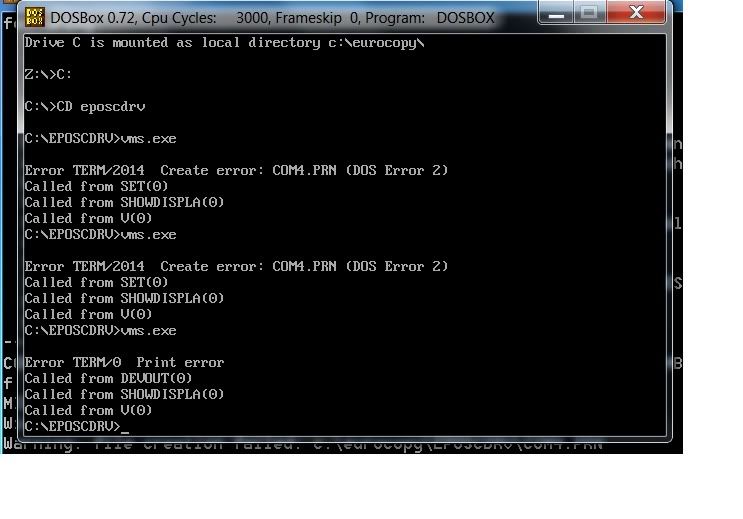
Suggestion 2 worked, so far in the program attempted to run.
I got these errors..

http://i22.photobucket.com/albums/b347/KBL007 … pg?t=1260961394

When this program used to run in other versions of windows, mainly '95, I had to edit the Config.sys and Autoexec.bat files to..

Config.sys
fileshigh=100
buffershigh=50
dos=high,umb

Autoexec.bat
Set tmp= c:windows\temp
set temp= c:windows\temp

Now, would it simply be a matter of editing the DOSBOX.CONF file and adding these at the end?

Also, I have managed to setup the shortcut on the desktop to open VMS.EXE straight away.

Kevin

Reply 10 of 18, by DosFreak

User metadata
Rank l33t++
Rank
l33t++

There is only [autoexec] at the end so you can only put Autoexec.bat lines in there.

If you have to use a config.sys then you'll have to boot MS-DOS in DOSBox. (Unless your programs doesn't actually require those config.sys values and just looks for a config.sys file in C:\)

How To Ask Questions The Smart Way
Make your games work offline

Reply 11 of 18, by Qbix

User metadata
Rank DOSBox Author
Rank
DOSBox Author

enable those serialports in the configfile maybe
(serial4)

Water flows down the stream
How to ask questions the smart way!

Reply 12 of 18, by KBL

User metadata
Rank Newbie
Rank
Newbie

@ DosFreak
I'll check that out and let you know how it goes.

@Qbix
Just remembered that there is no LTP on this motherboard. Looks like I'll have to go for a USB to Parallel cable.
Would there be any problem with that?

Reply 13 of 18, by KBL

User metadata
Rank Newbie
Rank
Newbie

Seem to have got passed the printer problem, no longer getting the printer error.

The only two two errors that I am still getting are:

WinPcap has to be installed for the Ne2000 to work

and

Warning: file creation failed: c:\eurocopy\eposcdrv\COM4.PRN

Will have a search for any related info on the web, but if you guys have any ideas I would be grateful to hear them.

TIA

Reply 14 of 18, by Jorpho

User metadata
Rank l33t++
Rank
l33t++

The first error is related to network support, which is also provided by the megabuild version. Since you do not seem to be concerned about network support in DOSBox, you can probably ignore that error.

No idea about the second error. Can you save a file in C:\eurocopy\eposcdrv with Windows Notepad?

Reply 15 of 18, by KBL

User metadata
Rank Newbie
Rank
Newbie

Yeah, tried creating the COM4.PRN file in c:\eurocopy\eposcdrv but I get a Specified Device Name Is Invalid error.

It's a bit strange as in there was no COM4.PRN file in the VMS files before, so why would it need one now. Something to do with the printer settings?

Reply 16 of 18, by Jorpho

User metadata
Rank l33t++
Rank
l33t++
KBL wrote:

Yeah, tried creating the COM4.PRN file in c:\eurocopy\eposcdrv

Presumably the COM4.PRN file needs to be created in order for printing to work.

How exactly did you try creating the file? Can you create any file in C:\eurocopy\eposcdrv with Windows Notepad?

Reply 17 of 18, by h-a-l-9000

User metadata
Rank DOSBox Author
Rank
DOSBox Author

COM4.PRN is a filename with special DOS handling. Not supported in DOSBox.

1+1=10

Reply 18 of 18, by KBL

User metadata
Rank Newbie
Rank
Newbie

h-a-l-9000

Looks like I'm screwed then?
May have to try going down the VBox route again and installing Win 95.