VOGONS


First post, by iulianv

User metadata
Rank Member
Rank
Member

First one is about a SpeedStar 24X card - there's jumper JP4 for 16-bit or 8-bit BIOS ROM access; the default is said to be 16-bit (JP4 closed), but in my case i have to open it (8-bit) for the card to POST. I wonder why that is, and how relevant (from a performance point of view) this "BIOS ROM access" is...

Second question is more likely a problem, and it concerns a SpeedStar VGA rev.3 card. Currently I have four memory chips on it, and ASTRA 5.48 reports 256KB of video RAM. I didn't google for their specs, but I replaced them with four other chips, taken from a Realtek card that reported 512KB - the SpeedStar still shows 256KB.

If I put all eight chips on the card it still reports 256KB of video RAM, but weird characters (# and ") show up here and there on the screen in text-mode. There's only one jumper on my card (JP3) and four dip-switches, but I couldn't find any docs about them - maybe more experienced retro-collectors on this forum could help me out here... 😀

Thanks.

Reply 1 of 11, by Markk

User metadata
Rank Oldbie
Rank
Oldbie

What kind of graphics chip does the second card have? It might be possible that you need to adjust some of the switches in order to see the extra memory. Also if it has 4 chips for 256kb, it might be possible that it uses some different/older kind of memory chips than the realtek card. So you might need to find chips similar to those in order to expand it's memory. That might explain the weird characters.

Reply 2 of 11, by iulianv

User metadata
Rank Member
Rank
Member

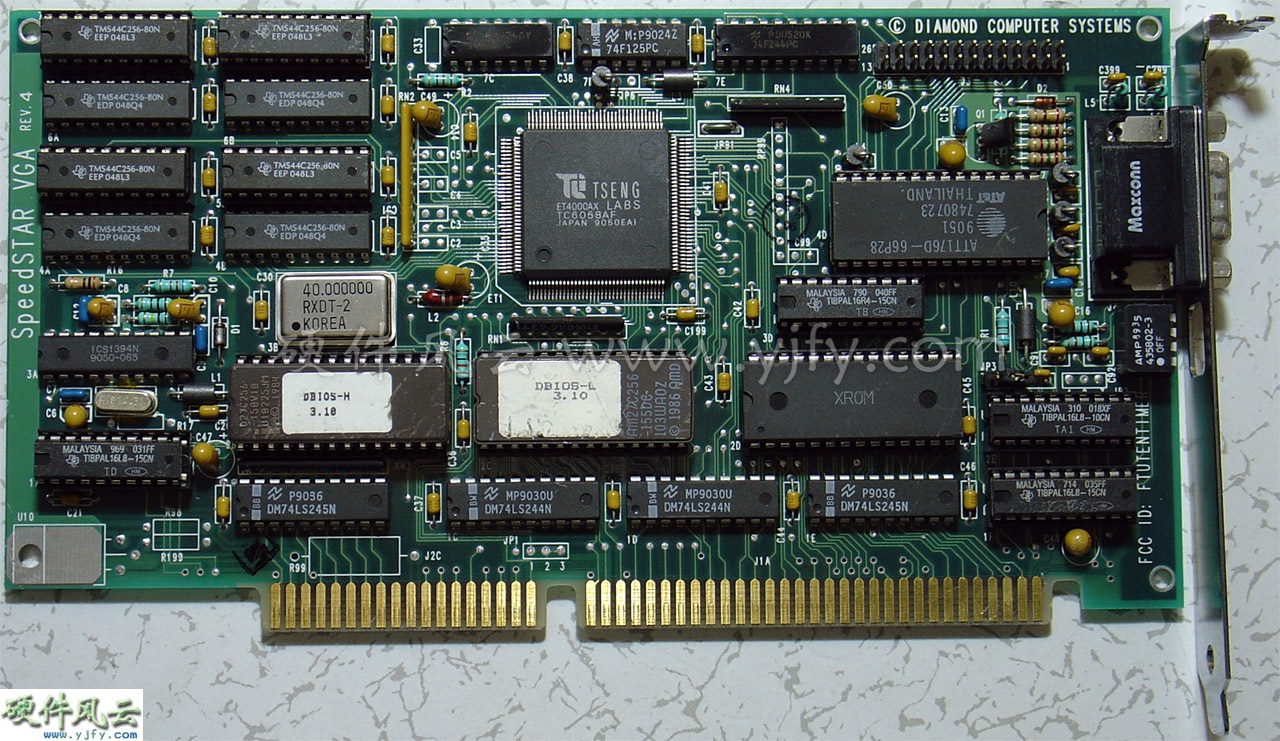
It's this baby here (just a slightly lower revision): http://www.yjfy.com/images/oldhard/video/Spee … r_VGA_REV.4.jpg

The chips in the picture are 128KBytes each (256Kx4bit), so I assume I'd find the same thing (4 chips for 512KBytes) if I google mine...

Also, my card has a transistor right there in the lower left corner (U10) that gets pretty hot, but I doubt that has anything to do with the RAM size - it must be either a defect somewhere, or a specific jumper/dip-switch combination that must be set up... or, maybe ASTRA cannot correctly determine video RAM size for this card.

Reply 3 of 11, by Markk

User metadata
Rank Oldbie
Rank
Oldbie

So if the card in the picture has 8 44c256 chips, and that is 1MB, and yours has 4 chips that are 512kb in total, I assume that it may be possible to upgrade up to 512kb. If it is so, then you have to find chips similar to those it has right now. 44c256 may not work. That's one possibility. The other one, is that maybe it is set to have 256kb in one bank, and that's why it shows 256kb when you use the realtek chips(which should be 512kb?). And also if you use those along with it's original chips that are half in size,and perhaps of different speed, it explains the appearence of the strange characters. Try to experiment with the dip switches!

Reply 4 of 11, by iulianv

User metadata
Rank Member
Rank
Member

The link does not show my exact card (mine is REV.3), I just found it on the Internet. The four chips originally on my card are KM44C256AP-8 (256 x 4 Bit CMOS Dynamic RAM with Fast Page Mode, 80ns) - so I should have a total of 512KBytes of video RAM, not 256 as reported by ASTRA.

The other four chips, taken from the Trident (not Realtek - my bad) card, are M5M44256BP-8 (FAST PAGE MODE 1048576-BIT (262144-WORD BY 4-BIT) DYNAMIC RAM, 80ns).

I guess I could find the time to try all possible dip-switch combinations...

[later edit] Just tried all 16 combinations - no luck, I think I'll keep the original chips (maybe test them on the Trident), toss the card and stick to the SpeedStar 24X...

Reply 5 of 11, by Markk

User metadata
Rank Oldbie
Rank
Oldbie

Why don't you try another program to confirm the memory size? If it is on a 386 or higher, you can run speedsys.

Reply 6 of 11, by iulianv

User metadata
Rank Member
Rank
Member

It's on a 386, but Speedsys seems to get stuck at determining memory type (I wonder why that is)...

On a 486 Speedsys says "VESA memory: unknown" and some pixels are missing here and there on the screen - that's it, I'm tossing the card.

A weird thing that I noticed while testing is that the 486 (DX2-66, with 256KB cache installed and reported by the BIOS) scores a lousy 8.55 in Speedsys (a bit above 386DX-40 and way behind a 486DX2-50), and much lower (less than a half) than a 386DX-33 in Norton Sysinfo...

Reply 7 of 11, by Markk

User metadata
Rank Oldbie
Rank
Oldbie

Is the turbo button connected?

Reply 8 of 11, by iulianv

User metadata
Rank Member
Rank
Member

No, no wires were connected to the board except the AT power. Both the BIOS and the sysinfo tools were displaying 66 MHz.

I did experiment with the turbo button on the 386 though... turbo button pressed (or no wires connected) = 40 MHz, turbo button off = 8 MHz; man, what a difference... now I'm in the process of understanding some schematics found in another thread here, to change the case LED display from 66/33 to 40/8 😀.

Reply 9 of 11, by Markk

User metadata
Rank Oldbie
Rank
Oldbie

On a 486, the turbo might disable the cache or something like that. If there is a turbo switch connector, place a jumper on it. Or it might be possible to control it in the bios.

Reply 10 of 11, by iulianv

User metadata
Rank Member
Rank
Member

Wow... thanks a lot for this, I've just learned something valuable today 😀. I was wondering why on the 486 the "TB SW" connector has two pins instead of three on the 386 - after placing a jumper on them the score is now 24.54 in Speedsys, just above the DX2-50. Norton Sysinfo score looks much, much better, too... all I have to figure out now is which of the pins from the case's turbo button wire to use on the two pins on the mainboard (orange+black or black+white).

Reply 11 of 11, by DonutKing

User metadata
Rank Oldbie
Rank
Oldbie

Usually with the 3 pin turbo buttons, one pair is used if you want turbo on with the button pressed in, or use the other pair to have turbo on with button out. The black wire is common to both pairs. Its just a personal preference thing.